Skip to content


Why the Perfect Invoice Email Matters for Faster Payments
The business impact: open rates, response times, and cash-flow
Your cash-flow often hinges on a single message: the email when sending an invoice. A clear subject line, a concise body, and a professional tone boost open rates, which in turn shortens the gap between service delivery and payment. Using an invoice email template created with the Create Invoice platform makes every message consistent, reducing the back-and-forth that slows approvals.
Faster responses also come from eliminating friction. Attaching a PDF generated in seconds with the free invoice generator or the mobile-first Probill Invoice maker app ensures the customer has everything they need at first glance. Companies that personalise their message—by pulling client details from relevant invoice templates or specific invoice resources by industry—see fewer clarifying emails and, consequently, quicker payments.
Finally, a well-structured invoice attached email supports your credit control process. It sets expectations early, so follow-ups like an invoice payment reminder email feel like part of a planned sequence rather than an escalation. When the entire communication flow is tight, revenue arrives predictably, giving you room to invest, hire, or negotiate better supplier terms.
Common pitfalls that delay payments (and how to avoid them)
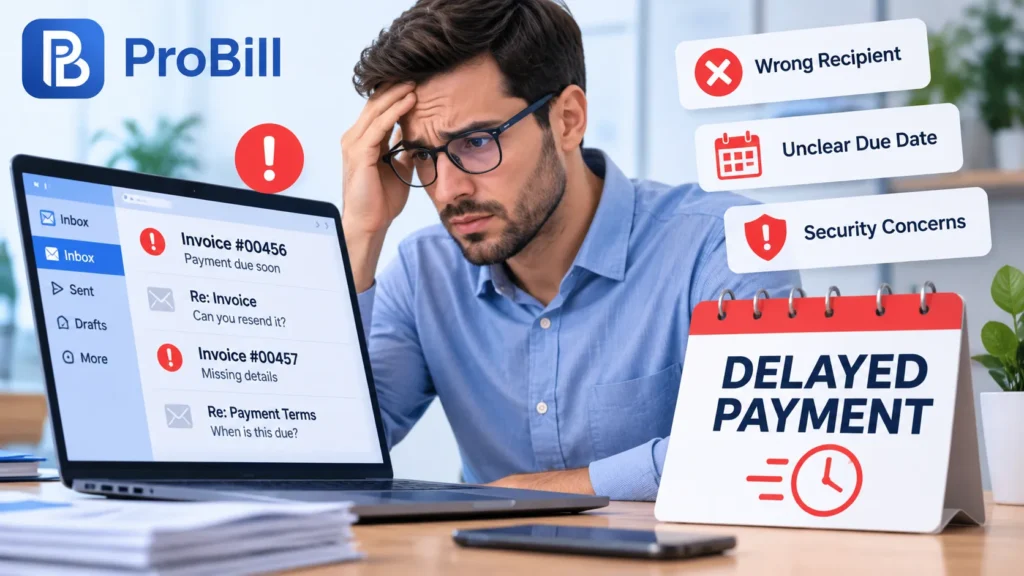
• Sending to the wrong contact: Misaddressed invoices disappear in crowded inboxes. Confirm decision-makers in advance, or use the checklist in our guide on addressing an invoice to the right recipient before you hit send.
• Vague or missing terms: If the customer has to ask, “When is this due?”, you’ve already lost momentum. Review the essentials in setting clear invoice payment terms and include them verbatim in every email.
• Unclear submission instructions: Clients often have strict portals or approval chains. Follow the steps in the correct way to submit an invoice so finance teams can process it without delay.
• Forgetting follow-ups: A polite how to write an invoice email is only the first step. Schedule reminders with the cadence outlined in examples of past-due invoice letters and escalate using the tactics in how to collect past-due invoices.
• Security concerns: Clients may ask, “Is invoice email safe?” Encrypt PDFs and reference secure payment options such as pay-by-invoice arrangements to build trust.
• Overcomplicated file formats: Proprietary files stall approvals. Stick to widely accepted PDFs—generated in seconds when you follow the steps in how to send an invoice or the broader guide on creating and sending invoices.
Addressing these pitfalls not only answers “how can I send an invoice through email” but also removes every hurdle between your completed work and your bank account.
Step-by-Step: How to Write an Invoice Email That Gets Opened & Paid
Crafting a compelling subject line for your invoice attached email
A subject line decides whether your email when sending an invoice is opened now, later, or never. Keep it short—50 characters or fewer—so it displays in full on mobile, yet informative enough to be filter-proof in crowded finance inboxes.
Include four elements in roughly the same order:
- Your business name or abbreviation.
- The word Invoice plus the reference number pulled automatically from your chosen invoice templates.
- The due date, mirroring the terms you set in setting clear invoice payment terms.
- A friendly action verb such as “review” or “process.”
Example: “Create Invoice – Invoice #00456 due 15 Jun – Please review”. This format flags urgency without sounding aggressive and aligns with best practices shown in every invoice email sample generated inside Create Invoice.
If you target multiple sectors, tailor the phrasing with cues from the relevant invoice resources by industry to improve recognition and trust.
Structuring the body: greeting, context, call-to-action, and polite close
Use the following four-part structure so recipients can scan, confirm, and pay within seconds:
Greeting and correct recipient
Address the individual decision-maker by name. Double-check their details with the checklist in addressing an invoice to the right recipient to avoid routing delays.Context and attachment confirmation
State the project or purchase order in one sentence, reference the attached PDF, and reassure the client that invoice email is safe thanks to encryption from the free invoice generator or the mobile-ready Probill Invoice maker app.Clear call-to-action
Specify how and when to pay:
• Include the due date again and accepted methods, such as pay-by-invoice arrangements outlined in pay-by-invoice arrangements.
• If the client must upload the PDF, link to their portal instructions or reference the correct way to submit an invoice.
• Offer a direct reply option for questions about how can I send an invoice through email or alternate formats.Polite close and next steps
Thank them for their business and preview your follow-up cadence: “If payment hasn’t arrived by the due date, you’ll receive an automated invoice payment reminder email.” This sets expectations for the reminder sequence described in examples of past-due invoice letters and escalation tactics in how to collect past-due invoices.
For extra clarity, append a one-line footer linking to your full guide on how to send an invoice or the broader resource on creating and sending invoices. Following this structure turns any invoice attached email into a professional, friction-free request that speeds approval and payment.
Ready-to-Use Invoice Email Templates & Samples
Fresh invoice email sample with attachment you can copy-paste today
Subject: [Your Company] – Invoice #[Invoice No.] due [Due Date] – Please review
Hi [Client Name],
I hope you’re well. Please find the invoice attached for [Project / PO Description], generated with the free invoice generator and secured as a PDF so you can trust that invoice email is safe.
The total amount is [Currency + Amount], payable by [Due Date] under the terms agreed in our proposal. You can settle the balance by bank transfer, card, or the pay-by-invoice arrangements outlined here: pay-by-invoice arrangements.
Kindly confirm receipt or let me know if you need the file uploaded through another channel; we’re happy to follow the correct way to submit an invoice for your finance team.
Thank you for your business, and please reach out with any questions about how to send an invoice through email or other formats.
Best regards,
[Your Name]
[Title], [Your Company]
[Phone | Website]
Tip: Save this as an invoice email template inside Create Invoice or the mobile-first Probill Invoice maker app so every future email when sending an invoice stays consistent.
Friendly invoice payment reminder email template for overdue accounts
Subject: Gentle reminder – Invoice #[Invoice No.] overdue as of [Original Due Date]
Hi [Client Name],
I’m touching base about invoice #[Invoice No.], originally due on [Original Due Date]. According to our records, payment hasn’t arrived yet, so I wanted to send a polite invoice payment reminder email in case something slipped through the cracks.
The outstanding balance is [Currency + Amount]. For your convenience, the original PDF is re-attached, and you can still pay via the methods listed in the footer. If the invoice has already been processed, please disregard this note and accept my thanks.
Should you need an updated copy, additional documentation from our invoice templates library, or clarification on the setting clear invoice payment terms we agreed upon, just reply to this message. Otherwise, I’d appreciate an update on the expected payment date.
Thank you for your prompt attention. If we don’t hear back within 3 business days, I’ll follow the next step outlined in our credit policy, as described in our examples of past-due invoice letters and, if necessary, the escalation process in how to collect past-due invoices.
Warm regards,
[Your Name]
[Title], [Your Company]
Feel free to adapt the tone for different sectors using the relevant invoice resources by industry or embed automated reminders within your workflow for truly hands-free collections.
Sending Invoices Via Email Safely: Best Practices & Tools
Is invoice email safe? Risks and how to eliminate them
An email when sending an invoice is generally safe, but only if you address four common threats: interception, tampering, mis-delivery, and impersonation. Unencrypted attachments or a mistyped address expose client data, while spoofed “invoice attached email” messages can trick customers into paying fraudulent accounts.
• Interception & tampering: Attackers can capture unsecured PDFs in transit and alter payment details before the recipient opens them.
• Mis-delivery: A single character error in the “To” field sends private financial data to the wrong inbox.
• Impersonation: Phishing emails that look like a legitimate invoice email template persuade clients to pay fake invoices.
• Data leakage after storage: Unprotected files stored on shared drives are easy to copy or forward without authorisation.
Mitigation starts with robust tooling. Generating password-protected PDFs through the free invoice generator or the mobile-ready Probill Invoice maker app encrypts the document at rest. Confirm recipient details using the checklist in addressing an invoice to the right recipient before you hit send. Finally, include explicit totals and bank data—mirroring those in your signed agreement and the setting clear invoice payment terms page—so clients can spot tampering immediately.
Encryption, secure links, and verification: keeping client data protected

Modern invoicing platforms make it easy to incorporate encryption, secure links, and identity checks without learning new tech. The comparison below shows how three popular delivery methods safeguard an invoice email sample:
| Delivery method | Setup time | Recipient effort | Protection level | Ideal tool |
|---|---|---|---|---|
| Password-protected PDF attached to email | <1 min | Enter password once | Encrypts file contents, reliant on correct email address | Create Invoice or free invoice generator |
| Expiring secure link in email body | 2–3 min | Click link, download from HTTPS portal | End-to-end TLS; no file in email servers | Create Invoice “Share link” feature |
| Client portal upload (no attachment) | 5 min initial setup | Login to portal | Highest: portal authentication + server encryption | Workflow in how to submit an invoice |
For extra assurance:
- Enable DKIM and SPF records so recipients can verify the message really originated from your domain—critical when they wonder, “is invoice email safe?”
- Add a digital signature or unique reference pulled automatically from your invoice templates so any altered copy is obvious.
- Store sent invoices in a secure cloud folder that inherits the permissions of your accounting system, reducing accidental leaks later.
When questions like “how can I send an invoice through email with maximum security?” arise, link clients to the step-by-step guide in how to send an invoice or the fuller resource on creating and sending invoices. If payment is delayed, a polite, signed invoice payment reminder email retains the original security measures and fits seamlessly into the escalation steps outlined in how to collect past-due invoices.
Following these best practices transforms every invoice—whether it’s a first request or a follow-up—into a reliable, tamper-proof document your customers can trust. The result is faster, safer payments across all sectors covered in our invoice resources by industry collection and smoother workflows inside Create Invoice itself.
Automate, Track, and Get Paid: Integrating Invoice Email With Your Workflow
How to send an invoice through email in one click from your invoicing software
Select the correct record
Open the client file in Create Invoice or the mobile-ready Probill Invoice maker app. Pull project data into a ready-made invoice template and double-check recipient details using the checklist in addressing an invoice to the right recipient.Populate terms and industry-specific fields
Insert due dates and late-fee rules from setting clear invoice payment terms. If you serve multiple sectors, swap in language from the relevant invoice resources by industry so the message feels tailor-made.Generate a secure attachment
Click “Export PDF.” Behind the scenes, the free invoice generator encrypts the file, satisfying clients who ask, “is invoice email safe?”Hit “Send email”
The platform drops the PDF into an invoice attached email that follows your saved invoice email template—no manual copy-and-paste. It also embeds the secure link described in how to send an invoice for clients who prefer portal downloads.Confirm delivery options
If the customer insists on portal submission, choose “Upload instead” and follow the correct way to submit an invoice. Otherwise, one click dispatches the message, archives a copy for compliance, and schedules automatic invoice payment reminder emails.Automate the follow-up sequence
Should the balance remain outstanding, the system triggers reminders based on the cadence in examples of past-due invoice letters and escalates per the steps in how to collect past-due invoices—all without leaving the dashboard.
This workflow compresses the entire email when sending an invoice process into under a minute, answering the common question, “how can I send an invoice through email with zero friction?”
Real-time tracking and analytics: know when clients open, view, and pay
Modern invoicing platforms embed a tiny tracking pixel and unique download link in every invoice email sample. The moment the recipient opens the message, views the PDF, or clicks pay-by-invoice arrangements detailed in pay-by-invoice arrangements, the event is logged to your dashboard.
| Metric captured | Why it matters | Automated action |
|---|---|---|
| Email open timestamp | Confirms delivery and interest | Start payment-term countdown |
| PDF download count | Signals the invoice reached finance staff | Delay reminder until at least one view |
| Click on payment link | Indicates intent to pay | Send friendly nudge if payment not completed in X hours |
| Payment confirmation | Closes the loop | Mark invoice as paid and stop reminders |
Instead of guessing when to follow up, you can program triggers: no open within three days? Send a gentle nudge. Multiple opens without payment? Dispatch a personalised invoice payment reminder email. Still no action by the due date? Escalate automatically using the tactics in creating and sending invoices.
Because every interaction is time-stamped, you’ll always know whether a delayed payment stems from client inaction, internal mis-routing, or unclear terms—information that feeds directly into improving how to write an invoice email for future projects.
FAQ: Everything You Wanted to Know About Invoice Emails
How can I send an invoice through email if the file is large?
Most finance teams prefer a quick download rather than a huge attachment. Generate a compressed PDF with the free invoice generator and, if it still exceeds the client’s limit, use the “Share link” option in Create Invoice to deliver an expiring HTTPS link instead of the file itself. This method keeps the invoice attached email light while answering, “how can I send an invoice through email if the file is large?” without extra IT support.
What file format is best for an invoice attached email?
A locked PDF remains the gold standard because it preserves layout, works on any device, and supports password protection if needed. Exporting directly from your saved invoice templates inside Create Invoice or the mobile-first Probill Invoice maker app ensures the recipient sees the exact figures you intended, avoiding the formatting errors common with Word or Excel attachments.
How many follow-ups should I send after the initial invoice email?
Plan for three touches: an invoice payment reminder email a few days before the due date, a polite nudge immediately after, and a firmer note seven days later. This cadence mirrors the schedule in our examples of past-due invoice letters and escalates automatically through the steps in how to collect past-due invoices if the balance remains open. Sticking to a predictable sequence keeps your credit control consistent without feeling aggressive.
Can I include payment links directly in the invoice email body?
Absolutely. Embedding secure URLs to your gateway or to pay-by-invoice arrangements outlined in pay-by-invoice arrangements shortens the path from reading to paying. Just place the link near the amount due and repeat it in the attached PDF so the client has multiple, consistent ways to settle. This small tweak converts a standard email when sending an invoice into a friction-free call to action.
What legal language should appear in an invoice email template?
At minimum, restate the agreed due date, late-fee policy, and governing jurisdiction exactly as shown in your contract. Pull this wording directly from the terms you set in setting clear invoice payment terms to eliminate disputes. Adding a brief confidentiality notice also reinforces that is invoice email safe concerns have been addressed within your invoice email template itself.
Do I need to password-protect every invoice email attachment?
Not always, but it’s wise for high-value or sensitive invoices. If the client handles standard, low-risk transactions, the PDF generated via Create Invoice is usually sufficient. For projects involving personal data or large sums, enable the password option in the generator or follow the encryption steps in how to send an invoice to reassure recipients that their data is protected. This balanced approach keeps security proportional without slowing routine billing.