Skip to content
Introduction: Avoid Delays, Mistakes, and Confusion When Creating Invoices
Invoicing often feels like an afterthought, yet it’s the lifeline of cash flow for freelancers and small businesses. The reality is, delays in payment rarely come from clients who don’t want to pay, but from invoices that arrive late, contain errors, or lack clarity. A single misplaced decimal, missing invoice number, or vague description can stall processing for days or weeks. Confusion over payment terms or unclear totals often leads to back-and-forth emails that waste time and test client relationships.
Creating an invoice isn’t just about jotting down amounts; it’s about building a clear, professional document that communicates exactly what’s owed and why. When you create your own invoice with care, you reduce these common stumbling blocks. Proper invoice creation streamlines payment, helps maintain professional credibility, and can even protect you legally.
Consider a small graphic design business that switched from handwritten bills to a simple digital invoice template. Within weeks, they noticed faster payments and fewer disputes. This jump in efficiency happened not because they suddenly had better clients, but because their invoices conveyed precise details—like service breakdowns, due dates, and accepted payment methods—without ambiguity.
Avoid the pitfalls that stall your business by starting with a consistent, accurate invoice right from the get-go. This foundational step saves hours of hassle, keeps your cash flow steady, and lets you focus on what matters: growing your work. If you want to speed up your billing, learning how to create invoices properly is the first step—and it doesn’t have to be complex. For those looking to streamline the process, using an invoice template can eliminate guesswork and help you generate invoices quickly and correctly.
How to Create an Invoice in 6 Simple Steps
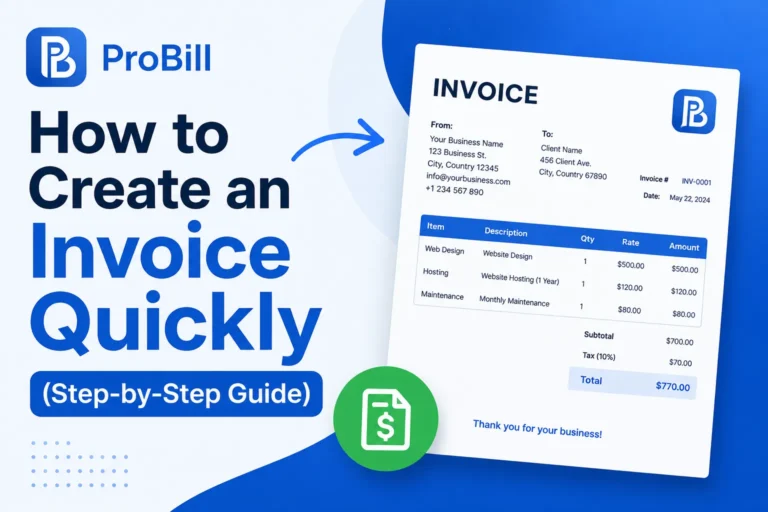
Creating an invoice doesn’t have to be a complex chore, even if you’re new to the process. Breaking it down into six clear steps gives you a reliable framework to generate invoices quickly and professionally every time.
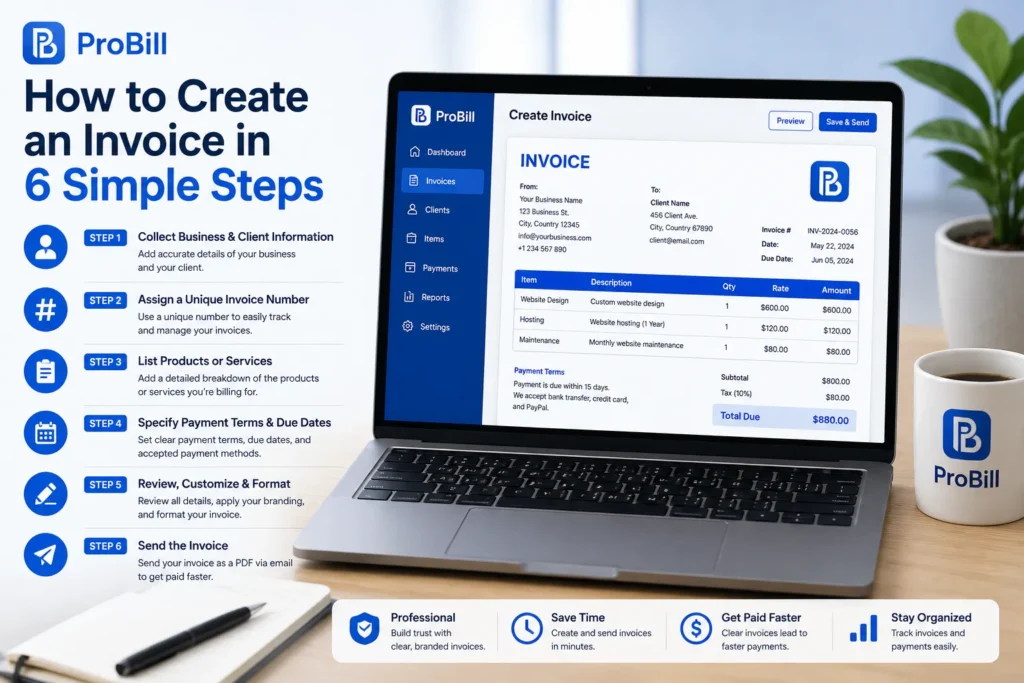
Step 1: Collect Accurate Business and Client Information
Start by confirming all essential details: your company’s name, address, and contact info, plus your client’s full name and billing address. Accuracy here eliminates delays caused by mismatched data during payment or accounting.
Step 2: Assign a Unique Invoice Number
Each invoice needs a distinctive number for tracking and legal purposes. Choose a system that’s simple but scalable—like sequential numbers or date-based codes. This small step prevents confusion and supports efficient bookkeeping.
Step 3: List Products or Services with Detailed Breakdown
Itemize each charge clearly, including description, quantity, rate, and subtotal. Detailed breakdowns avoid back-and-forth questions and create transparency for clients, making it easier for them to approve payment swiftly.
Step 4: Specify Payment Terms and Due Dates Clearly
Explicitly state how much time clients have to pay, accepted payment methods, and any late fees. Clear terms reduce misunderstandings that can cause payment delays or disputes down the line.
Step 5: Review, Customize and Format Your Invoice
Before sending, double-check for errors, add your branding, and format for clarity and professionalism. Well-designed invoices create trust and encourage timely payment by showing you take your work seriously.
Step 6: Send the Invoice as PDF or via Email
Delivering invoices in PDF format preserves layout integrity and avoids editing mishaps. Email remains the most common delivery method, offering a quick and trackable way to generate invoices and keep communication seamless.
Real-world experience shows that freelancers and small business owners who follow these steps spend less time chasing payments and more time growing their businesses. If you’re just starting out or looking to improve your process, consider using a free invoice generator—it can automate many of these steps and help you create an invoice that’s clean, compliant, and ready to send in minutes.If you want to create an invoice without paying for software, learn how to create an invoice online for free.
For more details on invoicing regulations, see the IRS invoice requirements.
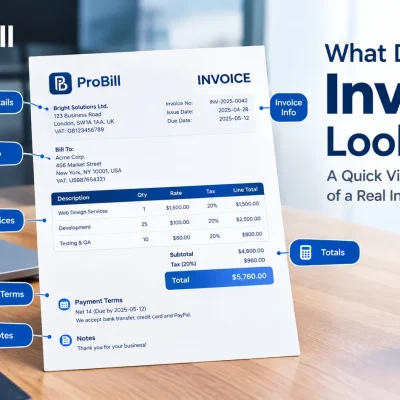
Essential Components of an Invoice
A strong invoice does more than list amounts—it provides the clarity and detail that ensure prompt payment while protecting your business legally. Understanding which components are essential prevents the costly pitfalls of incomplete or confusing billing documents.
First, clear company and client contact details anchor the invoice’s identity. This includes legal business names, addresses, phone numbers, and emails for both parties. Inaccurate or missing contacts are among the most common reasons invoices get overlooked or delayed.
Next, every invoice must have a unique invoice number and issue date. This isn’t just bookkeeping protocol—these details create an unambiguous reference that tracks your transactions and simplifies audits. Without them, you risk lost payments or accounting disputes.
The heart of any invoice is the itemized list of goods or services. Beyond just naming the products or services, include quantities, individual prices, and subtotals. This level of detail builds transparency and avoids the confusion that often triggers client questions and hesitations.
Including payment terms and methods is equally vital. Stating the accepted payment methods (bank transfers, credit cards, checks) and due dates clearly guides clients on how and when to pay. Also, specify any penalties for late payments to reinforce the urgency.
Finally, don’t overlook applicable taxes and the total amount, which ensure legal compliance and avoid surprises for clients. Be explicit about sales tax, VAT, or other fees—no one likes hidden charges.
A well-structured invoice rooted in these components creates a professional impression and accelerates cash flow. If you’re new to this, starting with a proven invoice template can take the guesswork out of invoice creation while ensuring you include all the critical elements.
Methods to Create an Invoice: Tools and Templates
The process of invoice creation can be as simple or sophisticated as your business requires. Many freelancers and small business owners face the same challenge: crafting professional invoices quickly without getting bogged down by formatting or missing details. Luckily, a variety of tools and templates can streamline this task, letting you focus on delivering value rather than wrestling with invoice design.
Free Online Invoice Generators provide an accessible starting point. These tools often allow you to enter your details, select a style, and instantly generate professional PDFs ready for emailing or printing. The biggest benefit is speed—you can generate invoices without needing spreadsheets or graphic design skills. For example, a free invoice generator can auto-number invoices and save client data, cutting repetitive work dramatically.
Customizable Templates in Excel, Word, or PDF formats offer a balance between control and convenience. If you prefer more hands-on invoice creation, templates let you tweak the layout, add branding, and adapt fields to fit unique services or billing structures. However, beware that templates require manual updating, which can introduce errors or inconsistency if you’re juggling many invoices.
Automated Invoicing Tools elevate your workflow by integrating invoicing with payment tracking and client management. For businesses with recurring billing or larger client lists, automation reduces errors and speeds up the entire invoice lifecycle—from creation to payment reminders. While they require an upfront time investment to set up, these tools pay off through increased accuracy and better cash flow visibility.
Choosing the right method depends on your workflow and volume: a solo freelancer might find customizable templates sufficient, whereas a growing small business benefits significantly from online generators or automation. Whichever route you take, starting with a structured invoice template or a trusted free invoice generator can eliminate the headache of manual formatting and help you create your own invoice that looks professional and complies with basic invoicing standards.Using a ready-made template can make the invoicing process faster and more consistent
The 10 Key Sections of an Invoice You Should Include
When you learn how to create invoices that get paid promptly, it’s not just about filling in numbers—it’s about structuring the document so every critical detail is instantly clear to your client. Including these 10 sections ensures your invoice is complete, professional, and legally sound, reducing confusion and accelerating payment cycles.
Header with Company Branding
Start strong with your logo and company name prominently displayed. Branding reinforces professionalism and helps your invoice stand out in a client’s inbox.Client Information Section
List your client’s full name or company, billing address, and contact details. Accurate client info avoids payment delays caused by misdirected invoices.Invoice Number and Date
A unique invoice number paired with the issue date helps both you and your client track payments effectively. Consider a sequential or date-coded system for consistency.Detailed Description of Items or Services
Break down every product or service provided. Include descriptions, quantities, unit prices, and subtotal lines to eliminate ambiguity and disputes.Price, Quantity, and Subtotal
Next to each item, clearly state quantities and rates, and calculate subtotals. This clarity builds trust and speeds up client approval.Tax and Discount Calculations
Apply any applicable taxes or discounts transparently. Clearly show how these adjustments affect the total to avoid surprises that slow down payment.Total Amount Due
Make the grand total unmistakable with bold formatting and proper currency symbols—this figure is what your client needs to focus on.Payment Instructions
Specify accepted payment methods (e.g., bank transfer, credit card, PayPal), including necessary account or reference details to reduce friction.Terms and Conditions
Outline payment terms, including due dates, late payment penalties, and refund policies. This section protects your interests and sets clear expectations.Footer with Contact Info and Digital Signature
End with your contact information for support or queries and, if possible, a digital signature to authenticate the document.
For many small business owners and freelancers, omitting even one of these sections can result in payment delays or additional communication loops. Adopting a complete and clear format removes guesswork from invoice creation and helps maintain a professional image. Using a reliable invoice template that incorporates all these elements can make generating invoices faster while ensuring you never miss a critical detail.
Freelancer Invoice Guidance: Best Practices
For freelancers, mastering how to create invoices is more than a formality—it’s a critical step that affects cash flow and professionalism. Unlike standard business invoices, freelancer invoices often need to capture project nuances and adapt to varying client preferences, which calls for a specialized approach.
One best practice is to include clear and detailed project descriptions. Freelancers often bill for custom services where ambiguity kills payment speed. Break down your work into clear line items with concise descriptions, so clients understand exactly what they’re paying for.
Distinguishing between hourly and fixed-price billing on your invoices is essential. When charging hourly, provide the number of hours worked and your rate per hour. For fixed projects, state the deliverables covered and total agreed price. Mixing these clearly prevents confusion and protects you in disputes.
Handling deposits and partial payments with explicit line items can ease cash flow pressure and build client trust. For instance, show an initial deposit as a credit and deduct it from the total due. This transparency helps avoid awkward conversations about what’s been paid versus what’s owed.
A savvy freelancer customizes invoices for different clients and projects. Tailoring payment terms—like net 15 vs. net 30—and branding to fit the client relationship can improve professionalism and responsiveness. This personalized approach often encourages faster payments and repeat business.
Finally, digital tools and invoice templates simplify invoice creation without sacrificing professionalism. Using a reliable free invoice generator allows freelancers to quickly generate, customize, and send polished invoices from any device, reducing errors and administrative overhead.
In practice, freelancers who put effort into clear, customized invoices report fewer payment delays and smoother client communications—a crucial advantage in competitive markets where cash flow timing can make or break a project. AI tools can also help you create invoices faster by generating invoice details from simple instructions
International Invoicing Considerations
Navigating international invoicing adds layers of complexity beyond domestic billing, but understanding key considerations can save freelancers and small businesses from costly mistakes and payment delays. When you create invoices for clients abroad, clarity, compliance, and cultural sensitivity become paramount.
Currency Formatting and Conversion is the first hurdle. Always specify the currency used, converting totals where necessary to avoid confusion—especially if your client operates in a different country. Exchange rates fluctuate, so clarifying who bears conversion costs or setting fixed rates in your contract can prevent disputes. For example, listing both your native currency and the client’s preferred currency side-by-side often eases accounting on both ends.
Understanding VAT and Tax Compliance varies widely by country and can be a minefield. Some countries require you to register for VAT or include local tax identification numbers on invoices. If you fail to meet these requirements, your invoice might be legally incomplete, delaying payment or causing penalties. Researching specific tax laws or consulting a tax professional familiar with international invoicing is crucial.
Acceptable Invoice Formats can differ internationally. While PDFs are widely accepted, some clients or countries mandate electronic invoicing formats to streamline tax reporting. Being flexible and ready to generate invoices in these formats can improve your professionalism and speed up payment processing.
Best Practices for Sending International Invoices include confirming your client’s preferred delivery method, whether email, postal service, or an invoicing platform. Including complete bank details, like SWIFT and IBAN codes, is essential for smooth international fund transfers. Clear payment terms and due dates also help avoid misunderstandings caused by varying business customs or holidays.
In practice, a freelance consultant discovered that following local VAT guidelines and using a tailored invoice template with currency specifics reduced payment delays by over 30% when working with European clients. Leveraging tools like a free invoice generator that supports international settings can simplify these challenges, helping you generate invoices compliant with global standards without hassle.
By embedding these international invoicing considerations into your routine, you not only protect your income but also demonstrate professionalism, making your cross-border business relationships more reliable and rewarding.
Common Mistakes to Avoid When Creating Invoices
Even seasoned professionals stumble when it comes to invoice creation, and these slip-ups often lead to payment delays or confusion. Knowing which pitfalls to avoid can drastically improve the efficiency of your billing process and protect your cash flow.
Incorrect Client Details top the list. Misspelled names, outdated addresses, or wrong email contacts not only cause delays but can also damage your credibility. Always double-check client information before you create an invoice.
Omitting Invoice Numbers is a surprisingly common error that complicates tracking and referencing invoices—for both you and your clients. Without unique invoice numbers, payments may be misapplied or lost in accounting systems.
Unclear or Missing Payment Terms leave clients guessing about deadlines and acceptable payment methods, often resulting in late payments. Clearly specify due dates, accepted payment options, and penalties for late payments to set expectations upfront.
Forgetting Tax or Discount Details can cause disputes or accounting headaches. Ensure you include all applicable taxes and accurately reflect any discounts or credits. Transparent breakdowns eliminate surprises and build trust.
Formatting Errors and Typos may seem minor but can undermine professionalism and cause confusion. Simple mistakes in numbers, dates, or descriptions can lead to payment disputes or requests for corrected invoices, wasting time.
A real-world example: a freelance web developer lost days chasing payments because an invoice omitted the payment due date and inadvertently used ambiguous service descriptions. After switching to a reliable invoice template that standardized these fields, payments arrived faster and follow-up inquiries dropped significantly.
Avoiding these common mistakes doesn’t require advanced accounting knowledge—just attention to detail and using smart tools to create your invoices correctly the first time. For a smoother, error-free process, consider leveraging a free invoice generator to help catch these errors before you send.
Frequently Asked Questions About Creating Invoices
Tackling how to create invoices often leads to common questions that can delay your billing process if left unanswered. Addressing these FAQs helps you work smarter and ensures your invoices get paid faster.
What is the Best Way to Number Invoices?
Using a consistent, sequential numbering system is best practice. It helps track payments and maintains clear records for accounting and legal compliance. Some freelancers add date stamps or client codes to invoice numbers for extra organization without complicating the sequence.
Can I Send an Invoice Without a Logo?
While not legally required, including a logo enhances your professional image and builds brand recognition. If you don’t have one yet, focus on clean, consistent formatting to maintain credibility—logos can come later as your business grows.
How Do I Handle Late Payments?
Clearly state payment terms and consequences for late payments upfront. If a payment is late, send polite reminders and consider follow-ups that emphasize urgency. Including late fees or interest can incentivize timely payments, but always balance firmness with maintaining good client relationships.
Are Payment Terms Mandatory?
Yes, payment terms are essential. They define when and how payments should be made, reducing misunderstandings. Terms like “Net 30” (payment due within 30 days) or specifying accepted payment methods create clear expectations.
How Should Freelancers Format Their Invoices?
Keep it simple, clear, and professional. Include your contact info, client details, invoice number, itemized services, prices, taxes, total due, and payment terms. Avoid clutter—your goal is transparency and ease of understanding to speed up approval and payment.
Answering these questions is part of mastering invoice creation. For additional help, using a free invoice generator can guide you through best practices, ensuring compliance and a polished final product every time.
Invoice Templates to Simplify Your Billing Process
When mastering how to create invoices, professional templates are one of the smartest shortcuts you can embrace. They eliminate guesswork and decision fatigue, turning invoice creation from a time-consuming chore into a seamless, consistent process.
Using an invoice template provides a ready-made structure that includes all necessary components—company details, client information, itemized services, payment terms, and totals—organized clearly and professionally. This ensures each invoice you generate meets basic standards without you needing to start from scratch every time.
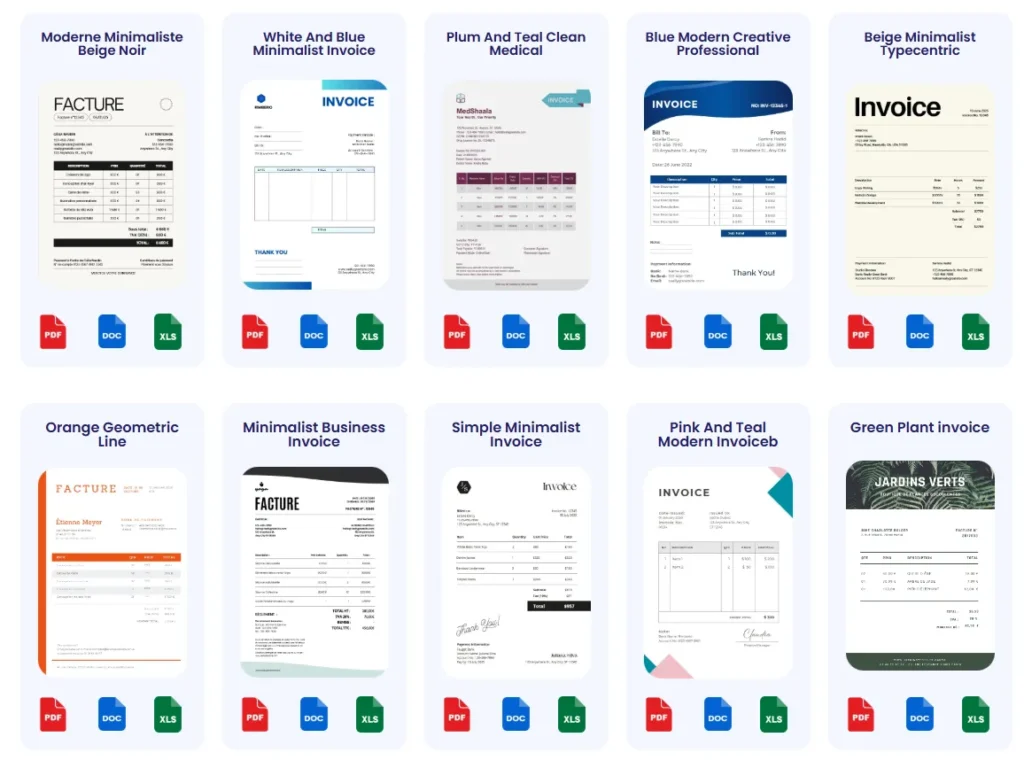
Templates also help maintain brand consistency across invoices, reinforcing your business identity. Customized with your logo and colors, they make a strong visual impression that subtly encourages prompt payment by confirming your professionalism.
There’s a variety of templates available to suit different needs: from simple PDF forms you can fill out quickly to editable Excel or Word documents allowing deeper customization. Digital options often enable direct export to PDF and integration with invoicing software, speeding up the entire billing workflow.
For freelancers and small business owners juggling multiple clients, switching between template types based on the job can increase efficiency. For example, use printable templates for in-person clients and digital, email-friendly versions for remote billing.
If you want to fast-track your invoice creation while reducing errors, exploring professionally designed invoice templates is highly recommended. Many templates are free to download and simple to adapt, helping you generate invoices quickly with confidence and professionalism.