Skip to content
How to Create and Send Invoices in Simple Steps
Step 1: Gather Client and Service Details
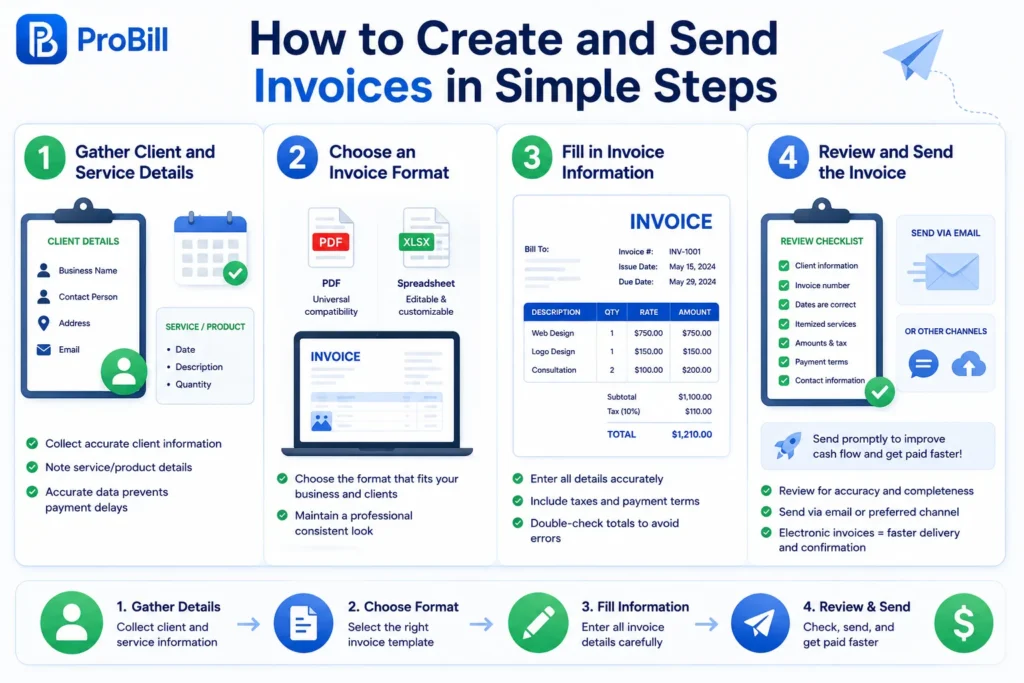
Begin by collecting all relevant client information, such as the business name, contact person, address, and email. Equally important are the specifics of the service or product you provided—date, description, and quantity. Missing these details is a common reason for payment delays. For instance, a freelancer once lost a payment because the client’s email was outdated. Accurate client data prevents such setbacks and keeps communication smooth.
Step 2: Choose an Invoice Format
Selecting the right invoice format depends on your business needs and client preferences. Popular formats include PDF for universal compatibility and editable spreadsheet templates for customization. A graphic designer might prefer a visually attractive template, while a consultant could opt for a minimalistic layout. Consistency in format also ensures your invoices look professional, which reflects on your brand’s credibility.
Step 3: Fill in Invoice Information
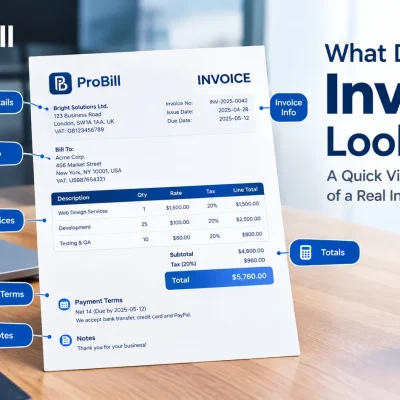
Enter all gathered details precisely: client info, invoice number, issue and due dates, itemized services with rates, and tax if applicable. Use clear, jargon-free language to avoid confusion. Errors in calculations or overlooked taxes are frequent causes of disputes. Double-check totals, or use an online tool to automate these steps and reduce human error.
Step 4: Review and Send the Invoice
Before sending an invoice, make sure you understand the essential steps involved in creating one. Review the invoice thoroughly to confirm all data is accurate and complete. Consider running a quick checklist: Are payment terms clear? Is your contact info included? When ready, send it via email or preferred delivery channels. Promptness matters—a small business owner who delays sending invoices risks cash flow problems. Sending invoices electronically, for example through a free invoice generator, accelerates delivery and permits immediate confirmation from clients.
For occasional billing, you can create an invoice online for free before sending it.
Methods to Create and Send Invoices Faster
Manual Invoice Creation vs. Using Invoice Generators
Manual invoicing involves crafting each invoice from scratch, typically using word processors or spreadsheets. This method often leads to repetitive tasks, increased error risk, and slower turnaround times. For example, a freelancer manually calculating totals once forgot to apply taxes, causing payment delays. In contrast, invoice generators automate calculations and formatting, drastically reducing mistakes and saving time. The trade-off is upfront learning, but most tools are intuitive and beginner-friendly. For busy entrepreneurs, switching to an invoice generator is a clear productivity win.
Benefits of Online Invoice Generator Tools
Online invoice tools streamline the billing process with features like auto-filled client details, pre-built templates, and instant PDF exports. They allow access from any device, simplifying remote invoicing. A small business owner reported cutting invoicing time by half after using an online invoice generator, which also improved the professional look of her bills. These tools often include payment tracking, reducing follow-up time. By eliminating manual drafting, you minimize human error and enhance cash flow management. Start with a free invoice generator to experience these benefits without commitment.
Leveraging Mobile Apps for Invoicing on the Go
Mobile invoicing apps empower freelancers and small business owners to create and send invoices directly from smartphones or tablets. This flexibility prevents billing delays caused by office-only invoicing setups. For instance, a consultant who meets clients offsite can immediately invoice after service completion, accelerating payments. Mobile apps typically sync with cloud-based systems, ensuring data consistency and backup. While they may lack some advanced desktop features, the convenience and speed they provide outweigh these limitations for many users. Integrating mobile invoicing with desktop platforms supports seamless invoice management anytime. If you need to bill customers while working away from your desk, mobile invoicing can be especially useful.
Key Elements Every Invoice Must Include When You Create and Send Invoices
Client Information and Contact Details
Including precise client information is crucial to avoid confusion and payment delays. This means listing the client’s full name, company name if applicable, address, phone number, and email. For example, a freelancer once faced a delayed payment because the client’s billing address was missing, which complicated record-keeping on the client’s side. Having these details not only speeds up communication but also ensures your invoice reaches the right department promptly.
Invoice Numbering and Dates
A clear, unique invoice number is essential for tracking and reference. Many small businesses skip this, causing accounting headaches and client disputes. Dates—specifically the issue date and due date—must be clearly stated to define the payment timeline. A service provider who issued invoices without due dates encountered repeated late payments because clients weren’t sure when to pay. Sequential invoice numbering helps prevent duplicate payments and simplifies tax reporting.
Itemized Description and Pricing
Breaking down the invoice by item or service with accurate pricing avoids questions and protects your income. A detailed description clarifies what was delivered, and transparent pricing including unit cost, quantity, and subtotal can prevent disputes. For instance, a graphic designer lost revenue by aggregating services into one line, leading clients to question the charges. Display any applicable taxes separately to meet compliance and keep clients informed.
Payment Terms and Methods
Clearly specifying payment terms—such as net 15 or net 30—and acceptable payment methods reduces confusion and accelerates cash flow. Common mistakes include vague or missing terms that leave clients guessing. A contractor experienced delayed payments because the invoice didn’t mention late fees or accepted payment forms, resulting in unnecessary follow-ups. Explicit terms encourage prompt payments and set expectations, while offering multiple payment options (bank transfer, PayPal, credit card) adds convenience. PayPal is another option for businesses that want to create and send invoices online.
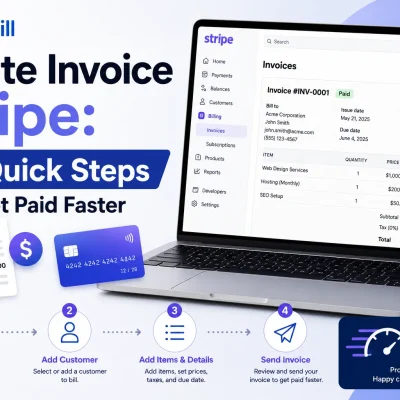
For a smoother process, consider using invoice templates designed to include all these key elements efficiently. Stripe also provides tools for businesses that need to invoice and collect payments from customers.
Common Mistakes to Avoid When Creating and Sending Invoices
Missing or Incorrect Client Details
Invoices lacking accurate client information generate confusion and delay payments. For example, a freelancer once sent an invoice missing the client’s updated email, forcing multiple follow-ups. Omitting or misstating names, addresses, or contact info hinders communication and may cause the invoice to be ignored or lost. Double-check every client detail before finalizing your invoice to maintain professionalism and speed up collections.
Inaccurate Calculations or Pricing
Calculation errors are a frequent cause of disputes and delayed payments. Small mistakes in quantity, rate, tax, or totals make clients question the invoice’s validity. A small business owner once forgot to include applicable sales tax, causing a billing dispute that stalled payment for weeks. Using automated tools or built-in calculators eliminates these risks, ensuring your invoices are both accurate and credible.
Unclear Payment Terms
Vague or missing payment terms leave clients unsure about deadlines and acceptable payment methods. A contractor experienced repeated late payments because his invoices lacked clear due dates and consequences for delay. Define precise terms like “net 30” and specify penalties or incentives clearly. Also, indicate which payment methods you accept—bank transfers, credit cards, or digital wallets—to prevent confusion and accelerate cash flow.
Delays in Sending Invoices
Postponing invoice dispatch disrupts cash flow and causes financial strain. Freelancers reporting services weeks later often find that clients have already closed their books or deprioritized their payment. Timely invoicing is critical: send your invoice immediately after project completion or delivery. Adopting electronic methods, such as a free invoice generator, ensures quick delivery and real-time confirmation, reducing payment delays significantly.
Tips for Creating and Sending Invoices Without Confusion or Delay
Use Clear and Professional Language
Complex jargon or vague descriptions on invoices often trigger questions and slow down payments. A freelancer who described multiple services with ambiguous terms had clients repeatedly request clarifications, prolonging payments. Use straightforward, professional language that clients can instantly understand. For example, instead of “Consultation,” specify “1-hour project consultation on March 5.” Clear wording reduces back-and-forth and promotes faster processing.
Automate Recurring Invoices
Recurring invoices for ongoing services or subscriptions are prone to delays when sent manually. Missing a monthly billing cycle risks cash flow disruption. Automating these invoices ensures they are created and sent consistently on schedule without manual input. A small business owner automating monthly invoices reported a 40% drop in late payments and less administrative work. Automation also reduces errors by reusing validated invoice templates and client data.
Keep a Consistent Invoice Template
Changing invoice layouts or details arbitrarily confuses clients and complicates internal tracking. Consistency enhances brand recognition and expedites client processing. For instance, a consultant switching between several invoice formats encountered payment delays since clients struggled to find payment information quickly. Adopt a fixed template that always includes your logo, contact info, payment terms, and item details. Using invoice templates helps maintain this consistency effortlessly.
Track Invoice Status and Payments
Many invoice confusions stem from uncertainty about whether an invoice was received or paid. Without follow-up, payments get delayed unnecessarily. Tracking invoice statuses—sent, viewed, paid, overdue—streamlines communication. A freelancer using a simple tracking system cut payment follow-ups by 30%. Use tools or platforms that notify you when an invoice is opened and flag overdue payments. This visibility allows prompt, targeted reminders that minimize disputes and delays.
For smoother invoicing, consider implementing tools designed to create and send invoices efficiently and reduce common points of confusion. Integrating such solutions complements these tips and accelerates your payment cycles.
Invoice Templates and Examples to Create and Send Invoices Quickly
Downloadable PDF Invoice Templates
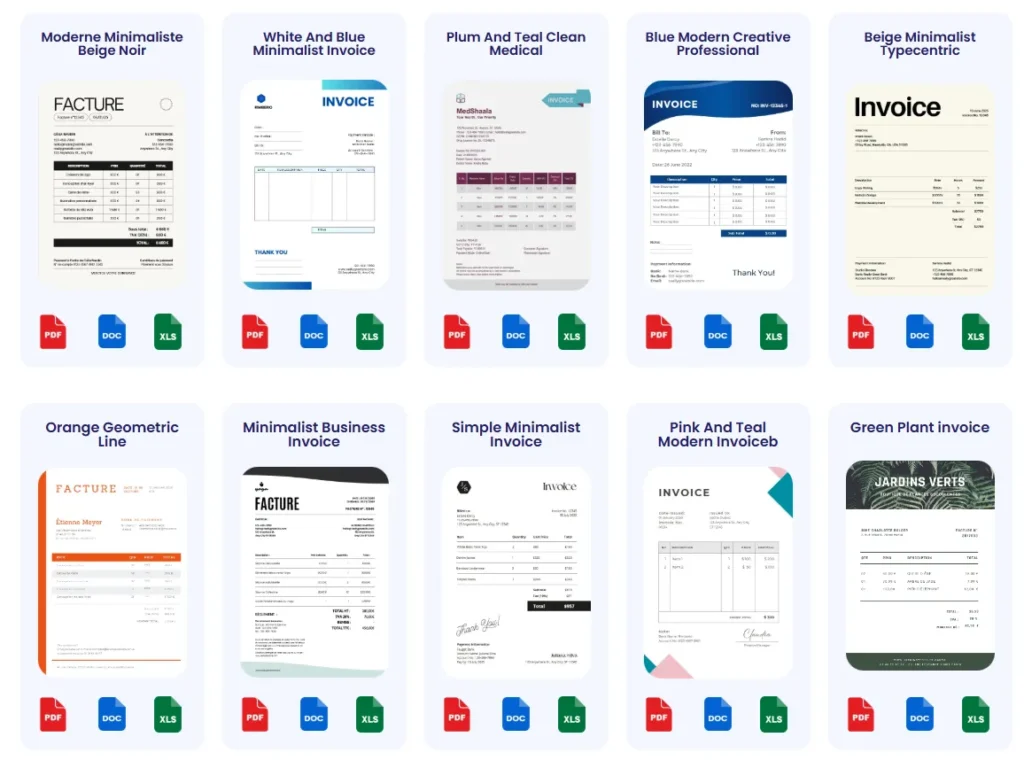
PDF invoice templates provide a reliable way to create polished invoices that retain formatting across all devices. Freelancers often favor PDFs because they are universally accessible and cannot be altered easily by clients, which preserves invoice integrity. For example, a small graphic designer distributed PDF invoices and avoided confusion over edits or missing information. You can find ready-made PDFs that include predefined sections for client details, itemized charges, and payment terms—eliminating the hassle of designing from scratch.
Editable Invoice Templates for Different Industries
Different industries require tailored invoice formats to capture specific details. Editable templates—usually in Word, Excel, or Google Docs—allow customization for professions like consulting, retail, or creative services. A consultant, for instance, benefits from adding time-tracking rows, while a contractor includes material costs. Using industry-specific templates prevents missing critical information and communicates professionalism. These templates also speed up the process by reusing layouts that clients recognize, reducing payment disputes and inquiries.
How Using Templates Speeds Up Invoicing
Templates transform the create and send invoices task from a chore into an efficient workflow. They eliminate repetitive formatting and input, letting you focus solely on updating client and project-specific data. Consider a freelancer who struggled to produce invoices on time until switching to templates; their invoice turnaround fell from days to hours. Templates also reduce errors by standardizing invoice elements, decreasing payment delays caused by inconsistent or incomplete documents. For seamless invoicing, pairing templates with an invoice generator can automate filling and exporting steps, enhancing speed without sacrificing accuracy.
Explore more ready-to-use invoice templates to streamline your invoicing process.
Frequently Asked Questions About Creating and Sending Invoices
What is the best way to create and send invoices quickly?
Using an online invoice generator is the fastest method. It automates calculations, formats the invoice professionally, and usually enables instant PDF export and email delivery. For example, freelancers who switched to tools like Probill reported reducing invoice creation time by over 50%. Manual methods often waste time on formatting and double-checking numbers, while generators ensure accuracy and speed.
How do I make sure my invoices get paid on time?
Clear payment terms are essential. Always specify due dates, accepted payment methods, and consequences for late payment. Including multiple payment options like bank transfer, PayPal, or credit cards increases convenience for clients. Also, sending invoices immediately after completing work and following up on overdue payments improves cash flow. Tracking functionality in invoicing software further helps identify unpaid bills promptly.
Can I create and send invoices from my mobile device?
Yes, mobile invoicing apps let you create and send invoices anytime, anywhere. This is especially useful for entrepreneurs or freelancers who meet clients offsite. For instance, a consultant can finalize and dispatch an invoice right after a meeting, avoiding delays. Mobile apps that sync with desktop systems keep all records unified and secure, allowing seamless invoicing on the go.
Are there legal requirements I need to follow when creating invoices?
Invoices must include specific details like your business name, client contact info, invoice number, issue and due dates, itemized descriptions, pricing, and payment terms to comply with tax authorities. Omitting mandatory information can cause tax or payment issues. Checking official standards, such as IRS invoice requirements, ensures your invoices meet local regulations and prevent disputes.
How can templates help with creating and sending invoices?
Templates save time by providing a consistent structure that includes all essential details. This consistency reduces errors and speeds up invoice generation. Freelancers and small businesses benefit by eliminating the repetitive setup of formatting and headings. Combining templates with an invoice generator automates filling client and project details, further accelerating the process and improving professional appearance.
What common mistakes should I avoid when creating and sending invoices?
Avoid errors like missing or incorrect client details, inaccurate calculations, unclear payment terms, and delays in sending invoices. Each mistake can lead to payment delays or disputes. For example, a freelancer once lost payment because a client’s email was mistyped. Double-checking all information and using automated tools can prevent these risks and streamline collections.
Is it safe to send invoices electronically?
Yes. Electronic invoices sent via email or secure invoicing platforms speed up delivery and often provide confirmation of receipt. Ensuring your invoice is in PDF format preserves formatting and prevents unauthorized changes. Using reputable online tools that encrypt data helps protect sensitive information, making electronic invoicing safe and efficient.
How do I handle recurring invoices?
Automating recurring invoices through invoicing software prevents missed billing cycles and reduces administrative work. Businesses with subscription services or ongoing contracts benefit the most. Automation ensures invoices are created and sent on schedule and can be customized for each billing period. This reduces late payments and improves overall cash flow management.
For more advanced invoicing solutions and templates tailored for freelancers and small businesses, consider exploring comprehensive options on the invoice templates page.
How to Use Probill to Create and Send Invoices Smoothly
Features for Quick Invoice Creation
Probill offers intuitive features that cut down the time it takes to create and send invoices. Its straightforward interface requires minimal setup, allowing users to generate professional invoices in minutes without technical skills. Freelancers who once spent hours balancing spreadsheets now complete invoices in a fraction of that time. Key capabilities include auto-filling client information from your contact list, automatic calculations of totals and taxes, and fast PDF export. These features minimize errors and ensure accuracy—critical for maintaining positive client relationships and steady cash flow.
Using Probill’s Mobile App for On-the-Go Invoices
Probill’s mobile app is a game-changer for self-employed professionals who need to bill clients immediately after service delivery. Imagine a small business owner finishing a job and invoicing the client right on the spot, eliminating the risk of forgotten or delayed billing. The app syncs seamlessly with the web platform so all your invoices, templates, and payment data stay up to date across devices. While some mobile apps sacrifice functionality, Probill balances convenience and essential invoicing tools like itemized entries and payment tracking, supporting invoicing anywhere without losing detail.
Invoice Templates and Payment Tracking with Probill
Probill includes a variety of customizable invoice templates designed to suit freelancers, entrepreneurs, and small businesses across industries. These templates come pre-configured with important sections such as client details, itemized charges, payment terms, and tax fields—saving users from building invoices from scratch. For example, a consultant using Probill’s templates reported fewer client questions and faster payments due to clearer invoices. Paired with integrated payment tracking, users can monitor invoice statuses—sent, viewed, paid, or overdue—directly within Probill, reducing the hassle of manual follow-ups and boosting timely collections.
For those wanting an easy start, explore Probill’s free invoice generator to create and send invoices efficiently without a steep learning curve.