Skip to content


Understanding the Invoice-to-Pay Process: Why Proper Submission Matters
A single faulty invoice submission can stall the entire invoice-to-pay process, stretch cash-flow timelines, and cost up to $10.18 per document in rework, according to Ardent Partners’ 2022 ePayables report. Understanding how to submit an invoice correctly, what happens after it is sent, and how errors ripple through accounts-payable (A/P) systems helps vendors protect revenue while enabling buyers to keep operations lean.
From invoice sent to payment received: what really happens behind the scenes
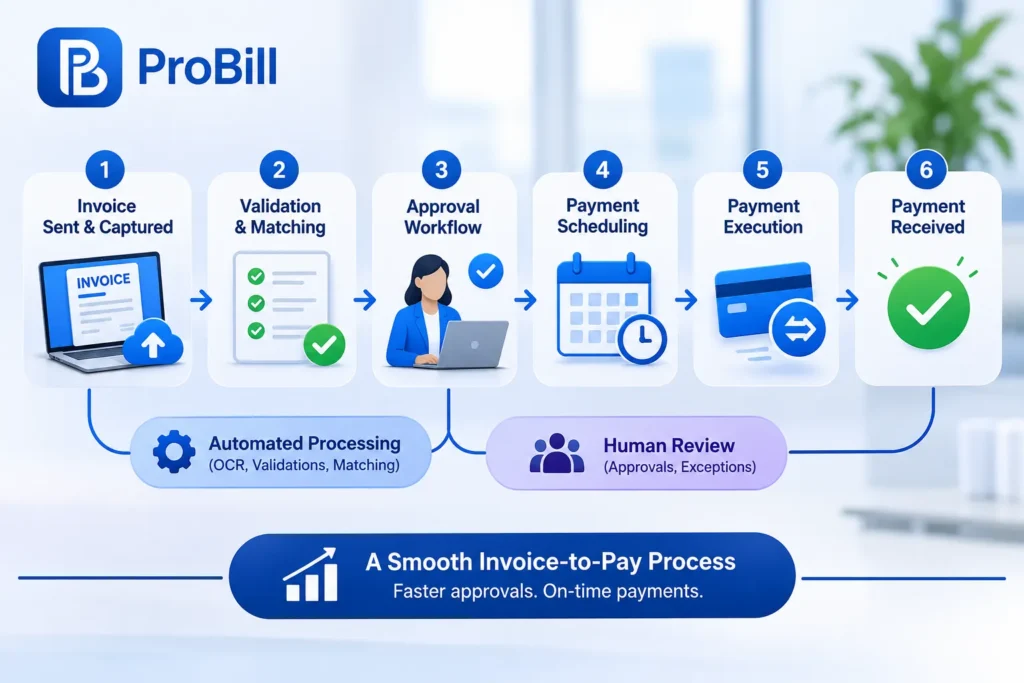
Invoice sent & captured
The supplier emails, uploads, or EDI-transmits the document. Optical character recognition (OCR) or an A/P clerk records the data and checks that the invoice number is unique.Header and line-item validation
Automated rules confirm tax, currency, PO match, and legal requirements. Any mismatch generates an exception queue that pauses the invoice to pay process until corrected.Three-way match & coding
System compares the invoice to the purchase order and goods-receipt. Services invoices without a PO require manual GL coding and managerial sign-off, adding extra days.Approval workflow
Department heads receive notifications. If they delegate or travel, approvals can languish. Gartner estimates each additional approver adds 2–3 days to cycle time .Payment scheduling
Once authorised, the ERP posts the liability and places it in the next pay run based on agreed terms (e.g., Net 30). Dynamic-discount tools may prioritise early payments to capture 2/10 Net 30 savings.Payment execution & reconciliation
Treasury releases ACH, wire, or virtual card funds. Bank confirmations feed back to the ERP, closing the transaction and updating supplier ageing reports.
A clean, complete invoice submission moves through all six stages with minimal human touch, letting buyers focus on strategic work instead of chasing clarifications.
Top 5 delays caused by incorrect invoice submission (and how to avoid them)
Missing purchase order reference
• Effect: System can’t perform three-way match; invoice routed to manual queue.
• Fix: Embed a mandatory PO field in your template—download ready-to-use invoice templates.Duplicate invoice number
• Effect: Fraud flags trigger holds; finance must investigate.
• Fix: Use a sequential numbering tool like the free invoice generator to eliminate repeats.Unapproved rate or quantity change
• Effect: A/P seeks buyer confirmation, adding email loops.
• Fix: Generate an updated PO before issuing the document via Create Invoice to keep data aligned.Incomplete tax or company data
• Effect: Compliance checks fail, risking regulatory fines.
• Fix: Reference local rules in our invoice resources by industry hub and save the details in your billing profile.Poor document formatting or unreadable scans
• Effect: OCR errors push the invoice to manual entry, extending processing by an average of 4.1 days (APQC).
• Fix: Export invoices as native PDFs directly from your accounting system instead of sending photos or print-outs.
By tightening every invoice submission step, suppliers shorten the overall invoice to pay process, secure earlier payments, and build trust with A/P teams.
Pre-Submission Checklist: Information and Documents You Need
Before you hit “send,” run through this quick checklist to make sure your invoice submission is airtight. A few extra seconds now keeps the invoice to pay process flowing and prevents the nightmare of correcting a file after the invoice sent notification has already landed in A/P.
Mandatory invoice fields that speed approval every time
A/P bots and staff look for the same data points on every invoice submission. Leave one out and the system parks your document in an exception queue. Double-check that each invoice shows:
– Invoice number and date
– Buyer’s complete legal entity name
– Supplier’s registered name, address, and tax ID
– Purchase order or contract reference (for non-PO work, include the signed SOW)
– Clear item descriptions, quantities, unit prices, and currency
– Sub-totals, tax, discounts, and grand total in the buyer’s currency
– Payment terms and accepted methods (ACH, wire, virtual card)
– Remittance instructions that match the bank on file
Building these fields into your preferred invoice templates or the Probill Invoice maker wizard ensures every future invoice submission meets requirements without manual retyping.
Supporting documents that prevent disputes and chargebacks
Complete data is only half of a solid invoice submission; include the backup that proves work was delivered. Attach or embed:
– Approved purchase order PDF or change order
– Signed delivery note, packing slip, or goods-receipt screenshot
– Timesheets or milestone sign-offs for services
– Tax exemption or resale certificates, if applicable
– W-9 or W-8BEN for U.S. payers (see IRS guidelines)
– Proof of delivery from the carrier when shipping high-value goods
– Pre-agreed rate cards or price lists for variable billing
– Dispute history log if the invoice replaces a previously rejected version
Bundle the files into a single ZIP or multi-page PDF so nothing goes missing. The free invoice generator can merge attachments automatically, and industry-specific tips are available in our invoice resources by industry hub. Following this documentation checklist raises first-pass success rates, trims days from the invoice to pay process, and keeps every invoice submission on the fast track to payment.
Step-by-Step Guide: How to Submit an Invoice Correctly the First Time
A flawless invoice submission keeps the invoice to pay process humming and guarantees your invoice sent notice turns into cash without rework. Follow these six concise steps before you relax and wait for remittance:
- Build the document with pre-validated data. Pull your buyer’s legal entity, tax ID, and PO straight from customizable invoice templates so nothing is mistyped.
- Choose the optimal delivery channel (email, customer portal, or EDI). Jump to the next section for a quick comparison.
- Export the file as a native PDF or XML. Use a clear naming convention:
Buyer_PO12345_Invoice98765.pdf. - Bundle every proof—PO, delivery note, timesheet—into one ZIP using the free invoice generator to prevent attachment loss.
- Send, upload, or transmit the packet. If you leverage Create Invoice, the platform logs an immutable timestamp for audit trails.
- Monitor acknowledgements and payment status. Detailed tracking tips appear in the final subsection.
Completing each step takes under five minutes and raises first-pass success rates, helping both supplier and buyer sail through the invoice to pay process.
Choosing the right submission channel—email, customer portal, or EDI?

Selecting the wrong lane is the fastest way to derail an otherwise perfect invoice submission. Compare the options below:
| Channel | Best For | Key Benefits | Common Pitfalls | Pro Tip |
|---|---|---|---|---|
| Email (PDF) | Small to mid-size buyers | Universal, no setup cost | Spam filters, lost threads | Request automatic “read” receipts and copy the AP alias plus your day-to-day contact. |
| Customer portal (web upload) | Enterprises using SAP Ariba, Coupa, etc. | Real-time validation, PO auto-match | Manual data re-key if portal rejects fields | Set browser autofill with line-item defaults from Create Invoice to speed entries. |
| Electronic Data Interchange (EDI) | High-volume, recurring orders | Touchless processing, standard mapping (e.g., GS1 EDI) | Initial mapping costs, strict syntax | Test with a single 810 invoice before going live to avoid mass failures. |
Always confirm which channel your buyer prioritises in the contract or onboarding pack delivered through their AP team. Adhering to their preferred rail minimises exception queues and keeps the invoice submission fully automated.
Tracking and confirming your invoice sent status like a pro
Never assume silence means success. Proactive follow-up closes the loop and shortens days-sales-outstanding:
• Capture acknowledgements. Email users should activate delivery and read receipts; portal and EDI users can export the system-generated ARN (Acknowledgement Reference Number).
• Sync statuses to your ERP. Integration with Create Invoice lets you update “invoice sent,” “approved,” and “scheduled” milestones automatically, so sales and finance see the same data.
• Set calendar reminders. If the buyer’s SLA promises an approval within five business days, schedule a polite chaser for day six—including the ARN and original files.
• Leverage industry benchmarks. The Business Payments Coalition notes that AP teams respond faster when suppliers quote the exact transaction ID; keep it visible in your follow-up template stored in invoice resources by industry.
Documenting each confirmation gives you an audit trail, speeds dispute resolution, and—most importantly—proves your invoice submission reached the right hands the first time.
Automation & Tools to Simplify Invoice Submission
Must-have features in modern invoice submission software
Modern invoice submission platforms should eliminate manual touchpoints, not just digitize paper. Look for these core capabilities to keep the invoice to pay process flowing:
Intelligent data capture
• Native PDF parsing plus AI-driven OCR that recognises line-items, taxes, and currencies without templates.
• Auto-flag duplicates so an invoice sent twice never clogs A/P.Real-time validation rules
• Built-in tax, PO, and currency checks fire before the document leaves your screen.
• Dynamic field logic pulls buyer data from saved invoice templates to prevent mismatches.Straight-through three-way matching
• Direct API links to ERP purchase orders and goods receipts enable a zero-touch match.
• Exceptions route to one-click collaboration threads instead of email chains.Configurable approval workflows
• Drag-and-drop logic assigns dollar thresholds, vacation delegates, and SLA timers.
• Mobile approvals shave days off the invoice to pay process when managers travel.Self-service supplier portal
• Vendors can upload, track, and update banking details, reducing status-check emails by up to 65% (source: IDC Link).
• Built-in chatbots answer “invoice sent yet?” questions automatically.Auto-bundled backup
• The platform merges POs, delivery notes, and timesheets into a single packet via the free invoice generator so nothing gets lost.Audit-ready trails and compliance dashboards
• Immutable timestamps, e-signatures, and exportable logs satisfy SOX or VAT audits in minutes.
Select tools that cover all seven boxes and your invoice submission rate reaches near 100% first-pass success.
When to graduate from spreadsheets to a full AP automation platform
Spreadsheets work until they don’t. Upgrade when these red flags appear:
• Monthly volume tops 150 invoices and manual entry steals more than eight hours a week.
• Duplicate or late payments surface because the invoice sent date lives in scattered files.
• Early-payment discounts expire unclaimed, showing the spreadsheet can’t surface timing insights.
• Audit prep involves chasing documents across email, proving your process lacks a single source of truth.
• Multiple entities or currencies make reconciliation a nightmare.
An AP automation suite such as Create Invoice synchronises submission, approval, and settlement in one dashboard, while its industry-specific playbooks inside invoice resources by industry handle niche compliance rules automatically. Unified reporting reveals bottlenecks, so finance can refine KPIs instead of debugging formulas.
If two or more symptoms match your reality, migrating to a purpose-built platform keeps invoice submission smooth, protects cash flow, and future-proofs the entire invoice to pay process.
Frequently Asked Questions About Submitting Invoices
What is the fastest way to submit an invoice and get paid?
The speed champion is portal upload or EDI because the system performs real-time validation the moment your invoice submission lands. Build the file with pre-populated data in Create Invoice and export it as a native PDF or XML so the A/P bot can auto-match it and schedule payment in the next run. Emailing a clean PDF still works but adds spam-filter risk and an extra manual step in the invoice to pay process.
How soon should I follow up if my client hasn’t acknowledged the invoice?
If no system or human acknowledgement appears within two business days, send a polite chaser that cites the original ARN or “invoice sent” timestamp. Most portals promise a 24-hour validation window, so waiting longer often signals the document never hit the queue. Timely follow-up keeps the invoice submission visible and prevents late-payment fees from creeping into the invoice to pay process.
Can I resend an invoice without resetting the payment clock?
Yes—resend the exact file, mark it “Copy—Original Invoice Sent [date],” and attach the original transmission receipt from the free invoice generator log. Because the invoice number doesn’t change, the ERP recognises it as the same liability and retains the original due date. Always add a note in the portal comment field so A/P can bypass duplicate-payment controls.
What file formats are safest for online invoice submission?
Native PDF and XML are the gold standards; both lock field data, resist tampering, and map cleanly into OCR or EDI parsers. Avoid image-only scans, which inflate error rates by 23% according to the Business Payments Coalition. Building invoices from secure invoice templates ensures every exported PDF carries embedded metadata that accelerates the invoice to pay process.
How does the invoice to pay process differ for international clients?
Cross-border invoice submission triggers extra tax, currency, and compliance checks, adding one to three validation days. Include correct VAT or GST IDs and convert totals to the buyer’s base currency to avoid holds. The regional playbooks inside invoice resources by industry outline statutory fields so your invoice sent to an overseas customer still clears approvals on the first pass.
Do automation tools replace human approval steps?
Automation eliminates data entry but not fiscal accountability; most platforms keep at least one managerial sign-off to meet audit standards like SOX. Tools route invoices to the right approver instantly and send mobile reminders, trimming idle time rather than bypassing oversight. Well-configured workflows maintain control while letting the invoice submission sail through the invoice to pay process with minimal friction.