Skip to content


Invoice Addressee vs. Billing Address: Why These Details Decide How Fast You Get Paid
Key definitions: invoice addressee, invoicing address, and billing address explained
The invoice addressee is the legal entity—person or company—responsible for accepting the goods or services and for paying the invoice. It must match the name on corporate records, purchase orders, and the information an invoice should include to avoid disputes.
An invoicing address (sometimes called the correspondence address) is where you mail or email the invoice. It can differ from a client’s trading location, so double-check it against their PO or your saved invoice templates before sending.
The billing address appears on the client’s payment method. If you’ve ever wondered what is billing address or what’s a billing address on an invoice, it’s the address the card-issuing bank or accounts-payable system uses to verify a transaction. Tools like Create Invoice and its free invoice generator automatically pull stored customer data to ensure the billing address on invoice matches bank records.
Keeping these three labels straight is easier when you save client profiles. The invoice resources by industry page shows sector-specific examples so you can tailor fields for retail, construction, or SaaS clients without mixing up the invoice billing address and addressee.
Tax, legal, and cash-flow consequences of getting the addressee wrong
Mislabeling the addressee can invalidate VAT or sales-tax claims, forcing you to reissue documents and delaying reimbursement. Before you hit “send,” walk through how to fill out an invoice to confirm the registered company name and tax ID align with the billing address on invoice.
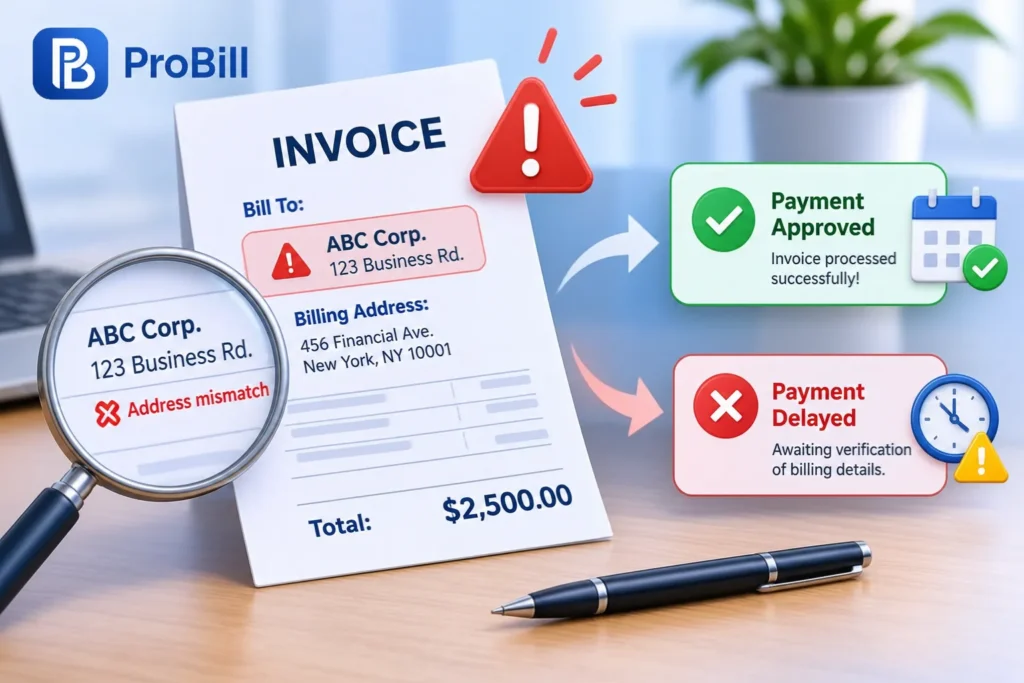
Payment processors flag address mismatches as potential fraud. A single typo can trigger declined card payments, pushing your due date back several days. The article on invoice dates and document details explains why every correction restarts the statutory payment clock and hurts cash flow.
Service providers face extra scrutiny. Failing to match the addressee with the site contact might breach industry regulations outlined in the service invoice requirements. If that happens, you’ll have to follow the steps in how to submit an invoice correctly and wait for a new approval cycle.
Small businesses feel the impact fastest. A two-week hold can drain working capital, as shown in our guide to creating invoices for small businesses. Mobile tools such as the Probill Invoice maker app help you capture the right addressee the moment a job is finished.
Finally, always preview the document in a sandbox or a create an invoice with the correct billing details screen before dispatch. A 30-second check saves days of chasing late payments and keeps your cash flow—and client relationship—healthy.
How to Collect the Correct Invoice Billing Address Every Time
Proven data-capture methods: client onboarding forms, CRM sync, and automated look-ups
Capturing the invoice billing address at the moment you add a new client prevents last-minute scrambles. The tactics below embed the correct data into every record, so you never have to ask what’s a billing address or what is billing address again.

Client onboarding forms
Embed required address fields in web intake sheets and pre-filled invoice templates. Include prompts drawn from the information an invoice should include to force users to enter the registered invoicing address and ZIP code before they can proceed.CRM and accounting platform sync
Centralize addresses in a single source of truth. Tools like Create Invoice let you tie customer profiles to your CRM, automatically pulling the latest street, suite, and tax-region details. Industry-specific fields from the invoice resources by industry page ensure you meet niche compliance rules without extra work.Automated look-ups and mobile capture
Address-validation APIs confirm the billing address on invoice drafts in real time, while the Probill Invoice maker app lets field staff scan a driver’s license or business card and populate records on the spot. Both methods cut keystrokes and shrink typo risk to near zero.
Double-checking the billing address on invoice day: quick validation steps to avoid re-issues
Even with solid data entry, run a last sweep before you hit “send.” The five-step checklist below guards against re-issued invoices, payment holds, and the timeline resets described in invoice dates and document details.
- Pull today’s record from your system and compare the stored address to the customer’s most recent PO or card statement. If anything conflicts, update the CRM first so future documents inherit the fix.
- Review special compliance fields—county, VAT number, or service-site code—against the service invoice requirements. Skipping these can block payment in regulated industries.
- Generate a draft with the free invoice generator. The tool instantly flags blank or mismatched address sections, which is invaluable when you’re creating invoices for small businesses on tight schedules.
- Run an AVS or postal validation if the amount is card-paid; even a single-digit error can trigger declines. Refer to how to fill out an invoice for field-by-field guidance.
- Preview and dispatch. Use the “Preview” button in the create an invoice with the correct billing details screen, then follow the submission checklist in how to submit an invoice correctly. This final glance takes seconds and virtually eliminates costly re-issues of the invoicing address section.
Step-by-Step: Formatting the Invoicing Address on Your Invoice Template
Mandatory fields for compliance in the US, UK, EU, and beyond
Failure to include the right address elements can void tax claims or stall payments. Cross-check your invoice billing address against regional requirements before you lock your layout.
| Region | Required invoicing address elements | Additional identifiers that speed approval |
|---|---|---|
| United States | • Legal business name • Street, suite, city, state, ZIP code | Employer Identification Number (EIN), state sales-tax number |
| United Kingdom | • Registered company name • Building and street, town/city, postcode | VAT registration number; Companies House number |
| European Union | • Registered name in local language • Complete street and postal code • Country code (e.g., DE-, FR-) | EU VAT ID; OSS/IOSS number for e-commerce |
| Canada & Australia | • Legal entity name • Street, province/state, postal code | GST/HST or ABN for tax-credit eligibility |
| Global e-commerce | • Cardholder’s billing address on invoice exactly as it appears on their payment method | Address Verification Service (AVS) match code |
Before saving the template, validate each field with the free invoice generator or the mobile-friendly Probill Invoice maker app. Both tools reference the information an invoice should include for every jurisdiction and update if rules change.
Layout and design tips that keep the billing address visible and professional
Smart placement prevents “address not found” errors and eliminates the back-and-forth that slows down cash flow.
Reserve the upper-left quadrant for the client’s invoicing address. Eye-tracking studies show accounts-payable teams look here first when matching POs.
Use a minimum 10-point sans-serif font and single-line spacing. A cramped or stylized typeface is the top formatting issue flagged in invoice dates and document details.
Separate your business address from the customer’s block with 12–18 px vertical space or a thin line. This visual cue helps avoid misfiling—a common mistake highlighted in how to submit an invoice correctly.
Mirror the exact line breaks from the customer’s purchase order or CRM record. If you’re unsure what’s a billing address line vs. a company name line, run the draft through how to fill out an invoice for field-by-field guidance.
For industry-specific mandates—like site codes on construction jobs—import the correct block from the invoice resources by industry.
Embed conditional logic in your invoice templates. When the client is in the EU, the template auto-reveals the “Country” line and VAT field; if US-based, it hides them to keep the layout clean.
Always leave enough white space for barcodes or QR codes your customer’s AP software might add later. Skipping this step is a top cause of rejected files reported by users creating invoices for small businesses.
Finish by previewing in PDF and mobile view inside Create Invoice. A quick zoom test ensures the full invoice billing address stays legible even on a 5-inch screen, preventing disputes about what is billing address accuracy in the future.
Common Mistakes When Listing the Invoice Addressee (And How to Fix Them)
Even seasoned bookkeepers slip up when entering the invoice billing address or addressee, and those errors slow approval cycles. The issues below account for most re-issued invoices our support team at Create Invoice sees each month—plus the fastest ways to correct them.
Mismatched legal entity names, subsidiaries, and trade names
Using a storefront brand instead of the parent company—or confusing two subsidiaries—breaks the legal chain that tells accounts-payable who owes the money. A card payment then fails the AVS check because the billing address on invoice no longer matches bank records, prompting a manual review.
Fix it fast:
- Pull the latest vendor record in your accounting app and compare it with the company name printed on the customer’s purchase order and tax certificate.
- Update your master data first, then regenerate the document with the free invoice generator so every future draft inherits the correct entity.
- If you rely on stored invoice templates, enable the “legal entity alias” field to display both the trading name and the registered name—e.g., “Sunset Fitness Ltd. (trading as SunFit Gyms)”—on a single line.
- Mobile teams can scan a recent contract with the Probill Invoice maker app to capture the exact wording and push it to the cloud CRM, eliminating typos in the invoicing address or name block.
For niche sectors, consult the invoice resources by industry page; several templates already contain the “Registered Company Name” placeholder so you never wonder what’s a billing address line versus an entity line again.
Forgetting purchase order numbers, VAT IDs, or country codes
Leaving out supporting identifiers makes it impossible for the buyer’s ERP to auto-match the invoice, triggering a “pending validation” status. In the EU, omitting a VAT ID or “FR-” country prefix also voids the tax credit until you resend the document.
Quick repair checklist:
- Open your draft in create an invoice with the correct billing details and add missing PO, VAT, or ISO country code fields.
- Cross-check each value with the client’s PO or tax letter by following the field-by-field guide in how to fill out an invoice.
- Re-date the invoice only if required; the timing rules in invoice dates and document details explain when a new issue date restarts the payment window.
- Submit through the buyer’s portal or email it again using the steps in how to submit an invoice correctly.
Smaller firms should bake these identifiers into default layouts when creating invoices for small businesses so no one has to ask what is billing address information still missing. Regulated contractors can reference the mandated fields list in the service invoice requirements article to avoid compliance holds before they happen.
Invoice Addressee & Billing Address FAQ
What’s a billing address, and why isn’t the shipping address enough?
The billing address on invoice is the location a bank or accounts-payable team uses to verify the cardholder or entity that owes payment, while a shipping address only directs where goods are delivered. When you follow the information an invoice should include , you’ll see that omitting the billing block can trigger fraud checks and delay funds. Save both fields in your reusable invoice templates so every new document automatically distinguishes the two.
Can I list a PO Box as the invoicing address?
A PO Box is acceptable for correspondence in many jurisdictions, but payment processors often reject it for AVS or tax validation because they require a physical street for the invoice billing address. Platforms like Create Invoice let you store a PO Box as the invoicing address and a separate street address for payment verification, ensuring you meet both postal and banking rules.
What if the client changes their address mid-project?
Update the client record immediately, then regenerate or credit-note any outstanding invoices; otherwise the old address can reset statutory payment timelines explained in invoice dates and document details. Once corrected, resend the document using the checklist in how to submit an invoice correctly so the buyer’s ERP auto-matches the new invoice billing address.
Is an email address acceptable as the official billing address?
Email is a valid delivery method, not a substitute for the physical invoicing address most tax agencies demand. Sectors under stricter rules—see the service invoice requirements—must always show a street address, though you can still reference an email for digital copies. Check the templates in the invoice resources by industry to confirm what each regulator allows.
Do freelancers and sole traders need to display their own home address?
Yes, unless local law lets you use a registered office or virtual mailbox; leaving it out can void deductions when creating invoices for small businesses . To protect privacy, consider a co-working address that still qualifies as your legal invoice billing address.
How does my invoicing software auto-populate the billing address?
Modern tools pull the stored client record the moment you open the free invoice generator or choose “duplicate” in create an invoice with the correct billing details . They sync CRM fields like street, VAT region, and ZIP code, so you never have to wonder what is billing address data or re-type it.
What documents can verify an invoice addressee in different countries?
Common proofs include certificates of incorporation, government-issued IDs, recent utility bills, and tax registration letters; the exact list varies by jurisdiction. Field staff can scan these documents with the Probill Invoice maker app and attach them while following how to fill out an invoice to satisfy auditors that the addressee and invoice billing address match official records.