Skip to content

How to Pay an Invoice: 5 Simple Steps to Avoid Errorsv
Understanding Your Invoice: What to Check Before You Pay
A quick scan is never enough when you’re about to pay an invoice. A few minutes of focused review can prevent duplicate charges, missed early-payment discounts, and costly late fees. Before you decide how to pay invoice—whether with ACH, card, or mobile wallet—run through the checklist below. It will save you time, money, and the headache of disputing errors after you’ve already hit pay the invoice button.
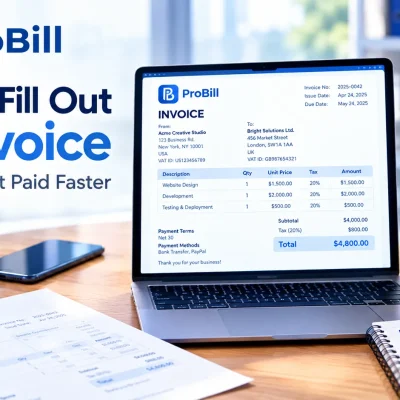
Decode the Charges, Taxes, and Discounts Line by Line
Start with the description column and verify that every product or service was actually delivered. Compare unit prices against the original quote or the pricing in your Create Invoice account dashboard:
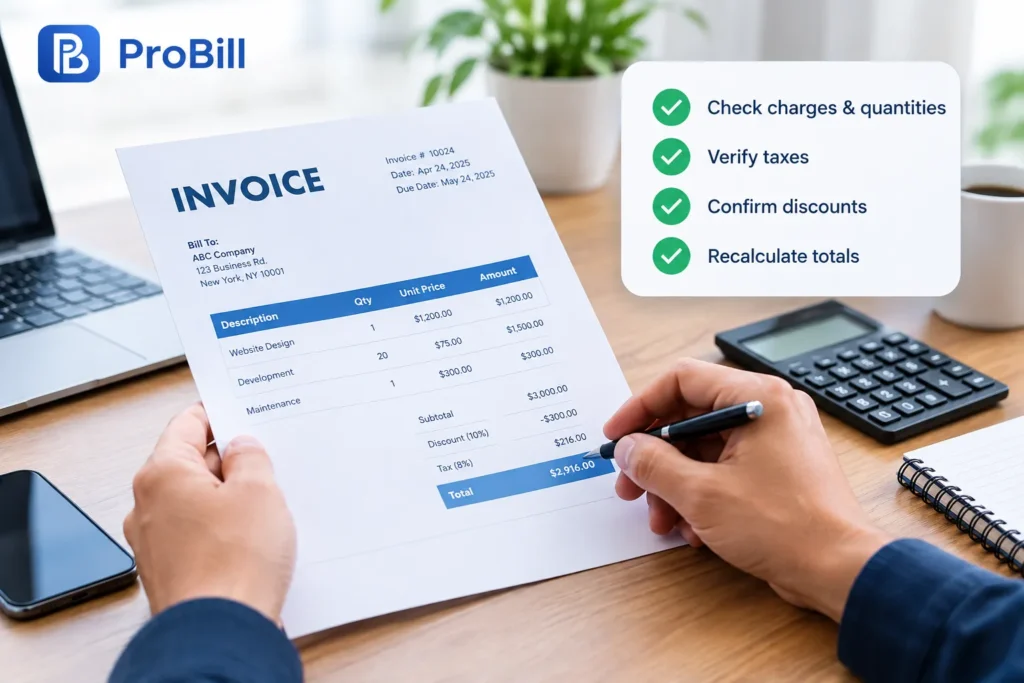
- Match quantities to signed work orders or delivery receipts.
- Confirm unit costs using saved price lists or relevant invoice templates—vendors sometimes transpose figures.
- Check tax rates. If you’re in a tax-exempt industry, the line should read 0%; if it doesn’t, request a corrected document before you pay an invoice. The IRS outlines exemption rules clearly (see irs.gov).
- Review applied discounts and promotional codes. Early-payment reductions, loyalty rewards, or coupon deductions should show as negative numbers, not hidden in totals.
- Recalculate the subtotal, taxes, and grand total. Even automated systems mis-sync; a quick spreadsheet check often catches 1–2% rounding differences.
If anything looks off, email the supplier first—never paying invoice until you receive a revised copy. For card payments, bookmark our guide on how to pay an invoice with a credit card before authorizing the charge. Once every figure makes sense, you can confidently pay an invoice in the method that best fits your cash flow.
Confirm the Due Date, Payment Terms, and Late-Fee Policy
Next, shift focus to timing. The “Terms” box dictates how to pay for an invoice and when funds must clear:
• Due date: Match it against the agreement. Net-30 means 30 calendar days from the invoice date, not from receipt.
• Payment window incentives: Many vendors offer 2/10 Net-30—2% off if you pay an invoice within 10 days. Grabbing that saving can shave thousands annually.
• Accepted methods: Look for bank details, card surcharges, and links to approved gateways. Our rundown of invoice payment methods explains processing times so you can choose the fastest option.
• Late-fee structure: Some suppliers add 1.5% per month; others charge flat fees after the grace period. Knowing this helps you schedule reminders in your free invoice generator dashboard.
• Dispute window: Terms often specify how long you have to contest errors—usually 7–14 days. Note it before you paying invoice.
If the terms feel rigid, negotiate. Our article on invoice payment shows scripts that win extensions without damaging relationships. And for industry-specific norms, explore our curated invoice resources by industry.
Understanding these elements answers, “how do i pay an invoice on time without surprises?” Once the dates and policies align with your cash-flow forecast, schedule the transfer, mark it done in your ledger, and rest easy knowing you pay an invoice accurately every time. For deeper dives into clauses like Net-45 vs. Net-60, bookmark our guide to invoice payment terms.
How to Pay an Invoice Online in 5 Easy Steps
Pay an invoice online in minutes by mapping out each click before you open your wallet. If you catch yourself asking “how do i pay an invoice or how do you pay an invoice without errors?” use the roadmap below.
- Capture the bill in your free invoice generator or accounting app so the amount syncs with cash-flow forecasts.
- Compare the due date against your budget and note any early-pay incentives inside the invoice payment terms section.
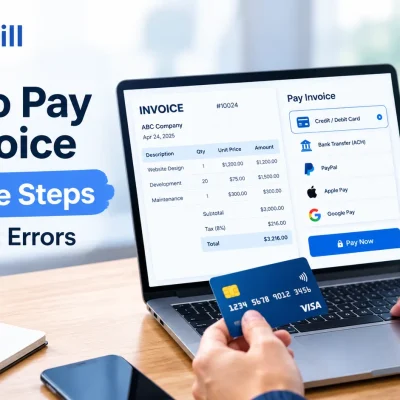
- Decide how to pay for an invoice—card, ACH, or mobile wallet—based on speed, fees, and fraud protection.
- Enter credentials, double-check the numbers, and pay the invoice through the secure gateway.
- Download the receipt, tag it to the original document in your Create Invoice dashboard, and archive it with industry-specific folders from our invoice resources by industry.
Choosing How to Pay for an Invoice: Card, ACH, or E-Wallets
When you reach Step 3, the method you pick can shave days off settlement time or inflate processing costs. Before paying invoice consider:

• Credit or debit card: Funds move instantly, and chargeback rights offer a safety net. If you need a walk-through, bookmark our guide on how to pay an invoice with a credit card.
• ACH transfer: Usually under $1 in fees and ideal for recurring suppliers; NACHA rules limit reversal windows, so verify details first.
• E-wallets (Apple Pay, PayPal, Google Pay): Great for freelancers who ask “how to pay invoice on the go,” but some wallets cap transaction size.
A quick scan of our comprehensive invoice payment methods article shows typical clearance times—ranging from real-time card approvals to two-day ACH settlements—so you can pay an invoice without liquidity surprises.
Review, Authorize, and Save Your Receipt for Future Reference
Steps 4 and 5 take less than a minute, yet they close the loop:
- Re-read the amount on-screen; even a misplaced decimal means you’ll pay the invoice twice.
- Hit “Authorize.” Your bank or wallet will timestamp the transfer, creating an audit trail that answers any future “how do you pay an invoice proof” requests.
- Immediately export the PDF receipt and attach it to the original document inside your preferred invoice templates or expense folders.
- Log the payment status in your ledger and tag it “cleared” to keep your overall invoice payment report accurate.
Following these checkpoints means you’ll never wonder again how to pay invoice correctly. Instead, you’ll move from “decide” to “done” while meeting every vendor’s terms—and getting back to work instead of chasing paperwork.
Traditional Ways to Pay the Invoice (and When They Still Make Sense)
Digital wallets and instant-pay platforms are convenient, yet many organisations still pay an invoice with time-tested methods that mesh neatly with legacy accounting systems, vendor preferences, or strict compliance rules. Below you’ll see where each traditional option shines, so you can decide how to pay invoice without sacrificing control, cash-flow accuracy, or security.
Bank Transfer or ACH: Timing, Costs, and Best Practices
Same-day wires and two-day ACH credits remain the backbone of B2B settlements because they move large sums economically and leave a rock-solid audit trail. If you often wonder, “how do i pay an invoice quickly without card fees?” this channel is usually the answer.
Timing
• Standard ACH: NACHA allows next-business-day settlement; many banks now offer same-day windows that credit suppliers by 5 p.m. local time (see Nacha’s rule update: https://www.nacha.org/rules/same-day-ach).
• International SWIFT wires: 1–3 days depending on currency cut-offs and intermediary banks.Costs
Banks charge $0.20–$1.50 per ACH batch—dramatically lower than the 2.9% + 30¢ typical for cards, according to NACHA data. Domestic wires run $15–$30 but make sense when delaying shipment could cost more.Best practices to pay an invoice by bank transfer
- Confirm the supplier’s routing and account number on company letterhead, then phone-verify with a known contact to block fraud.
- Schedule the debit in your accounting software or the free invoice generator so the ledger and cash forecast update simultaneously.
- Add the due date and any 2/10 incentives to your calendar, or better, store them in the invoice payment terms dashboard.
- Reconcile the cleared amount inside Create Invoice and attach proof of payment to the original PDF for easy audit retrieval.
When vendors add surcharges for card usage, or when your industry (e.g., construction) favours bank rails for six-figure draws, a transfer remains the fastest, cheapest way to pay the invoice.
Cheques and Cash: Security Tips for In-Person Payments
Paper cheques and hard currency feel antiquated, yet thousands of SMBs still pay an invoice this way for field deliveries, COD terms, or suppliers without bank access. The key is tightening controls so “how do you pay an invoice safely?” never becomes an after-the-fact question.
• Use pre-numbered cheques printed from your accounting suite or our downloadable invoice templates to guarantee sequence integrity.
• Require dual signatures on cheques over a threshold you define in the invoice payment policy—an internal measure that slashes forgery risk.
• For cash, limit petty-cash boxes to minor, same-day jobs and log every hand-off in the invoice resources by industry worksheets; reconcile nightly.
• Hand payments only to the vendor’s authorised agent and collect a stamped receipt. Snap a photo and archive it inside Create Invoice to document paying invoice compliance.
• Transport large sums with a bonded courier; many insurers insist on this step before they’ll cover loss.
If you can’t get ACH details, the supplier discounts for paper, or the site lacks internet access, writing a cheque is still a pragmatic way to pay an invoice. Just remember to log it promptly so your cash position and invoice payment methods report stay accurate. And when the vendor finally accepts cards, point them to our guide on how to pay an invoice with a credit card for speedier collections next cycle.
Avoiding Fees: Smart Tips for Paying Invoices On Time
Small scheduling tweaks—not heroic cost cutting—usually decide whether you pay an invoice before penalties kick in. If you still wonder “how do i pay an invoice without incurring late charges?” the tactics below turn timing into a cost-saver instead of a cash drain.
Automate Reminders so You Never Miss a Due Date
Ignoring a due date is rarely intentional; it’s almost always a calendar problem. Put software in charge so you actually pay an invoice when the clock says “now.”
- Add the supplier’s terms and exact due date to the built-in scheduler inside the free invoice generator.
- Sync those details with your Google or Outlook calendar and set two alerts: one seven days out and one 24 hours out.
- Embed the vendor’s ACH or card credentials within the Create Invoice contact record so you can pay the invoice from the reminder itself—no file digging required.
- For complex agreements like 2/10 Net-30, store the incentive in the invoice payment terms dashboard; a pop-up will flag the early-pay window automatically.
- Use push notifications for mobile so even field managers can approve and pay an invoice on the go, eliminating the “I forgot” excuse.
If staff still ask, “how do you pay an invoice quickly in an emergency?” point them to the invoice payment methods guide that compares same-day ACH, cards, and e-wallets side by side.
Match Cash Flow to Invoice Cycles to Prevent Shortfalls
Late fees often strike because funds arrive after you need to pay an invoice, not because you dislike paying invoice obligations. Align incoming cash with outgoing bills to keep the bank balance above zero.
• Forecast incoming revenue by client and date using the cash-flow widget inside Create Invoice; then overlay supplier due dates to spot gaps early.
• If a gap appears, decide how to pay for an invoice before it’s issued—credit card, line of credit, or accelerated receivables. The walkthrough on how to pay an invoice with a credit card shows how to bridge a two-day cash dip without overdrafts.
• Group vendor invoices by frequency (weekly, bi-weekly, monthly) and negotiate unified cycle dates. Industry norms for scheduling are listed in the invoice resources by industry library.
• Plug the agreed cycles into recurring drafts inside invoice templates so future bills land when income is highest.
• Review actual versus forecast in the invoice payment report every Friday; adjust next week’s releases first, not last.
These moves ensure you can always pay the invoice that’s due today while preserving liquidity for tomorrow. And if you’re still curious about strategy details—like “how to pay invoice balances during seasonal slowdowns?”—the invoice payment article breaks down contingency options step by step.
By automating reminders and syncing cash-flow rhythms, you’ll consistently pay an invoice on the exact due date rather than wrestling with costly penalties.
Frequently Asked Questions About How to Pay an Invoice
How do I pay an invoice? 5 Essentials to Verify First
Before you pay an invoice, open it in the free invoice generator and confirm five points: correct payee details, accurate line-item math, applied discounts, valid tax rate, and the due date shown in the invoice payment terms. If anything conflicts with the figures stored in your invoice templates, stop and request a revision—“how do I pay an invoice” always starts with error-free data. Once every field passes muster, approve the charge and archive the receipt. Taking these minutes prevents duplicate payments and ensures you confidently pay an invoice the first time.
How do you pay an invoice from overseas?
International customers often wire funds via SWIFT, but fees and three-day settlement times (see SWIFT gpi statistics: https://www.swift.com) make multi-currency wallets and international ACH cheaper alternatives. Review the “Accepted Methods” line, then compare options in our invoice payment methods guide to decide how do you pay an invoice across borders without excess bank charges. Log the FX rate inside your Create Invoice dashboard so your ledger and local-currency cash flow stay aligned. Always confirm the IBAN or SWIFT code with the vendor by phone before you pay an invoice internationally.
What’s the safest way to pay an invoice online?
For most businesses, a credit card with 3-D Secure protection and PCI-compliant gateways offers the strongest buyer safeguards; chargebacks provide a last-resort refund path (PCI standards: https://www.pcisecuritystandards.org). Our tutorial on how to pay an invoice with a credit card walks through tokenisation, fraud alerts, and receipt storage so you know exactly how to pay for an invoice without exposing card data. If the vendor prefers ACH, use bank portals that support multifactor authentication and same-day processing to still pay an invoice safely.
Can I pay the invoice in installments?
Yes—split schedules are common for large projects, but you must negotiate them before you pay the invoice the first time. Ask the supplier to spell out installment dates, amounts, and any surcharges in updated invoice payment terms and attach that addendum to your contract. This clarity ensures each partial transfer posts on time and shows lenders how to pay invoice balances without breaching agreement clauses.
What if I miss the due date and need to pay an invoice late?
Call or email the vendor immediately, outline your revised payment date, and request a waiver or reduction of late fees—most suppliers prefer dialogue to collections. Our invoice payment article includes negotiation scripts and, for sector-specific norms, the invoice resources by industry hub lists typical grace periods. Once both sides agree, document the change in writing and pay an invoice promptly to rebuild goodwill.
Will I receive proof after paying invoice electronically?
Every reputable gateway issues a timestamped receipt or transaction ID within seconds of paying invoice balances. Download that PDF, attach it to the original bill in your invoice templates folder, and sync the status to “Paid” in the free invoice generator. This digital trail satisfies auditors and lets you easily show proof if a supplier claims you didn’t pay an invoice later.
Next Steps: Automate Your Invoice Payments & Save Hours Each Month
Manual data entry, calendar reminders, and last-minute bank logins are why it often takes longer to pay an invoice than to approve the underlying purchase. If you keep asking “how do I pay an invoice without derailing my day?”, the answer is end-to-end automation. Routing every bill through a single portal eliminates keystrokes, captures early-payment discounts automatically, and syncs status updates to your accounting ledger in real time. Below, see why thousands of finance teams have stopped wondering how to pay invoice efficiently and started letting software handle the clicks.
Why Businesses Switch to Our All-in-One Payment Portal
A truly unified platform tackles every “how do you pay an invoice” scenario—card, ACH, or wallet—without extra apps or logins. Here’s what companies gain the moment they connect it to their Create Invoice workspace:
• Unified dashboard: View pending, scheduled, and cleared transactions side by side, so you never hunt across bank sites to verify you did, in fact, pay the invoice.
• Auto-scheduling rules: Tag each supplier’s due date and associated invoice payment terms once; the system then releases funds on the exact day that avoids late fees but still optimises cash flow.
• Multi-rail engine: Pick the cheapest or fastest rail—card, ACH, or wallet—using realtime data from our invoice payment methods guide. If a vendor prefers plastic, a single click follows the secure flow outlined in how to pay an invoice with a credit card.
• Template-driven accuracy: Import bills directly from your existing invoice templates; line items, taxes, and discounts stay intact, killing re-key errors that often inflate the cost of paying invoice.
• Industry presets: Construction draw schedules, e-commerce return windows, or agency retainers—choose profiles from our invoice resources by industry library, then click “Apply” so compliance is baked in from day one.
• Zero-touch reconciliation: Every automated disbursement annotates itself inside the ledger and the free invoice generator, closing the books without extra spreadsheet gymnastics.
Finance leaders adopt the portal because it answers “how to pay for an invoice in the fewest steps possible” while creating an immutable audit trail. The payoff is hours reclaimed each month and a dramatic drop in duplicate or missed payments, benefits documented throughout our deep-dive on invoice payment.
Get Started in Minutes: Free Trial, Seamless Setup, Dedicated Support
- Sign up for a 14-day free trial—no card required—then connect your bank or card credentials in the secure vault.
- Import vendor records and any outstanding bills from the free invoice generator or drag-and-drop PDFs.
- Map default rails and invoice payment terms to each supplier; the wizard suggests optimal schedules based on due dates and available discounts.
- Activate autopay. The engine now knows exactly when to pay an invoice, whether you’re on-site, off-site, or on vacation.
- Lean on our onboarding team via chat, phone, or email. They’ll answer every niche query, from “how to pay invoice in multiple currencies” to integrating card cashback strategies explored in how to pay an invoice with a credit card.
From there, dashboards light up with colour-coded statuses, and real-time alerts confirm each time you pay an invoice successfully. Automation transforms the dreaded task of paying invoice into a background process, so the next time someone asks “how do you pay an invoice quickly?”, you can point to the portal, not the clock—and confidently let the system pay an invoice while you tackle work that matters.