Skip to content


What Is Cloud Invoicing & Why It Matters for Modern Businesses
Defining cloud-based invoicing vs. traditional methods
Traditional invoicing usually relies on desktop software, paper printouts, and lengthy email chains. These manual steps slow cash flow and expose data to version-control issues. Cloud-based invoicing replaces local files with secure, always-available servers, letting teams collaborate in real time from any location.
Modern platforms such as Create Invoice host your customer database, item lists, and tax rules in the cloud. From the same browser tab you can create invoices online, pull ready-made invoice templates, or switch to the free invoice generator for one-off bills. Because everything is transmitted as an electronic invoicing and digital invoice exchange file, clients receive PDFs or e-invoices instantly, cutting postal costs to zero.
Mobility is another key advantage. The Probill Invoice maker app and the guide to creating invoices from a mobile device show how field teams can bill customers before leaving the job site. For larger back-office stacks, cloud integrations make tasks like creating invoices in NetSuite just as seamless. The result is faster payments, lower overhead, and the many other benefits of cloud invoicing that drive today’s digital-first commerce.
Core components of an online invoicing system
A robust online invoicing system combines several cloud-native modules that work together to streamline billing and get money in the bank faster:
- Invoice creation engine with drag-and-drop layouts, branding controls, and a library of invoice templates for consistent documents.
- Workflow automation that routes bills for approval, reminders, and recurring schedules—see these automated invoicing workflows in action.
- End-to-end processing tools that capture, validate, and post transactions; review how invoice processing works for details.
- Centralized cloud invoice management dashboard linking AR, PO, and payment data; the roundup of invoice management solutions explains typical features.
- Real-time monitoring for cash-flow insight, including dashboards for tracking invoices and payments digitally.
- Integrated payment gateways that accept cards, ACH, or e-wallets directly from the invoice screen.
- Industry-specific rule sets to meet niche compliance needs—browse the curated invoice resources by industry for examples.
- Enterprise-grade security, backups, and audit trails that keep data safe and simplify regulatory compliance.
Together, these components form the backbone of modern cloud invoicing software, enabling businesses to automate billing, reduce errors, and accelerate cash collection without the IT burden of on-premise servers.
Top Benefits of Cloud Invoicing That Boost Your Bottom Line
Faster cash flow through automated billing and reminders
Automated scheduling inside modern cloud invoicing software replaces manual follow-ups with rule-based triggers that send invoices the moment work is approved. Platforms such as the free invoice generator let you set recurring bills in minutes, while pre-designed invoice templates ensure every document complies with brand and tax requirements automatically.
Once an invoice is out the door, built-in reminder logic—illustrated in these automated invoicing workflows—fires polite nudges at strategic intervals, cutting average days-sales-outstanding without extra staff time. Because each file is delivered as an electronic invoicing and digital invoice exchange message, customers receive it instantly and can pay on the spot.
Mobility accelerates things further: technicians can generate bills on-site with the Probill Invoice maker app or by creating invoices from a mobile device, capturing signatures and deposits before leaving the job. For back-office teams, native ERP connectors like the guide to creating invoices in NetSuite sync AR data automatically, eliminating batch exports. Whether you prefer to create invoices online in a browser or embed billing inside existing systems, cloud-based invoicing turns work performed today into cash in the bank tomorrow.
Real-time visibility and control with cloud invoice management dashboards
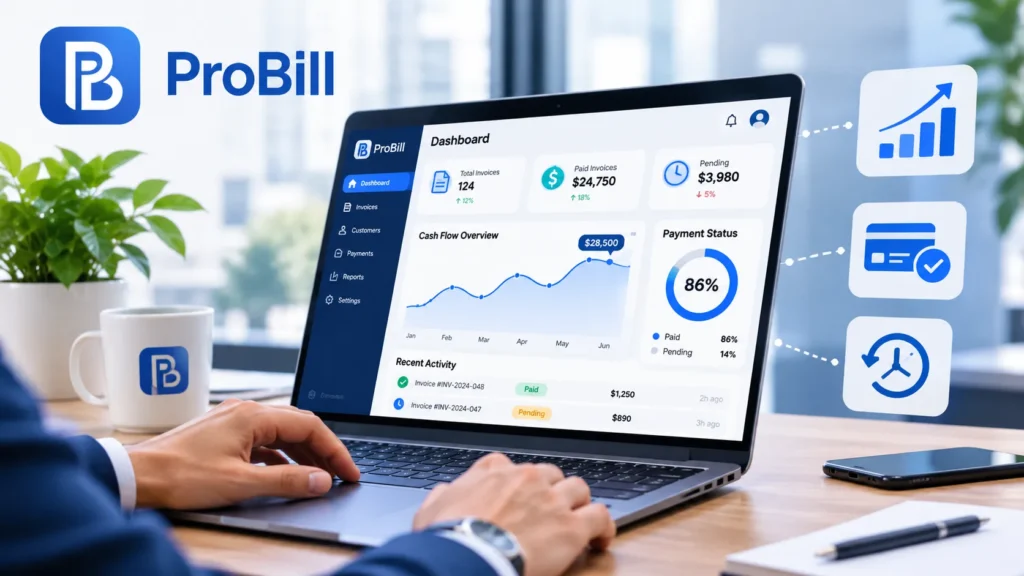
A single, role-based dashboard delivers the cloud invoice management insight traditional spreadsheets can’t match. Leading invoice management solutions surface aging summaries, disputed items, and payment-gateway status in real time, while tools for tracking invoices and payments digitally flag bottlenecks before they threaten cash flow.
Because all activity flows through one online invoicing system, executives can drill from portfolio views to individual line items, export KPIs, or forecast collections directly inside Create Invoice. Automated audit trails described in the primer on how invoice processing works also tighten internal control, reducing write-offs and compliance risk.
Industry-specific filters—see the curated invoice resources by industry—let you benchmark performance across business units and adjust credit terms proactively. The result is faster decision-making, optimized working capital, and a measurable uptick in profitability—core benefits of cloud invoicing that compound as your transaction volume grows.
How to Choose the Right Cloud Invoicing Software for Your Workflow
Must-have features checklist for SMEs, freelancers, and agencies
- Effortless document creation – look for drag-and-drop editors, reusable invoice templates and one-click tools like the free invoice generator that let you create invoices online without design work.
- Mobile billing on the go – field teams should be able to issue invoices from the Probill Invoice maker app or by simply creating invoices from a mobile device to capture payment before leaving the job site.
- Automated workflows – templates for reminders, recurring billing, and approval routes such as those in the showcased automated invoicing workflows remove manual follow-ups and accelerate cash flow.
- Seamless integrations – your cloud invoicing software should sync with core platforms; for example, follow this guide to creating invoices in NetSuite to avoid double entry.
- Real-time analytics – dashboards from leading invoice management solutions and built-in tools for tracking invoices and payments digitally surface bottlenecks instantly.
- Industry-specific compliance – verify that the app offers localized taxes, languages, and sector presets; the curated invoice resources by industry highlight what to check.
- Native e-invoicing support – full compatibility with electronic invoicing and digital invoice exchange standards keeps you ahead of government mandates and speeds cross-border payments.
- Bulk capture and validation – an engine similar to the one outlined in how invoice processing works should extract data, detect duplicates, and post transactions automatically.
Security, compliance, and scalability considerations you can’t ignore
Regulatory fines and data breaches easily dwarf the subscription cost of any online invoicing system, so dig into each vendor’s safeguards before committing. Confirm that role-based permissions, encryption in transit and at rest, and tamper-proof audit trails come standard—features already embedded in Create Invoice and other reputable providers.
Scalability goes beyond user counts. Ask how the platform handles sudden invoice spikes, global tax updates, and multi-currency growth. A cloud-native architecture automatically allocates resources, ensuring consistent performance without extra IT overhead—a prime example of the benefits of cloud invoicing.
Finally, audit the provider’s compliance certifications (e.g., ISO 27001, GDPR) and disaster-recovery posture. Pair these guarantees with flexible API limits and transparent uptime SLAs, and you’ll have a future-proof foundation for cloud invoice management that can expand with your client base and evolving legal landscape.
Step-by-Step Guide to Migrating From Spreadsheets to Cloud-Based Invoicing
Preparing your data and mapping existing processes
Migrating to cloud-based invoicing is smoother when spreadsheet data is clean and your current billing flow is clearly documented. Follow this sequence to avoid rework and unlock the full benefits of cloud invoicing right away:
- Inventory every spreadsheet and tab that touches billing. Note file owners, formulas, and manual steps so nothing critical is lost during the move.
- Standardize column names, date formats, and currency symbols. Remove duplicates and outdated contacts to keep your new online invoicing system lean.
- Map each spreadsheet field (e.g., “Client Name,” “Line-Item Subtotal”) to the corresponding fields inside the platform’s invoice templates.
- Document approval paths and reminder triggers by referencing the flowcharts in how invoice processing works. This becomes the blueprint for automation.
- Import master data with a pilot batch. Tools like the free invoice generator inside Create Invoice let you upload CSVs, validate records, and spot formatting errors instantly.
- Configure taxes, currencies, and regional rules in accordance with local electronic invoicing and digital invoice exchange mandates. Use the invoice resources by industry to apply sector-specific requirements.
- Rebuild approvals, recurring schedules, and dunning emails using drag-and-drop automated invoicing workflows. Pair them with role-based dashboards from leading invoice management solutions for end-to-end cloud invoice management.
- Run a parallel test cycle. Issue a limited set of bills and monitor payment status with the tools for tracking invoices and payments digitally.
- Freeze legacy spreadsheets on the agreed cut-off date, redirect staff to the new cloud invoicing software, and archive old files for audit purposes.
Training teams and integrating with accounting & CRM tools
People and systems must sync seamlessly once data is live. Use this phased approach to drive adoption and connect your new cloud-based invoicing hub to the rest of the stack:

- Segment users by role—sales, finance, field techs—and design targeted sessions. Start with hands-on demos that show how to create invoices online in under two minutes.
- Introduce mobility next. Have field staff practice issuing bills with the Probill Invoice maker app and follow the guide to creating invoices from a mobile device so they can close jobs on-site.
- Provide cheat sheets on search, filters, and bulk actions, emphasizing how real-time cloud invoice management eliminates version-control headaches common to spreadsheets.
- Connect the invoicing API to your ERP. The tutorial on creating invoices in NetSuite illustrates the typical mapping and authentication steps.
- Sync customer and deal data from the CRM so reps never re-type contact details, and schedule nightly two-way updates to keep balances current.
- Monitor adoption metrics—login frequency, invoice turnaround, and payment lag—and share quick wins to reinforce change. Iterate training based on feedback to maximize the ongoing benefits of cloud invoicing for every department.
Frequently Asked Questions About Cloud Invoicing
How secure is cloud invoicing software compared to desktop solutions?
Reputable cloud invoicing software such as Create Invoice encrypts data in transit and at rest, stores backups in multiple regions, and offers role-based access—protections that often exceed those of on-premise tools. Because every transaction moves through a tamper-proof audit trail and follows electronic invoicing and digital invoice exchange standards, you also gain compliance features that simplify audits and reduce fraud risk. Regular third-party penetration tests and automatic security patches further harden the platform without IT intervention.
Can I customize invoices and currencies in a cloud-based invoicing platform?
Yes. Most providers let you swap logos, colors, and fields or start with professionally designed invoice templates and adapt them in minutes. Multi-currency and localized tax settings come standard, while the invoice resources by industry library helps you fine-tune layouts for sector-specific rules. Even the free invoice generator supports custom branding for one-off bills.
What does cloud invoicing cost, and are there hidden fees?
Pricing usually follows a monthly subscription that scales by user count or transaction volume; entry tiers are often less than a single missed late-payment fee. Many vendors include unlimited documents, support, and updates, so you avoid the upgrade charges common with desktop licenses. For occasional use, the free invoice generator works at no cost, and built-in automated invoicing workflows eliminate manual labor—reducing overall ownership costs.
Will an online invoicing system integrate with my existing accounting software?
Modern cloud invoice management platforms ship with prebuilt connectors or open APIs. For example, this guide on creating invoices in NetSuite shows how two-way syncing pushes AR data into your ERP in minutes. Broader stacks are covered through Zapier, REST APIs, or native links cataloged in leading invoice management solutions, so you rarely need custom code.
How quickly can my team get up and running on cloud invoice management?
Because everything is browser-based, most teams can create invoices online the same day they subscribe. Mobile crews can start billing in the field with the Probill Invoice maker app or by creating invoices from a mobile device. Data import tools outlined in how invoice processing works map legacy spreadsheets to the new system automatically, so full rollout often finishes within a week.
What support options are available if issues arise?
Vendors typically offer 24/7 chat, email, and phone assistance, plus searchable knowledge bases that cover topics like tracking invoices and payments digitally. Premium plans may bundle a dedicated success manager and on-demand training sessions similar to those highlighted in comprehensive invoice management solutions reviews. Community forums and regular product webinars round out the support ecosystem, ensuring rapid resolution and continuous learning.