Skip to content


What Is a Sales Order, and Why Does It Matter?
Definition, Purpose, and Legal Standing of a Sales Order
A sales order is a seller-generated document that confirms the exact products, quantities, prices, and delivery terms a customer has agreed to purchase. Unlike a quote, a sales order is issued after the buyer’s acceptance, making it a binding confirmation of the commercial deal. The primary purpose of a sales order is to give every department—fulfillment, finance, and customer service—a single source of truth for what must be delivered and billed.
Because the sales order is accepted by both parties, it carries legal weight similar to a basic contract; courts routinely recognize it as evidence of the agreed-upon transaction when disputes arise (see Cornell Law School’s discussion of contract evidence ). That legal standing is why auditors and lenders often request copies of sales orders during due-diligence reviews.
In day-to-day operations, a clear sales order streamlines record-keeping and sets the stage for the later conversion to an invoice—helping teams avoid the classic “sales order vs invoice” confusion. When the time comes to bill, you can pull line items directly from the approved order into an invoice template or a free invoice generator, cutting manual re-entry and reducing errors. The tight link between a sales order and invoice also accelerates cash flow, since nothing has to be double-checked before sending the bill. so what’s the difference between sales order and invoice ?
When a Sales Order Is Created and Who Uses It in the Workflow
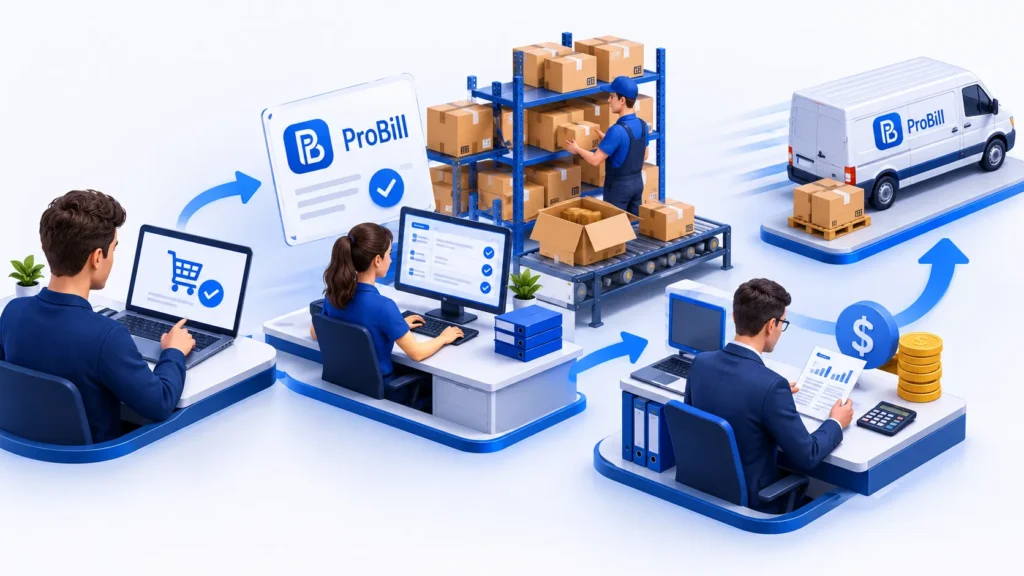
- Customer accepts quote or places an online cart order.
- Sales or e-commerce system instantly generates the sales order.
- Operations receives the document to pick, pack, and schedule shipment.
- Finance references the same sales order to reserve inventory value and forecast revenue.
- After goods ship, the sales order converts into an invoice through tools such as Create Invoice, ensuring the amounts match perfectly.
- Customer receives the invoice, pays, and finance closes the loop in the ERP.
Each stakeholder touches the sales order at a different stage, but the document keeps everyone synchronized. Operations avoids stockouts, finance shortens days-sales-outstanding, and the customer enjoys transparent order tracking. For industries with complex billing—construction, wholesale, or SaaS, for example—linking the sales order and invoice inside standardized invoice templates eliminates costly discrepancies. Companies that customize workflows can also tap our curated invoice resources by industry to align document flows with sector-specific compliance rules.
By creating the sales order at the precise moment of buyer commitment and circulating it across departments, businesses maintain operational clarity, speed up billing, and uphold the legal integrity of every sale.
What Is an Invoice, and How Does It Complete the Sale?
An invoice is the seller-issued document that flips a confirmed order into an official request for money, turning the promise recorded in your sales order into enforceable accounts receivable. By codifying the exact amount owed, payment terms, and tax details, the document closes the “sales order vs invoice” loop and starts the countdown to cash collection.
Core Components of an Invoice and Its Compliance Role
Every compliant invoice must answer five questions—who, what, when, how much, and under which rules:
• Header information: legal business names, addresses, and tax identification numbers for buyer and seller.
• Unique invoice number and issue date: creates an auditable trail that tax authorities such as the IRS expect.
• Itemized description and quantity: copied directly from the approved sales order for one-to-one accuracy.
• Pricing, subtotal, tax, shipping, and grand total: figures that feed revenue recognition under both GAAP and IFRS (see IFRS 15 guidance at ifrs.org).
• Payment terms and accepted methods: Net-30, bank transfer instructions, or a link to a client portal.
Because each element maps to statutory or accounting requirements, auditors can match the document to inventory records, tax filings, and bank deposits. Pre-formatted invoice templates ensure these fields are present, while our invoice resources by industry overlay sector-specific rules like construction retention or SaaS usage tiers.
Timing, Recipients, and How Invoices Trigger Payment
- Shipment or service completion occurs, signaling that revenue can be billed.
- Finance exports the confirmed sales order into a Create Invoice workspace, Probill Mobile Invoice Maker or a free invoice generator, producing the document instantly.
- The invoice is emailed to accounts-payable contacts, posted to a customer portal, or transmitted via EDI for larger buyers.
These steps push the transaction from “promised” to “payable.” Most ERP systems start the aging clock the moment the recipient’s server records delivery, allowing you to monitor days-sales-outstanding (DSO) in real time. Automated reminders, late-fee clauses, and payment-gateway links embedded in the document further shrink collection cycles, proving why the tight integration of sales order and invoice data is essential for predictable cash flow.
Difference Between Sales Order and Invoice at a Glance
Side-by-Side Comparison Table: Sales Order vs Invoice
| Attribute | Sales Order | Invoice |
|---|---|---|
| Primary Goal | Confirms what the customer has agreed to buy | Requests payment for the confirmed purchase |
| Typical Issue Point | Immediately after quote acceptance or cart checkout | After goods ship or services finish |
| Creator | Sales, e-commerce, or order management system | Finance or automated billing module |
| Binding Effect | Locks in quantity, price, terms; acts as evidence of agreement | Creates legally enforceable accounts-receivable balance |
| Accounting Entry | No journal entry—used only for forecasting | Debits A/R, credits revenue and tax accounts |
| Inventory Impact | Reserves items in stock ledger | Reduces on-hand balance once shipment posts |
| Cash-Flow Trigger | None; cash clock hasn’t started | Starts DSO timer the moment the customer receives it |
| Modifications | Can still be amended with customer approval | Rarely altered; usually requires a credit memo instead |
| Common Format | Internal form in ERP or PDF sent for reference | PDF, EDI, or link generated via free invoice generator |
| Next Workflow Step | Feeds pick/pack list, shipment schedule | Feeds payment reminders and cash-application rules |
By scanning the table, teams instantly see the decisive sales order vs invoice contrasts without wading through policy manuals. Modern platforms such as Create Invoice link both documents so line items flow seamlessly—eliminating manual re-entry and the costly errors that often blur sales order and invoice data.
Impact on Accounting, Inventory, and Cash Flow Management
A clear divide between a sales order and invoice does more than tidy paperwork—it reshapes financial performance. From an accounting standpoint, the sales order has zero balance-sheet impact; it is a forecast cue that allows controllers to model revenue and tax exposure. The moment the document morphs into an invoice, however, the ledger recognizes receivables and revenue under GAAP or IFRS, so reconciliation relies on strict sales order vs invoice matching.
Inventory also pivots on the distinction. The sales order reserves SKU quantities, preventing overallocation in the warehouse. When the invoice is raised, the system finalizes the inventory decrement, giving real-time visibility that purchasing can trust. Businesses that embed these rules in pre-built invoice templates cut stockouts and over-purchasing because every pick slip ties back to an approved reservation.
Cash-flow timing is perhaps the sharpest contrast. Until the invoice is issued, the customer owes nothing. Once sent, the DSO clock starts, late-fee clauses activate, and automated reminders push collection. Integrating invoice resources by industry refines those triggers—construction invoices can include retention schedules, while SaaS billing can prorate mid-cycle upgrades, all anchored to the originating sales order.
In short, keeping the lifecycle of a sales order and invoice distinct yet connected safeguards financial accuracy, stabilizes inventory, and accelerates cash inflows—benefits no growing company can afford to overlook.
Sales Order vs Invoice in the Real World: Common Pitfalls and How to Avoid Them
Poorly managed hand-offs between a sales order and its matching invoice can snowball into shipping delays, write-offs, or even audit flags. The most frequent issues crop up when teams treat the two records as interchangeable, forgetting that the core sales order vs invoice distinction anchors inventory, revenue recognition, and cash collection. Below we unpack where businesses stumble and map out a workflow that closes the gaps.
Top 3 Mistakes Businesses Make When Managing Both Documents

Copy-pasting data across systems
Re-entering line items from a sales order into an invoicing tool invites typos, unit-price drift, and missed tax codes. The problem is amplified when spreadsheets, email threads, and PDFs float around with no single source of truth.Skipping status checks before billing
A sales order might show “partially fulfilled,” yet finance still triggers the invoice. The customer disputes the charges, AR reverses the entry, and the company burns days reconciling inventory counts. This breakdown is the textbook sales order vs invoice timing error.Overlooking change-control protocols
Scope creep, post-order discounts, or shipping substitutions often hit the order after warehouse pick but before invoicing. Without a documented adjustment trail, the final bill diverges from the approved sales order and invoice mismatches appear during audits, eroding trust and potentially violating revenue-recognition rules (see the SEC’s guidance on contract modifications: https://www.sec.gov/corpfin/financial-reporting-manual).
Best-Practice Workflow to Prevent Duplication and Revenue Leakage
- Generate the sales order inside an integrated platform such as Create Invoice or your ERP so every department views identical live data.
- Lock the order record once the warehouse picks the items; funnel any later changes through a formal revision process logged in the system.
- Automate invoice creation by converting the sealed sales order directly into an invoice template—our ready-made invoice templates pull quantities, SKUs, and taxes without manual input.
- Validate fulfillment status via barcode scan or API call before the invoice is dispatched; partial shipments trigger proportional billing or a back-order notice, not a full charge.
- Send the customer a digital invoice through EDI, email, or a free invoice generator link that embeds payment options and late-fee logic tailored by our sector-specific invoice resources by industry.
Executing the five steps above ensures the sales order vs invoice lifecycle stays synchronized, slashing duplicate data entry and plugging revenue leaks while keeping “sales order and invoice” records audit-ready.
Frequently Asked Questions About Sales Orders and Invoices
Do I Need Both a Sales Order and an Invoice for Every Transaction?
You need a sales order and invoice whenever goods or services are delivered on credit, shipped later, or subject to audit—situations where a clear audit trail protects both parties. For cash-and-carry retail or small digital downloads, many businesses skip the sales order and rely only on the invoice, but that choice removes the built-in checkpoint that prevents pricing or quantity errors. When in doubt, generate the sales order in a free invoice generator; it takes seconds and keeps the sales order and invoice pair ready for future reconciliation. Maintaining both documents also clarifies the sales order vs invoice timing difference that auditors expect to see.
Can a Sales Order Automatically Convert Into an Invoice?
Yes. Most ERPs and tools such as Create Invoice let you press one button to transform an approved sales order into a final invoice, ensuring line items, taxes, and payment terms transfer without retyping. Automating the hand-off closes the classic sales order vs invoice gap that causes revenue leakage, and it speeds cash collection by issuing the bill as soon as shipment data hits the system. To customize the look or add sector-specific clauses, you can layer pre-built invoice templates over the converted data before sending the document.
How Do Sales Orders and Purchase Orders Differ?
A sales order is the seller’s confirmation of what will be provided, whereas a purchase order is the buyer’s request for those goods or services. Think of the two as mirror images: the PO starts the procurement cycle from the customer’s side, and the sales order answers it from the vendor’s side, locking in identical quantities and prices. Keeping the documents distinct prevents “crossed wires” when matching the sales order and invoice against the customer’s PO during three-way reconciliation. That clarity reduces disputes and accelerates payment approvals.
Is an Invoice Legally Binding Without a Prior Sales Order?
An invoice can be enforceable on its own if it clearly shows the buyer accepted the goods or services—delivery receipts, signatures, or emails can serve as supporting evidence. However, the absence of a prior sales order weakens your position in court because you lack the front-end document that establishes mutual assent before fulfillment (see Cornell Law School’s contract evidence overview). Issuing both the sales order and invoice therefore tightens legal protection and simplifies any future dispute over the sales order vs invoice sequence.
What Information Must Appear on Each Document to Stay Compliant?
Both documents must list seller and buyer names, addresses, tax IDs, unique numbers, issue dates, item descriptions, quantities, unit prices, and agreed terms. The invoice additionally needs tax breakdowns, total payable, and payment instructions because it triggers accounts-receivable recognition. Industry-specific mandates—such as retention lines in construction or usage metrics in SaaS—should be added via our curated invoice resources by industry. Omitting any required field risks tax penalties, delayed audits, or rejected payments, so treat each sales order and invoice as compliance assets, not mere paperwork.
Can I Combine Multiple Sales Orders Into One Invoice?
You can, provided every included sales order references the same customer, currency, and payment terms. Consolidating reduces billing fees and helps the buyer cut check-runs, but you must attach a line-level cross-reference so each shipment can still be traced back to its originating sales order. If items span different tax rates or delivery dates, issuing separate invoices is safer to avoid skewing revenue recognition. Always verify the customer’s accounts-payable policy before merging to keep the sales order vs invoice audit trail intact.
How Long Should I Keep Sales Orders and Invoices for Audits?
Retain both documents for at least seven years—the period the IRS and many international tax authorities can review (IRS Publication 583). Highly regulated industries or companies operating under long warranty terms often store records for 10 years or longer. Digital archiving linked to the original sales order and invoice metadata speeds retrieval during due-diligence or financial-statement audits. Keeping complete, well-indexed files ensures you can prove the entire sales order vs invoice lifecycle long after the cash is collected.
Choosing the Right Software to Streamline Sales Orders and Invoices
Key Features to Look for in Order-to-Cash Automation Tools
Modern finance teams need more than a digital filing cabinet; they need software that keeps every sales order and invoice in perfect lockstep. Evaluate candidates against these essentials:
1. End-to-end data continuity – The platform must pull customer, SKU, and tax data straight from CRM and push it through fulfillment to invoicing without manual re-entry, eliminating the classic sales order vs invoice mismatch.
2. One-click order-to-invoice conversion – Look for a native function that seals the approved order and spins up the bill instantly, preferably via customizable invoice templates.
3. Real-time inventory sync – Automatic stock reservation on order creation and decrement on invoice posting keeps warehouse and finance in sync.
4. Built-in payment gateways – Embedded links to cards, ACH, or digital wallets shorten the time between sending an invoice and collecting cash.
5. Compliance guardrails – Country-specific tax engines, e-signature capture, and audit logs protect the legal standing of every sales order and invoice.
6. Role-based dashboards – Finance needs DSO metrics while ops tracks fulfillment status; tailor views so each team sees relevant KPIs at a glance.
7. Open API & ERP connectors – Pre-built hooks into NetSuite, SAP, or Shopify prevent data silos and support future scale. Gartner notes that API-driven tools reduce integration costs by up to 30% (see gartner.com for methodology).
8. Intelligent reminders & dunning – Automated, rules-based nudges activate the moment payment terms lapse, reclaiming revenue without extra headcount.
Shortlist only products that score high on all eight pillars; anything less will force workarounds that undo the promised efficiency.
How Our Platform Simplifies Document Flow and Speeds Up Payment
Create Invoice was built to erase the friction between a sales order and invoice—not merely digitize it. When a quote converts, the system instantly generates the order, reserves inventory, and locks pricing. One click later, that sealed record morphs into an invoice populated by industry-ready invoice templates; no copy-paste, no errors.
Because every document shares the same database, users can track the exact sales order vs invoice status on a live timeline. Sector-specific rules—retention for construction, tiered usage for SaaS—drop in automatically through our curated invoice resources by industry. The final bill includes an embedded pay-now button powered by our free invoice generator, shrinking days-sales-outstanding without extra plugins.
From initial order entry to cash in the bank, the platform keeps every stakeholder aligned and every sales order and invoice audit-ready—turning document management into a competitive advantage.