Skip to content


What Is Automated Invoicing & Why Your Finance Team Can’t Ignore It in 2026
From Manual Chaos to Digital Flow: Defining Invoice Automation
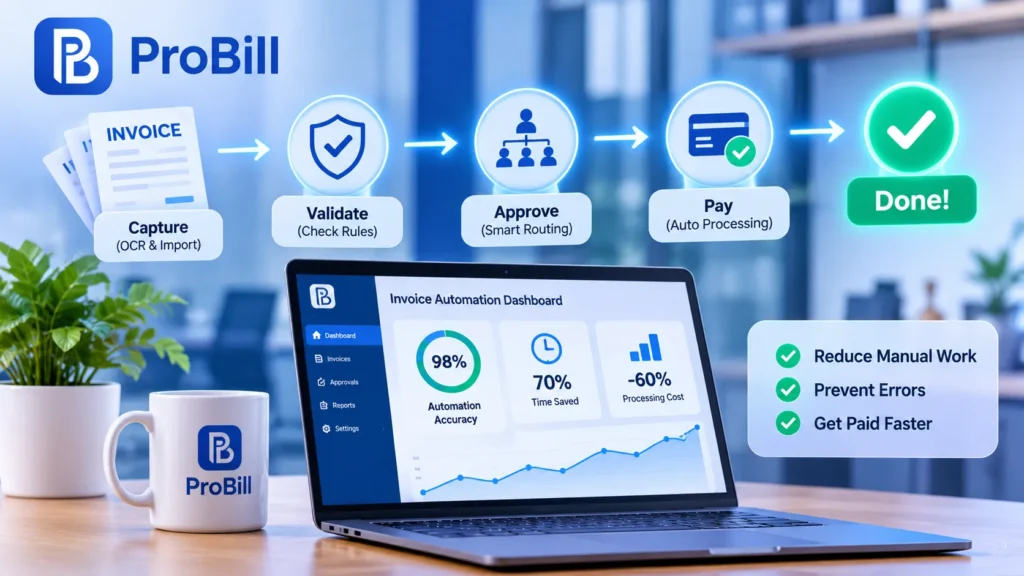
Invoice automation replaces paper- and spreadsheet-based tasks with a software-driven, rules-based workflow that captures, validates, approves, and posts invoices without constant human intervention. Instead of keying data line by line, solutions ingest supplier bills via OCR or an e-invoicing feed, route them through predefined approval paths, and sync the entries directly to your ERP or accounting app.
Finance leaders can’t ignore this shift in 2024 for three reasons. First, global e-invoicing mandates are accelerating; governments from France to Japan now require digital submissions, making manual processes non-compliant. Second, hybrid workforces need real-time, cloud access—an area where traditional, desktop-bound tools fall short. Third, AI-enhanced data capture has finally made automated invoice processing both accurate and affordable, closing the ROI gap for midsize firms.
If you already rely on point tools like the free invoice generator or Probill Invoice maker app for customer billing, invoice automation extends the same digital efficiency to supplier spend. It streamlines invoice workflow automation end-to-end, from receipt through payment reconciliation, as outlined in the invoice processing workflow.
Key Components of an Automated Invoice System That Scales
| Component | What It Does | Why It Matters for Scale |
|---|---|---|
| Intelligent data capture | Uses OCR and machine learning to extract header, line-item, and tax data | Eliminates manual typing errors and supports high-volume intake during growth spurts |
| Dynamic approval engine | Applies routing rules based on amount, cost center, or project | Keeps controls tight without adding extra headcount as spend grows |
| Two- & three-way matching | Compares invoice data to POs and receipts automatically | Prevents overpayments and supports bulk purchasing without slowing AP |
| Real-time integrations | Syncs with ERPs (e.g., creating invoices in NetSuite), payroll, and procurement tools | Maintains a single source of truth even when your app stack expands |
| Self-service supplier portal | Lets vendors submit, track, and update invoices online | Reduces status-update emails so AP can focus on exceptions |
| Analytics & anomaly detection | Surfaces duplicate, late, or non-PO invoices instantly | Provides the insight needed for continuous process improvement and fraud prevention |
| Cloud architecture & APIs | Delivers anywhere access and easy extension via integrating invoicing through APIs | Supports multinational teams and future add-ons without large IT projects |
Many solutions bundle extra features—such as pre-built invoice templates and industry-specific workflows found in our invoice resources by industry—to speed deployment. Pairing these core components with secure, cloud-based invoicing systems ensures your automated invoice system can handle seasonal spikes, acquisitions, and new regulatory requirements while avoiding the “add more clerks” trap. For finance teams eyeing efficiency goals this year, the question is no longer whether to automate, but how quickly you can plug the gaps between intake and payment—and start reallocating those saved hours to higher-value analysis and cash-flow strategy.
Step-by-Step: Setting Up an Automated Invoice Processing Workflow
Choosing the Right Software & Integrations for Your Stack
Selecting technology first prevents re-work later, because every subsequent rule, approval path, and KPI hinges on what your automated invoice system can technically handle.
- Map existing tools. Inventory anything touching payables—ERP, procurement portal, online invoice generation tools, and spreadsheets used for managing invoice records and payments.
- Define integration points. Decide whether invoices will originate from a vendor portal, email capture, the free invoice generator, or an app such as the Probill Invoice maker app.
- Evaluate core platforms. Compare standalone invoice management solutions with ERP-native modules. If you’re already creating invoices in NetSuite, ensure the AP add-on offers field-level sync rather than batch file uploads.
- Check API flexibility. A robust REST layer simplifies future feature adds—see best practices for integrating invoicing through APIs.
- Prioritise deployment model. Cloud-based invoicing systems offer faster vendor onboarding and remote approvals without VPN headaches.
- Validate scalability extras. Features like pre-built invoice templates and sector-specific presets in the invoice resources by industry library cut weeks off configuration for specialised teams.
- Run a pilot. Import a month of historical data from Create Invoice or another source to test OCR accuracy, approval routing, and error handling before full roll-out.
Designing Error-Proof Invoice Workflow Automation Rules
Once the tech is in place, configure rules that turn generic software into a fit-for-purpose invoice workflow automation engine.
- Start with policy translation. Convert your existing approval matrix and tolerance guidelines into machine-readable conditions—amount thresholds, cost-centre ownership, and PO matching requirements.
- Layer validation checkpoints. Use header checks (vendor ID, tax ID) followed by line-level logic (price variance ≤ 5 %, duplicate detection) to minimise false approvals.
- Automate matching tiers.
• Two-way: invoice-to-PO for services and non-stock items.
• Three-way: add receipt verification for inventory purchases. - Build exception queues. Route any rule breach to a specific Slack channel or queue inside the automated invoice processing dashboard, keeping approvers focused on outliers only.
- Set escalation timers. If an invoice sits unapproved for X days, auto-notify a backup approver or raise a finance ticket to avoid late-payment fees.
- Apply roll-up analytics. Connect rule outcomes to the reporting layer so finance can spot chronic bottlenecks and optimise continuously, aligning with benchmarks defined in the invoice processing workflow.
By anchoring rules in corporate policy and letting software handle the repetitive checks, finance teams achieve straight-through invoice automation while keeping tight control over spend and compliance.
7 Ways Automated Invoicing Boosts Cash Flow & Cuts Costs
Automating accounts payable is more than a back-office upgrade—it directly improves working capital and slashes operational spend. Below are seven practical gains an automated invoice system delivers the moment you replace manual spreadsheets and standalone tools like the free invoice generator or the Probill Invoice maker app.
Early-payment discounts without cash-flow surprises
Invoice workflow automation accelerates approvals, letting finance capture dynamic discounts while the real-time dashboards protect against accidental over-payments.Zero duplicate or inflated invoices
Built-in two- and three-way matching in modern invoice management solutions halts duplicates and price variances before they touch the ERP.Granular forecasting & spend visibility
Cloud analytics surface approved-but-unpaid liabilities instantly, aiding treasury teams that were previously stuck managing invoice records and payments in separate sheets.24/7 approvals from any device
Approvers working remotely gain secure access through cloud-based invoicing systems, ending the routing delays that trigger supplier late-fees.Self-service supplier communication
Vendor portals—complete with status tracking and branded invoice templates—eliminate “Where’s my payment?” emails, freeing AP staff for higher-value analysis.API-driven data entry elimination
Seamless API connections, such as integrating invoicing through APIs or directly creating invoices in NetSuite, post transactions automatically and reduce IT maintenance costs.Industry-specific rules out of the box
Preconfigured workflows housed in the invoice resources by industry library let teams adapt controls quickly, supporting cash-sensitive sectors without expensive custom coding.
Real-World ROI: Time, Labor, and Late-Fee Savings
Switching to automated invoice processing typically removes every touch point of rekeying, chasing signatures, and filing PDFs. Compared with the manual steps outlined in the invoice processing workflow, AP clerks reclaim hours each day, allowing one person to handle volumes that once needed several. Faster cycle times stop late-payment penalties, while discount capture turns AP from a cost center into a cash-flow contributor. Platforms like Create Invoice show that when data flows straight from online invoice generation into approval rules, labor costs drop without compromising control.
Compliance, Audit Trails, and Fraud Prevention Advantages
Every action inside an automated invoice system—data capture, rule validation, approval decision—creates a tamper-proof log. Auditors can trace a transaction’s full journey in seconds, eliminating binder searches and strengthening compliance with tax mandates that now require digital evidence. Automated checks flag anomalies far earlier than humans, reducing fraud risk and ensuring policy adherence even as organizations scale through mergers, new regions, or high-volume e-commerce channels.
Pitfalls to Avoid When Switching to Automated Invoicing
Data Migration & Change Management Mistakes That Derail Projects
Many projects stall because teams underestimate the effort required to move clean, usable data into a new automated invoice system. Legacy exports from the free invoice generator or the mobile-focused Probill Invoice maker app often carry inconsistent vendor IDs, tax codes, or currency formats that break OCR learning models. Audit a representative sample first, standardise field names, and flag exceptions before the bulk upload begins.
Field mapping frequently overlooks custom columns baked into older invoice templates—or industry-specific requirements already catalogued in the invoice resources by industry library. When these details are lost, downstream two- or three-way matching rules misfire and finance scrambles to fix line-item errors manually, eroding the promised gains of invoice automation.
Integration shortcuts cause another wave of rework. Teams may push go-live without end-to-end API testing, assuming the ERP connector will “just work.” In reality, syncing fields like project codes or department tags between your new platform and an ERP such as NetSuite requires the exact endpoints outlined in the guide to creating invoices in NetSuite. Perform a dry run using the sandbox and follow best practices for integrating invoicing through APIs so duplicate or empty records don’t flood production.
Finally, ignore people and process at your peril. If approvers still print PDFs because they never saw the demo, your shiny invoice workflow automation stalls on day one. Build a communication plan that links each new screen or alert back to existing controls in the invoice processing workflow. Offer short, role-based sessions and a fallback cheat sheet hosted in your cloud-based invoicing systems portal. Tools like Create Invoice even embed tutorials directly inside the dashboard, reducing post-launch confusion and support tickets related to automated invoice processing.
KPIs to Monitor for Continuous Improvement Post-Launch
Once invoices flow automatically, tracking the right metrics keeps momentum high and exposes new savings opportunities.

| KPI | Why It Matters | How to Track It Quickly |
|---|---|---|
| First-pass success rate | Shows the % of invoices posted without human touch; low scores reveal data-capture or rule gaps | Pull straight-through processing stats from your invoice management solutions dashboard |
| Average approval cycle time | Directly affects early-payment discount capture and supplier satisfaction | Compare timestamps in the audit log against pre-automation baselines kept while managing invoice records and payments |
| Exception volume by category | Pinpoints whether issues stem from data quality, policy, or supplier behaviour | Filter exception queues by error code and cross-reference with source system (e.g., uploads from online invoice generation) |
| Cost per invoice | Combines labour, platform fees, and late-fee penalties; trending downward proves ROI | Blend AP payroll data with transaction counts supplied by your automated invoice system |
| Discount realisation rate | Links faster approvals to tangible cash savings | Compare discounts earned vs. opportunity size inside the analytics layer of invoice automation software |
Review these KPIs monthly during the first quarter after go-live, then quarterly once performance stabilises. Continuous monitoring ensures you refine rules, retrain vendors, and expand automation to new entities without losing the gains already captured.
Frequently Asked Questions About Automated Invoicing
How does automated invoicing integrate with my existing ERP or CRM?
Most modern invoice automation platforms ship with connectors for popular ERPs and CRMs, allowing bi-directional data flow without manual exports. If you’re already creating invoices in NetSuite, the same APIs can post approved payables directly to vendor records and projects. Robust invoice management solutions also expose webhooks and REST endpoints—see the guide on integrating invoicing through APIs—so status updates, attachments, and GL codes sync automatically with Salesforce, Dynamics, or any custom system.
What level of customization can I apply to invoice templates?
Leading automated invoice systems let you import or design unlimited invoice templates with your own branding, tax fields, and multi-currency formats. You can start with a draft from the free invoice generator or any file produced via online invoice generation, then adjust fonts, logos, and conditional lines (e.g., project codes). Industry-specific data blocks—available in the invoice resources by industry library—ensure healthcare, construction, or SaaS teams meet sector requirements without extra coding.
Is automated invoice processing secure and compliant with SOC 2 & GDPR?
Yes. Top vendors run on encrypted, permission-based cloud-based invoicing systems that undergo annual SOC 2 audits and support GDPR features like data residency and right-to-be-forgotten automation. Role-based access, MFA, and immutable audit logs keep invoice data and approval histories tamper-proof while still accessible for finance and audit teams.
How long does it take to see ROI after implementation?
Most companies cut invoice cycle times by 50–70 % within the first quarter, because straight-through processing immediately eliminates manual touches documented in the invoice processing workflow. Savings show up as lower late-payment fees and reduced effort spent on managing invoice records and payments, so payback periods of three to six months are common even for midsize finance teams.
Can small businesses benefit as much as enterprises?
Absolutely. SMBs running tools like the Probill Invoice maker app or the full Create Invoice suite can layer automation on top of their existing workflows to eliminate data entry and approval bottlenecks just as large firms do. Cloud pricing scales per invoice or user, so smaller volumes still achieve quick ROI without enterprise-grade budgets or IT staff.
What support and training are required for finance teams?
Implementation partners usually provide a sandbox, role-based video modules, and live Q&A so AP clerks and approvers master the new invoice workflow automation in hours, not weeks. After go-live, in-app walkthroughs, chat support, and knowledge-base articles keep teams productive while the vendor’s customer success manager helps fine-tune rules as your automated invoice processing volume grows.