Skip to content


Invoice Date Explained: Meaning, Purpose, and Legal Weight
What Is an Invoice Date and Why It Matters for Cash Flow
The invoice date meaning is simple: it marks the precise day an invoice is formally issued to a customer. Because billing clocks, credit terms, and tax periods all start from this point, the invoice date is the heartbeat of your accounts-receivable timeline. If you’re unsure about the broader context of invoicing, review what an invoice is first.
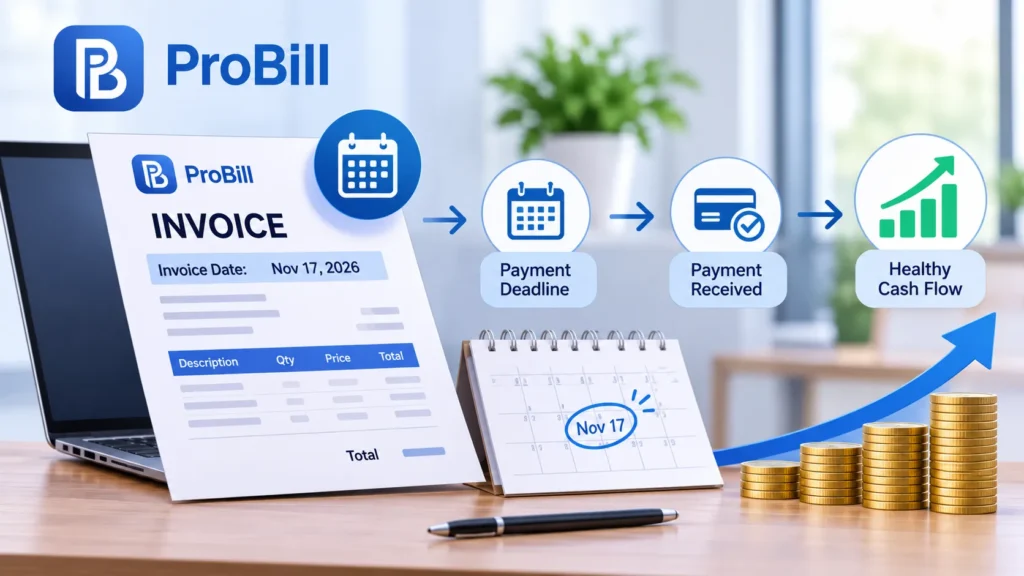
Prompt, accurate dating keeps money moving. A correctly stamped invoice tells your client when the payment window opens, aligns with agreed‐upon invoice payment terms, and supports reliable cash-flow forecasting. Delays in issuing or dating an invoice push the due date out, directly postponing the moment cash hits your bank.
Digital tools make this easier. The Probill Invoice maker app, the online Create Invoice platform, or a free invoice generator can timestamp each document automatically, so you avoid manual errors. Using ready-made invoice templates further ensures the date field appears in the correct place alongside all of the essential information on an invoice.
Cash-flow advantages from precise dating include:
- Faster approval in the customer’s system, shortening the order-to-cash cycle.
- Predictable aging reports for the finance team, improving credit-control decisions.
- Clear alignment with budgets and forecasts so you can time expenditures confidently.
For industries with milestone or progress billing, consult our invoice resources by industry to confirm any sector-specific dating conventions.
Below is a quick comparison of the three dates most often confused:
| Attribute | Invoice Date | Due Date | Service Date |
|---|---|---|---|
| Purpose | Signals when the bill is issued; triggers payment terms | Indicates the last day payment is accepted without penalty | Shows when goods were delivered or work performed |
| Set By | Seller | Seller based on terms (e.g., Net 30) | Operational schedule or project timeline |
| Changes Cash Flow? | Yes—earlier invoice means earlier cash | Yes—shorter term accelerates cash | Indirectly—early completion allows earlier invoicing |
| Learn More | — | how invoice due dates are determined | how invoice numbering works (ties date to job log) |
To avoid confusion between invoice date vs due date or invoice date vs service date, make sure you create an invoice with accurate dates and details every time.
The Legal and Tax Implications Behind the Invoice Issue Date
The invoice issue date carries legal weight because most jurisdictions treat it as the official record of a taxable supply. A wrong date can shift a sale into the wrong VAT/GST period or breach statutory “prompt invoicing” rules, exposing you to fines or delayed input-tax credits.
Auditors rely on the invoice date when tracing revenue recognition and cross-checking payment receipts within the invoice processing workflow. Accurate dating therefore protects you during compliance checks and helps in keeping organized invoice records.
Back-dating is especially risky. A backdated invoice may constitute fraud if it misrepresents when a service was actually rendered. Even innocent clerical backdating can trigger late-filing penalties or invalidate warranty periods. Always document legitimate adjustments with credit notes rather than altering the original date.
Finally, certain industries (construction, medical, government contracting) have regulations that dictate how quickly an invoice must be issued after completion. Refer to the relevant section in our invoice resources by industry to ensure compliance.
By treating the invoice date as a non-negotiable data point—and using the automation tools mentioned above—you strengthen both your legal footing and your cash-flow position.
From Service to Settlement: Invoice Date vs Service Date vs Due Date
Timeline Breakdown: Service Completion, Invoice Creation, Payment Deadline
Understanding how the three key dates line up keeps your billing cycle predictable and dispute-free. If you need a refresher on what an invoice is, review that first before mapping the sequence below.
Service Date – work delivered
This is the calendar day goods are handed over or services are finished. Recording it accurately proves fulfillment and starts contractual clocks such as warranty periods.Invoice Date – bill issued
Also called the invoice issue date, it stamps the document the moment it’s sent. Every credit term (Net 15, Net 30, etc.) counts forward from here, so the sooner you issue, the sooner you can collect.Due Date – payment deadline
Calculated by adding the agreed term to the invoice date. For example, a Net 30 term on 3 April makes 3 May the due date. See how invoice due dates are determined and align them with your invoice payment terms to keep expectations clear.
Digital tools remove date-entry guesswork. The Probill Invoice maker app, browser-based Create Invoice platform, or a free invoice generator automatically timestamp each draft, while ready-made invoice templates put every field in the correct spot.
Project-driven sectors sometimes label multiple service dates on a single document. Check our invoice resources by industry for sector-specific sequencing rules.
Avoid Costly Mistakes by Choosing the Correct Date on Your Invoice
Misdating looks trivial but can stall cash flow, trigger tax errors, or even void contracts. Watch out for these common slip-ups:
- Using the service date as the invoice date, which silently extends credit and delays receipt.
- Entering a backdated invoice to “fit” a closed accounting period; auditors view this as misrepresentation.
- Forgetting to adjust the due date when you revise credit terms, creating “phantom” late fees.
- Skipping sequential checks; gaps between dates and numbers often flag fraud in the invoice processing workflow.
Prevent problems with a simple checklist:
- Confirm all three dates appear in the header—see the essential information on an invoice.
- Base every deadline on written terms; calculate with the help of how invoice due dates are determined and your documented invoice payment terms.
- Match dates to sequential IDs; learn how invoice numbering works so discrepancies stand out quickly.
- File supporting proofs (timesheets, delivery notes) with the invoice to simplify audits and keeping organized invoice records.
Modern software handles most of this for you. Simply create an invoice with accurate dates and details and let automated checks flag inconsistencies before sending.
Can You Backdate an Invoice? Risks, Rules, and Best Practices
When Backdated Invoices Are Permitted—and When They’re Fraud
Understanding the invoice date meaning is essential: it marks the moment the document is legally issued, not when the work was done. A date that predates the actual dispatch can therefore misstate revenue timing and distort tax periods.
Legitimate back-dating is rare and narrowly defined:
- Administrative correction of a clerical error spotted within the same tax period, provided you reissue promptly and disclose the change.
- Consolidated billing cycles (e.g., month-end summaries) where contracts explicitly allow a single invoice issue date covering services completed earlier, as long as the invoice clearly shows both the service date and the correct issue date.
- Government-approved retrospective claims, such as specific healthcare or construction schemes detailed in our invoice resources by industry.
Anything beyond these exceptions is usually treated as fraud:
- Shifting income to an earlier period to inflate performance or secure financing.
- Hiding late issuance to avoid penalties under prompt-invoicing laws.
- Falsifying tax periods to dodge VAT/GST deadlines, undermining invoice date vs due date tracking and statutory invoice payment terms compliance.
Such practices expose you to fines, loss of input-tax credits, and potential criminal liability. Automation tools like the Probill Invoice maker app, Create Invoice platform, or a free invoice generator timestamp each document automatically, removing the temptation to backdate while still letting you apply tailored invoice templates.
Practical Steps If You Must Issue a Corrected or Adjusted Date

Reconcile all three key dates. Confirm the service date, the original and corrected invoice issue date, and recalculate the due date with the help of how invoice due dates are determined and your agreed invoice payment terms.
Void or credit the erroneous document. Issue a credit note that references the original number; then raise a fresh invoice with a new sequential ID, following the rules in how invoice numbering works.
Include every field auditors expect. Use the essential information on an invoice checklist so the revised copy clearly states both the corrected issue date and the original service date—preserving the distinction between invoice date vs service date.
Route the revision through the normal invoice processing workflow to ensure approvals, postings, and payment reminders align with the updated timeline.
File supporting evidence. Store timesheets, delivery notes, and both the credit note and replacement invoice together; this simplifies audits and aids in keeping organized invoice records.
Prevent repeat errors with software. When you create an invoice with accurate dates and details, built-in validations in the Probill Invoice maker app or Create Invoice flag date discrepancies instantly, while reusable invoice templates lock the date field to the current day.
How to Set and Automate the Perfect Invoice Date in Your Accounting Software
Configuring Default Invoice Dates to Accelerate Billing
Most platforms let you pre-fill the invoice issue date with the current day, so every new bill lands on the client’s desk as fast as possible. If you still wonder what is an invoice date or why it matters, revisit what an invoice is before tweaking your settings.
Because the invoice date vs service date vs due date distinction drives collections, link your default field to rules that also calculate deadlines automatically. Most systems use the term stored under invoice payment terms and the logic described in how invoice due dates are determined.
- Open the company or template settings.
- Select “Use current date” as the default invoice date meaning your team no longer hand-types the field.
- Enable automatic term application (e.g., Net 30) so the due date updates instantly.
- Add a prompt that flags any manual override occurring more than two days in the past, deterring an accidental or deliberate backdated invoice.
- Activate sequential checks; most apps rely on the rules in how invoice numbering works to ensure every issue date fits the numeric order.
- Save these preferences inside reusable invoice templates so every department follows the same clock.
After saving, preview a live draft to confirm that the header shows the correct date alongside the essential information on an invoice. If you operate in construction, healthcare, or government contracting, consult the specific guidance inside our invoice resources by industry to comply with sector-imposed timing rules.
Automated Reminders and Payment Links That Slash Late Payments
Once the default invoice date vs due date pipeline is set, scheduling reminders is the next win for cash flow. The Probill Invoice maker app, browser-based Create Invoice platform, and our free invoice generator each let you:
- Trigger an email or SMS reminder three days before the due date, quoting the original invoice issue date so clients see the full credit window.
- Embed one-click payment links that align with the cadence defined in the automated timetable, shortening the gap between reminder and settlement.
- Log every nudge inside the invoice processing workflow for clear audit trails.
To keep the system tidy, schedule a monthly batch export to your document archive; this practice supports keeping organized invoice records and makes reconciliation a breeze. Finally, test the sequence by sending yourself a sample using today’s date—an option built into “preview” mode when you create an invoice with accurate dates and details.
Invoice Date FAQ: Your Top Compliance and Timing Questions Answered
Is the invoice date the same as the billing date?
Not always. The invoice date meaning is the day you formally issue the document, which kicks off credit terms and tax clocks. A “billing date” can instead describe when the customer records the charge or when a periodic statement closes. For clarity, stamp the official issue date on every form—most invoice templates and the primer on what an invoice is treat that field as mandatory.
Can I change an invoice date after sending it to a client?
You shouldn’t overwrite the original timestamp; doing so can create a backdated invoice and break audit trails. The compliant route is to void or credit the first bill, then re-issue a new one with a fresh sequential ID (see how invoice numbering works) and the correct invoice issue date. Modern tools such as the Probill Invoice maker app let you do this in seconds, and the entire change is logged inside the invoice processing workflow. For speed and accuracy, simply create an invoice with accurate dates and details instead of editing the old one.
What happens if I forget to include an invoice date?
Omitting the field stalls payment approval because reviewers can’t calculate the invoice date vs due date window. It also weakens legal standing and complicates keeping organized invoice records for tax time. Avoid the error by using a free invoice generator or checking against the essential information on an invoice before you hit send.
How far in advance should the invoice issue date be from the service date?
Best practice is to issue the bill the same day work finishes; any gap inflates the invoice date vs service date lag and delays cash. Some sectors—consult our invoice resources by industry—allow milestone or periodic advance billing, but local law still expects a realistic timeline. As a rule of thumb, keep the interval under seven days unless a contract states otherwise and confirm the resulting deadline with how invoice due dates are determined.
Does the invoice date affect early-payment discounts?
Yes. Early-payment windows, rebates, or “2/10 Net 30” offers all start counting from the invoice issue date, not the service date. Make sure the discount terms are spelled out in your invoice payment terms section so clients know the clock is ticking the moment the invoice lands. The automated settings in Create Invoice can calculate the exact last-day-to-save and print it on the form.
Are digital signatures tied to the invoice date valid in court?
Courts look for tamper-evident timestamps and a clear link between the signature and the document’s invoice date vs due date information. Reputable e-sign platforms embed a cryptographic hash showing when and by whom the invoice was executed, which is generally admissible. Retaining that signed PDF alongside supporting records strengthens authenticity—another reason to store files methodically with keeping organized invoice records.
How do different countries treat invoice dating for VAT/GST?
Most VAT/GST regimes require the invoice date to fall within a specified period—often 15–30 days—after the taxable supply. Late or incorrect dating can shift liability to the wrong tax period and block input-credit claims. While the core rule is consistent, details vary: the EU mandates a “date of supply” reference, Australia enforces strict timing on progress claims, and some jurisdictions fine for issuing a backdated invoice. Always confirm local guidance and, when in doubt, let your accounting software time-stamp the document automatically.