Skip to content

What Is a Purchase Invoice? Definition and Core Purpose
A purchase invoice is the official document a supplier issues to request payment after delivering goods or services to a business. It lists what was provided, the agreed-upon price, payment terms, and any applicable taxes, giving both parties a legally enforceable record of the transaction. By matching each purchase invoice to its related order and delivery notes, companies verify that what they received is exactly what they are being asked to pay for.
Modern finance teams increasingly rely on cloud tools such as the Create Invoice platform and its free invoice generator to capture, store, and audit every purchase invoice digitally. Centralizing these documents speeds up approvals, reduces errors, and creates a searchable archive that stands up to external scrutiny.
Breaking Down the Term: From Purchase Order to Invoice Receipt
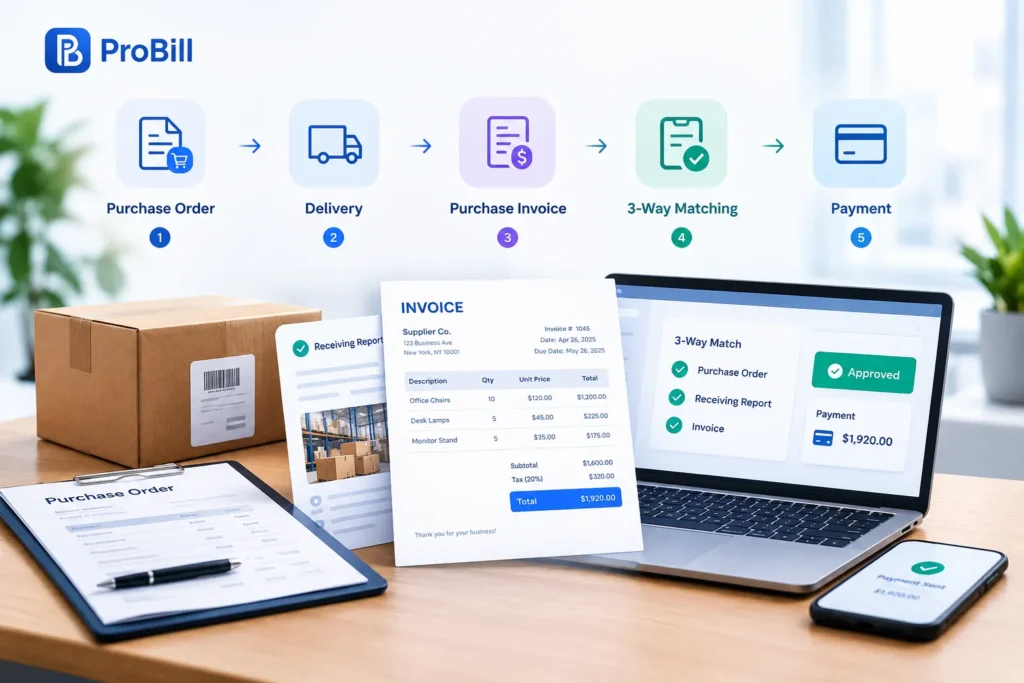
- Buyer issues a purchase order (PO) detailing quantities, prices, and delivery dates. See a line-by-line comparison in our guide on purchase order vs invoice.
- Supplier fulfills the PO and ships the goods or completes the service.
- Upon delivery, the supplier sends a purchase invoice that references the original PO number.
- Accounts payable performs a three-way match—PO, receiving report, and purchase invoice—before authorizing payment.
This sequence creates a transparent audit trail: the PO shows intent, the receiving report shows fulfillment, and the purchase invoice shows the financial obligation. For fast reconciliation, many businesses import supplier invoices directly into pre-formatted invoice templates that map fields like net amount, tax rate, and payment due date. Linking these steps helps avoid duplicate payments and catches mismatches early, an issue that costs companies up to 0.1% of annual spend, according to data cited by the Institute of Finance & Management (IOFM).
Why Purchase Invoices Matter for Cash Flow, Audits, and Tax Compliance
Accurate, timely processing of each purchase invoice keeps cash forecasts realistic. Because the document pins down the exact payment due date, finance leaders can prioritize disbursements and prevent late-payment penalties that damage supplier relationships. Automated dashboards—often segmented by department or by our curated invoice resources by industry—turn invoice data into forward-looking cash requirements.
From an audit standpoint, auditors test a random sample of purchase invoices to confirm that expenses are real, approved, and recorded in the correct period. A missing or incomplete purchase invoice is a red flag that can escalate testing scope, increasing audit fees. Tax authorities operate similarly: they require every deductible expense to be backed by a properly issued purchase invoice that states tax amounts separately, as outlined by the OECD’s electronic invoicing guidelines .
Finally, distinguishing a purchase invoice from a sales invoice is essential for correct revenue and expense recognition. Both are simply two sides of the same transaction, but treating them interchangeably can skew profit margins and misstate VAT or sales-tax liabilities. For a deeper dive into billing variations—credit notes, pro-forma bills, recurring charges—visit our overview of types of invoices.
Key Elements Found on Every Purchase Invoice (and How to Read Them)
Essential Data Fields: Vendor Details, PO Number, Line Items, Totals, and Tax

The quickest way to verify a purchase invoice is to scan five fields that appear on every legitimate bill and cross-check them against your ERP or the original purchase order vs invoice record.
- Vendor details
Match the supplier’s legal name, address, and tax ID to your vendor master file. Discrepancies here often signal phishing or an outdated remit-to address. - PO number
A purchase invoice that omits or alters the PO number can’t pass three-way matching. Flag any number that differs by even one digit from the PO stored in your system. - Line items
Review quantity, unit price, and item description. When you import PDFs into invoice templates, set conditional formatting to highlight any unit price variance above your tolerance band. - Sub-totals and tax
Net amount, applicable VAT or sales tax, and gross total should recalculate exactly. Cloud tools such as the free invoice generator auto-validate the math before posting. - Payment terms and due date
Confirm that the due date reflects the agreed terms—especially for early-payment-discount windows—so finance can model cash needs in its invoice resources by industry dashboards.
Digital platforms like Create Invoice display these fields in a fixed order, making deviations obvious and accelerating approvals for every purchase invoice.
Red Flags to Watch For When Reviewing a Purchase Invoice
A rushed review can let fake or inflated bills slip through. Scan each purchase invoice for the warning signs below before releasing payment.
- Missing or blurred vendor details
- PO number inserted as an image rather than editable text—often a tactic to bypass automated PO matching
- Duplicate invoice number that already exists in the ledger; many ERPs catch this, but fraudsters change a single character to avoid detection
- Line-item descriptions that don’t align with goods received; compare against delivery notes or a related sales invoice when dealing with drop-ship arrangements
- Unusual invoice type (e.g., pro-forma, credit memo) submitted instead of a standard bill—double-check against our guide to types of invoices
- Round-number totals or tax amounts that don’t match statutory rates, a pattern cited by the Association of Certified Fraud Examiners in its 2022 Report to the Nations
- Bank details that changed without a formal vendor-master update request—one of the most common vectors in business email compromise, per FBI IC3 data
Routing each suspect document through the AI-assisted workflows inside Create Invoice lets teams quarantine anomalies, add approver notes, and prevent the 20 % of occupational fraud that the ACFE attributes to billing schemes. A disciplined review ensures every purchase invoice is accurate, authorized, and audit-ready.
How Purchase Invoices Fit Into the Purchase-to-Pay Workflow
The purchase-to-pay (P2P) cycle turns a purchase order into cash leaving the bank. A purchase invoice sits in the center of that flow, triggering controls that protect spend, feed the general ledger, and release funds on time. Unlike a sales invoice, which books revenue, each purchase invoice drives the buyer’s expense recognition and cash planning. Understanding exactly where it plugs in helps finance teams tighten compliance, speed close, and surface savings opportunities across departments tracked in our invoice resources by industry.
Step-by-Step Journey: Matching, Approval, Posting, and Payment
Invoice capture
– Suppliers email PDFs, EDI files, or submit through the Create Invoice portal. OCR or the free invoice generator standardizes the data to your chart of accounts.Three-way matching
– The accounts-payable robot reconciles quantity and price against the purchase order and receiving record. Any mismatch routes to the buyer highlighted in color-coded invoice templates.Workflow approval
– If the purchase invoice exceeds a tolerance band or hits a strategic commodity code, it escalates to budget owners. Approvers see real-time KPIs so they can weigh early-payment discounts against cash constraints.ERP posting
– Once approved, the system books the expense, accrues tax, and assigns cost centers. Coding errors here ripple into month-end close, so automated field validation checks against master data and the rules outlined in purchase order vs invoice.Payment execution
– The scheduled pay run selects the purchase invoice when its due date aligns with payment terms. Treasury may bundle invoices to capture dynamic discounting or separate them when different types of invoices require special handling, such as retention releases.
Each gate tightens control without burying users in email threads, providing a touchless path for low-risk spend while still flagging anomalies that matter.
Digital vs. Manual Processing: Speed, Accuracy, and Cost Comparison
A digital purchase invoice stream cuts cycle time and defects dramatically compared with paper. Scanned images introduce keystroke risk; native data capture ensures line-item accuracy and enforces VAT logic automatically. Manual routing relies on busy managers to forward emails, whereas workflow engines in Create Invoice push mobile approvals and log every click for auditors. The result is fewer late fees, cleaner accruals, and a searchable archive that auditors can sample remotely—advantages impossible with filing cabinets.
Cost benefits follow the same pattern. Paper handling consumes envelopes, storage, and hours of data entry; digital networks reuse supplier master data, so each purchase invoice lands coded correctly the first time. When exceptions arise, dashboards built on standardized invoice templates highlight root causes, eliminating repetitive queries. Even better, real-time analytics reveal process bottlenecks by business unit, data you can benchmark inside our invoice resources by industry hub.
In short, shifting from manual to automated handling of every purchase invoice elevates accuracy and visibility while freeing finance talent for supplier negotiations, cash-flow forecasting, and other value-add work.
Common Mistakes in Purchase Invoice Management—And How to Avoid Them
Top 5 Errors That Inflate Costs or Cause Duplicate Payments
Even seasoned AP teams stumble over the same purchase invoice pitfalls; each one chips away at margins or triggers costly rework.
Missing PO reference
A purchase invoice that fails to cite the original PO forces manual look-ups and can slip past matching controls, opening the door to overbilling. Embed PO-must-match rules in your workflow and reinforce them with the comparison checklist in our guide on purchase order vs invoice.Manual data entry of totals
Re-keying figures invites transposition errors that inflate spend. Capture supplier PDFs with the free invoice generator so math fields auto-recalculate before posting.Unverified vendor banking changes
Fraudsters often submit a “corrected” purchase invoice alongside new remit-to details. Route any master-data change through your vendor-onboarding module inside Create Invoice and insist on secondary approval from treasury.Inconsistent document formats
When suppliers send mixed layouts, line items land in the wrong GL codes, creating accrual headaches. Distribute standardized invoice templates that lock field positions and reduce mapping errors.Misclassified document type
Treating a credit memo or pro-forma like a standard bill can cause duplicate payments or misstated liabilities. Train reviewers to cross-check the form against our explainer on types of invoices and, for revenue-side clarity, the companion piece on a sales invoice.
Proactively monitoring these five red flags ensures every purchase invoice is validated once—and only once—before cash leaves the bank.
Automation Best Practices: Using AP Software to Streamline Purchase Invoices
Digitizing the purchase invoice flow eliminates most human-caused defects, but only when automation is configured with finance-grade rigor.
• Centralize intake. Funnel every purchase invoice—email, EDI, or portal—into a single capture queue inside Create Invoice to guarantee uniform metadata tagging.
• Enforce straight-through three-way matching. Align quantity, price, and receipt data automatically; exceptions should surface instantly to the requisitioner rather than stalling in AP.
• Apply role-based approval thresholds. The system should escalate a high-value purchase invoice to budget owners while green-lighting low-risk spend for touchless posting.
• Leverage smart templates and coding rules. Pre-populated invoice templates map commodity codes, tax rates, and cost centers, preventing downstream journal reclassifications.
• Benchmark and refine. Use dashboards in the invoice resources by industry hub to compare cycle times, then tweak workflows or supplier onboarding to close gaps.
• Automate archiving and audit trails. Store each finalized purchase invoice alongside its approvals, comments, and payment status; auditors gain self-serve visibility while the finance team gains stress-free compliance.
By weaving these best practices into your AP software, you convert every incoming purchase invoice into structured, searchable data—unlocking faster closes, cleaner books, and stronger supplier trust.
Frequently Asked Questions About Purchase Invoices
Is a purchase invoice the same as a bill?
Yes—“bill,” “supplier invoice,” and “purchase invoice” all describe the document a vendor issues to request payment. Finance teams prefer the term purchase invoice because it signals that the expense must be matched to a purchase order and posted to accounts payable, whereas “bill” can refer to utilities or other recurring expenses listed in our guide to types of invoices. No matter the label, the legal obligation, tax reporting, and approval workflow remain identical.
How does a purchase invoice differ from a sales invoice?
A purchase invoice records the buyer’s liability, while a sales invoice records the seller’s revenue—two mirror images of the same transaction. The fields look similar, but the general-ledger impact is opposite: one credits accounts payable, the other debits accounts receivable. For a line-by-line comparison, see our explainer on purchase order vs invoice.
Can a purchase invoice be issued without a purchase order?
It can, but doing so bypasses three-way matching and weakens spend control. Many organizations still allow non-PO invoices for utilities or emergency buys, yet leading platforms such as Create Invoice let suppliers flip an approved PO into a purchase invoice automatically, eliminating rogue documents. Even ad-hoc bills processed through the platform’s free invoice generator should be linked to a retrospective PO so audit trails stay intact.
What documents should be attached to a purchase invoice for audit purposes?
Attach the original PO, goods-received note or delivery docket, and any contract or change order that explains price variances. Storing these files together—ideally inside standardized invoice templates—allows auditors to verify quantity, price, and authorization in a single view. Digital attachments also speed dispute resolution because approvers can drill down without hunting through email threads.
How long should businesses keep purchase invoices for tax records?
In the United States, the IRS recommends retaining expense documents such as a purchase invoice for at least seven years when they support deductions for bad debts or worthless securities, and three years for standard expense claims (IRS Publication 583). HMRC in the UK requires six years from the end of the last company financial year they relate to. Many firms keep digital copies longer because cloud storage is inexpensive and retention within Create Invoice is automatic.
What is the typical approval workflow for high-value purchase invoices?
High-value items usually trigger a tiered workflow: the requisitioner’s manager signs first, finance or procurement reviews the coding and budget, and an executive provides the final sign-off before payment is scheduled. Configuring these dollar-based thresholds inside invoice resources by industry dashboards ensures that a large purchase invoice never slips through with only one click. Automated routing in Create Invoice flags such invoices, while dynamic notifications in the free invoice generator keep approvers on deadline so early-payment discounts are not lost.