Skip to content

What Is a Tax Invoice? Simple Guide to Taxable Invoices
What Is a Tax Invoice & Why It Matters for Your Business
Clear Definition: Understanding a Tax Invoice vs. Other Invoice Types
A tax invoice is a legally prescribed document that itemises goods or services, shows the amount of tax charged (GST, VAT, or sales tax), and displays the supplier’s and buyer’s tax registration numbers. Unlike a standard sales invoice or purchase invoice, a tax invoice is mandatory for transactions where the customer may claim input tax credits.
Key distinctions to note:
- Mandatory tax fields – A tax invoice must state the exact tax rate, the tax amount for each line item, and the total tax payable, details not always required on a regular invoice.
- Registration numbers – The supplier’s tax identification number and, in many jurisdictions, the buyer’s number appear prominently; this information is optional on other invoice types.
- Timing rules – Many tax authorities require a tax invoice to be issued within a specific period after supply, whereas the timing for a general invoice is driven by contract terms.
- Credit-claim eligibility – Only a compliant tax invoice allows the buyer to reclaim input tax, making accuracy critical.
For a broader look at other formats—pro forma, progress, or recurring—see our guide to the types of invoices. If you need quick, compliant layouts, explore our ready-made invoice templates or generate one on the fly with the free invoice generator.
The Role of a Tax Invoice in Claiming Input Tax Credits and Staying Compliant
The main reason a tax invoice matters is its function as evidence for input tax credits. Tax authorities such as the IRS and HMRC specify that a buyer can deduct the tax paid on purchases only when a valid, correctly formatted tax invoice is on file (see HMRC Notice 700/21 for details). Without it, the claimed credit can be denied, leading to back-tax assessments and penalties.
Failure to issue a compliant tax invoice—or issuing an incomplete taxable invoice—also exposes sellers to fines for under-reporting output tax. To avoid these risks, your document should always include:
• Supplier and customer tax IDs
• Item descriptions with taxable value and tax rate per line
• Total tax amount and grand total
Unsure whether your form meets all requirements? Compare it against our checklist of what an invoice should include or browse industry-specific advice in our invoice resources by industry. When both seller and buyer retain accurate tax invoices, the books reconcile smoothly, audits run faster, and cash stays in the business rather than in unexpected tax bills—proof that the humble tax invoice is a cornerstone of compliance and cash-flow health.
Anatomy of a Compliant Tax Invoice: Mandatory Elements You Can’t Miss
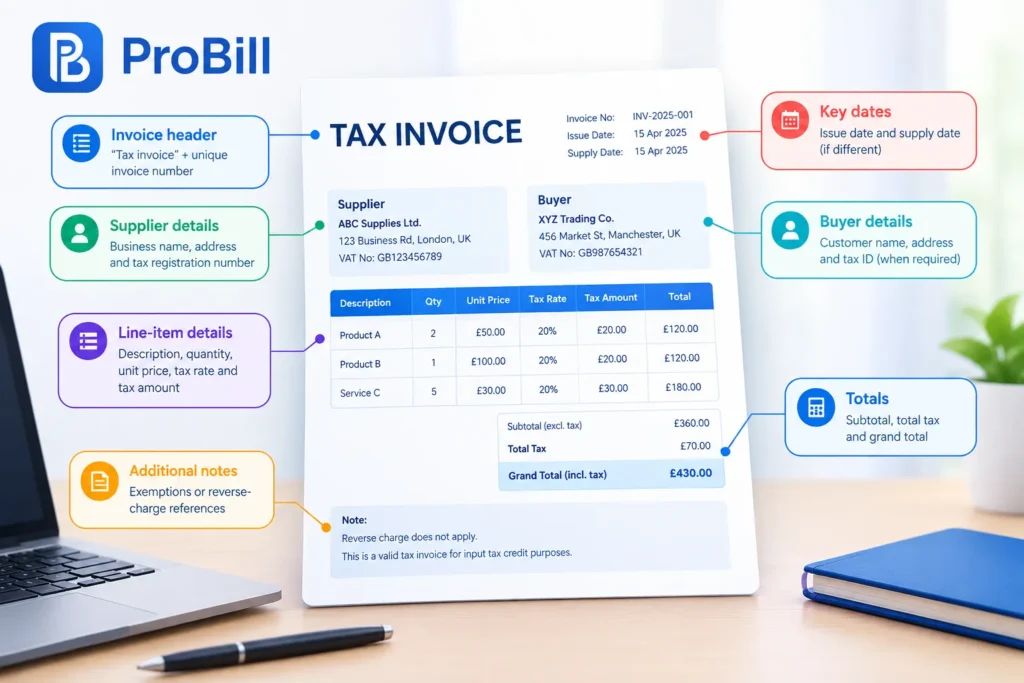
Core Information Required by Law (Supplier Details, GST/ VAT Numbers, Totals, Etc.)
A tax invoice is legally valid only when every compulsory data point is present and laid out clearly enough for auditors to scan in seconds. Check your draft against the list below before you hit “Send” or upload it to your accounting system.
- Invoice header
• The term “tax invoice” in bold
• A unique, sequential invoice number - Key dates
• Issue date
• Supply date if different (sometimes called “tax point”) - Supplier identification
• Registered business name and physical address
• Tax registration number (GST, VAT, Sales Tax, etc.) - Buyer identification
• Customer’s legal name and address
• Customer tax ID when required for input-credit claims - Line-item detail
• Precise description of each good or service
• Quantity or hours, unit price, taxable value
• Applicable tax rate per line and calculated tax amount - Summaries and totals
• Subtotal exclusive of tax
• Total tax payable
• Grand total inclusive of tax, in the invoicing currency - Additional statutory notes
• Any exemptions or reverse-charge references mandated by local rules
Miss even one of these elements and your document slips from “tax invoice” to “taxable invoice” risk, exposing both parties to denied credits and penalties (see HMRC VAT Notice 700/21 for specifics). If you’d rather not build the layout from scratch, grab ready-made invoice templates or our free invoice generator and let the fields auto-populate. You can also compare requirements against our deeper checklist of what an invoice should include.
Smart Add-Ons: Optional Fields That Build Trust and Speed Up Payments
Once the mandatory skeleton is locked in, enrich your tax invoice with strategic extras that shave days off your DSO and slash dispute emails.
• Purchase Order or contract reference – links your billing to the buyer’s internal workflow and reduces approval bottlenecks.
• Bank account or payment-gateway link – embed ACH, card, or PayPal details to let clients settle in two clicks; pair it with the instant “Pay now” button inside the Create Invoice platform.
• Early-payment discount terms – state “2% 10/Net 30” visibly; research by Dun & Bradstreet shows such prompts can accelerate remittances by up to six days.
• QR code – popularised by GST e-invoicing regimes, it lets tax authorities and customers validate data instantly.
• Digital signature or e-seal – legally binds the document in most jurisdictions under eIDAS and ESIGN, cutting paper trails.
• Multi-currency display – show both local and functional currency when you bill cross-border clients, preventing FX disputes.
• Detailed remittance instructions – include a dedicated email or portal URL for proof-of-payment uploads.
• Industry-specific data blocks – for example, vehicle VINs on automotive jobs or patient IDs on healthcare bills; dive into niche tips in our invoice resources by industry.
These enhancements are not compulsory, but they signal professionalism, support automated AP systems, and shorten the gap between issuing and collecting. Curious how the layout differs from a sales invoice or a purchase invoice? Our overview of types of invoices clarifies when each format—tax or non-tax—delivers peak compliance and cash-flow efficiency.
How to Issue a Taxable Invoice Step-by-Step (With Template Walk-Through)
A properly issued tax invoice is your client’s passport to input-tax recovery and your shield against audit penalties. Follow the two stages below to move from blank screen to compliant, payable taxable invoice in minutes.
Pre-Invoice Checklist: Data, Deadlines, and Digital Signatures
- Verify tax IDs
• Pull your own registration number from the accounting system and request the customer’s if input-credit rules demand it. - Lock in the tax point
• Note the supply date; many authorities—including HMRC in VAT Notice 700/21—require the tax invoice no later than 30 days after this date. - Confirm chargeable status
• Check whether the goods or services are standard-rated, zero-rated, or reverse-charged so the taxable invoice shows the correct rate and wording. - Gather pricing support
• PO, contract, or quote documents prevent later disputes and help populate totals quickly. - Choose your medium
• Open one of our ready-formatted invoice templates or the drag-and-drop free invoice generator inside Create Invoice. - Prepare digital authentication
• Load your e-signature certificate or enable the built-in seal feature—eIDAS and ESIGN recognise digitally signed tax invoices as legally binding. - Cross-reference compliance
• Skim the live checklist in what an invoice should include to be sure every statutory field is on deck. - Tailor industry extras
• Healthcare, automotive, and construction users can grab sector-specific blocks from our invoice resources by industry.
With this data in hand, you’re ready to populate the template and turn the draft into a revenue-ready tax invoice.
Filling Out the Template: Line-Item Examples and Formatting Tips
- Header & numbering
• Type “Tax Invoice” in bold, then assign the next sequential number—e.g., INV-2024-045—to keep auditors happy. - Seller & buyer panels
• Auto-fill names, addresses, and tax IDs. If the customer lacks a registration number, leave the field blank; never guess on a taxable invoice. - Supply and issue dates
• Use separate fields: “Invoice Date” (today) and “Supply Date” (actual delivery). This distinction distinguishes a tax invoice from a sales invoice or purchase invoice. - Product/service lines
• Example row: “Consulting – April 2024 | 10 hrs @ $150 | Subtotal: $1,500 | VAT 20%: $300”. Repeat for each item.
• Keep descriptions concise but specific; vagueness is a top rejection reason according to OECD audit guides. - Subtotals and tax summary
• The template calculates subtotal, total tax, and grand total automatically. Double-check the rounded figures—rounding errors trigger payment holds. - Additional disclosures
• If reverse charge applies, insert the mandatory legend. For multi-currency deals, add a note that exchange rates follow local tax-authority rules. - Payment instructions
• Embed your IBAN or click-to-pay link; invoices with instant payment options can cut DSO by up to 6 days (Dun & Bradstreet). - QR code & signature
• Click “Generate QR” in the tool; then apply your e-signature. These touches turn a basic tax invoice into a polished, fraud-resistant document. - Final review & dispatch
• Preview the PDF, re-run the types of invoices checklist to ensure format accuracy, and email or e-submit it directly from the platform.
By methodically completing each field, you convert a template into a legally compliant taxable invoice that speeds up approval, preserves your input-tax entitlement, and keeps cash flowing.
Avoiding Costly Mistakes: Common Tax Invoice Errors and Penalties

Top Oversights That Trigger Audits or Fines
Even seasoned bookkeepers slip up on a tax invoice, and those slips are what auditors hunt first. Repeated mistakes transform an ordinary taxable invoice into an instant red flag.
• Missing or wrong tax registration numbers – the quickest way to lose input-credit rights and invite penalties under HMRC VAT Notice 700/21 .
• Duplicate or non-sequential invoice numbers – breaches basic accounting controls; see the IRS recommendations on unique numbering for “substantiating documents” .
• Incorrect tax point – dating the tax invoice to the payment date instead of the supply date often leads to under-reported output tax.
• Line items without tax rates – a common error when copying from a standard sales invoice or purchase invoice; use the checklist in what an invoice should include to avoid omissions.
• Rounding variances over local tolerances – even a $0.05 mismatch can halt automated AP systems.
• Reverse-charge legend omitted – failure to state “reverse charge” where required shifts liability back to you.
• Exchange rates sourced from commercial platforms instead of tax-authority rates – can result in fines in cross-border deals; compare correct treatments in types of invoices.
• Mixing zero-rated and standard-rated items without subtotaling each category – denies credits to buyers and triggers adjustments.
Penalties vary by jurisdiction but typically include denied input credits, interest on unpaid tax, and monetary fines that can reach 20% of the under-declared amount according to the IRS accuracy-related penalty table. A compliant tax invoice, backed by accurate invoice templates, is the cheapest insurance.
Best Practices for Ongoing Accuracy and Record-Keeping
Cutting error risk starts long before you hit “Send.” Follow the cycle below to keep every tax invoice clean, searchable, and audit-ready.
- Standardise layouts with industry-fit invoice templates, then lock the file to prevent casual edits.
- Generate each taxable invoice through the free invoice generator in Create Invoice so mandatory fields auto-populate.
- Run a three-point validation—tax IDs, tax point, totals—against the live checklist in what an invoice should include before approval.
- Automate sequential numbering and duplicate detection inside your accounting software; monthly reconciliations catch gaps early.
- Store PDFs in a cloud folder mirrored to your ERP; use invoice resources by industry to tag files with sector-specific metadata.
- Retain every tax invoice for the full statutory period—often six years—alongside its source documents.
- Schedule quarterly reviews comparing issued documents to corresponding sales invoice and purchase invoice records for consistency.
These habits embed compliance into daily workflows, reducing manual touchpoints where errors creep in. By partnering with Create Invoice you gain real-time error flags, while its free invoice generator keeps your taxable invoice output consistent across teams and jurisdictions.
Frequently Asked Questions About Tax Invoices
Below you’ll find concise answers to the questions business owners most often ask about a tax invoice. Keep this quick guide handy to make every taxable invoice compliant and audit-ready.
What is the difference between a tax invoice and a regular invoice?
A tax invoice lists the tax charged, plus the supplier’s and buyer’s registration numbers, allowing the customer to claim input credits; a regular invoice simply requests payment. Because of these extra statutory details, a tax invoice is sometimes called a taxable invoice in legislation. For a deeper comparison of pro-formas, credit notes, and other formats, see our overview of the different types of invoices or the streamlined alternative of a sales invoice used for consumer sales.
When is a tax invoice legally required to be issued?
Most tax authorities require that a tax invoice be issued within 15–30 days of the supply date whenever the buyer can reclaim tax. Missing this deadline can trigger penalties, so lean on auto-numbered invoice templates and the compliance checklist in what an invoice should include to send each taxable invoice on time.
Are electronic or PDF tax invoices accepted by tax authorities?
Yes—virtually all jurisdictions accept an electronic or PDF tax invoice when it is unalterable and stored for the full retention period. Creating your PDF through the free invoice generator inside Create Invoice adds a time-stamped audit trail that meets EU eIDAS and U.S. ESIGN standards, turning a digital file into a legally valid taxable invoice.
Do freelancers and small businesses need to issue tax invoices?
If you’re registered for GST, VAT, or sales tax, you must issue a tax invoice even as a sole trader; unregistered freelancers should send a non-taxable invoice instead. The step-by-step guides in our invoice resources by industry show exactly when registration kicks in and how to add the right data to your taxable invoice without expensive software.
How long should I store tax invoices for audit purposes?
Retain every tax invoice—along with the corresponding purchase invoice and payment proof—for six to seven years in most countries, though some authorities demand ten. Digital archiving is fine provided the taxable invoice remains readable, searchable, and quickly retrievable during an audit.