Skip to content

Why Getting Invoice Details Right Matters for Your Cash Flow
Even a single typo in your invoice details can delay payment, choke working capital, and raise red flags with tax authorities. Precise invoice details make it easy for clients, banks, and bookkeepers to trust the document and release funds quickly. If you struggle to keep every field correct, tools like the free invoice generator inside Create Invoice let you lock standard fields so the data stays consistent every time.
From legal compliance to credibility: why every line on an invoice counts
Governments set strict invoice requirements, and auditors look for proof that you understand what needs to be on an invoice— from the correct invoice addressee to a sequential invoice number. Missing or wrong invoice details can trigger fines or force you to reissue the bill, eroding client confidence. Using professional invoice templates mapped to industry regulations ensures you never forget what should an invoice include or what information needs to be on an invoice.
Accuracy also protects your brand image. Clients judge reliability by how cleanly you present what to include on an invoice: the legal name, tax ID, itemized services, and exact invoice amount. If anything looks off, they may question the total or your professionalism. To remove that doubt, study real-world invoice examples and niche-specific invoice resources by industry so you know precisely what should be included in an invoice for your sector. Consistently flawless invoice details move you from “vendor” to “trusted partner.”
How accurate invoice details translate into faster payments and fewer disputes
The fastest way to slash Days Sales Outstanding is to eliminate questions before they arise. Clear invoice details—correct totals, due dates, and explicit invoice payment terms—mean the accounts-payable clerk can approve the bill without internal escalations. According to a 2023 QuickBooks survey, 61 % of late payments stem from missing or confusing data.¹ When you spell out what should an invoice contain and what is required on an invoice, you remove excuses for delay.
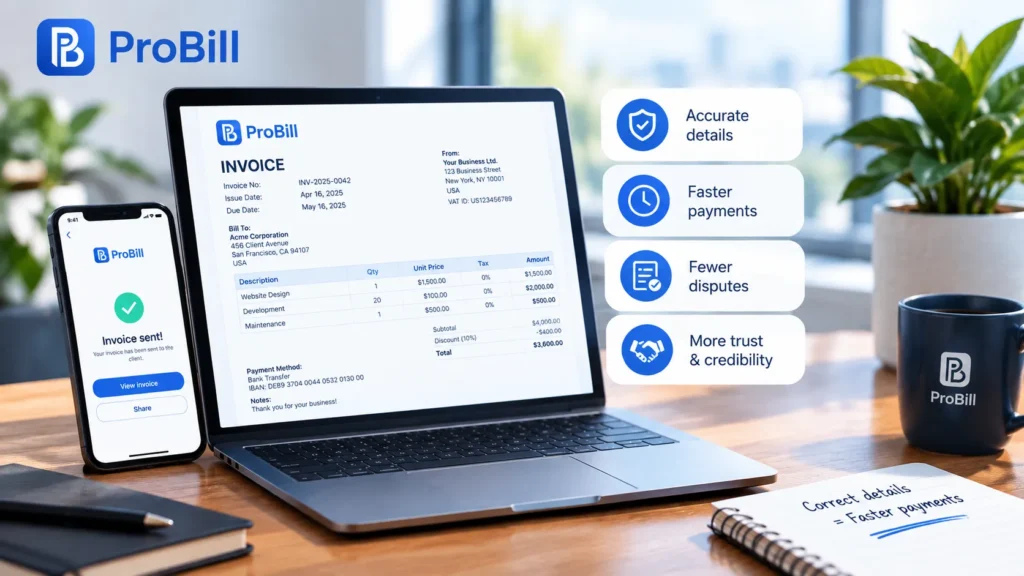
Precise data also minimizes chargebacks and legal fights. If a client disputes the scope, you can point to the agreed-upon invoice terms and conditions embedded on the document. Because every line aligns with what to put on an invoice and what invoice should include, the burden of proof shifts away from you. In short, rock-solid invoice details accelerate cash inflow, keep negotiations out of court, and free you to focus on growth.
¹ Intuit QuickBooks, “The Impact of Late Payments on Small Business Cash Flow,” 2023.
The Non-Negotiables: What Must an Invoice Include by Law
Failing to meet legal invoice requirements can expose you to fines, rejected payments, or tax audits. Below are the non-negotiable invoice details regulators in the U.S., U.K., EU, and most other jurisdictions demand. Use a trusted tool such as Create Invoice or its built-in free invoice generator to lock these fields so every bill complies automatically with what must an invoice include.
Core identification data: seller info, invoice addressee, date, and unique invoice number
Tax agencies treat these four elements as the DNA of every bill—omit one and the document loses legal validity.

Legal seller identity
• Registered business name and trading name (if different)
• Full postal address and contact email or phone
• Tax or VAT registration number where applicableExact invoice addressee
• Client’s legal name and billing address, spelled exactly as in the contract
• Purchase-order reference if the customer mandates itIssue date and, in many countries, supply date if different
Sequential invoice number that never repeats, enabling auditors to trace every transaction.
Because these fields are static for each party, most users preload them into reusable invoice templates or industry-specific formats found in our invoice resources by industry. Doing so eliminates typos and guarantees you always include what needs to be on an invoice without manual re-entry.
Itemised goods/services, tax rates, and the final invoice amount broken down clearly
Authorities want to see precisely what should be included in an invoice: every charge unpacked to the penny and taxed correctly.
• Line-by-line description of each product or service delivered, quantity, and unit price. This level of detail proves exactly what is on an invoice and stops disputes over scope.
• Applicable tax rate per line—e.g., 0 %, 5 %, or 20 %—plus the tax amount in currency so reviewers can verify compliance with local statutes such as HMRC’s VAT rules (https://www.gov.uk/vat-record-keeping).
• Subtotal, total tax, and grand invoice amount displayed in the client’s billing currency.
• Payment specifics—due date, bank details, and any late-fee policy—laid out with crystal clarity. Our guide to invoice payment terms shows how to phrase them so accounts-payable teams release funds quickly.
• Contractual protections like invoice terms and conditions that secure your right to collect.
If you’re unsure what to put on an invoice for niche scenarios—say, advance deposits, milestone billing, or multi-currency jobs—study the curated invoice examples library. Each sample highlights what information needs to be on an invoice and illustrates how to display it legally.
In short, itemisation and transparent totals ensure everyone sees what invoice should include, satisfy auditors that what should an invoice contain is present, and give clients zero room to question what is required on an invoice before paying.
Beyond the Basics: Extra Elements That Impress Clients and Speed Up Payment
Payment terms, due dates, late-fee clauses, and preferred payment methods
Clear financial expectations turn an ordinary bill into a pay-now trigger. After you have covered what needs to be on an invoice, refine the following extras so the accounts-payable team can hit “approve” without hesitation.
- State a single, unmistakable due date. Avoid “Net 30” alone; spell out the calendar date to remove any doubt about when the invoice amount is owed. The built-in calendar in the free invoice generator makes this automatic.
- Embed concise, contract-matched “invoice payment terms” such as instalment schedules or retainers. Linking to a full list of invoice terms and conditions prevents scope disputes and fulfils invoice requirements in regulated sectors.
- Add a late-fee clause that complies with local law—e.g., “1.5 % interest per month after 14 days.” Even a modest penalty shows you enforce what is required on an invoice and nudges prompt action.
- Highlight preferred payment methods—bank transfer, card, PayPal, or local rails—and place them directly under the totals so clients never hunt for instructions. Pair each option with clickable links or QR codes generated via Create Invoice to slash friction.
- For international customers, specify the settlement currency, SWIFT/BIC, and any intermediary bank charges. This extra line stops wire rejects that often arise when someone guesses what to include on an invoice for cross-border deals.
By locking these fields into reusable invoice templates you ensure every future bill still contains what must an invoice include while adding user-friendly touches that accelerate cash-in.
Branding touches, notes, attachments, and digital signatures that build trust
Once the functional blocks of what to put on an invoice are complete, polish the document so it feels like a secure brand interaction, not just a demand for money.
• Visual identity: Place your logo, brand colours, and a professional font at the top next to the unique invoice number. Consistent styling tells the invoice addressee the email is legitimate and prevents phishing confusion.
• Friendly notes: A one-line “Thank you for your business” or a customised project recap humanises the form. Short messages remind clients what should be included in an invoice beyond dollars and cents—relationship context.
• Supporting attachments: Add timesheets, purchase orders, or milestone sign-offs as PDFs. These files back up what information needs to be on an invoice, eliminating questions about deliverables and the final total. The attachment feature inside Create Invoice attaches evidence with one click.
• Digital signatures: Signing the PDF with an e-signature platform such as DocuSign (https://www.docusign.com/) certifies authenticity and shows you meet modern security expectations. Recipients can counter-sign, locking agreement on what invoice should include before payment.
• Industry-specific extras: If your field has unique documentation rules, pull guidance from the curated invoice resources by industry. Adding sector-required certificates proves you understand what should an invoice contain in that niche.
These enhancements demonstrate attention to detail, reassure clients that what is on an invoice is accurate, and often shave days off approval cycles. Together with the core data, they complete the picture of what should be included in an invoice and position your company as a meticulous, trustworthy partner.
Step-by-Step: How to Populate Your First Invoice Template (With Examples)
Launching your first bill is simpler than it looks—provided you understand exactly what needs to be on an invoice. Follow the two mini-workflows below to pick the right file type and then fill every field so the document meets all invoice requirements and speeds up approval.
Choosing the right format—PDF, e-invoice, or cloud-based tool
Static or dynamic? Picking the right container determines how easily you can keep what needs to be on an invoice accurate over time.
| Format | Best for | Pros | Watch-outs |
|---|---|---|---|
| PDF exported from desktop software | Freelancers sending occasional bills | Fixed layout, easy email attachment, locks invoice details | Manual edits risk typos; version control is tricky |
| Structured e-invoice (XML, UBL, PEPPOL) | Government or enterprise portals that demand electronic data | Passes automated compliance checks; instant validation of what is required on an invoice | Steeper learning curve; not every client can accept it |
| Cloud-based tool such as Create Invoice | Growing teams that need speed and collaboration | Auto-populates saved client data, generates a unique invoice number automatically, and embeds bank links for the exact invoice amount | Requires internet access |
Pro tip: Start with the reusable invoice templates inside the free invoice generator. You can export to PDF for clients who prefer attachments or push the same data to e-invoicing networks when legislation changes—no retyping of what should be included in an invoice.
Filling each field: what to include on an invoice line by line
Once your shell is ready, feed it the data that regulators, bookkeepers, and the invoice addressee all expect. Use this nine-step checklist and compare with the live invoice examples for visual cues.
Seller block
Enter your legal business name, address, and tax ID. Saving this once in the cloud app prevents future mistakes in what should an invoice contain.Client block
Pull the recipient’s legal name straight from your CRM to nail the invoice addressee. Consistency here is part of what must an invoice include to stay compliant.Issue and service dates
Add today’s date plus the delivery date if different. Many auditors look first at these timestamps to confirm what information needs to be on an invoice.Auto-generated sequence
Let the software assign the next invoice number so you never duplicate records—a core piece of what invoice should include by law.Item table
For each product or service, list description, quantity, and unit price. This granular view shows exactly what is on an invoice and removes room for disputes about scope.Tax column
Select the correct rate from the dropdown. The tool will calculate totals, preserving accuracy in what to put on an invoice for VAT or sales-tax returns.Totals section
The system sums line items, tax, and final invoice amount. Double-check the currency if you bill cross-border; small lapses here derail payments more than any other invoice details.Payment panel
Insert bank or card links, plus crystal-clear invoice payment terms like “Due on receipt.” Stating penalties and preferred rails covers what should be included in an invoice to avoid late-pay excuses.Legal footer
Paste pre-approved invoice terms and conditions or sector-specific clauses from the invoice resources by industry. This final block shows what is required on an invoice for enforcement if things go south.
Need a safety net? The free invoice generator inside Create Invoice flags empty mandatory fields in real time, ensuring every draft already contains what to include on an invoice before you press “Send.” This friction-free flow means you meet all invoice requirements with zero extra clicks.
Common Mistakes & How to Avoid Invoice Disputes
The five omissions that most often hold up payment—and how to fix them
Even meticulous businesses face invoice disputes when small gaps slip through. Spot these five frequent omissions before you hit “Send,” and you’ll prevent most friction around the invoice amount and approval.
Wrong or missing invoice addressee
A single spelling error or outdated department name reroutes your bill into limbo. Pull client data directly from your CRM or the autofill panel in the free invoice generator to guarantee the correct recipient every time.Duplicate or non-sequential invoice number
Accounts-payable teams flag duplicates as potential fraud. Let Create Invoice assign the next unique invoice number automatically and lock the field in your saved invoice templates.Vague line descriptions and lump-sum totals
When a client can’t tell what is on an invoice, they open a ticket instead of signing off. Break charges into clear rows that reflect what information needs to be on an invoice—units, rates, and dates. If you serve a niche market, consult the invoice resources by industry for wording that resonates with sector reviewers.Missing or confusing invoice payment terms
Ambiguous due dates spark late fees and, ultimately, invoice disputes. Embed precise terms with calendar dates through the invoice payment terms shortcut so reviewers see exactly what is required on an invoice before approving funds.No legal fallback language
Leaving out governing law, late-fee clauses, or refund policies means you have little leverage if a disagreement escalates. Paste pre-approved invoice terms and conditions into the footer; this satisfies invoice requirements while giving you legal cover.
Quick pre-send checklist to ensure every invoice is complete and compliant
Run through this 60-second sweep to confirm what needs to be on an invoice and avoid costly back-and-forth:
• Verify seller and client blocks: legal names, tax IDs, and addresses match the contract—this is what must an invoice include for tax validity.
• Confirm sequential numbering and issue date are correct; duplicate values trigger instant rejections.
• Review line items to ensure they reflect what to include on an invoice—description, quantity, unit price, and applicable tax—for transparent invoice details.
• Double-check that the subtotal, tax, and final invoice amount auto-calculate correctly; manual edits cause rounding errors.
• Ensure payment data ties to one preferred method and the due date is explicit; this covers what invoice should include for prompt settlement.
• Attach supporting files such as purchase orders or time sheets so the reviewer sees exactly what should be included in an invoice without extra emails.
• Add branding, a polite note, and, if needed, a digital signature; these touches show you know what to put on an invoice and strengthen trust.
• If you operate internationally, confirm currency, SWIFT/BIC, and that any bank fees are disclosed—fulfilling what should an invoice contain for cross-border compliance.
• Finally, preview the PDF against the invoice examples gallery to ensure every statutory field satisfies what is required on an invoice.
Hit “Send” only after every box is ticked. This systematic approach slashes invoice disputes and keeps cash flowing.
Frequently Asked Questions About Invoice Requirements
Accurate invoice requirements confuse many founders, yet meeting them is essential for fast payments and audit safety. The answers below cut through the noise and show exactly what needs to be on an invoice in everyday scenarios.
What information needs to be on an invoice for small businesses?
At minimum, small businesses should capture the legal seller and buyer names, addresses, tax IDs, the issue date, a unique invoice number, item-by-item descriptions, tax rates, and the final invoice amount. Lock these core invoice details into reusable invoice templates so every bill already carries what information needs to be on an invoice. If you want visual proof of the correct layout, review the curated invoice examples library.
Is a purchase order number required on every invoice?
A PO reference is not part of what is required on an invoice by law, but large corporate or government clients often treat it as mandatory for payment. If a contract or vendor portal requests one, add the PO next to the invoice number so the accounts-payable team can match documents instantly and avoid holds.
Can I issue an invoice without a tax ID?
Yes, but only in jurisdictions that exempt sole proprietors below the registration threshold. Everywhere else, a tax or VAT number is part of what must an invoice include; omitting it can invalidate the bill. The quickest way to comply is to store your ID once in Create Invoice so the software auto-fills the field every time.
What should an invoice include for international clients?
For cross-border work, what should be included in an invoice expands to currency codes, SWIFT/BIC bank details, and any intermediary fees that affect the invoice amount. Add the consignee’s tax number if local rules require reverse charge or GST collection, then reference the Incoterms or service location in a footnote. The invoice resources by industry hub outlines extra fields common in logistics, SaaS, and creative sectors, ensuring you know exactly what to put on an invoice for your niche.
How long should I keep invoice records?
In the United States the IRS recommends retaining invoices for at least three years; in the U.K. HMRC mandates six.² Because statutes vary, many advisers suggest seven years to cover most audits. Storing signed PDFs alongside your digital invoice terms and conditions gives you iron-clad proof of what should an invoice contain during any review.
Does electronic invoicing meet legal requirements?
When generated through compliant platforms or PEPPOL-ready XML, e-invoices fully satisfy what invoice should include—often with better validation than PDFs. Using the free invoice generator you can embed digital signatures and real-time tax calculations, ensuring every field aligns with what to include on an invoice before transmission.
What happens if I forget to include the invoice addressee?
Missing the invoice addressee violates basic invoice requirements and almost guarantees a payment delay. Send a corrected copy immediately, maintaining the original invoice number but adding “Revised” to the subject line; never issue a new sequence unless local law forbids edits. Attach a brief note referencing agreed invoice payment terms so the client understands there’s no change to due dates or the invoice amount.
² Internal Revenue Service, “Recordkeeping for Individuals,” 2023; HMRC, “VAT Record Keeping,” 2026.