Skip to content

Invoice vs Bill Explained in Plain English
Before diving into the nitty-gritty, remember that every “invoice vs bill” debate is really about context. Both documents request payment, but the difference between bill and invoice becomes obvious once you look at who issues the document, when it’s sent, and how it’s tracked in the books. This section clarifies that invoice and bill difference in everyday language, then shows you where each one fits in a typical workflow.
What Is an Invoice? Core Elements and Purpose
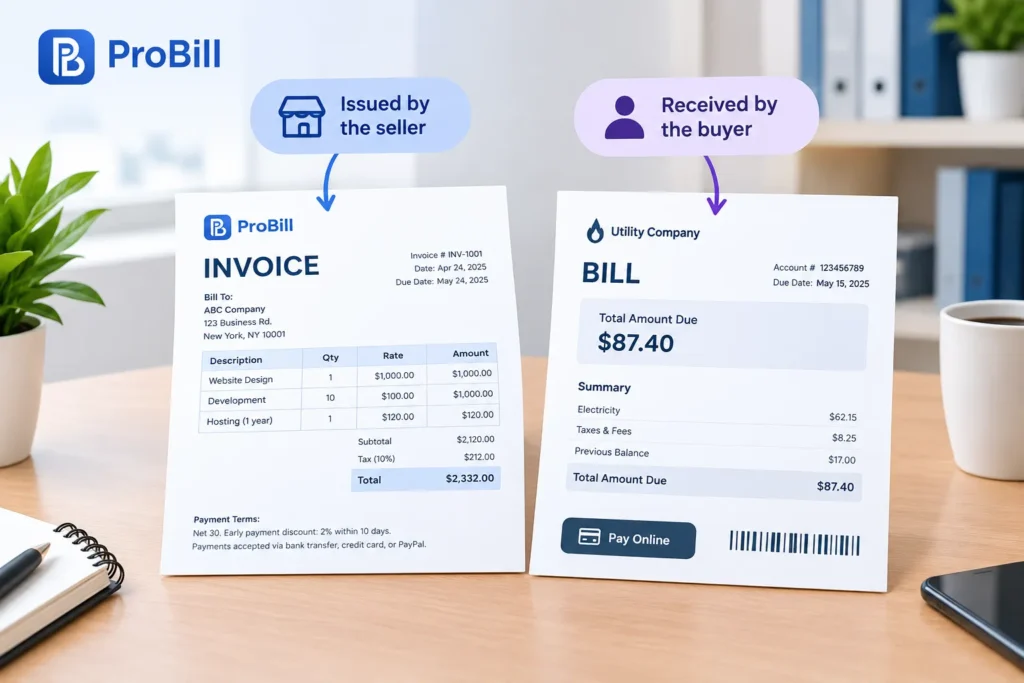
An invoice is a seller-generated request for payment that doubles as a legally enforceable record. Understanding the difference between bill and invoice starts with seeing how a professional invoice is built:
• Header details: Business name, logo, and contact info establish who’s demanding payment.
• Unique number & date: These fields let you reconcile transactions and prove delivery—key in any difference between bill and invoice discussion.
• Line-item breakdown: Quantity, rate, and tax for each product or service make costs transparent (see our free invoice templates for real-world layouts).
• Total, currency, and due date: Clarify exactly what the buyer owes and when.
• Payment terms & methods: Early-pay discounts or late fees give teeth to the document, underscoring the difference between bill and invoice as a contractual tool.
• Legal notes: Tax IDs or regulatory disclosures keep you compliant with authorities such as the IRS (external).
Because invoices feed directly into accounts receivable, many businesses rely on a free invoice generator or full-scale platforms like Create Invoice to automate numbering and reminders. That automation is what distinguishes an invoice from a quick “bill invoice” slip handed over at a restaurant. For deeper dives into structure, check out what an invoice is and what an invoice should include, or browse targeted invoice resources by industry. Mastering these elements clarifies the invoice and bill difference for both bookkeepers and clients.
What Is a Bill? Everyday Examples You Already Know
A bill flips the perspective: it’s the buyer-side document you receive and pay. When you settle a phone plan, utility charge, or dinner tab, you’re interacting with a bill. Recognizing the difference between bill and invoice is simple here—the business created an invoice in their system, which arrives to you as a bill to be cleared.
You seldom see sequential numbers or detailed terms on a bill; instead, you get straightforward amounts and a due date—think “Pay $87.40 by the 15th.” This brevity keeps the focus on immediate payment and highlights the operational invoice vs bill divide. In accounting software, bills land in accounts payable, while invoices sit in receivables, cementing the invoice and bill difference for reporting and cash-flow management.
Everyday bill formats include:
1. Point-of-sale receipts (contrasted in our guide on invoice vs receipt)
2. Monthly statements from utilities or subscription services (see how they differ in invoice vs statement)
3. One-time service charges like car repairs, often labeled simply “bill invoice” on the counter copy
By viewing bills as consumer-facing and invoices as seller-facing, the difference between bill and invoice becomes crystal clear—two sides of the same transaction, but recorded, chased, and archived in entirely different ways.
The Key Difference Between Bill and Invoice (Side-by-Side Comparison)
Timing, Documentation, and Legal Weight: Where They Diverge
The quickest way to grasp the difference between bill and invoice is to line them up attribute by attribute.
| Attribute | Invoice (Seller Perspective) | Bill (Buyer Perspective) |
|---|---|---|
| When it’s issued | Right after goods/services are delivered, often generated automatically by tools like the free invoice generator | When the same document arrives in the buyer’s hands or POS system |
| Core purpose | Formal request for payment and legal evidence of a sale | Reminder to settle the amount due; triggers payment from accounts payable |
| Required details | Sequential number, line-item breakdown, tax IDs—see full list in what an invoice should include | Amount, due date, and minimal reference details |
| Bookkeeping bucket | Accounts receivable; feeds revenue forecasting in Create Invoice dashboards | Accounts payable; affects cash-on-hand projections |
| Legal enforceability | Acts as a contract; failure to pay can support legal action (IRS record-keeping rules underline this need: IRS Recordkeeping) | Proof of liability but less detailed; stronger proof relies on the seller’s corresponding invoice |
| Storage lifespan | Kept for 3–7 years for audit defense | Retained until payment clears, then archived under expense records |
Notice how the difference between bill and invoice shows up mainly in timing, documentation depth, and the legal weight each side needs to protect. That invoice and bill difference drives how software labels them and how auditors verify them.
How ‘Bill Invoice’ Misconceptions Affect Your Cash Flow
Confusing the terms “bill” and “invoice” can quietly sabotage cash management:
- Duplicate entries: Treating one document as both sides of the same event creates double postings—AR and AP end up overstated, masking the true difference between bill and invoice.
- Missed early-pay discounts: If staff log a vendor invoice as a generic bill invoice, they may overlook the net-10 or 2/10 N30 terms spelled out on the seller’s form, forfeiting easy savings.
- Skewed forecasts: Invoices not marked “sent” in Create Invoice stay invisible to revenue projections, while unlogged bills delay expense recognition. Either error distorts the invoice and bill difference in cash-flow models.
- Compliance risk: Misfiled paperwork leaves you without the audit trail the IRS or local tax authority expects. Separating documents according to their legal roles removes that exposure.
To avoid these pitfalls, map every incoming document to a workflow: buyer bills funnel into AP approval, seller invoices route through the invoice templates you’ve standardized. Cross-checking totals against receipts (see our guide on invoice vs receipt) or monthly statements (invoice vs statement) guarantees the recorded invoice and bill difference mirrors reality. Clear labeling keeps the main difference between bill and invoice front-and-center—so your cash moves exactly when and where you planned.
When to Send an Invoice and When to Issue a Bill in Your Workflow
Knowing the exact moment to request payment keeps cash flowing and clarifies the difference between bill and invoice for everyone involved. Below you’ll see how timing shifts across service work and retail, so you never blur that invoice and bill difference again.

Service-Based Businesses: Milestone Invoicing vs Point-of-Sale Billing
Large projects—web design, consulting, construction—benefit from milestone invoicing because each phase has a clear deliverable and measurable value. Send the first invoice the moment a contract is signed, the second when you complete 50 %, and the final on hand-off. Hitting those markers preserves the difference between bill and invoice and keeps accounts receivable predictable.
- Draft a schedule in your proposal.
- Plug those dates into the free invoice generator so every milestone auto-fires.
- Attach supporting documents and reuse branded invoice templates to reinforce professionalism.
- Monitor status in Create Invoice dashboards; if a client drags past terms, automated reminders safeguard cash flow.
On the flip side, quick on-site jobs—locksmithing, appliance repair—call for a bill invoice printed or emailed immediately after service. The customer pays on the spot, and your system logs the same data as an internal invoice record. This instant settlement highlights the invoice and bill difference: the seller files an invoice internally, while the buyer only sees the bill to swipe or tap.
Service pros who juggle both models can tap invoice resources by industry to match their niche, ensuring every document contains what an invoice should include without overloading a simple bill. Using that framework twice within a single workflow cements the difference between bill and invoice while slashing admin time.
Product Sales & Retail: Streamlining Checkout With Instant Bills
Retail moves too fast for post-sale follow-ups, so the register issues a bill the second the barcode scans. That slip doubles as a customer proof of purchase and underscores the difference between bill and invoice at the checkout counter. Behind the scenes, your POS logs an invoice record to sync inventory, sales tax, and daily close.
For omnichannel shops, follow this two-tier flow to keep the invoice and bill difference clean:
• Point-of-sale: POS prints the customer bill, and an electronic copy feeds directly to accounting.
• End-of-day: Batch the internal invoices into a daily statement for reconciliation—handy when you review invoice vs receipt tallies or monthly invoice vs statement summaries.
• E-commerce: Email receipts still function as instant bills, but embed a “View full invoice” link so business buyers can access line-item data compliant with what an invoice is.
• Returns & exchanges: Use the original bill number to locate the underlying invoice; matching fields preserve audit trails and curb fraud.
Including every tax element the moment stock leaves the shelf meets legal standards explained in what an invoice should include, while sector-specific tweaks live in invoice resources by industry. By scripting this routine, you’ll mention the difference between bill and invoice just twice to staff before it becomes habit—cutting training time and error rates tied to invoice and bill difference mishaps.
Going Digital: Switching From Paper Bills & Invoices to Automated Software
Paper documents make it hard to track the difference between bill and invoice, slow down approvals, and bury you in filing cabinets. Moving to cloud-based tools unifies data, keeps the invoice and bill difference visible in every workflow, and eliminates lost bill invoice slips. Below you’ll find the key software features to insist on and a practical migration roadmap that shrinks admin cost while speeding collections.
Must-Have Features in Modern Invoice and Billing Tools
• Unified AR/AP dashboard – instantly shows the difference between bill and invoice, so teams never confuse receivables with payables.
• Customisable invoice templates – drag-and-drop fields that already contain everything listed in what an invoice should include, plus your logo, colours, and tax IDs.
• Automated numbering & reminders – a free invoice generator can assign sequential IDs and chase late payers without human follow-up.
• OCR bill capture – snap a photo of a vendor bill invoice and let the system read totals, dates, and due dates to preserve the invoice and bill difference in one click.
• Multiple payment gateways – offer cards, ACH, and wallet options directly inside the digital form; Create Invoice supports auto-reconciliation as soon as funds land.
• Real-time tax calculation – pull correct rates by jurisdiction so every document meets standards set out in what an invoice is.
• Industry presets – niche-specific defaults from invoice resources by industry adapt line items for freelancers, trade contractors, or SaaS firms.
• One-click document links – attach proofs such as receipts or periodic statements; internal links to guides like invoice vs receipt and invoice vs statement help staff verify they’re attaching the right proof.
• API & accounting integrations – push data to ERP or pull supplier bills back in, keeping the invoice and bill difference intact across platforms.
Step-by-Step Migration Plan to Cut Costs and Get Paid Faster
- Audit current paperwork – list every paper bill invoice and customer invoice you issue or receive each month; flag gaps where the difference between bill and invoice becomes blurry.
- Select software – compare feature lists above, run a free invoice generator test, and book a Create Invoice demo to ensure it handles both sides of the invoice and bill difference.
- Digitise templates – convert your best-performing paper forms into branded invoice templates; embed payment links to reduce friction.
- Import historical data – bulk upload past PDFs or scan stacks of bills using OCR so the system can spot any lingering difference between bill and invoice errors.
- Train stakeholders – walk AP on how to code a vendor bill while showing AR how to send a customer invoice; emphasise why preserving the difference between bill and invoice avoids double posting.
- Pilot with one department – run both paper and digital for a single team, compare cycle times, then iterate.
- Switch off paper – decommission printers, update supplier terms to accept e-docs only, and notify customers that future bills and invoices will arrive via email links.
- Review performance monthly – track DSO, early-pay discounts, and support tickets; use Create Invoice analytics to prove cost savings and confirm the invoice and bill difference remains crystal clear.
Following these steps locks in the benefits of automation while keeping every instance of the difference between bill and invoice transparent—from the first scan to final payment.
Frequently Asked Questions About Invoice and Bill Difference
Is an invoice legally enforceable while a bill is not?
Yes. An invoice is a seller-issued document that can support legal action if the buyer fails to pay because it contains the contractual details courts and auditors look for. A bill is simply the buyer’s copy of the same obligation, so it carries less evidentiary weight. That legal edge is the core difference between bill and invoice, as outlined in our guide on what an invoice is.
Can I use the same document as both a bill and an invoice?
You can send a single PDF, but label it “Invoice” so the buyer knows it is enforceable and can record it correctly. Once it lands in the customer’s accounts payable, they will treat it as a bill, preserving the invoice and bill difference in the ledgers. Automating this with a free invoice generator prevents numbering gaps and duplicate “bill invoice” files.
How should freelancers label documents to avoid tax issues?
Stamp every request for payment “Invoice,” assign a unique number, and include your tax ID. Using ready-made invoice templates or niche-specific invoice resources by industry keeps fields consistent, proving the difference between bill and invoice to tax reviewers.
Do POS receipts count as bills or invoices for accounting?
A register slip is a bill in the customer’s hands but an internal invoice in yours. Because receipts often omit the full tax breakdown, accountants still need the underlying record to reconcile VAT or sales tax. See the nuances in invoice vs receipt and how monthly close links them in invoice vs statement.
What information must appear on an invoice to stay compliant?
Include a sequential number, issue date, seller and buyer details, line-item totals, applicable taxes, payment terms, and due date. Missing any of these blurs the difference between bill and invoice and can void deductibility. Check the full compliance list in what an invoice should include.
Are e-invoices accepted by all tax authorities?
Most jurisdictions, from the EU’s e-Invoicing Directive to India’s GST portal, accept properly formatted digital invoices as originals. Exporting directly from Create Invoice with embedded signatures ensures authenticity, maintaining the invoice and bill difference even without paper.
How do late fees differ on bills vs invoices?
Late fees are enforceable only when disclosed on the original invoice; a plain bill rarely lists them. Add the percentage or flat charge in your payment terms so clients recognize the consequence—another practical difference between bill and invoice that accelerates collections and reduces disputes.