Skip to content


What Is Construction Invoicing Software & Why Your Business Needs It Now
Construction invoicing software is a digital toolset that lets contractors draft, send, track, and reconcile project bills from one dashboard. Cloud platforms like Create Invoice or mobile solutions such as the Probill Invoice maker app combine estimating, time-tracking, and payment collection so you can issue professional bills in minutes instead of hours. By tapping a free invoice generator, teams convert field data into branded PDFs that clients can pay instantly. These capabilities turn a patchwork of spreadsheets, carbon copies, and email threads into a single, audit-ready construction invoice management software workflow.
Manual Billing Pain Points That Software Solves
Even the most organized site foreman can lose track of paperwork when projects span multiple trades and change orders. Purpose-built invoicing software for construction removes the bottlenecks that drain profit:
- Data re-entry errors disappear because crews pull line items directly from live invoice templates—from specialized construction invoice templates to niche forms such as concrete contractor invoice templates and roofing invoice templates.
- Scope creep is documented in real time; change orders sync to the estimate and become a new line on the software contractor invoice instead of a forgotten sticky note.
- Trade-specific compliance is built in. Electricians grab pre-formatted electrical contractor invoice templates, plumbers use plumbing invoice templates, and general builders lean on contractor invoice templates—all of which meet local tax and lien-waiver rules.
- Fragmented job costing is replaced by live dashboards. Whether you’re invoicing individual construction jobs or managing umbrella contracts, every labor hour and material receipt rolls into a single contractor billing software report.
- Knowledge silos break down. Field crews can snap photos, update quantities, and sync details so office staff has everything needed for fast, accurate billing.
If you need further industry guidance, the platform’s invoice resources by industry and broader invoice resources for different industries keep your team aligned with best practices.
Tangible ROI from Switching to Construction Invoice Software
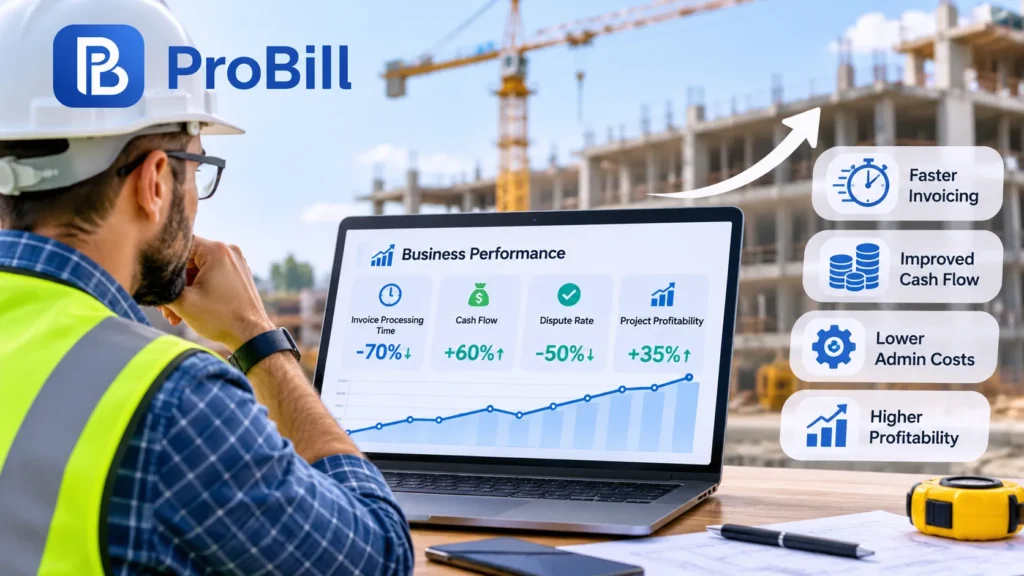
Modern contractor invoicing software isn’t just a convenience—it’s a profit lever. The table below shows how strategic adoption boosts the bottom line.
| ROI Metric | How Software Delivers | Typical Gain |
|---|---|---|
| Invoice processing time | One-click conversion of estimates to invoices using the best estimate and invoice app for contractors | Hours saved every week |
| Days Sales Outstanding (DSO) | Digital pay links and automatic reminders shorten the wait for checks | Accelerated cash flow |
| Dispute frequency | Time-stamped change orders and photo evidence stored with each bill | Fewer payment conflicts |
| Overhead costs | Paperless workflows, e-signatures, and cloud storage | Reduced printing & postage |
| Win rate on bids | Branded estimates flow straight into invoices, showcasing professionalism | Higher client confidence |
Additional gains come from automating invoice workflows: schedule recurring draws, trigger late-fee rules, and sync directly with accounting apps. Solo tradespeople benefit too—invoicing as an independent contractor becomes as simple as tapping “send” on your phone. Need a quick turnaround on site? Use the same tool to create construction invoices online even when you’re standing next to the rebar.
With these efficiencies, invoice software for construction pays for itself quickly, freeing cash and headspace so you can focus on building—not chasing payments.
Must-Have Features in Modern Invoice Software for Construction Projects
Modern construction invoice software condenses estimating, billing, and payment collection into one streamlined pipeline. Below are the two core capabilities any platform should nail before you entrust it with your cash flow.
From Estimates to Final Payment: Unified Estimate and Invoice Software Workflow
A true estimate and invoice software suite eliminates data re-entry by keeping every cost item in a single database from bid to close-out.
- Instant conversion: Win a bid in Create Invoice, tap the free invoice generator, and the estimate becomes draft invoice #1—no copy-paste required.
- Template library integration: Pull labor and material codes directly from dynamic invoice templates. Whether you need construction invoice templates, contractor invoice templates, or niche forms like concrete contractor invoice templates, roofing invoice templates, electrical contractor invoice templates, and plumbing invoice templates, every line remains consistent across documents.
- Change-order sync: Field updates flow straight into the existing record, automatically generating a new software contractor invoice line so nothing is missed.
- Progress & retention billing: Specify draw schedules, hold retainage, and trigger reminders via the platform’s automating invoice workflows engine.
- Job-level visibility: Dashboard widgets surface margin, WIP, and aging for both umbrella contracts and invoicing individual construction jobs—a must-have in any serious contractor billing software.
- Centralized compliance: Use the in-app invoice resources by industry and broader invoice resources for different industries to apply the correct tax rates, lien waivers, and regional rules before sending the final bill.
Mobile-First Capabilities: The Best Estimate and Invoice App for Contractors On-Site
Job sites rarely have a spare desk, so the best estimate and invoice app for contractors must act like a pocket controller for the entire billing cycle.
- On-device creation: The Probill Invoice maker app lets supers snap photos, collect digital signatures, and even create construction invoices online while standing next to the slab.
- Offline resilience: Data caches locally, then syncs automatically when service returns, guaranteeing your construction invoice management software stays accurate in remote zones.
- Real-time collaboration: Crew updates populate instantly across phones and desktops, giving accountants the info they need for same-day payouts.
- Flexible payment capture: Swipe cards, log ACH, or generate QR codes on the spot—perfect for subcontractors invoicing as an independent contractor(https://create-invoice.app/how-to-create-an-invoice-as-an-independent-contractor/) at project closeout.
- Alerts & GPS stamps: Push notifications flag overdue draws, and location data verifies that time & material entries occurred on the actual job site, limiting disputes in contractor invoicing software.
Implementation Guide: Setting Up Contractor Billing Software in 7 Simple Steps
Modern construction invoice software can be live in a single workweek if you follow a structured rollout. Use the sequence below to get your contractor billing software humming without stalling cash flow.
Audit your current billing workflow
Map every touchpoint from field data capture to payment posting. The checklist inside the invoice resources by industry and parallel invoice resources for different industries helps you surface trade-specific requirements you might miss otherwise.Select a cloud and mobile platform
Office teams often prefer the browser-based dashboard in Create Invoice, while supers can handle draws on the fly with the Probill Invoice maker app. Both options sync, giving you a unified construction invoice management software stack.Standardize all estimate and invoice templates
Consolidate every PDF, spreadsheet, and carbon copy into the platform’s invoice templates. Import trade-ready forms such as construction invoice templates, contractor invoice templates, concrete contractor invoice templates, roofing invoice templates, electrical contractor invoice templates, and plumbing invoice templates. Consistent branding and cost codes make later automation painless.Migrate historical data and run sandbox tests
Use CSV import wizards to pull in clients, jobs, and prior bills. Spin up a few trial invoices with the free invoice generator or directly create construction invoices online to verify taxes, markup, and retainage calculations before flipping the switch.Configure billing automation rules
Inside your estimate and invoice software, set default progress-billing schedules, retainage percentages, and late-fee triggers. Lean on the workflow recipes in automating invoice workflows to fire reminders, post to accounting, and push payment links automatically.Train field and back-office users simultaneously
Walk PMs through setting up draws for invoicing individual construction jobs while showing subcontractors the quick-send flow for invoicing as an independent contractor. The dual perspective speeds adoption and keeps everyone on the same page.Monitor performance and refine settings
Track KPIs like DSO, dispute rate, and margin inside your contractor invoicing software dashboard. Revisit templates and rules quarterly, drawing on updated best practices from the industry resource library to keep your invoice software for construction aligned with evolving project demands.
Migrating Existing Data and Templates Without Downtime
Begin by exporting customers, job codes, and open invoices from legacy systems into flat files. Most contractor billing software accepts CSV or Excel imports, letting you map columns to fields in minutes. Import during off-peak hours, then spot-check totals against source reports to ensure labor, material, and tax amounts carried over correctly. Because templates are already unified in step 3, switching documents on live projects is as simple as selecting the new layout—clients never notice the back-end change.
Automating Progress Billing, Retainage, and Change Orders

Inside your new invoicing software for construction, create automation rules that tie directly to project milestones:
- Progress billing: Link draw schedules to percentage-complete or cost-plus triggers so invoices fire automatically when field crews update quantities in the mobile app.
- Retainage: Set default holdbacks at the contract level; the platform moves retained funds to a separate ledger and releases them when punch-list items close.
- Change orders: When a foreman submits a scope change through the Probill Invoice maker app, the system adds a new line to the existing software contractor invoice, updates the budget, and notifies accounting without manual re-entry.
These automations free your team from repetitive admin and ensure every cost lands on the correct invoice the first time.
Side-by-Side Comparison of the Leading Contractor Invoicing Software Options
Pricing, User Limits, and Integrations at a Glance
| Software | Pricing Model | User Limits | Key Integrations | Mobile App |
|---|---|---|---|---|
| Create Invoice | Free starter tier plus pay-as-you-go upgrades; unlimited invoices via the free invoice generator | Unlimited users on paid plans | QuickBooks, Xero, Zapier, Stripe | iOS & Android—field teams can also use the Probill Invoice maker app |
| QuickBooks Online + Contractor Apps | Monthly subscription per company file | One admin; additional users at extra cost | 650+ marketplace apps, including Procore | Yes |
| Procore Financials | Custom enterprise pricing | Unlimited users | Sage 300 CRE, Viewpoint Vista, QuickBooks | Yes |
| Knowify | Tiered monthly plans | 1–25 users depending on tier | QuickBooks Online, Gusto, PayPal | Yes |
How Our Platform Stands Out in Construction Invoice Management Software
Because construction projects shift daily, Create Invoice focuses on flexibility and speed rather than rigid accounting workflows.
The platform ships with a library of invoice templates covering every trade—from broad construction invoice templates and contractor invoice templates to niche forms like concrete contractor invoice templates, roofing invoice templates, electrical contractor invoice templates, and plumbing invoice templates. Field crews tap the free invoice generator or quickly create construction invoices online and send branded PDFs before leaving the jobsite.
Automations built into our contractor billing software trim admin time. Rules inside the automating invoice workflows engine handle progress draws, retainage release, and late-fee reminders without manual follow-up. Whether you’re invoicing individual construction jobs or invoicing as an independent contractor, the same workflow applies, ensuring every software contractor invoice lands in the client’s inbox with embedded pay links.
Industry-specific guidance is always one click away. The invoice resources by industry hub (and its broader invoice resources for different industries) keeps regional tax, lien, and compliance rules current, so your estimate and invoice software stays audit-ready. Combined with real-time dashboards and native Stripe/ACH integrations, Create Invoice delivers an all-in-one construction invoice software stack that rivals the most expensive enterprise suites—without the learning curve that hampers other invoice software for construction tools.
Frequently Asked Questions About Construction Invoicing Software
Is cloud-based invoicing software for construction secure?
Yes. Reputable construction invoice software encrypts data in transit and at rest, enforces role-based permissions, and maintains redundant backups on SOC-2–compliant servers. Platforms such as Create Invoice also offer audit logs so you can trace every change to an estimate or software contractor invoice, meeting most project-owner and lender requirements without extra IT overhead.
Can contractor invoicing software handle multiple projects and clients?
Purpose-built contractor invoicing software is designed for complex portfolios. You can segment costs by customer, job, and cost code, then roll them up in real-time dashboards. When you’re invoicing individual construction jobs, the system keeps each draw schedule and retainage rule separate while still letting you reuse shared invoice templates across clients.
How does estimate and invoice software sync with accounting tools like QuickBooks?
Most modern estimate and invoice software uses a two-way API connection. Items, clients, and payments created in the field push to QuickBooks automatically, while new chart-of-account codes flow back to the billing app to prevent data silos. This live sync eliminates double entry and keeps invoice software for construction fully aligned with your general ledger.
What training is required for field teams to use a software contractor invoice solution?
Training is typically minimal because interfaces mirror everyday mobile apps. Crews can watch a 10-minute walkthrough of the Probill Invoice maker app, learn to capture photos, and send a draft invoice before lunch. Back-office staff can tap the invoice resources by industry library for workflow tips, making organization-wide adoption of contractor billing software straightforward.
How quickly can we see cash-flow improvements after adopting construction invoice software?
Contractors often see faster payments in the first billing cycle because digital pay links and automated reminders shorten DSO. Using the free invoice generator or the option to create construction invoices online gets invoices out the door the same day work is completed, turning previously idle receivables into cash within days instead of weeks.
Does contractor billing software support progress billing and retainage?
Yes. Leading construction invoice management software lets you schedule percentage-complete draws, hold retainage automatically, and release it upon milestone approval. Built-in rules from the automating invoice workflows guide can trigger reminders for upcoming draws, ensuring no revenue is left unbilled.
What is the typical cost of construction invoice management software?
Pricing ranges from free tools to enterprise suites. Small teams can start with Create Invoice’s no-cost tier and unlimited documents via the free invoice generator, while larger firms may pay a per-user or per-project fee that scales with features like ERP integrations. Compared to manual processing costs, even premium invoicing software for construction usually pays for itself through time savings and reduced DSO.