Skip to content

What Does an Invoice Look Like? A Quick Visual Walk-Through of a Real Invoice Example
Before you hit “send,” it helps to see exactly what does an invoice look like in practice. Below, we zoom in on a real-world layout, highlight every required element, and compare design tweaks that suit different industries. Use the walk-through to decide what should an invoice look like for your own brand, then try it instantly with our Create Invoice tool or the free invoice generator.
Annotated images: Breaking down sample invoices line by line
A single glance at annotated images invoices can answer “what does an invoice look like?” Here’s a numbered overlay you can replicate with any invoice example template:
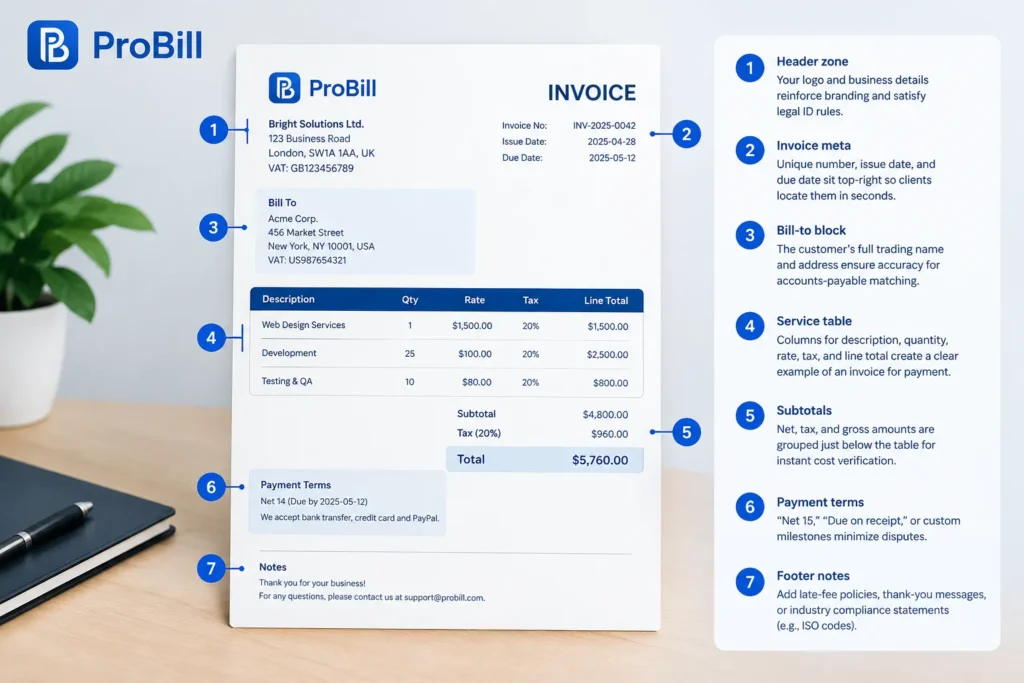
- Header zone – Your logo and business details reinforce branding and satisfy legal ID rules (see the SBA’s guidelines for record keeping: Small Business Administration).
- Invoice meta – Unique number, issue date, and due date sit top-right so clients locate them in seconds.
- Bill-to block – The customer’s full trading name and address ensure accuracy for accounts-payable matching.
- Service table – Columns for description, quantity, rate, tax, and line total create a clear example of an invoice for payment that meets most accounting software imports.
- Subtotals – Net, tax, and gross amounts are grouped just below the table for instant cost verification.
- Payment terms – “Net 15,” “Due on receipt,” or custom milestones minimize disputes; link directly to online pay-now buttons.
- Footer notes – Add late-fee policies, thank-you messages, or industry compliance statements (e.g., ISO codes).
Repeat this structure to guarantee every client immediately recognises what does an invoice look like, yet you can still tweak fonts, colours, or column widths without losing clarity. For quick customisation, explore our ready-made invoice templates.
Common layout variations and when to use each
Even though the core anatomy answers “what does an invoice look like,” sector-specific tweaks can speed approvals:
| Layout variation | Best for | Why it works |
|---|---|---|
| Service-heavy, no SKU column | Agencies, consultants | Leaves space for multi-line project descriptions, reflecting examples of invoices where narrative matters. |
| Itemised SKU grid | eCommerce, wholesalers | Aligns with inventory systems, so clients instantly see SKU codes and quantities. |
| Milestone schedule | Construction, software projects | Shows percentage completions and retainage; clarifies what does a invoice look like when payments span months. |
| Flat-fee single total | Legal retainers, subscription services | One bold amount emphasises value over hours and reduces line-item haggling. |
Choose the style that mirrors your workflow, then adapt colours and typography so the document still answers what does an invoice look like at first glance. Need inspiration by niche? Browse our curated invoice resources by industry before downloading an invoice example template.
Essential Elements Every Professional Invoice Should Include
A polished bill isn’t just about aesthetics; it’s the legal proof of a transaction. Knowing exactly what does an invoice look like when every required field is present keeps you compliant, gets you paid on time, and signals professionalism the moment clients open the file.
Mandatory legal and tax details you can’t miss
Every jurisdiction sets its own rules, but the following checklist covers the information auditors and accounts-payable teams look for on sight. If any item is missing, even the smartest design—or the most visually stunning images invoices—can be rejected.
- Registered business identity
• Legal name, trading name (if different), and full address
• Government-issued ID (EIN, GST, VAT) per the IRS requirements (https://www.irs.gov/). - Unique invoice number in an unbroken sequence
• Skip gaps; regulators equate missing numbers with unreported income. - Issue date and clear payment due date
• Use ISO 8601 (YYYY-MM-DD) to avoid global confusion. - Buyer’s full legal details
• Mirror their purchase order to prevent “vendor mismatch” delays. - Tax breakdown by rate and jurisdiction
• Show zero-rated, exempt, or reduced rates separately. - Currency code (USD, EUR, GBP)
• A multi-currency line removes ambiguity for cross-border deals. - Total amounts – net, tax, and grand total
• Label each clearly to create a scan-friendly example of an invoice for payment. - Payment instructions tied to terms
• Bank info, IBAN/SWIFT, or clickable pay-now link meet digital-record rules. - Late-fee clause or statutory interest notice
• Many regions let you charge up to 8% over base rate; including it is often a legal requirement.
When you tick these boxes, any reader understands what should an invoice look like from a regulatory standpoint—and you can generate them in seconds with our free invoice generator.
Optional add-ons that boost brand trust and speed up payment
Beyond the must-haves, thoughtful extras transform standard paperwork into a customer-friendly touchpoint, clarifying what does a invoice look like when brand experience matters.
• Company logo and color palette
Reinforces identity and makes your file stand out among dozens of bland examples of invoices in an AP inbox.
• QR code or “Pay Now” button
Converts mobile scans into instant checkout; integration is baked into our Create Invoice tool.
• Dynamic early-payment discounts
Auto-calculate 2%-10 Net 10 offers to nudge faster cash flow.
• Project or SKU thumbnails
A miniature photo beside each line item helps creative agencies prove value and mirrors an invoice example template that’s already winning approvals in visual industries.
• Client-specific purchase order reference
Eliminates back-and-forth and mirrors exactly what does an invoice look like inside their ERP system.
• Digital signature or e-seal
Adds authenticity for enterprise clients who archive PDF/A files.
• Embedded compliance statements
GDPR or HIPAA footers show you care about data security—another cue for prompt payment.
• Multilingual notes section
Clear instructions in the buyer’s language slash follow-up emails, a pattern we observed while compiling invoice resources by industry.
Want to test-drive every element you’ve just read? Pick an invoice templates layout that suits your sector, customise it inside Create Invoice, and download a ready-to-send PDF. Within minutes you’ll see precisely what does an invoice look like—and feel confident it’s complete.
Industry-Specific Invoice Example Templates You Can Download Today
Seeing exactly what does an invoice look like for your niche removes guesswork and accelerates approvals. Use the invoice example templates below, then open them in Create Invoice to add your branding, payment links, or tax IDs in minutes.
Freelancer & creative services: Clean, minimalist design
Independent designers, copywriters, and consultants thrive on clarity—clients want to verify hours, rates, and usage rights at a glance. Our minimalist invoice example template strips away clutter yet still covers every legal field, so you never have to ask “what should an invoice look like” again.
Key features:
• Large project-description column supports narrative copy or embedded thumbnails—perfect for images invoices that showcase deliverables.
• Hourly, daily, or flat-fee selector auto-calculates totals, turning the file into a ready-made example of an invoice for payment.
• Discreet brand bar lets your logo pop without overpowering white space, mirroring the aesthetic standards in AIGA’s freelance guidelines (https://www.aiga.org/).
• One-click export to PDF/A guarantees colour integrity for portfolio-quality proofs.
Download it from our invoice templates gallery, then tweak colours in the free invoice generator to match your style. For more sector ideas, browse our invoice resources by industry.
E-commerce & retail: Tax, shipping and SKU-friendly format
Product sellers juggle sales tax, shipping zones, and inventory codes, so what does a invoice look like for retail? This SKU-ready layout answers with precision:
- Item grid lists product name, internal SKU, HS code, and variant options in discrete columns.
- Automatic tax mapping pulls the correct state or VAT rate, reflecting IRS destination-based rules (https://www.irs.gov/).
- Integrated shipping line fetches weight and carrier cost, so clients know the exact landed price before paying.
- Multi-currency footer displays FX rate used, an essential detail in cross-border examples of invoices.
Because every column matches common ERP imports, buyers can ingest the file without manual edits—minimising chargebacks and fulfilment delays. Start with this invoice example template inside Create Invoice, or clone it directly from our invoice templates hub.
Still wondering what does an invoice look like in real life? Launch the free invoice generator, drop in your data, and the finished PDF will show you—down to the last cent—exactly what an industry-ready invoice should look like.
From Draft to Payment: How to Create an Invoice That Gets Paid on Time
Step-by-step guide using our free online invoice generator
Seeing clear examples of invoices is helpful, but turning that insight into cash in your bank starts with a repeatable workflow. Follow these quick steps inside the free invoice generator to move from first draft to “paid” status without wondering again what does an invoice look like in your client’s inbox.

- Pick a pre-built invoice example template. Inside the tool, filter by niche or browse the full invoice templates gallery so your file mirrors the best examples of invoices for your industry.
- Enter your business and client details once. The generator auto-saves them for future bills, eliminating manual typos that can delay payment.
- Add line items. Quantity, rate, and tax fields calculate in real time, so you never second-guess if the total matches the example of an invoice for payment you previewed earlier.
- Drop in a “Pay Now” link or QR code. Clients can settle the balance the moment they verify what should an invoice look like for compliance.
- Attach proof. Upload project files or images invoices if the client needs visual confirmation before approving costs.
- Preview the PDF. The live render shows exactly what does a invoice look like on desktop and mobile, helping you spot last-minute issues.
- Schedule automatic reminders. Built-in email and SMS nudges kick in before the due date and keep your cash flow predictable.
- Click “Send.” The system time-stamps delivery, giving you a documented trail of examples of invoices sent—ideal for audit or dispute resolution.
Now you can replicate this process with a single click from your dashboard in Create Invoice.
Pro tips to avoid disputes and follow up like a pro
Even flawless examples of invoices can stall if you overlook client psychology and account-payable workflows. Employ these tactics so what does an invoice look like never becomes a point of contention.
• Reference the customer’s PO or contract clause in the subject line. Matching internal codes speeds approval and shows that you know exactly what should an invoice look like inside their ERP.
• Send a courtesy draft for review 24 hours before the official document. This micro preview acts as an unofficial invoice example template that catches scope creep early.
• Add specific late-fee language—but highlight an early-payment discount first. Research by the Federation of Small Businesses shows positive framing halves dispute rates (link: https://www.fsb.org.uk/).
• Use cloud-based shared folders for supportive images invoices or time-sheet exports. When every attachment aligns with the example of an invoice for payment you issued, there’s less room for “missing document” claims.
• Automate a gentle reminder on day 3 after due date, then escalate to a phone call on day 7. Each reminder includes the original PDF so the client can re-see what does a invoice look like without digging through threads.
• If payment still lags, send a final notice referencing statutory interest rules in their jurisdiction and link them to sector-specific guidance in our invoice resources by industry.
Following these touchpoints keeps your communication rhythm consistent, reinforces dependable examples of invoices, and nudges even the slowest payer across the finish line.
Frequently Asked Questions About Invoices
Seeing what does an invoice look like in real scenarios often raises quick questions. The answers below clear up the most common doubts, so you can issue documents that match professional standards and get paid faster.
What is an example of an invoice for payment?
A solid example of an invoice for payment lists seller and buyer details, a unique number, dated line-items, tax, and a grand total—exactly what does an invoice look like in the invoice templates library. Each invoice example template there shows totals calculated automatically and embeds clickable pay-now links, giving you practical, copy-ready examples of invoices that pass most AP checks.
Can I use Word or Excel to make invoices, or do I need dedicated software?
You can draft a bill in Word or Excel, but software purpose-built for invoicing eliminates numbering gaps, adds instant tax math, and shows what does an invoice look like on any device. Free tools such as Create Invoice and the free invoice generator handle branding, currencies, and automated reminders that spreadsheets can’t, so what should an invoice look like never becomes a manual formatting headache.
How many invoice copies should I send to a client?
Send one digital PDF and keep one identical archive for yourself; that single source of truth ensures everyone sees the same data and knows exactly what does an invoice look like for the job. If your client’s policy still requests a hard copy, mail one printed version—but avoid multiple email variants that could create conflicting images invoices or numbering errors.
Do online invoices count as legal documents?
Yes. An online PDF or e-invoice is legally valid as long as it contains all mandated fields and remains unaltered, so what does a invoice look like digitally must mirror paper standards. Adding a timestamp, digital signature, and the compliance footers outlined in our invoice resources by industry strengthens enforceability in audits or court.
How long should I keep invoice records for tax purposes?
The U.S. Internal Revenue Service advises retaining records for at least three years after the return date, while many accountants recommend seven to cover extended audits (source: IRS.gov). Keeping invoices—whether paper or electronic—within that window lets you prove income, VAT, and expense claims and quickly retrieve what does an invoice look like if authorities request examples of invoices from past years.