Skip to content
How to Create an Invoice for a Small Business: Quick Answer
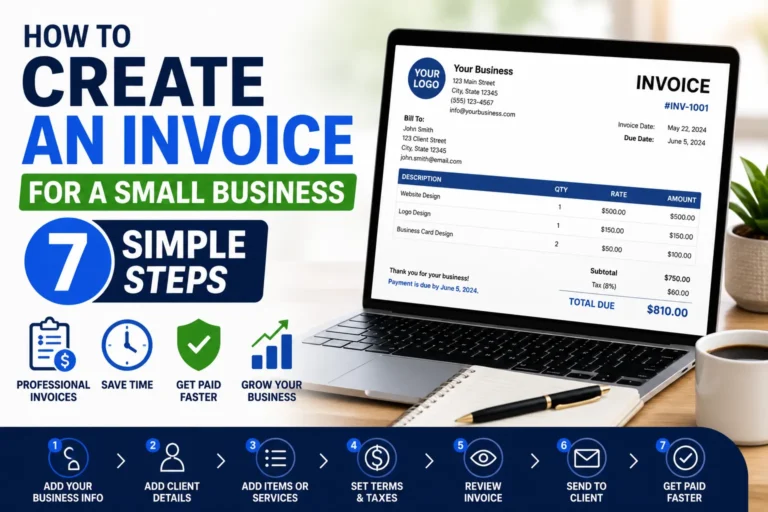
Step 1: Include Your Business Information
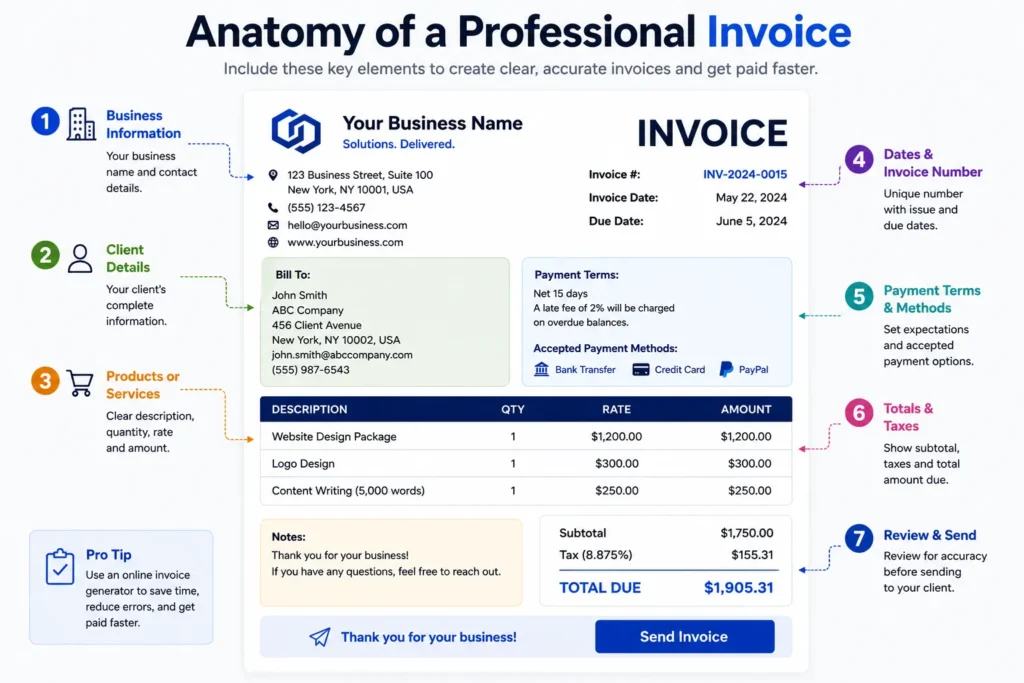
Start your invoice by clearly stating your business name, address, phone number, and email. This not only legitimizes your document but also ensures clients can reach you with questions or payments. For example, a freelancer listing their name and business registration number upfront avoids confusion during tax reporting.
Step 2: Add Client Details
Next, insert the client’s full name or company name along with their contact information. Missing or vague client details often cause delays in payment processing. For instance, small businesses working with multiple clients should double-check these details to match contract records exactly.
Step 3: List Products or Services with Prices
Detail each product or service provided with clear descriptions and unit prices. Avoid ambiguous terms like “consultation”—instead, specify duration or scope. This transparency speeds client approvals and prevents disputes over charges.
Step 4: Specify Payment Terms and Methods
Clearly state payment deadlines, accepted methods (bank transfer, credit card, PayPal), and penalties for late payments if applicable. Many small businesses overlook specifying terms, causing payment delays. Explicit terms set expectations upfront and reduce follow-ups.
Step 5: Review and Send Your Invoice
Before sending, review the invoice for completeness and accuracy. An invoice with calculation errors or missing information will stall payments. After reviewing, send it promptly via email or your invoicing platform to maintain your cash flow rhythm.
Use Our Online Invoice Generator for Faster Creation
To speed up creating professional invoices, consider using an online invoice tool designed for small businesses. These platforms automate numbering, formatting, and save client data for repeat use. For quick, hassle-free invoicing, try our free invoice generator tailored to entrepreneurs and freelancers alike.
For the fundamental steps that apply to any business, see our guide on how to create invoices.
Step-by-Step Guide on How to Create an Invoice for a Small Business
Gather Essential Information
Before drafting your invoice, compile all necessary details: your business info, client contact, and a description of products or services. Missing data at this stage often leads to incomplete invoices and payment delays. For example, freelancers commonly forget client purchase orders, which later complicates bookkeeping.
Choose an Invoice Format
Select a clear, professional layout that fits your business style. Common formats include PDF, Word, or Excel. PDFs are preferred for their uneditable nature, preventing accidental changes. Small companies selling both products and services should pick a hybrid format that separates these clearly.
Draft the Invoice Header
Your invoice header must include your business name, logo if available, and the unique invoice number. Skipping or duplicating invoice numbers causes confusion in tracking payments. For instance, a growing consultancy faced client disputes due to inconsistent numbering, highlighting the need for strict header discipline.
Detail Services or Products
List each item or service separately with precise descriptions, quantities, and unit prices. Avoid generic terms like “project work.” Instead, specify details such as “web design consultation – 10 hours.” This precision helps clients verify charges quickly, reducing back-and-forth questions.
Calculate Taxes and Totals
Apply applicable taxes like VAT or sales tax based on local regulations. Miscalculations here are frequent pain points that delay payments and may trigger audits. For example, a small retailer underestimated sales tax, resulting in fines. Always double-check rates or consult authoritative sources such as IRS invoice requirements for U.S. guidelines.
Include Payment Terms and Conditions
Explicitly state deadlines, late fees, and accepted payment methods. This sets performance expectations and speeds up payments. Ambiguous or missing terms are a leading cause of invoice disputes. For example, specifying “net 30 days, 5% late fee thereafter” clarifies timing and consequences.
Finalize and Save the Invoice
Perform a final review for accuracy and completeness before saving the file as a PDF or other non-editable format. Store the invoice securely for future reference and tracking. An organized archive prevents duplicated invoices and supports smooth accounting at tax time. After preparing the invoice, you’ll need to send it to the customer and follow up on payment.
For a streamlined creation process, consider using a free invoice generator tailored for how to create an invoice for your business effectively and without technical hassle.
Methods to Create an Invoice for a Small Business
Manual Creation Using Word or Excel
Many small business owners start by using Word or Excel to create invoices. These programs offer complete freedom to design your invoice easily. However, manual creation often leads to errors in calculations and inconsistent formatting. For example, a freelance graphic designer may spend extra hours adjusting formulas or retyping client details, slowing down the billing process. This method suits businesses with few invoices but becomes inefficient as volume grows.
Using Online Invoice Generators
Online invoice generators streamline the entire process by automating formatting, calculations, and numbering. These tools allow users to input client and transaction details quickly, then produce polished PDFs instantly. For small businesses wondering how to create an invoice for business use with minimal hassle, online generators eliminate common pitfalls like math mistakes or missing client info. Since the data is often saved securely, repeat invoicing becomes faster. Try a free invoice generator to experience this convenience firsthand.
Mobile Apps for On-the-Go Invoicing
Mobile invoicing apps address the need for speed and flexibility, especially for freelancers and entrepreneurs who invoice immediately after service delivery. Creating invoices on a smartphone or tablet means you can send them before leaving a client’s site, reducing delays and improving cash flow. A self-employed consultant reported getting paid 25% faster after switching to mobile invoices. These apps often sync across devices, ensuring your records stay updated regardless of location.
Benefits of Using an Invoice Generator Tool
Invoice generator tools combine the advantages of automation, accuracy, and accessibility. They minimize errors by instantly recalculating totals and taxes, enforce professional layouts for client trust, and maintain organized records. Many incorporate payment tracking features, helping small businesses monitor outstanding invoices efficiently. For owners facing challenges in managing multiple clients and services, these tools reduce administrative overhead and accelerate payments. Probill, for instance, caters to entrepreneurs seeking simple invoice creation without technical skills, accessible from any device.
IRS invoice requirements provide additional guidance on proper invoicing to ensure compliance, especially for tax reporting.
Key Elements Every Small Business Invoice Must Include
Business and Client Information
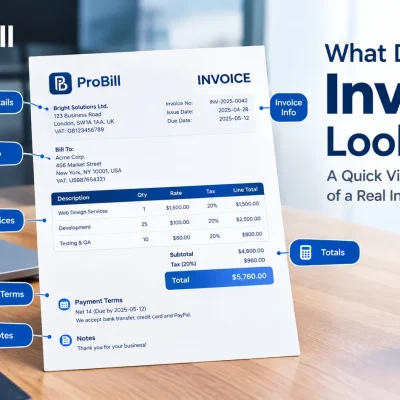
Clear identification of both your business and your client is fundamental. Include your legal business name, address, and contact details alongside the client’s full name and billing address. Missing or mismatched client info often triggers payment delays. For example, a small web design firm once lost a payment because the client’s company name on the invoice didn’t match their official records. Precision here avoids unnecessary follow-ups.
Unique Invoice Number
Each invoice should carry a distinct number that follows a consistent sequence. Skipping numbers or duplicating them complicates tracking and accounting. A freelancer experienced delayed payments when invoices were duplicated by mistake, causing client confusion. Using a logical numbering system—such as a date-based prefix plus an incrementing number—simplifies reconciliation and audit trails. Assigning a consistent invoice number is also important for keeping your business records organized .
Detailed List of Products or Services
Break down all items or services rendered with clear, specific descriptions, quantities, unit prices, and subtotals. Vague entries, like “services rendered,” increase disputes and payment postponements. For instance, a consultant listing “marketing strategy session – 3 hours” provided clarity that expedited client approvals. Accurate detailing instills confidence and speeds settlements.
Invoice Date and Due Date
The invoice date establishes when the billing period starts; the due date signals when payment is expected. Omitting the due date leads to inconsistent payment timing and potential cash flow issues. A boutique agency learned this after several clients paid late due to ambiguous timing on invoices. Always set and highlight a payment deadline, such as “Due within 30 days of invoice date,” to enforce timely payment.
Payment Terms and Accepted Methods
Defining payment terms—including deadlines, penalties for late payment, and accepted methods (e.g., bank transfer, credit card, PayPal)—removes ambiguity. Many small businesses lose revenue by failing to clearly state this information upfront. A freelance photographer now requires “Net 15 days, 2% late fee” terms and accepts multiple payment methods, reducing overdue accounts by 40%. Clear payment terms also protect you legally if collections become necessary.
For faster preparation of professional invoices that include these essential elements, try our free invoice generator, built for small businesses and freelancers.Small businesses can also create invoices online for free without investing in complex accounting software.
IRS invoice requirements provide authoritative guidance on compliant invoicing practices to avoid tax issues.
Common Mistakes to Avoid When Creating an Invoice for a Small Business
Missing or Incorrect Business Details
Omitting or misstating your business information causes confusion and delays in payment. For instance, missing a registered business address or using an outdated phone number forces clients to seek clarification before processing payment. Always double-check that your legal business name, address, and contact details are accurate and current on each invoice to maintain professionalism and prevent unnecessary back-and-forth.
Ambiguous Descriptions
Vague service or product descriptions lead to client confusion and payment delays. Labeling an entry merely as “consultation” can generate disputes over what was actually delivered. A freelance copywriter, for example, resolved frequent invoice challenges by specifying “SEO content creation – 5,000 words,” which clarified scope and shortened approval time. Precise descriptions reduce misunderstandings and speed up your cash flow.
Wrong Calculations
Math errors undermine client trust and slow payments significantly. A common trap is manually adding line items or tax amounts incorrectly—a small retailer once faced a delayed payment because of a sales tax miscalculation. Use automation tools or double-check totals before sending. This vigilance stops clients from hesitating or questioning the invoice’s validity and prevents repeated corrections.
Unclear Payment Terms
Most invoice disputes stem from missing or ambiguous payment terms. Without clear deadlines or penalty details, clients often delay payment unintentionally. A freelance photographer who switched to explicitly stating “Net 15 days, 2% late fee” noticed a sharp decrease in overdue invoices. Stating accepted payment methods also eliminates excuses and speeds transactions.
Ignoring Invoice Numbering
Failing to assign unique, sequential invoice numbers creates chaos in bookkeeping and payment tracking. One entrepreneur lost track of multiple unpaid invoices because they reused numbers, confusing clients and accountants alike. A consistent, logical numbering system is essential to avoid missed payments and facilitate easy reconciliation. Automating invoice numbering is the easiest way to prevent this common mistake.
Each of these errors prolongs the time it takes to get paid and increases administrative headaches. Avoid these pitfalls to keep your invoicing process smooth and professional.
For error-free invoice creation, consider using a free invoice generator that automates numbering, calculations, and formatting, reducing common mistakes dramatically.
Tips for Creating Invoices Faster and More Professionally for Your Small Business
Use Pre-Built Invoice Templates
Pre-built templates save time by providing a ready-made structure with professional designs and essential fields. A freelance photographer switched from crafting invoices in Word every month to using templates, reducing prep time by over 50%. Templates prevent format inconsistencies and reassure clients with a polished appearance, making them invaluable for how to create an invoice for business use efficiently.
Automate Recurring Invoices
Recurring invoices are a major productivity booster for businesses with repeat clients or subscriptions. Automating this process eliminates manual entry and cuts errors. For instance, a coaching startup automated monthly billing, which freed up staff to focus on client engagement instead of invoicing. Automation also improves cash flow predictability by sending invoices on schedule without delays.
Keep Client Data Organized
Maintaining an organized client database accelerates invoice creation and reduces mistakes. Businesses with well-kept records avoid repeated manual input, speeding up how to create an invoice for your business. A small marketing agency noticed that standardized client profiles in their system cut invoice errors by 30% and sped up approvals due to accuracy in contact and payment details.
Double-Check Before Sending
Rushing to send an invoice invites costly errors—miscalculations, wrong client info, or missing payment terms. A freelance graphic designer lost a payment because of a typo in the email address, forcing a resend and delaying receipt by weeks. Always review each invoice critically or use proofreading checklists before delivery to maintain professionalism and ensure timely payments.
Leverage Mobile Invoicing Apps
Mobile invoicing apps allow invoice creation anywhere, crucial for freelancers and small businesses frequently on the move. A delivery service owner used mobile apps to invoice immediately after each job, accelerating payment cycles by up to 20%. Mobile tools also sync with desktop systems, ensuring comprehensive invoice tracking and easier management of how to create an invoice for a small business on the go.
For even faster and more professional invoice creation, consider our free invoice generator, which combines templates, automation, and mobile access in one tool.
Invoice Templates and Examples for Small Business Invoicing
Simple Invoice Template Download
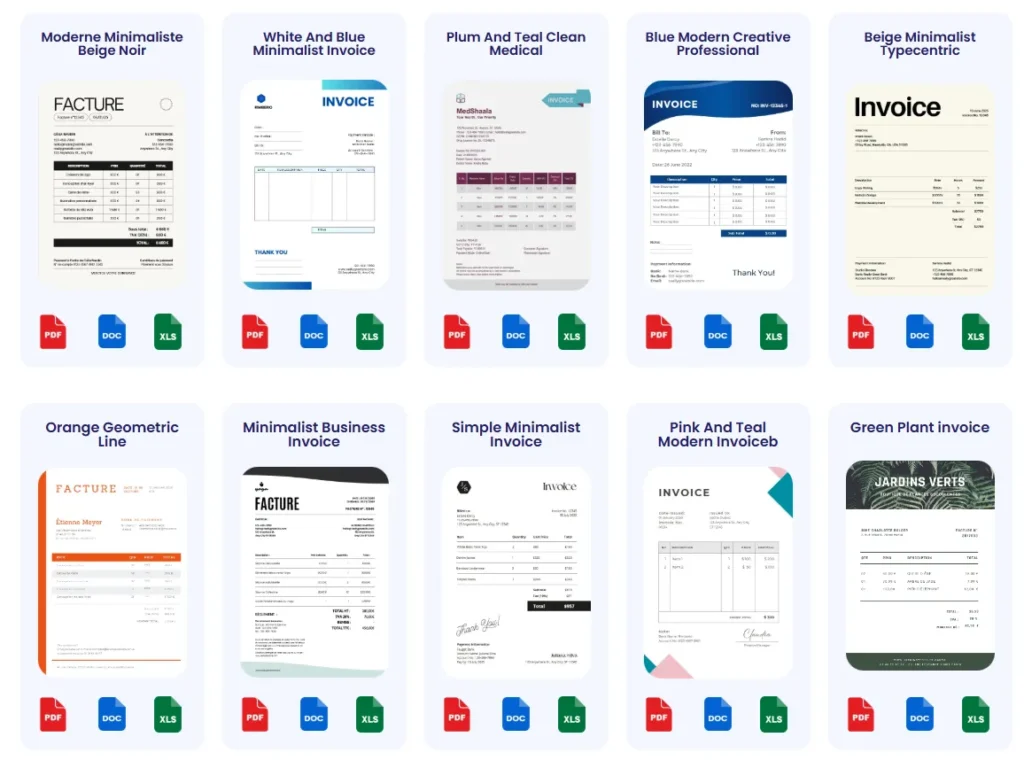
A straightforward invoice template focuses on clarity: business and client info, itemized list, totals, and payment terms. Freelancers appreciate simple designs for easy customization without distraction. For example, a solo consultant used a minimal template to speed billing while maintaining professionalism, avoiding complex setups. Downloadable simple templates reduce trial-and-error and eliminate formatting guesswork. For quick access, see our invoice templates to get started immediately.
Service-Based Invoice Template
Invoices for service providers must highlight labor hours, rates, and service descriptions. Ambiguity hurts payments; clients want to see exactly what they’re paying for. A graphic designer billing by project milestones uses service-based templates that include sections for hourly rates, task descriptions, and progress billing. These templates organize detailed entries while keeping layout neat, improving approval speed. Using tailored templates tailored to service invoicing minimizes client disputes.
Product Sales Invoice Template
Invoicing physical goods demands clear fields for SKU numbers, quantities, unit prices, and shipping costs. A small retailer lost time reconciling invoices lacking proper product descriptions and shipment fees. Product sales templates separate product lines and calculate totals clearly, which simplifies client verification and inventory tracking. Such templates also include tax rates per item, avoiding manual tax calculations and errors—a frequent source of delays in payment processing.
How to Customize Invoice Templates
Customizing invoice templates to your branding and business needs strengthens client trust and reinforces professionalism. Adding your logo, color scheme, and consistent fonts distinguishes your invoices from competitors’. For example, a freelance writer added brand colors and payment instructions to eliminate confusion. Most templates allow quick edits—adjusting fields or adding tax identification numbers ensures compliance. To streamline this, consider tools that combine templates with customization, such as our free invoice generator, which supports branding personalization while simplifying how to create an invoice for your small business. A well-structured invoice template can help small businesses save time and maintain consistent invoices.
By adopting tailored templates, small businesses avoid common pitfalls like vague descriptions or missing legal info, accelerating payments and reducing administrative overhead.
Frequently Asked Questions About How to Create an Invoice for a Small Business
What information is mandatory when creating an invoice for my business?
Include your business name, contact details, unique invoice number, date, client information, detailed product or service descriptions, prices, tax calculations, and clear payment terms. Missing any of these can delay payments or cause disputes. For example, omitting tax details often leads to compliance issues or audits.
How do I choose the right invoice format for my small business?
PDF is the most secure and professional format since it prevents edits after sending. Word or Excel suits businesses needing frequent customization but risks formatting errors. Small service companies often combine detailed line items with clear totals in their layout to boost client clarity and speed approvals.
How can I make sure my invoice looks professional?
Use consistent fonts, your logo, structured sections, and clear payment instructions. Avoid clutter or vague descriptions. A freelance designer once transformed slow-paying clients by simply improving invoice readability and adding branded headers, which reduced client questions by 40%.
What are the best payment terms to include in a small business invoice?
Specify clear due dates (e.g., “Net 30”) and late payment penalties to prevent delays. Include accepted payment methods such as bank transfer, credit card, or PayPal. Freelancers who implemented “Net 15 days, 2% late fee” terms cut overdue payments by nearly half.
How can I avoid common invoicing mistakes?
Double-check business and client details, use precise product descriptions, verify calculations, clarify payment terms, and maintain a consistent invoice numbering system. Automating these steps with tools reduces errors and speeds payment cycles.
What is the easiest way to create invoices quickly for multiple clients?
Recurring invoices and client data organization save significant time. Automation eliminates repeated manual entry and reduces errors. Using online tools or mobile apps accelerates invoice creation, especially when handling many clients regularly.
Are there legal requirements my invoices must meet?
Invoices should comply with your country’s tax laws including proper tax calculations and invoice numbering. For U.S. businesses, following IRS invoice requirements avoids costly errors and audits.
Can I customize invoice templates for my business branding?
Yes, adding logos, brand colors, and consistent fonts enhances professionalism and client trust. Many invoice generators offer easy template customization without technical skill, simplifying how to create an invoice for your business that aligns with your brand identity.
What tools can help me create invoices without technical skills?
Online invoice generators and mobile invoicing apps automate formatting, calculations, client management, and payment tracking. These tools suit freelancers and small business owners wanting fast, polished invoices without software expertise.
How do I track unpaid invoices efficiently?
Use invoice management features in invoicing tools that send reminders and monitor payment status. Manual tracking often leads to missed follow-ups; automation ensures timely collection efforts and preserves cash flow.
For practical invoice creation and simplified management, explore our free invoice generator designed for small businesses seeking fast, professional invoicing solutions.
Try Probill to Create Invoices for Your Small Business Faster
Features of Probill Invoice Generator
Probill offers a straightforward interface designed for freelancers and small business owners who struggle with invoice complexity. It supports automatic invoice numbering, multi-currency handling, and real-time tax calculations—features often missing in basic tools. A solo consultant praised Probill for its seamless client management and PDF export, which eliminated manual assembly and formatting errors. These capabilities reduce the time spent figuring out how to create an invoice for your business and focus more on core activities.
How Probill Simplifies Invoice Creation
Probill’s workflow guides users from inputting business and client details to selecting products or services with predefined price lists—minimizing repetitive typing. Its built-in payment tracking flags overdue invoices, making follow-up effortless. For example, a small digital marketing agency cut invoice disputes by standardizing terms and templates through Probill, accelerating payments. The tool is accessible from any browser, removing the learning curve associated with complex accounting software and answering the common how to create an invoice for a company question with simplicity.
Download the Probill Mobile Invoicing App
On-the-go invoicing becomes painless with the Probill mobile app. Service providers, such as photographers or handymen, can create and send invoices immediately after job completion, significantly improving cash flow. The app syncs automatically with the web platform, ensuring no data loss or duplication. Entrepreneurs who frequently travel reported up to 30% faster invoice processing times, simply by using Probill’s mobile features. For reliable, mobile-friendly how to create an invoice for my business solutions, download the app and stay connected to your invoicing anytime.
For fast, professional invoice creation tailored to small businesses, try the free invoice generator from Probill and experience its ease firsthand.