Skip to content
Introduction: Common Delays and Mistakes in Invoice Creation
Manually creating invoices often leads to common delays caused by repetitive data entry and overlooked fields. Freelancers and small business owners frequently struggle with inconsistent layouts and missing payment terms, which slow down the entire billing process. Using an invoice generator page helps eliminate these issues by offering standardized templates that auto-fill client details and calculate totals automatically. This reduces human error and speeds up invoice creation, making it much easier to create invoice online free without sacrificing professionalism or accuracy. The streamlined workflow from such tools sharply cuts down time wasted on corrections and formatting adjustments.If you need a complete overview of the invoicing process, start with this guide on how to create invoices.
Quick Answer: How to Create Invoices Faster and Error-Free
The fastest way to create invoice online free and error-free is by using an invoice generator page. This tool eliminates manual entry errors by auto-filling saved client and company information, calculating totals, taxes, and discounts instantly. For example, a freelancer who uses such a tool can generate consistent, professional invoices in less than five minutes instead of hours. The automation also reduces costly mistakes like wrong billing details or missing payment terms, which are frequent in hand-crafted invoices.
Experience shows that relying on an online invoice creator not only improves accuracy but accelerates the entire billing cycle by simplifying creation, review, and delivery—all vital for cash flow. For a practical solution, try the free invoice generator that integrates these time-saving benefits on a simple platform.
This approach addresses core challenges freelancers and small business owners face when they create invoices free and want reliable results without delays or errors. Using these digital tools is essential to keep invoicing both fast and flawless. Starting with an invoice template can save time and give your invoices a consistent structure.
Step-by-Step Guide to Creating Invoices Efficiently
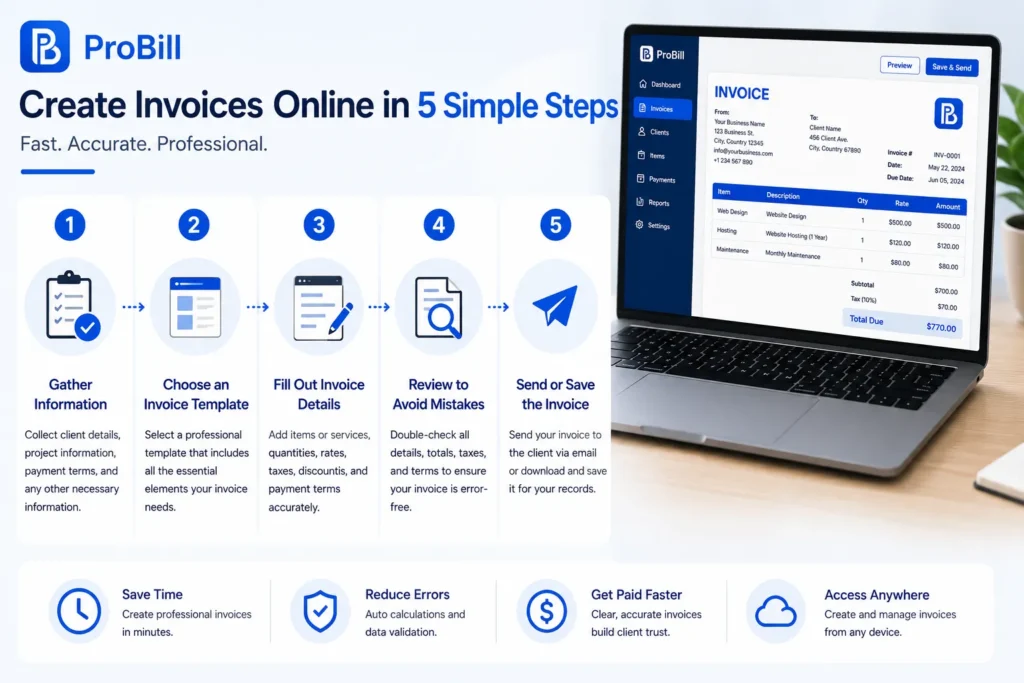
Step 1: Gather Necessary Information
A major bottleneck in invoicing is jumping in without full details. Collect client name, address, contact info, project scope, delivery dates, and agreed payment terms upfront. Consider a small business owner who once delayed invoicing repeatedly due to chasing project specs and payment methods post-completion. Organizing all this data before you create invoice online free minimizes errors and accelerates the whole process. It’s faster to build accurate invoices the first time than to fix them later.
Step 2: Choose an Invoice Template
Choosing a consistent template avoids confusion and brand inconsistency. For example, freelancers who use generic blank documents often miss essential fields or duplicate information, causing payment delays. Selecting professional invoice templates ensures all legal and bus
iness elements appear correctly every time. Using vetted invoice templates helps you create a free invoice online that looks official, improving client trust while reducing the need for corrections.
Step 3: Fill Out Invoice Details Accurately
Errors here cause the most disruptions. Mismatched invoice numbers or incorrect tax rates lead to disputes and slow payments. For instance, a freelancer once lost payment because the invoice did not reflect the correct project phase and included a wrong hourly rate. When you create invoice for free with automated tools, these validations happen in real time, catching misspellings, incorrect quantities, or missing tax information. Accurate data is crucial to get paid on time and to maintain clean financial records.
Step 4: Review to Avoid Mistakes
Skipping the review phase might save minutes but costs days in follow-ups. An entrepreneur who neglected final checks once sent an invoice with outdated payment terms, requiring a re-issue and fresh client approval. Reviewing ensures invoice numbers follow sequence, totals add correctly, and tax information complies with regulations. This last quality control protects you from claims of incorrect billing and accelerates client approval.
Step 5: Send or Save the Invoice
How you deliver invoices shapes your payment timeline. Emailing a PDF with a clear subject line and a polite, professional message usually speeds recognition. A scenario: a consultant emailed the invoice but never confirmed receipt, resulting in a two-week payment delay. Saving a digital copy organized by client and date enables quick retrieval and prompt reminders if payments lag. Being able to create invoice online free and send it instantly reduces administrative drag and speeds cash flow for freelancers and small businesses alike.
For those seeking faster invoicing, this step-by-step workflow aligns perfectly with tools like the free invoice generator that simplify compliance, accuracy, and delivery. Understanding this process is key when creating invoices online to avoid needless delays. If you want to speed up invoice creation, AI-powered tools can help generate an invoice from simple instructions.
Methods and Options to Streamline Invoice Creation
Manual Creation vs Using Templates
Manual invoice creation demands drafting each document from scratch, increasing the risk of inconsistent formatting and forgotten details. For example, a self-employed consultant who manually creates invoices often wastes time aligning fields and recalculating totals. In contrast, using pre-designed invoice templates standardizes layout and includes necessary sections upfront, reducing errors and speeding up the process. While templates require an initial setup, their reuse slashes time spent per invoice, making them ideal to create invoices free without sacrificing professionalism or accuracy.
Automated Invoice Generators
Automated invoice generators transform tedious steps into clicks. Consider a freelancer juggling multiple clients who used a generator to auto-populate saved client data and instantly calculate taxes and totals. This automation eliminated repetitive entry errors and reduced invoice creation time by over 50%. These tools also often include features like PDF export and payment tracking integration, which further accelerates the billing cycle. Choosing to create invoice online free via such generators shifts focus from formatting to business, improving overall efficiency.
Benefits of Using the Invoice Generator Page
A dedicated invoice generator page, like the one offered at Probill, consolidates speed and accuracy in one platform. Small business owners using this tool benefit from an intuitive interface that requires no technical skills, enabling them to create a free invoice online quickly, regardless of device. Features include instant validation of billing info, real-time tax calculations, and easy client management. For example, a freelance designer saved hours weekly by instantly generating professional invoices that met client expectations. Utilizing this streamlined tool ensures consistent formatting and reduces risks of common errors that slow down manual processes. Explore the free invoice generator to experience faster and more reliable invoice creation.
Key Elements Required When You Create Invoice Online Free
Essential Invoice Information to Include
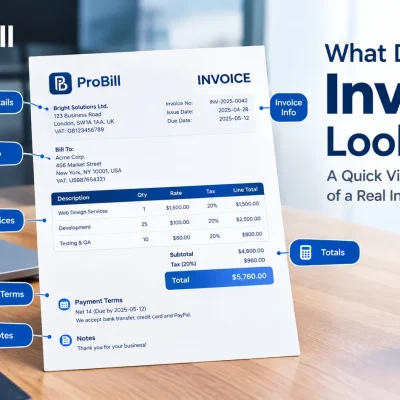
A professional invoice must contain key details to ensure clarity and prompt payment. Include:
- Seller’s full business name, address, and contact information
- Buyer’s name and valid contact details
- A unique invoice number and invoice date for tracking
- Clear payment terms, including due date and accepted payment methods
- Detailed list of goods or services with quantities and prices
- Applicable taxes or discounts clearly stated
- Total amount due prominently displayed
Freelancers often overlook payment terms, causing delays. Small businesses miss tax ID or business registration info, raising compliance concerns. Skipping any of these elements risks disputes and late payments.
Formatting Tips for Professional Appearance
How an invoice looks impacts credibility. Use clean layouts with well-defined sections and ample white space to enhance readability. Choose standard fonts and limit color use to branding accents. Align numerical data right and item descriptions left to avoid confusion.
Consistent branding with your logo and business colors reinforces professionalism without overcomplicating the design. Overly busy or cluttered layouts create distrust and can obscure crucial information.
For faster invoice creation that balances clarity and appearance, consider starting with free invoice templates tailored for online use. This ensures you never miss vital sections while maintaining a polished look that clients recognize instantly.
For compliance with invoice requirements, businesses in the U.S. can refer to IRS invoice guidelines to verify mandatory elements are present.
Common Mistakes to Avoid When You Create Invoice Online Free
Missing Important Details
Omitting critical invoice components is the top cause of payment delays. Freelancers frequently skip including payment terms or unique invoice numbers, leading to client confusion. Small businesses often forget tax identification numbers, which can cause compliance issues. Ensure every invoice has your business and client contact info, accurate dates, and explicit payment instructions. Without these, your free invoice create efforts risk rejection or prolonged follow-up.
Incorrect Calculations
Calculation errors are common when using free tools or manual methods. Misapplied taxes, overlooked discounts, or wrong totals can cause client distrust and payment disputes. For example, a self-employed consultant once undercharged by not including VAT due to manual calculation mistakes, delaying payment clearance. Automating calculations—even with free invoice creators—eliminates these risks and secures professional accuracy.
Overcomplicated Layouts
Complex invoice designs detract from clarity and delay payment processing. Overuse of colors, fonts, or excessive information can overwhelm clients and obscure key details like totals or due dates. Small business owners sometimes fill invoices with irrelevant notes or lengthy terms, making them hard to read. Aim for simplicity: a clean, structured layout with essential sections only helps clients review and pay invoices quickly.
Explore free invoice templates designed to keep your invoices clear and professional while creating them free online.
Tips to Create Invoice Online Free Faster and More Accurately
Utilize Templates for Consistency
Templates eliminate guesswork and keep your invoices uniform. Freelancers using a consistent free invoice create template find clients recognize their brand immediately, reducing follow-up questions. Templates embed essential sections, so you never omit critical data like payment terms or invoice numbers. Standardizing layouts also speeds up the process—each new invoice only needs details updated, not format redesigned. For a quick start, explore free invoice templates tailored for online invoice creation to combine speed with professionalism.
Automate Calculations and Data Entry
Manual math errors in taxes or totals create delays and disputes. Automating calculations saves time and ensures accuracy. Many free online invoice tools support automatic tax, discount, and subtotal computations. For example, a small business owner who switched to a free online invoice generator reduced billing errors by 90%, speeding payments. Data entry automation, like saving client profiles, cuts repetition for frequent customers. This prevents errors such as invoicing incorrect addresses or missing billing details—common issues when creating invoices free manually.
Keep Client Details Handy
Missing or incorrect client information causes invoice rejection or payment delays. Organize client data in a contact list or secure CRM tool to access instantly while creating invoices free online. Entrepreneurs juggling multiple clients benefit from storing addresses, payment terms, and contact emails in one place to avoid retyping mistakes. For instance, a consultant who regularly updated client details in their invoice tool cut invoice processing time in half. Quick retrieval reduces stress during busy billing cycles and prevents costly mis-invoicing.
Try the free invoice generator to combine easy templates, automated calculations, and client management in one lightweight solution designed for freelancers and small business owners.
For official guidelines on invoice components and requirements, especially if operating in the U.S., consult the IRS invoice requirements.
Tools and Templates to Help You Create Invoices Quickly
Best Invoice Templates for Faster Entry
Pre-made invoice templates dramatically cut down the time needed to create an invoice for free. Instead of starting from scratch with each billing cycle, you can rely on formats that already include essential sections like client details, itemized services, and payment terms. For example, a small business owner who switched to a professional template reduced invoice preparation time by nearly 30%. Good templates enforce consistency, which means fewer corrections later and faster client approval. Using vetted invoice templates helps anyone create free invoice online with minimal fuss while retaining a professional look.
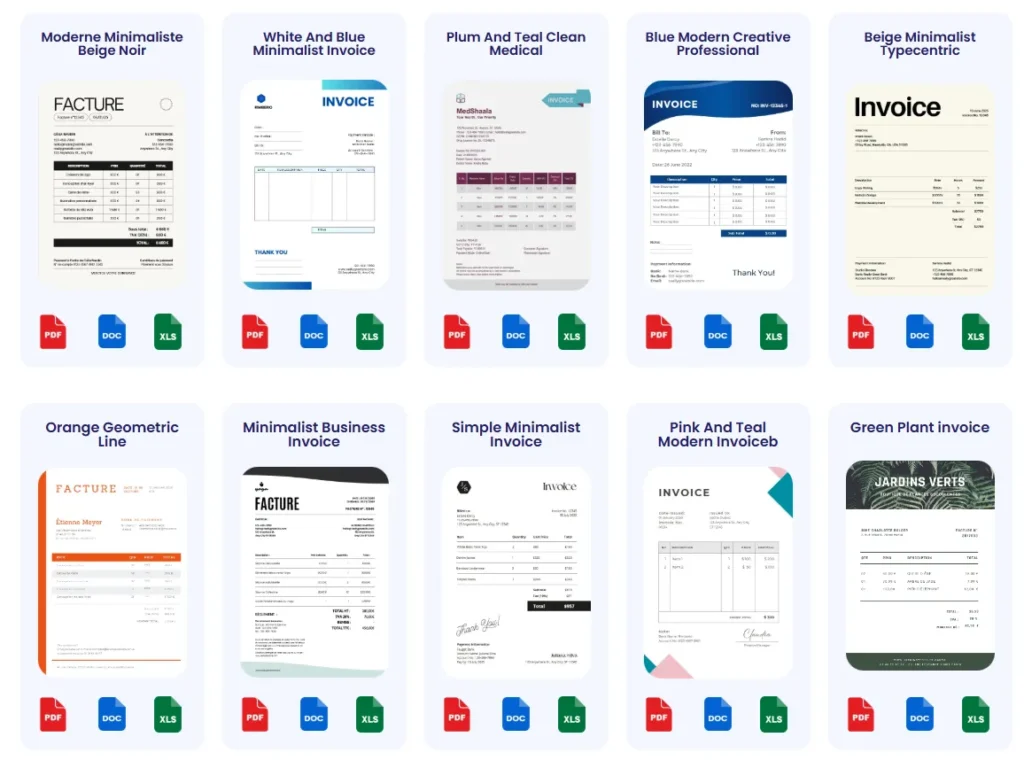
Invoice Generator Page Features and Benefits
Invoice generator pages consolidate the entire process into a simple, accessible interface. Key features often include automatic client data entry, instant tax and total calculations, and saving past invoices for reuse. A freelancer juggling multiple projects found generating invoices faster by using an online tool that exports directly to PDF and tracks payments. This eliminated manual math errors and reduced follow-up emails about missing details. Such pages enable users to create online invoice free from any device, without technical skills. To see these benefits firsthand, test a free invoice generator that balances speed, accuracy, and ease of use perfectly.
Leveraging professionally designed templates combined with flexible invoice generator pages creates a powerful duo for anyone creating invoices for free online. This approach tackles the main bottlenecks of formatting, accuracy, and delivery speed, ensuring you spend your time growing your business rather than fixing invoices. If you work away from your desk, you can also learn how to create invoices directly from your mobile device .
Frequently Asked Questions
What is the easiest way to create an invoice online free?
The easiest way to create an invoice online free is by using an automated invoice generator. These tools provide pre-filled templates and auto-calculate totals and taxes, eliminating manual errors. For example, freelancers save time and maintain professionalism by quickly generating clear, compliant invoices without complex software. Using a reliable online tool streamlines the process, allowing users to create invoices free and send them promptly.
Can I create multiple invoices free without signing up?
Many online invoice generators allow creating invoices free without mandatory registration but may limit how many you can save or track. For instance, a small business owner experimenting with create free invoice online tools found that signing up unlocked bulk invoice creation and client management features, which are essential for ongoing operations. To maximize efficiency, consider platforms that offer both free and paid plans to scale as invoicing needs grow.
Are free invoice templates legally compliant?
Good free invoice templates include fields that fulfill basic legal requirements, such as unique invoice numbers, vendor and client details, tax information, and payment terms. However, compliance depends on jurisdiction-specific rules. For example, omitting a VAT number in the EU can invalidate the invoice. Using vetted invoice templates from trusted sources or online generators reduces compliance risks when you create online invoice free.
How can I ensure my free invoice format looks professional?
Consistency in font, layout, and inclusion of your logo or company branding signals professionalism. Freelancers who rely on generic word processors often miss this aspect and appear less credible. Selecting well-designed templates on an invoice templates page helps maintain a polished appearance consistently while creating free invoices online. This improves client trust and speeds payment approval.
Is it possible to create an invoice free online with tax calculations included?
Yes, many free online invoice generators automatically calculate relevant taxes based on user input. This feature saves time and reduces errors in manual tax computation. For example, freelancers who create invoice free online benefit from automated VAT and sales tax addition, ensuring accuracy and compliance. This reduces follow-ups and speeds up payments for both parties.
How do I send a free online invoice to clients effectively?
Emailing invoices as PDFs with clear subject lines and a concise message works best. A freelance consultant once delayed getting paid because the invoice went unnoticed in a bulky inbox. Using integrated send features in invoice generators or apps also tracks delivery and lets you know when a client views the invoice. This approach speeds reconciliation and minimizes lost documents.
Can I save and reuse invoices for free?
Many online platforms allow you to save invoice drafts and duplicate previous invoices for recurring clients at no cost. This is crucial for freelancers issuing regular bills without re-entering all details each time. One entrepreneur noted that create invoices free with such features cut preparation time by half. Look for tools that offer easy access to past invoices and client profiles to increase efficiency.
What should I do if a client disputes a free invoice I created online?
Keep detailed records of your invoice creation process, including dates, service details, and payment terms. A common resolution used by freelancers is to resend a corrected invoice quickly through the same online platform that generated it, ensuring clear communication. Reliable invoice tools that allow quick editing and re-issuance help resolve disputes without losing valuable time.
For anyone looking to create invoice online free with confidence and speed, leveraging trusted tools and templates is key. To explore reliable forms and save time, consider visiting the invoice templates page. For official requirements related to invoice details and tax compliance, refer to resources like the IRS invoice requirements.
Try a Free Online Invoice Generator Tool
Benefits of Using Probill for Free Invoice Creation
Probill simplifies creating invoices free online by combining a user-friendly interface with essential features tailored for freelancers and small businesses. Its intuitive design eliminates the steep learning curve common with some free invoice create platforms. For example, a freelance writer using Probill reported a 40% faster invoice turnaround compared to manual spreadsheet methods. The tool automates tax calculations, applies consistent formatting, and stores client data to avoid repetitive entry—helping prevent common billing errors and saving valuable time.
Access from Any Device and Export Options
Probill’s cloud-based platform allows creating an online invoice anytime, whether on a desktop, tablet, or smartphone. This accessibility empowers entrepreneurs on the go to generate or send invoices immediately after work completion. Export options include PDF files, which maintain a professional look and prevent unauthorized editing. Unlike many free invoice tools, Probill supports quick export without watermarks and permits multiple file downloads, boosting client trust and accelerating payment cycles.
Link to invoice generator page
Explore the free invoice generator by Probill for a fast, no-frills way to create invoice online free that combines convenience, accuracy, and professional presentation. This platform is designed to streamline your billing process without sacrificing quality or incurring hidden costs.