Skip to content
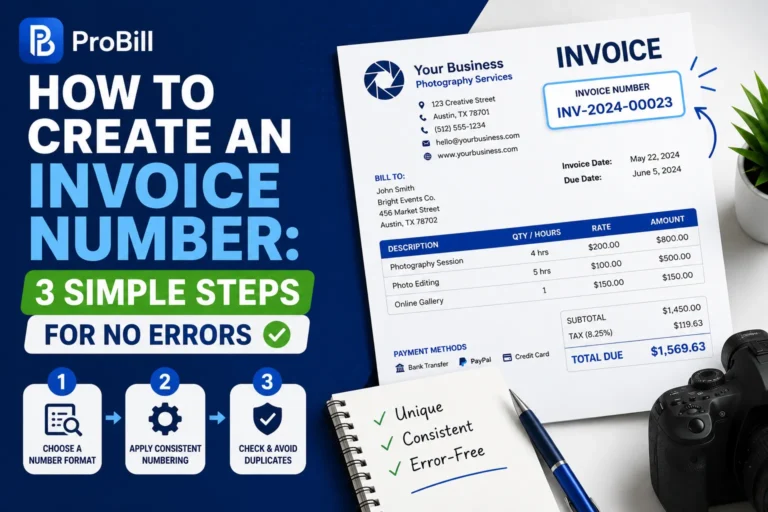
Introduction: Overcoming Delays and Errors When Creating Invoice Numbers
Creating invoice numbers might seem straightforward, but freelancers and small business owners often face unexpected hurdles. Commonly, invoicing gets delayed when numbers are duplicated or formats don’t match system requirements, causing payment hold-ups and client confusion. For example, a graphic designer accidentally sending two invoices with the same number found it difficult to track payments, losing valuable time resolving client disputes.
Invoice numbering errors usually stem from manual processes without consistent tracking or clear standards. Re-entering invoice numbers or relying on memory invites mistakes that ripple through financial records. These inefficiencies can delay cash flow and undermine professionalism.
Recognizing these problems emphasizes the need for streamlined methods to create invoice numbers that are both unique and easy to manage. Starting with a solid approach prevents errors and ensures invoices reach clients promptly. Avoiding such pitfalls improves payment tracking and minimizes administrative headaches for self-employed professionals who juggle multiple tasks. An invoice number is only one part of the process, so see how to create invoices for the complete workflow.
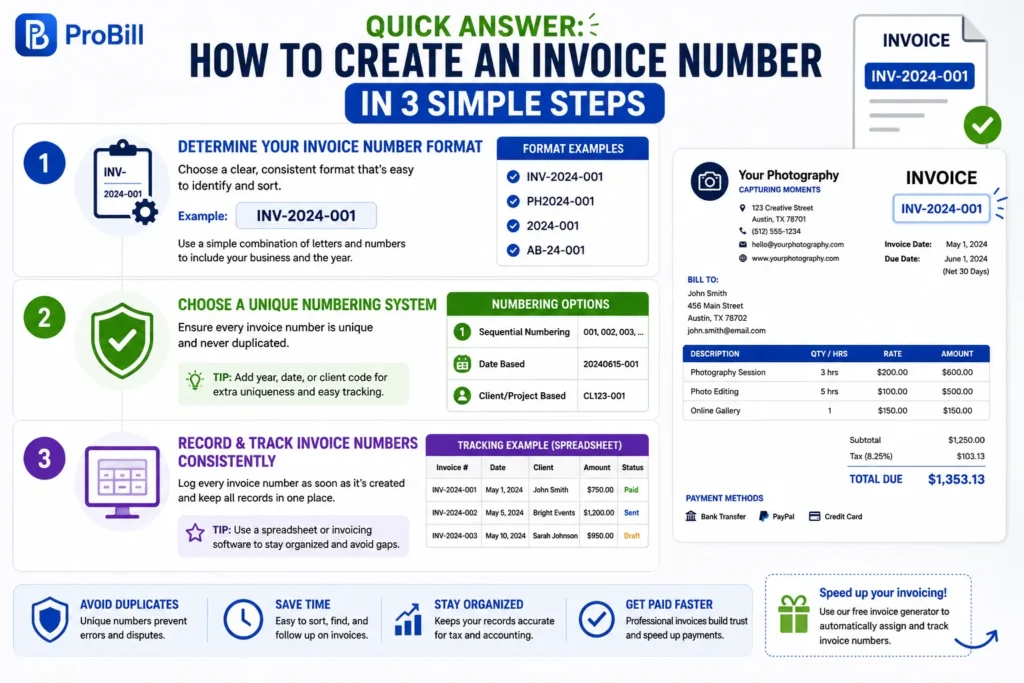
Quick Answer: How to Create an Invoice Number in 3 Simple Steps
Step 1: Determine Your Invoice Number Format
Choosing a clear, consistent invoice number format upfront prevents confusion and mistakes later. Many businesses combine numbers and letters—for example, INV-2024-001. This format makes it easy to identify and sort invoices by year and sequence. Avoid overly complex codes that slow down processing. An effective format balances simplicity with enough detail to distinguish invoices quickly.
For instance, a freelance photographer might use a format like PH2024-001, where “PH” identifies the business and “2024” the year. This approach cuts down errors and speeds payment follow-up.
Step 2: Choose a Unique Numbering System
How to create a unique invoice number boils down to ensuring no duplicates ever occur. Use either sequential numbering that increments with each invoice, or include elements like date, client code, or project ID for uniqueness.
Sequential numbering is the simplest but risks duplication if records aren’t well maintained. Adding date stamps (e.g., 20240615-001) or client codes (CL123-001) strengthens uniqueness. Avoid random numbers without a tracking system, as they complicate audits and can cause duplicates.
Step 3: Record and Track Invoice Numbers Consistently
Tracking invoice numbers in a single, organized place is critical. Without consistent recording, mistakes multiply and invoice delays increase. Use a dedicated ledger, spreadsheet, or invoicing software to log each invoice number immediately upon creation.
For example, a small business owner using Excel should record invoice numbers in one column and sort by date to spot gaps or duplicates. Consistency in this step safeguards your records and ensures smooth communication with clients and accountants.
For a faster solution, consider using a free invoice generator to automatically assign and track invoice numbers, eliminating manual errors altogether.
How to Create an Invoice Number in Excel Without Mistakes
Setting Up the Invoice Number Column
Start by dedicating a specific column for invoice numbers in your Excel sheet. Label it clearly—something like “Invoice No.” This prevents mixing invoice numbers with other data, which causes confusion. For example, a freelance consultant once placed invoice numbers in different columns per client, leading to duplicate numbers and payment tracking errors. Keeping all invoice numbers in one column makes validation straightforward and spotting errors simple. Freelancers can also benefit from a clear invoice numbering system when billing multiple clients.
Using Formulas to Automate Invoice Numbering
Automate your invoice numbering by using Excel formulas. The simplest method uses a formula like =MAX(A:A)+1 assuming column A holds invoice numbers. This ensures each new invoice number is one higher than the current maximum. Another approach combines date codes plus sequence, for instance: =TEXT(TODAY(),"YYYYMMDD")&"-"&TEXT(COUNTIF(A:A,">0")+1,"000"). This not only sequences invoices but embeds the date, increasing uniqueness.
Avoid manual number entry; it risks duplicates and slows down your workflow. Automation reduces mistakes and speeds invoice creation.
Ensuring Unique and Sequential Numbers in Excel
Maintaining unique, sequential invoice numbers in Excel requires regular checks. Sort the invoice number column ascending to reveal gaps or duplicates. If gaps appear, investigate missing or skipped invoices. A common pitfall is deleting rows with previous invoices, which breaks numbering and can lead to duplicate use later.
One practical tip: lock or protect the invoice number column after entering the formula to prevent accidental changes. Periodically back up your Excel file to avoid loss or corruption of numbering data.
For ease and error-free management, small business owners sometimes transition from Excel to invoicing tools. These tools, like a free invoice generator, automatically assign unique invoice numbers and sync your records without manual intervention.
Note: To ensure compliance and professional invoicing, verify invoice numbering standards relevant to your tax jurisdiction, such as those detailed by authorities like the IRS invoice requirements. This adds an important layer of accuracy and legality to your record-keeping.
Methods to Create a Unique Invoice Number for Your Business
Incorporating Date and Client Codes
Adding dates and client identifiers to invoice numbers is a reliable way to ensure uniqueness and quick reference. For example, a small graphic design firm might assign invoice numbers like 20240612-CL789, where “20240612” is the date and “CL789” represents the client code. This method drastically reduces duplication risk because each element—date and client—narrows down the invoice’s identity.
Combining these codes also helps when searching or sorting invoices by client or date, improving payment tracking. However, be cautious not to make codes too long; excessive length can complicate record-keeping, especially for freelancers managing many clients. Small businesses can use a consistent numbering system to keep invoices easier to organize
Sequential Numbering vs Randomized Numbers
Sequential numbering is the most straightforward system. It offers clear progression (001, 002, 003), making it easy to detect missing or duplicate invoices. Freelancers often prefer this method due to its simplicity and ease of audit. Yet, without careful tracking, gaps or duplications may occur if invoices are deleted or created offline.
Randomized invoice numbers—such as INV-9F4B2—tend to complicate invoice management but improve confidentiality and reduce predictability, which some businesses prefer for security reasons. This approach requires dependable software or a robust manual system to ensure no repeats.
Choosing between sequential and randomized numbers hinges on your business type and operational needs. For most small business owners, sequential numbering combined with other unique elements (like dates) offers the best balance of clarity and uniqueness.
Using Prefixes and Suffixes for Clarity
Prefixes and suffixes provide immediate context to invoice numbers and help categorize invoices by year, department, or invoice type. For instance, prefixing with “INV-“ makes it instantly clear that the string is an invoice number, while adding a suffix like “-SRV” could indicate a service-type invoice.
A freelance consultant, for example, might use INV-2024-045-SRV for service invoices and INV-2024-045-PRO for product sales. This distinction mitigates confusion in bookkeeping and instills professionalism in documents.
Be consistent with the placement and form of prefixes/suffixes to avoid misinterpretation. When well-structured, this method enhances your invoice system’s scalability and compliance.
For streamlined creation of unique invoice numbers using prefixes and other elements, freelancers and small business owners can explore tools like Probill’s free invoice generator that simplify assigning and tracking invoice numbers automatically.
Common Mistakes When Creating Invoice Numbers and How to Avoid Them
Skipping Number Verification
Overlooking the step to verify invoice numbers before sending is a common source of errors. Duplicate invoice numbers can trigger payment rejections or disputes. For instance, a freelance writer once sent an invoice with a reused number that caused client confusion and stalled the payment process by weeks. Always cross-check new invoice numbers against your existing records before finalizing. Regular audits—such as weekly reviews of your invoice log—catch mistakes early and prevent costly administrative back-and-forths.
Using Non-Standard Formats
Non-standard invoice numbering formats increase the chance of misfiling and slow down accounting workflows. Complex, inconsistent codes make it harder for clients and software systems to recognize and sort invoices. A small business owner who mixed formats (e.g., INV-001; 2024/002; 03-2024-INV) reported frequent delays reconciling payments. Adopt a consistent format that aligns with your bookkeeping system, such as “INV-YYYY-NNN” or “ClientCode-YYYYMMDD-Seq.” This clarity speeds up verification and reduces errors in payment tracking.
Failing to Backup Invoice Records
Loss of invoice numbering records due to lack of backups can cripple your accounts receivable management. One solopreneur lost months of invoice data when their spreadsheet file corrupted, making it impossible to track outstanding payments accurately. Protect your invoice number records by backing up regularly using cloud storage or automated invoicing tools. Using software like a free invoice generator helps maintain secure, synchronized records accessible across devices, minimizing risks of data loss and manual errors.
For best practices on legal compliance, refer to official IRS invoice requirements.
Tips for Maintaining Accurate and Professional Invoice Number Records
Regularly Update Your Invoice Logs
Invoice logs left unattended grow inaccurate fast. Skipping routine updates leads to overlooked gaps and duplicates, which disrupt payment tracking. A freelance copywriter found that monthly log reviews uncovered missing invoice numbers from canceled projects, allowing her to adjust numbering sequences before billing clients. Schedule consistent intervals—weekly or monthly—depending on invoice volume, to update and verify logs. This prevents errors and maintains a reliable audit trail for every invoice number issued. Independent contractors should similarly use unique invoice numbers for each client invoice .
Standardize Numbering Across All Templates
Inconsistent invoice numbering formats across templates cause confusion and bookkeeping errors. For instance, a small business owner who switched between three templates ended up with invoice numbers formatted as INV-123, 123-INV, and 2024/123, complicating accounting reconciliation. Enforce one clear standard format for every invoice template you use. This promotes professional appearance and ensures your records and client communications remain uniform, simplifying audits and payment follow-up.
Utilize Invoice Management Tools for Automation
Manual numbering invites human error and slows invoice processing. Automation through invoice management tools drastically reduces these risks. For example, a self-employed consultant adopted an online invoice generator that auto-assigned sequential numbers, instantly updated logs, and prevented duplicates. This streamlined her billing workflow and minimized payment delays. Using automated tools, like a free invoice generator, frees up time to focus on client work while maintaining error-free, professional invoice number records accessible from any device.
Invoice Number Templates and Tools to Simplify Creation
Free Invoice Number Excel Templates
Excel templates tailored for invoice numbering accelerate setup and reduce errors. Many templates come pre-designed with invoice number columns and built-in formulas, allowing immediate use without complex customization. For instance, a freelance writer once saved hours by using a template that automatically incremented invoice numbers, avoiding manual entry mistakes. These templates also offer a consistent format that helps maintain professionalism.
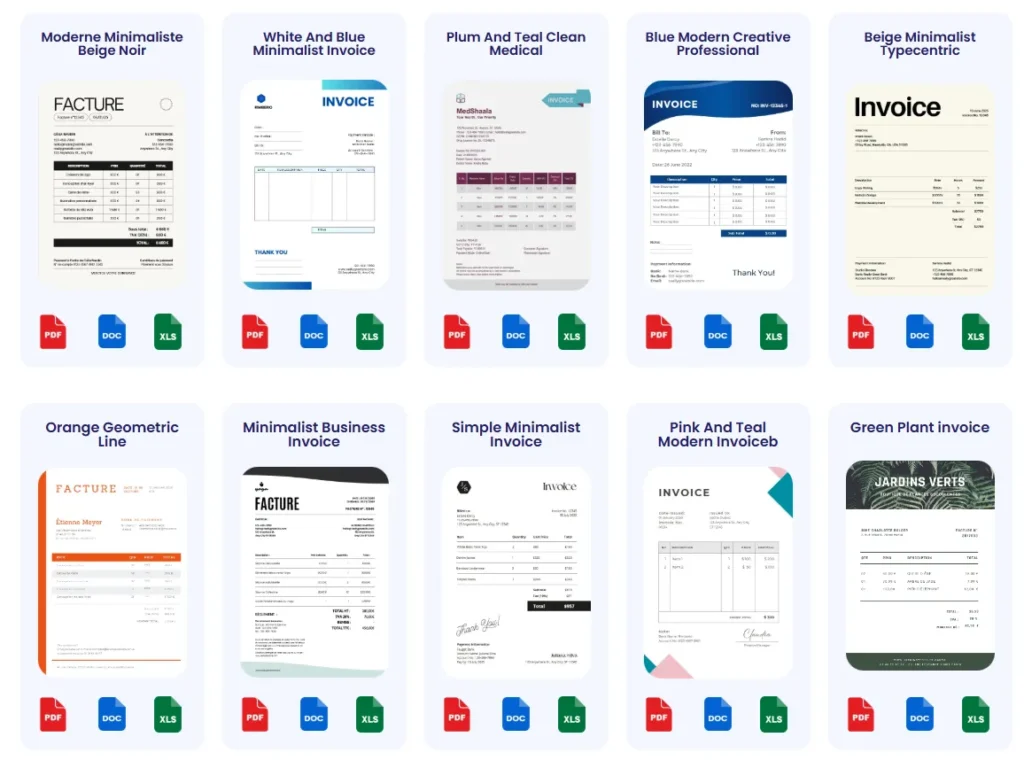
Downloading templates from specialized sources means the layouts often match standard invoice requirements and include placeholders for client info and payment terms, streamlining your workflow.
Using Online Invoice Number Generators
Online invoice number generators provide an effortless way to create unique, sequential invoice numbers without manual input. Unlike static spreadsheets, these tools, such as Probill’s free invoice generator, automate numbering, eliminate duplicates, and integrate with invoice creation.
For example, a small consulting firm transitioned to an online generator and reduced billing errors by 90%, freeing up time spent on administrative tasks. The cloud-based nature lets users access and manage invoices from any device, improving collaboration and record-keeping.
These generators often include options to customize prefixes, date stamps, and client codes, allowing fully tailored invoice numbers that are compliant and clear.
Benefits of Invoice Management Software
Invoice management software combines number generation with comprehensive invoicing features like PDF export, client tracking, and payment reminders. Small business owners using these systems notice faster invoice creation cycles and improved accuracy, as all data syncs automatically.
A freelance graphic designer using such software mentioned how automatic numbering removed the stress of keeping sequential records, especially during busy periods with multiple simultaneous projects.
Beyond numbering, these tools provide audit trails and backup options, addressing common risks associated with invoice records loss or format inconsistency. Many offer free tiers or trials, making them accessible for startups aiming to professionalize their billing without upfront investment.
For those wanting premium features, scalable options allow growth without changing platforms, ensuring invoice numbers remain accurate as business complexity increases.
For quick access to invoice templates optimized for easy number entry, visit the invoice templates page.
Frequently Asked Questions About How to Create an Invoice Number
What is the best way to create an invoice number that prevents duplicates?
The best approach combines sequential numbering with date stamps or client codes. For example, using a format like 20240615-001 ensures each invoice is unique by date and sequence. Avoid manual entry without a tracking system, as duplicates often occur this way. Automating the process, such as with an online invoice generator, improves consistency and cuts errors drastically.
How can I create an invoice number in Excel?
Set up a dedicated invoice number column and use a formula like =MAX(A:A)+1 to increment numbers automatically. To increase uniqueness, embed the date using a formula like =TEXT(TODAY(),"YYYYMMDD")&"-"&TEXT(COUNTIF(A:A,">0")+1,"000"). Lock the column to avoid accidental edits, and regularly check for gaps or duplicates to maintain accuracy.
Why should I include prefixes or suffixes in invoice numbers?
Prefixes and suffixes clarify invoice context immediately. For example, prefixing with “INV-” identifies the number as an invoice, while suffixes like “-SRV” or “-PRO” separate service and product invoices. This helps organize invoices by type or department and prevents mix-ups in accounting, especially for businesses handling various kinds of transactions.
What are common mistakes to avoid when creating invoice numbers?
Skip skipping verification Sending invoice; duplicate numbers cause payment delays. Avoid switching formats mid-way as inconsistency confuses clients and accountants. Lastly, never neglect backing up your invoice records; losing data can disrupt your entire payment process. Regular audits and secure backups safeguard against these pitfalls.
How do I maintain consistent invoice numbering across multiple templates?
Standardize your invoice number format and apply it to all templates you use. Changing formats between templates causes confusion and makes audits difficult. For consistency, choose a single numbering pattern that suits all invoice types, then enforce it strictly. This promotes professionalism and smooth bookkeeping, especially as business scales.
Can invoice numbering be automated to save time?
Automation through invoice management tools or online generators ensures unique, sequential invoice numbers without manual effort. This reduces human error, speeds up billing, and centralizes tracking. Many tools also allow customization with date stamps or client codes, enabling professional and compliant invoicing without spreadsheet hassles.
How is an invoice number related to legal and tax requirements?
Invoice numbers often need to be sequential and unique to meet tax authorities’ rules. For example, the IRS requires clear records for audits and tax returns. Proper numbering prevents penalties and supports transparent financial tracking. For detailed guidelines, consulting official resources such as the IRS invoice requirements is recommended.
Where can I find templates or tools to simplify invoice number creation?
You can use Excel templates designed for invoice numbering or online tools like Probill’s free invoice generator to simplify the process. These options reduce errors and save time by automating number assignment and integrating with invoicing workflows. The invoice templates page offers additional resources optimized for easy number entry.