Skip to content
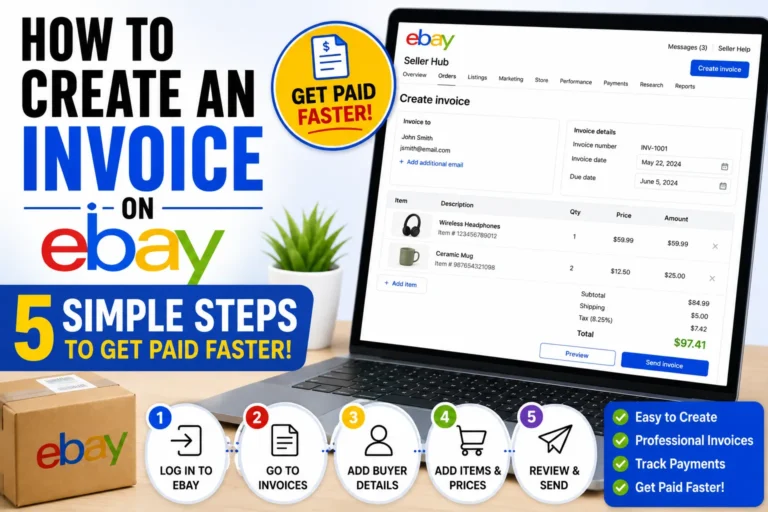
How to Create an Invoice on eBay: Quick Answer
Step 1: Locate the ‘Request Invoice’ Option on eBay
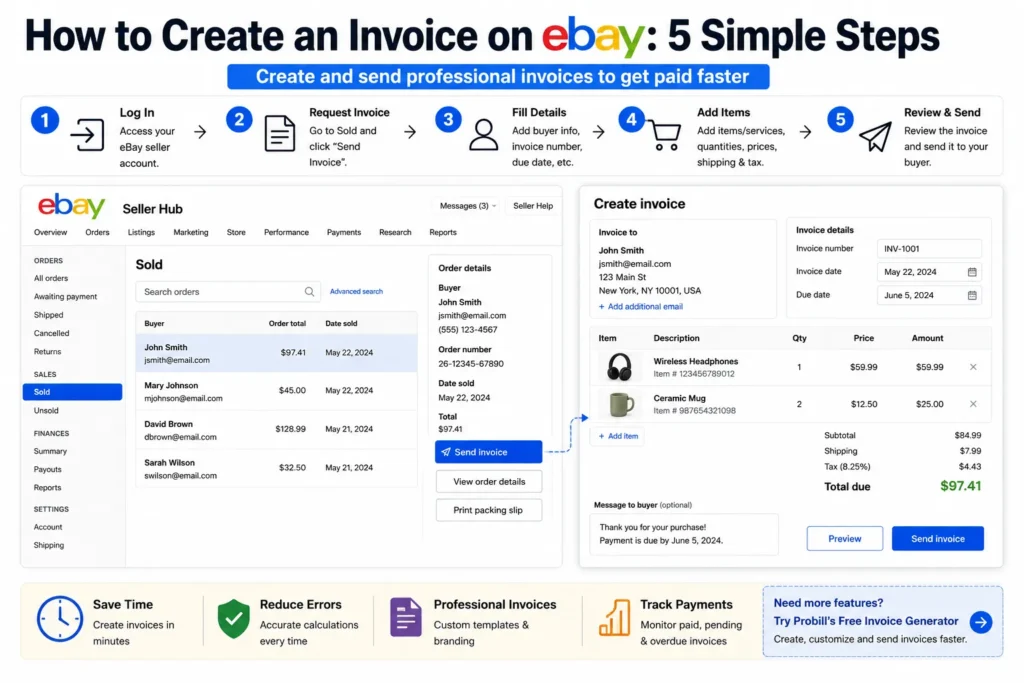
Start by logging into your eBay seller account. Navigate to the “Sold” section under your Seller Hub. Find the specific transaction for which you want to create an invoice. Usually, the “Request Invoice” or “Send Invoice” button appears next to items sold where immediate payment wasn’t made. This option is essential for sellers who need to collect payment after a buyer’s request or when combining multiple items into a single invoice.
Step 2: Fill Out Buyer and Transaction Details
Once you click “Request Invoice,” a form appears requiring buyer details, item description, quantity, and price. Make sure to double-check the buyer’s shipping address and contact information here. Adding accurate transaction details prevents confusion or delays. For example, if a buyer ordered two items with different shipping methods, specify these correctly to avoid disputes.
Step 3: Review and Send the Invoice
Before sending, carefully review the invoice to confirm that all item prices, quantities, shipping fees, and taxes are correct. Mistakes here are a common cause of delayed payments. After verification, send the invoice directly through eBay’s messaging system. This ensures it reaches the buyer securely and keeps the transaction transparent.
Using an Invoice Generator as a Time-Saving Alternative
Creating invoices manually on eBay can become tedious, especially with frequent sales. Using an invoice generator simplifies the process by automating repetitive tasks, such as filling in buyer info or calculating totals with taxes and shipping. This method significantly reduces errors and saves time. For busy freelancers or small business owners selling on eBay, invoice generators offer a reliable shortcut without sacrificing professionalism.
Link to Probill invoice generator page
For a streamlined invoicing process, consider using the Probill free invoice generator. It integrates seamlessly with eBay sales, allowing you to create, customize, and send professional invoices faster while managing client and payment tracking effortlessly. For a general explanation of the invoice creation process, see our guide on how to create invoices.
How to Create an Invoice on eBay: Step-by-Step Guide
Accessing the Invoice Creation Tool in Your Seller Dashboard
Begin by logging into your eBay seller account and navigating to the Seller Hub. From there, head to the “Sold” tab to locate the transaction that requires invoicing. Clicking on the buyer’s order will reveal options including “Send Invoice,” which opens the invoice creation form. Missing this step is common among new sellers, resulting in payment delays.
Entering Item and Price Details Correctly
Accurate input of item specifics is crucial. Enter the item title exactly as listed, state the correct quantity, and input the sale price without unnecessary adjustments. For example, a seller who miscalculates combined shipping fees or applies incorrect discounts often faces payment disputes. Stick to the agreed price unless notifying the buyer of changes beforehand.
Adding Shipping and Tax Information
Include precise shipping details depending on the buyer’s location and shipping method selected. Taxes should reflect local laws or any eBay-required fees. Overlooking this step can trigger invoice rejections or payment confusion. Utilize eBay’s suggestions for sales tax settings or consult local tax regulations to avoid errors. IRS invoice requirements clarify tax-related invoicing essentials.
Reviewing the Invoice Before Sending
Before finalizing, perform a line-by-line review of the invoice. Check item descriptions, prices, shipping costs, taxes, and total amount due. Sellers often skip this, resulting in inaccurate or incomplete invoices. Double-checking prevents disputes and saves time spent issuing corrections. This review step solidifies buyer trust and expedites payment processing. After creating an invoice, make sure you know how to send it and communicate the payment details clearly.
Tracking the Invoice Status on eBay
After sending the invoice via eBay’s system, monitor its status under the “Sold” tab. eBay displays whether the invoice is “Viewed,” “Paid,” or “Unpaid.” Proactive tracking helps identify late payments or issues early. For instance, freelancers relying on timely invoices to manage cash flow benefit significantly from consistent status checks, allowing timely follow-up messages or reminders.
For sellers seeking to simplify these steps, the Probill free invoice generator offers an easy way to enter item, price, and shipping details, then export professional invoices fast and track payment status seamlessly.
Different Methods to Create an Invoice on eBay
Using eBay’s Built-in Invoice Feature
eBay’s native invoice tool lets sellers quickly generate and send invoices directly from the Sold items list. This is the most straightforward method for “how to create invoice on eBay” tasks, as it auto-populates buyer and order info. However, it lacks customization, often resulting in generic invoices that don’t reflect branding or flexible payment terms. Sellers who ship varied items or offer discounts may find it too rigid. For example, a small business owner combining multiple purchases might struggle with eBay’s simple format, causing confusion for buyers.
Creating Custom Invoices via PDF Generators
Some sellers prefer crafting invoices outside eBay using PDF generators or word processors. This allows full control over layout, payment terms, and branding. The tradeoff is manual entry, increasing the chance for errors such as mismatched prices or missing details. Freelancers frequently use this method to add contract terms or VAT info that eBay invoices don’t support. Yet, sending a PDF invoice separately requires extra effort to track payment confirmations on eBay, creating workflow inefficiencies.
Automating Invoice Creation with Online Tools
Automation speeds up the “how do you create an invoice on eBay” process by handling repetitive tasks like filling in item, price, and tax details. Online tools designed for invoice management integrate or work alongside eBay to reduce manual errors and time spent. A freelance graphic designer might use an automated tool to send batch invoices after each sale, ensuring accuracy and professional appearance without multiple logins. These tools often include features like payment reminders and status tracking, which eBay’s native options don’t provide.
Benefits of Integrating an Invoice Generator Tool
Using an invoice generator tool offers several advantages over eBay’s default system. First, generators provide customizable templates that enhance brand consistency and communication clarity. Second, they handle complex calculations, including taxes and shipping, removing common mistakes that delay payment. Third, integrated client management and payment tracking create an organized invoicing workflow critical for freelancers and entrepreneurs managing multiple buyers. For those asking “how do i create an invoice on eBay” efficiently, transitioning to an invoice generator is a best practice. To explore options tailored for eBay sellers, check out the Probill free invoice generator, which enables quick invoice creation with professional templates and seamless payment tracking.
Key Elements Required When Creating an eBay Invoice
Buyer and Seller Contact Information
Accurate contact details are the foundation of any effective eBay invoice. Include the buyer’s full name, shipping address, and email to ensure smooth delivery and communication. Similarly, the seller’s contact information must be clear and professional, helping resolve any post-sale questions quickly. Missing or incorrect addresses often cause shipment delays or disputes, which hurt seller reputation and payment speed.
Item Description and Quantity
The item description should precisely match the product listed on eBay, including model numbers or unique features where applicable. Avoid vague terms like “item” or “goods.” Specify the exact quantity sold, especially for bulk orders. For example, a seller shipping five identical phone cases must clearly state “5 units” to prevent misunderstandings or chargebacks. Overlooking detailed descriptions leads to buyer confusion and potential claims.
Pricing and Payment Terms
State item prices as agreed upon during the sale without hidden fees. Include any discounts or bundled offers explicitly. Payment terms like “Due upon receipt” or “Payment within 7 days” clarify expectations and reduce follow-up effort. Sellers who fail to specify these terms risk delayed payments and strained buyer relationships. Transparent pricing fosters trust and speeds up clearance.
Shipping Costs and Delivery Method
Show exact shipping fees, separated from the item cost, and specify the delivery method chosen by the buyer. When multiple shipping options apply, reflect this clearly in the invoice to avoid confusion. For instance, if expedited shipping was requested, note the exact carrier and service level. Over or undercharging shipping damages credibility and can lead to refund requests.
Invoice Date and Unique Invoice Number
Every invoice must include the issue date and a unique invoice number for proper tracking and record-keeping. Invoice numbers prevent duplication and help reconcile payments efficiently. Freelancers juggling multiple clients benefit from this organization by quickly referencing invoices during tax season or accounting reviews. Omitting or repeating invoice numbers complicates dispute resolution and auditing.
For sellers looking to streamline this process, using professional invoice templates can ensure all key elements are present and correctly formatted. Additionally, consulting IRS invoice requirements helps maintain compliance with tax regulations.
Common Mistakes to Avoid When Creating an Invoice on eBay
Incorrect Item or Price Details
Submitting an invoice with wrong item descriptions or pricing is a top invoicing error. For instance, a seller who accidentally lists a product as “new” instead of “used” risks immediate buyer disputes. Similarly, mismatched prices—such as inputting retail instead of the agreed sale price—stall payment and harm reputation. Always verify item titles and prices match the original transaction to avoid this trap.
Omitting Shipping or Tax Costs
Neglecting to include shipping fees or taxes can create confusion and payment delays. A common scenario is a seller forgetting to update shipping costs when buyers request expedited delivery, resulting in undercharged invoices. Likewise, skipping applicable sales tax reduces invoice accuracy and may violate compliance. Accurate shipping and tax entries are essential for prompt payment.
Delays in Sending the Invoice
Late invoice dispatch often stalls cash flow. Sellers who wait days after a sale to send an invoice risk losing buyer interest or causing payment procrastination. For example, a freelancer tracking multiple clients may miss timely invoicing, impacting income. Prioritize sending invoices promptly post-sale to keep payment cycles steady.
Failing to Track Payment Status
Not monitoring if an invoice is viewed or paid introduces operational risk. Sellers who ignore unpaid invoices miss timely follow-ups, leading to longer payment cycles or lost revenue. A typical small business owner juggling multiple transactions benefits from consistent review of invoice status to trigger reminders effectively. Use eBay’s tracking tools or integrated systems to avoid this oversight.
Not Using Professional Invoice Templates
Using plain or inconsistent invoice formats harms perceived professionalism. An invoice missing clear sections—item details, payment terms, or seller info—confuses buyers and increases disputes. For instance, manual invoices without a standard template often omit key data, slowing payment. Templates ensure consistent, readable invoices that build trust and streamline collections.
For a mistake-proof invoicing experience, leverage professional invoice templates that cover all essential details and support brand consistency.
Tips for Creating an eBay Invoice Faster and More Accurately
Prepare Buyer and Item Information in Advance
Having all buyer and item details ready before starting an invoice cuts down errors and speeds up creation. For example, a freelance seller who jots down the buyer’s exact shipping address, item SKUs, and agreed prices immediately after sale avoids back-and-forth corrections. Skipping this often leads to rushed invoices with incorrect quantities or prices that delay payments.
Use Invoice Templates for Consistency
Templates eliminate guesswork and ensure every invoice includes essential sections like item details, payment terms, and shipping costs. Consistency builds buyer trust and reduces confusion. Consider a small business owner who sends invoices daily—using templates prevents omissions such as missing tax or discount lines that cause disputes. Professional templates also ease formatting, making invoices easier to review.
Leverage Invoice Generator Tools with PDF Export
Invoice generator tools automate calculations and generate polished PDFs instantly. This minimizes common mistakes like wrong totals or omitted taxes. For instance, an entrepreneur selling multiple items on eBay saves hours monthly by exporting invoices directly from a tool instead of manual entry. PDFs maintain formatting integrity and look professional on all devices, enhancing buyer confidence.
Keep Track of All Sent Invoices and Payments
Tracking every invoice’s status prevents oversight and helps identify late or missed payments early. Sellers ignoring this risk cash flow issues. For example, freelancers juggling various clients benefit from monitoring which invoices remain unpaid, enabling timely follow-ups. Some invoice tools integrate tracking dashboards directly, simplifying management beyond eBay’s native features.
Double-Check Details Before Sending
Rushing to send invoices often causes errors in item descriptions, prices, or shipping amounts. Even minor mistakes can stall payment or trigger buyer disputes. Always conduct a final review line by line—checking quantities, costs, taxes, and the buyer’s contact info. This habit drastically reduces correction requests and solidifies the seller’s reputation for accuracy and professionalism.
For faster, error-free invoice creation, explore the Probill free invoice generator, which offers ready templates, PDF export, and easy payment tracking tailored for eBay sellers.
Invoice Templates and Examples for eBay Sellers
Free Downloadable Invoice Templates
Using free downloadable invoice templates streamlines creating professional invoices on eBay. Many sellers download templates to avoid building invoices from scratch and reduce errors. For example, a small business owner juggling multiple sales found that having a ready template saved 30 minutes per invoice while maintaining consistency. These templates typically include predefined areas for buyer info, itemization, pricing, and payment terms—ensuring clarity and compliance. Starting with a solid template cuts time spent formatting and verifying invoice data.
Using the Invoice Templates from Probill
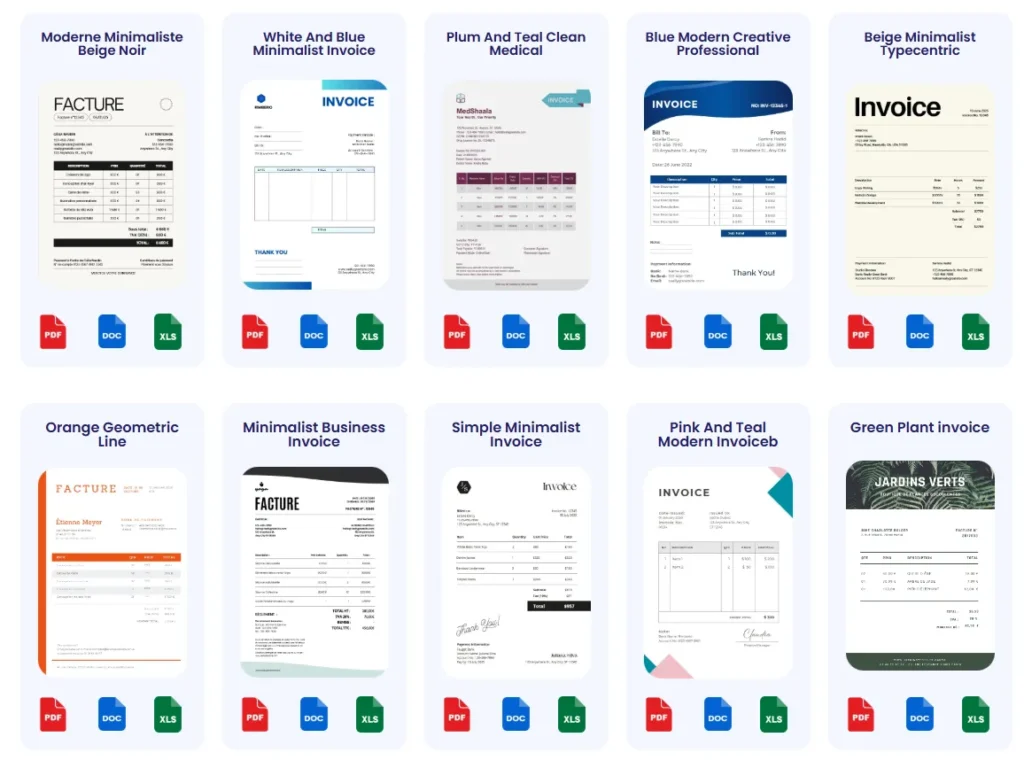
Probill offers customizable invoice templates tailored for eBay sellers, combining ease of use with professional layouts. These templates help incorporate all necessary details like shipping, taxes, and payment terms in a visually clean way. Freelancers frequently mention how Probill’s templates prevent omissions common when manually creating invoices, such as missing shipping charges or incorrect totals. Using these templates alongside Probill’s invoice generator speeds up “how to create ebay invoice” tasks while maintaining invoice accuracy.
How Templates Improve Your Invoicing Workflow
Templates bring structure and efficiency to invoicing workflows by reducing repetitive data entry and standardizing appearance. Without templates, sellers risk inconsistent invoices causing buyer confusion or delayed payments. For instance, an entrepreneur who redesigned invoices using templates reduced inquiries about payment terms by 50%. Templates also simplify auditing and bookkeeping by keeping invoice formats uniform. When paired with an online tool, templates enable batch creation and fast PDF export—critical for managing volume without losing accuracy.
For sellers aiming to upgrade their invoicing process, exploring professional invoice templates ensures a foundation of clarity and speed is in place.
Frequently Asked Questions About Creating an Invoice on eBay
How do I create an invoice on eBay after a sale?
To create an invoice on eBay, go to your Seller Hub and open the “Sold” section. Find the transaction, then click “Send Invoice.” Fill in item details, shipping, and tax information. Review everything carefully before sending. This process helps confirm buyer expectations and speeds up payment. For faster invoicing, some sellers use tools like the Probill free invoice generator to automate details and create professional invoices.
Can I customize the invoice when I create an eBay invoice?
eBay’s built-in invoice creation allows basic edits like adjusting shipping or adding notes but has limited customization options. It doesn’t support branded layouts or detailed payment terms. Sellers needing tailored invoices usually use PDF generators or online tools to add logos, specific terms, and custom fields. This helps freelancers and small businesses maintain professional appearances and clear communications outside eBay’s standard template.
What if I want to combine multiple items into one invoice on eBay?
Combining items into a single invoice on eBay requires requesting payment via the “Request Total” or “Send Invoice” option from the “Sold” section. Enter each item’s details accurately to show a clear breakdown. This is useful for buyers purchasing multiple listings, reducing confusion and transaction fees. Mistakes in quantities or shipping costs across combined items can delay payment, so double-check each entry carefully.
Is there a way to automate invoice creation for eBay sales?
Automation tools exist that integrate or work alongside eBay to speed up invoice generation. They pull buyer, item, and price info automatically, then create ready-to-send invoices with consistent templates. For example, freelancers or entrepreneurs selling frequently benefit from automating repetitive invoicing tasks to avoid errors and save time. Such tools often include payment tracking and reminders—not available in eBay’s basic invoicing system.
How do I track if my eBay invoice has been paid?
eBay provides status updates in the Seller Hub under “Sold.” It shows if an invoice is “Viewed,” “Paid,” or still “Unpaid.” Consistently monitoring these statuses lets sellers identify late payments early and send reminders promptly. For more advanced tracking, invoice management tools offer dashboards that consolidate payment statuses across multiple platforms, reducing missed payments and improving cash flow management.
What common mistakes should I avoid when creating an invoice on eBay?
Avoid mismatched item descriptions or prices, missing shipping or tax costs, and delayed invoice sending. These are top reasons payments get delayed or disputed. Skipping invoice tracking or using unprofessional invoice formats also harms buyer trust. Using templates and reviewing details carefully prevent most issues. For example, entering “item” instead of a specific product name confuses buyers and may cause chargebacks.
Can I resend or update an invoice on eBay if I make a mistake?
Yes, you can resend an updated invoice by canceling the previous one and sending a new corrected invoice through the same “Sold” tab interface. However, frequent changes may irritate buyers or cause payment delays. Minimizing errors before sending by thorough review and using templates reduces the need for corrections, streamlining the payment process.
Are invoice templates helpful when creating an eBay invoice?
Invoice templates save time and enforce consistency in how invoices look and what information they include. They help prevent missing key elements like payment terms and shipping fees. Many sellers use templates either within invoicing tools or as downloadable files to speed up creation. Templates also contribute to a professional impression, encouraging timely payment. Explore professional invoice templates tailored for eBay sellers to improve your workflow.
Can I include tax details or VAT information on an eBay invoice?
eBay’s native invoices allow adding basic tax amounts but lack detailed VAT handling for many regions. Sellers needing comprehensive tax info or legal compliance often use external invoice generators or software that supports tax customization. Ensuring compliance with tax laws relevant to your location, verified through official sources like the IRS, keeps your invoices valid and avoids regulatory issues.
What is the best way to create an invoice on eBay for freelancers and small businesses?
The best practice for freelancers and small businesses is to use eBay’s invoice feature for quick sales but complement it with an online invoice generator for customization, speed, and payment tracking. This hybrid approach balances convenience and professionalism, reducing manual errors and improving cash flow. Tools like Probill’s invoice generator integrate easily and offer templates, PDF export, and client management—all critical for growing sellers seeking efficient invoicing.
How Probill Helps You Create and Manage eBay Invoices Effortlessly
Simple Online Invoice Generator Compatible with eBay Sales
Probill streamlines how to create an invoice on eBay by providing an intuitive online invoice generator that doesn’t require technical skills. It lets you input buyer details and transaction data quickly, whether you’re invoicing one item or multiple sales combined. This ease is vital for freelancers handling many eBay orders who need a reliable tool that reduces manual entry errors and accelerates processing without switching platforms.
Ready-to-Use Invoice Templates for Fast Creation
Probill includes professional invoice templates tailored for eBay sellers, which ensure every invoice contains necessary fields like item description, pricing, taxes, and shipping costs. Using these templates helps avoid common mistakes—such as missing payment terms or miscalculations—that often delay payments. For example, small business owners can maintain consistent branding and clarity across hundreds of invoices, fostering trust and reducing buyer queries.
PDF Export and Easy Client Management
Exporting invoices as PDFs with Probill preserves formatting and supports seamless sharing via eBay messages or email. The tool also organizes client contact info in one place, eliminating the need to search through past orders for addresses or payment history. This feature is especially helpful for entrepreneurs juggling multiple buyers, as it saves time when creating new invoices or issuing corrections while maintaining professionalism.
Track Payments and Stay Organized
One common challenge eBay sellers face is monitoring payment statuses after sending invoices. Probill addresses this by integrating payment tracking directly into its dashboard. You can see which invoices are unpaid or overdue without logging into eBay multiple times. This centralized view enables timely follow-ups, improving cash flow and minimizing income delays. Freelancers benefit particularly from this, as consistent income depends on efficient invoice management.
Try the Probill Free Invoice Generator or Download the Mobile App
To enhance your eBay invoicing workflow, try the Probill free invoice generator. It offers fast, accurate invoice creation with ready templates and payment tracking. For on-the-go invoicing, download the mobile app from Probill’s home page to create, send, and manage invoices anytime, anywhere. Using Probill reduces common frustration points in how to create an invoice on eBay and helps keep your business running smoothly.