Skip to content
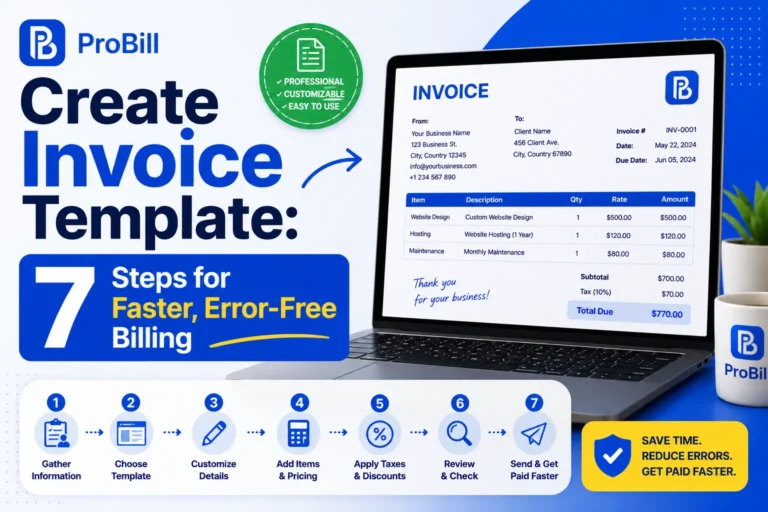
Introduction: Why Creating Invoice Template Can Cause Delays and Errors
Many freelancers and small business owners face delays because of manual invoicing, incorrect calculations, and missing payment details. Small mistakes like wrong totals, duplicate invoice numbers, or incomplete billing information can slow down approvals and create unnecessary back-and-forth with clients.
Using the right tools to create invoice template files professionally helps simplify the entire billing process. Instead of formatting invoices from scratch every time, businesses can use structured templates and automated calculations to reduce errors and save time. This makes invoicing faster, more consistent, and easier to manage for recurring clients and ongoing projects.
For a smoother workflow, using create invoice templates proven for clarity and completeness is key—explore options on our invoice templates page.Before customizing a template, it helps to understand the basic steps involved in creating an invoice.
How to Create Invoices Faster and Without Errors
Use an Invoice Generator Tool
Automated invoice generator tools drastically cut the time needed for creating invoices and reduce human errors. For example, freelancers juggling multiple clients can simply input customer data once, then generate accurate invoices on demand without manual recalculations. These tools usually come with pre-built tax and total calculators, eliminating mistake-prone math. Using a free invoice generator like the one on the home page means less time wrestling with templates and more time focused on your core business tasks. This approach streamlines creating an invoice template process by automating routine steps, ensuring accuracy even when handling complex billing scenarios.
Step-by-Step Guide to Creating Accurate Invoices Quickly
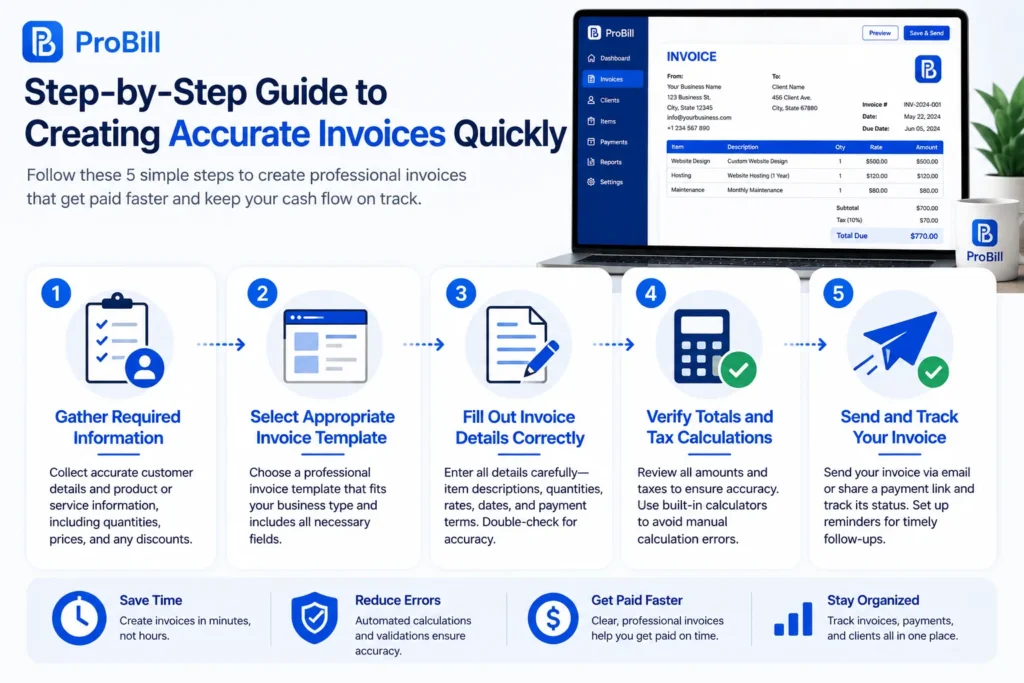
Gather Required Customer and Product Information
Start with a complete and verified list of customer details: legal name, billing address, contact info, and tax ID if applicable. Equally important is product or service data—precise descriptions, quantities, unit prices, and any applicable discounts. Neglecting these leads to frequent edits and disputes. For instance, a freelancer once delayed invoicing because client tax info was missing—causing payment postponements. Collecting everything upfront minimizes errors and accelerates invoice creation.
Select Appropriate Invoice Template
Choosing the correct invoice template streamlines your workflow and reduces mistakes. For example, a small business owner using a generic template struggled to include VAT details properly, resulting in compliance issues. The ideal template fits your business type, includes necessary tax fields, and is simple enough to avoid clutter but complete enough to capture every detail. Templates that reflect your invoicing needs reduce the time spent on adjustments and speed up the billing process.
Fill Out Invoice Details Correctly
Entering data swiftly yet accurately requires focus. A common error is mixing client references or inputting incorrect tax rates under pressure. Consider a self-employed consultant who once inverted hours and rates in haste, causing an invoice discrepancy. Double-check key data like quantities, dates, and unit costs before moving on. Developing a robust routine for filling out details during creating invoice template sessions cuts down on revisions and strengthens professional reliability.
Verify Totals and Tax Calculations
Manual math errors cause more invoice corrections than any other factor. Tax rules can be complex—especially if your services span multiple regions or tax categories. For businesses unfamiliar with tax nuances, an automated calculator can verify totals instantly. For example, a retailer faced client complaints because sales tax was misapplied across jurisdictions. Confirm totals and taxes transparently to avoid client pushback and potential legal issues. For authoritative guidance on tax compliance, consult official sources like the IRS invoice requirements.
Send and Track Your Invoice
Dispatch your invoice through a system that confirms delivery and reminds you of pending payments. Many delays appear post-sending due to lost invoices or forgotten follow-ups. Imagine a freelancer who manually emailed invoices and lost track, resulting in delayed payments. Using tools that track whether invoices have been opened and automatically schedule reminders prevents these cash flow disruptions. Tracking also simplifies resolving queries and keeps your receivables on schedule.
For faster setup, explore various professional-quality invoice templates on our invoice templates page.If you prefer creating invoices directly online, you can also create an invoice for free without starting from scratch .
Different Methods for Creating an Invoice Template
Using Word to Create a Custom Invoice Template
Microsoft Word offers flexibility for creating tailored invoice templates without needing design skills. Start with a blank document or a basic template, then customize headers, fonts, and tables to suit your brand. However, even simple layouts in Word can lead to alignment issues on different devices or printers if not carefully tested. For a solo consultant, manually adjusting columns for itemized billing ensured clarity but required trial and error to perfect spacing. Word is ideal if you want full control over the invoice design and plan to reuse the template consistently. Google Sheets is useful when you want to combine invoice creation with spreadsheet-based calculations.
Creating Free Invoice Templates Online
Free online platforms streamline creating invoice templates by providing ready-to-use designs and fields you just fill in. This saves hours compared to manual setup. Many small business owners prefer this method because it removes formatting headaches and automatically includes legal invoice elements like tax fields. For example, a freelance photographer saved time and avoided errors by using an online tool to create invoice templates free of charge, enabling quick invoice dispatch without software installations. These platforms often support export options like PDF or Word, fitting diverse business workflows.If you work in the cloud, Google Docs provides another convenient way to create an invoice.
Benefits of Using Online Invoice Generators
Online invoice generators combine customization with automation to boost efficiency. They handle numbering, tax calculations, and can even store client information for repeat invoices. This reduces mistakes common in manual invoice creation, such as duplicate numbers or forgotten line items. Entrepreneurs juggling multiple clients find online generators save hours weekly by automating these tasks. Additionally, cloud-based tools allow invoice creation from any device, critical for on-the-go professionals. For a streamlined process, try a free invoice generator that integrates with your existing client data to speed up creating invoice templates and sending them promptly. This method reduces administrative delays that often slow payment cycles.Once your invoice is complete, converting it to PDF makes it easier to share and preserve the final version.
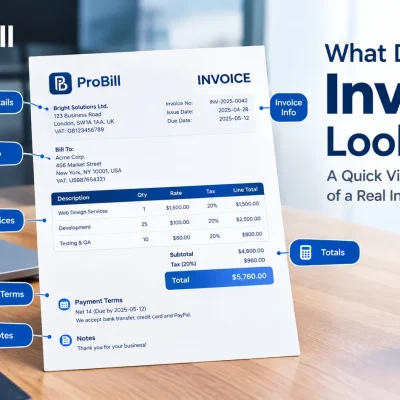
Key Elements Every Invoice Must Have to Avoid Mistakes
Correct Business Information
Accurate business details are the foundation of a professional invoice. Missing or incorrect company name, address, or tax ID can lead to payment delays or legal complications. For example, a small business owner once submitted invoices without consistent company registration info, prompting client requests for revisions. Confirm your contact details match official records before issuing invoices. This step ensures clear communication and smooth financial transactions.
Invoice Number and Date
Each invoice needs a unique number and the correct date to avoid confusion and enable easy tracking. Reusing invoice numbers or omitting dates can trigger payment disputes or accounting errors. Freelancers often lose track when manually numbering invoices, causing overlap and client mistrust. Implementing a consistent numbering system, such as sequential digits or date combinations, supports orderly records and faster reconciliations.
Detailed Product or Service List
Invoices that lack clear descriptions or have vague entries risk rejection or questions from customers. For instance, a consultant once billed simply “services rendered,” resulting in client demands for clarification and invoice resubmission. Break down your products or services with specific names, quantities, unit prices, and applicable discounts. This transparency prevents misunderstandings, expedites approval, and reduces the chance of payment disputes.
Payment Terms and Methods
Clear payment terms—such as due date, accepted payment methods, and late fees—set expectations and protect cash flow. Missing or ambiguous terms often cause delayed payments. For example, a freelancer experienced late payouts because the invoice didn’t specify that payments via bank transfer were preferred. Explicitly state payment instructions and deadlines to minimize confusion. Including multiple payment options reduces friction and speeds up receipt confirmation.
For a practical way to ensure your invoices include all these key elements, consider using proven invoice templates designed for clarity and compliance.
Common Mistakes When Creating Invoice Templates and How to Avoid Them
One of the biggest traps in invoicing isn’t just human error—it’s the overlooked patterns that repeatedly trip up freelancers and small business owners. Consider Elena, a graphic designer who started creating invoices manually on her laptop. She faced constant setbacks: invoices missing crucial client contact details, overlooked discounts, or tax amounts entered inconsistently. These mistakes delayed payments and forced her to spend hours on corrections.
The real issue? Inconsistent use of invoice templates or skipping them entirely. When creating an invoice template is sidelined, every invoice becomes a fresh problem to solve, increasing the chance for errors like:
- Missing or incorrect client details: Often, the wrong email or billing address leads to confusion or lost invoices.
- Calculation errors: Manual math introduces mistakes in totals, taxes, or discounts that hurt cash flow.
- Inconsistent formatting: Without a template, invoices differ wildly, reducing professionalism and clarity.
- Late submission: Delays happen when there’s no streamlined system, causing frustration and payment deferrals.
- Non-compliance with tax rules: Freelancers who overlook tax codes or regional requirements risk penalties and rejected invoices.
The solution lies in creating a consistent template that addresses these points upfront, turning recurring errors into rare exceptions. For freelancers or entrepreneurs juggling multiple clients, it’s not just about faster invoicing but reliable accuracy. While templates reduce human error by design, pairing them with tools like a free invoice generator ensures that fields are auto-validated and calculations automatic—minimizing the need for manual checks.
Addressing these frequent issues can transform your invoicing accuracy. For faster correction-free invoices, explore our reliable invoice templates designed for clarity and compliance. For authoritative guidance on invoicing regulations, refer to the IRS invoice requirements.
Tips for Streamlining Your Invoice Process
Automate Recurring Invoices
Automating recurring invoices is a proven method to reduce administrative workload and cut down errors. For example, a freelance graphic designer billing monthly retainers can set up automatic invoice generation instead of manually creating the same invoice every billing cycle. This practice eliminates delays caused by forgetfulness and ensures payments are requested consistently on time. With automated systems, you also avoid copying errors and maintain professional reliability. Setting up recurring invoices is especially advantageous for stable client relationships that require routine billing.
Use Consistent Templates
Sticking to a single, well-designed invoice template streamlines the process by providing a familiar layout every time you create an invoice. Consider a small business owner who tried switching templates frequently—the result was missing fields and inconsistent formats that confused clients and delayed payments. Using a consistent template simplifies data entry and reduces omissions. When creating an invoice template, choose one that covers all essential details without clutter. Consistency also speeds up client approvals, since they recognize and trust your standard invoice format.
Set Reminders for Invoice Follow-ups
Many freelancers and entrepreneurs lose track of unpaid invoices due to ineffective follow-up systems. Setting automated reminders is the most reliable way to maintain visibility on outstanding payments without investing extra time in manual tracking. For instance, a self-employed consultant once waited weeks before chasing a late invoice, which delayed cash flow unnecessarily. Tools that send polite reminders at preset intervals improve collection times and reduce awkward client interactions. Integrating payment tracking with reminder automation creates a seamless invoicing cycle that supports healthy receivables.
Enhance your workflow further by using proven invoice templates designed to fit various business needs, helping you create an invoice template that balances speed and accuracy.
Create Invoice Templates to Speed Up Your Workflow
Selecting the Right Invoice Template
Choosing the right invoice template is crucial to speeding up your billing process without sacrificing accuracy. An ideal template balances simplicity with all essential fields, preventing the need for manual edits each time you create an invoice. For example, a freelance graphic designer once struggled with multiple templates, causing confusion and delays; switching to a single, well-structured template reduced invoicing time by 40%. When creating an invoice template, focus on industry relevance and ease of use, ensuring it accommodates taxes, discounts, and payment terms specific to your business. Avoid overly complex templates that add unnecessary steps or too minimal ones that omit critical data.
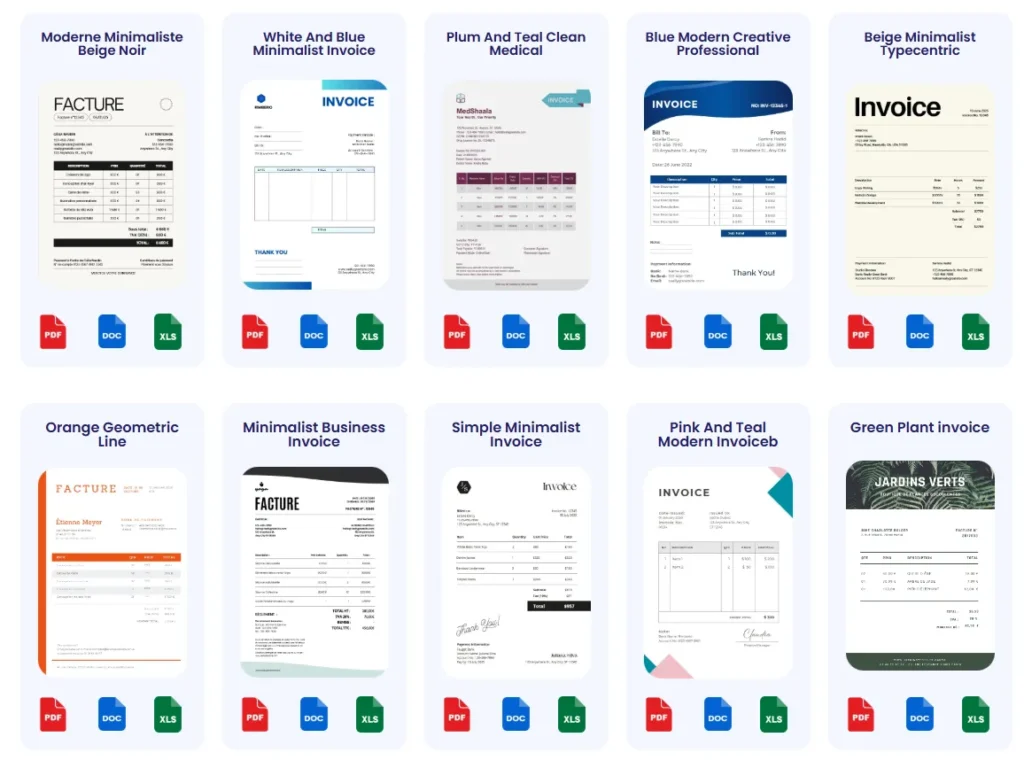
Customizing Templates for Your Business
Customizing invoice templates to your brand and operational needs eliminates repetitive changes and errors. Consider a small business owner who used generic templates requiring frequent manual adjustments for client info and tax calculations—customization saved hours weekly. Tailor your headers, color scheme, and footer notes, and integrate your logo to enhance professionalism and client trust. Additionally, adjust fields to match your invoicing terms, such as installment payments or subscription services. Creating a invoice template in Word or using an online tool with flexibility helps maintain consistency while adapting to each project’s details. This approach minimizes editing time and speeds up the overall process.
Explore professional and easy-to-adapt invoice templates designed to help you create an invoice template free of common errors and ready to accelerate your workflow. For businesses that prefer spreadsheets, Excel can be used to create and customize invoices.
Frequently Asked Questions About Creating Invoices Quickly and Error-Free
How do I create an invoice template that is easy to use?
A simple invoice template focuses on essential fields like customer info, products, prices, and payment terms without clutter. Avoid overly complex layouts that require frequent manual adjustments. For example, freelancers benefit from templates that clearly separate line items and tax details, minimizing confusion. Using a customizable template—such as those found on the invoice templates page—allows you to balance ease of use with necessary detail, speeding up invoice creation.
What is the best way to create an invoice template free of errors?
Automating calculations and integrating validation checks is key. Manual data entry invites mistakes, especially under time pressure. For instance, a small business owner found that formulas in a spreadsheet template prevented common math errors. Choosing a tool or template that auto-calculates totals and tax reduces risk dramatically. Additionally, reviewing templates periodically ensures compliance with updated tax rules, helping maintain accuracy in your invoice template setup.
How do I create free invoices template online efficiently?
Online platforms offering free invoice templates combine ready-to-use formats with automation features. This eliminates repetitive manual tasks and ensures consistent formatting. A common scenario is freelancers using free invoice templates online to quickly generate professional invoices without installing software. Look for tools that allow easy customization and PDF export for client delivery. Starting with a free invoice generator online can significantly improve speed and reduce errors compared to crafting templates from scratch.
Is it better to create a invoice template in Word or use invoice software?
Creating a invoice template in Word offers full design control and flexibility but demands manual data entry every time, increasing error and time spent. In contrast, invoice software stores client data and auto-calculates totals, vastly improving speed and accuracy for frequent invoicing. For example, entrepreneurs who switched from Word templates to software reported cutting invoicing time by half. A hybrid approach uses Word templates for occasional invoices and software for recurring billing, depending on volume and complexity.
How do I verify that my invoice template complies with tax regulations?
Verifying compliance requires keeping your template updated with current tax laws, including correct rates and required disclosures. Many miss details like tax registration numbers or jurisdiction-specific fields, triggering delays. Using automated tools or regularly consulting official resources like the IRS invoice requirements helps ensure your invoice template includes all mandatory information. Consistent audits of your template save headaches and support timely client payments.
How do I create an invoice template that works well across different devices?
Responsive templates adapt to screens from desktops to mobiles without losing clarity. This is crucial as many clients review invoices on phones or tablets. Freelancers using portable devices benefit from templates designed to display cleanly with readable fonts and well-spaced fields. Online invoice generators typically provide mobile-friendly templates out of the box. Testing your invoice template on multiple devices before deployment prevents formatting issues that slow down client approval.
How can I create an invoice template that speeds up payment collection?
Clear payment terms and easy-to-understand layout accelerate payments. Templates that highlight due dates, accepted payment methods, and late fees upfront reduce client confusion. For example, a designer who added bold payment deadlines to their invoice template noticed a measurable drop in overdue payments. Incorporate multiple payment options and reminders, which can be automated through invoice software, to encourage timely settlement and minimize disputes.
Where can I find reliable free invoice templates to start with?
Trustworthy sources include reputable invoicing platforms that offer free, tested templates designed for various business types. These templates typically cover legal and tax essentials, allowing quick adaptation without errors. Platforms like the one on our invoice templates page provide diverse templates compatible with common invoicing needs. Using these ensures your creating an invoice template process starts on a solid, error-resistant foundation.