Skip to content
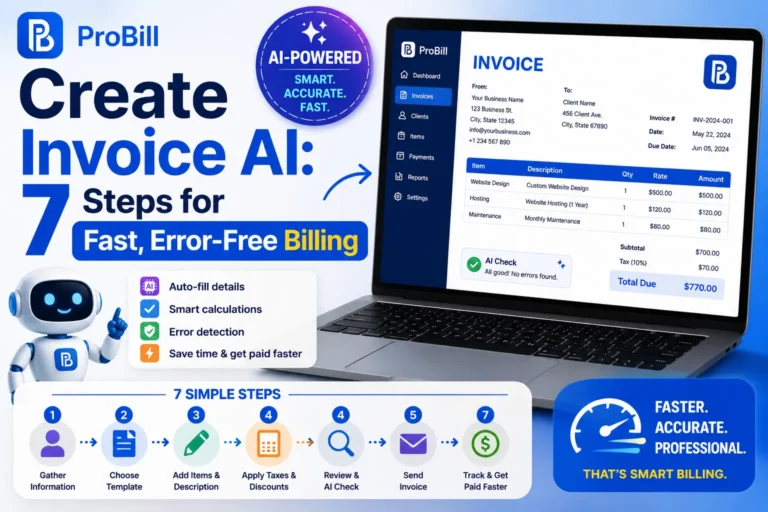
How to Create Invoice AI Quickly and Accurately
Using Online AI Invoice Generators
Online AI invoice generators streamline the billing process by automating number assignment, calculating totals, and formatting invoices professionally. For example, a freelancer juggling multiple clients can input client details and services once, letting the AI generate error-free invoices in seconds. This eliminates manual math mistakes and speeds up issuing invoices, ensuring faster payments. The tradeoff is occasionally needing to verify AI assumptions, but the time saved typically outweighs these small checks.
Benefits of AI for Invoice Creation
AI creates invoices with high accuracy by using predefined rules and data patterns. It reduces repetitive tasks, prevents underbilling due to missed taxes or discounts, and provides consistent formatting that enhances business professionalism. Small business owners benefit notably by avoiding late payments caused by unclear invoices. AI’s capability to update templates instantly also means invoices stay compliant with the latest tax regulations without manual intervention.
Link to invoice generator page
To try an easy, fast solution, explore our free invoice generator that leverages AI to create invoice free for freelancers and small businesses, combining simplicity with accuracy to reduce your invoicing workload. Understanding the standard invoice creation process can help you get better results from AI-powered tools
Step-by-Step Guide to Create Invoice AI
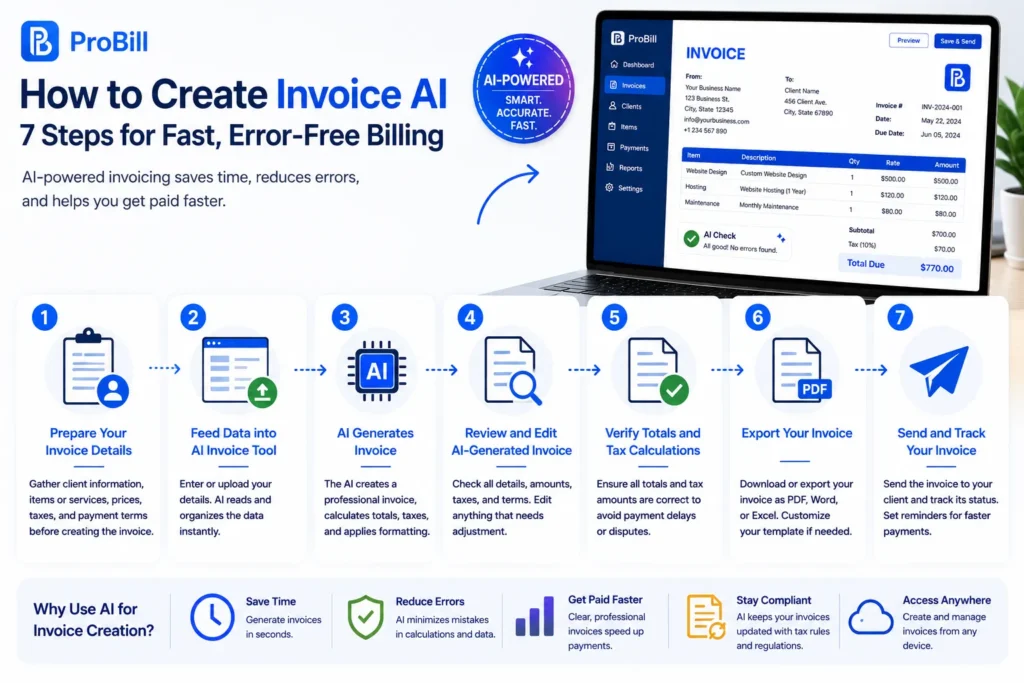
Preparing Your Invoice Details
Start by gathering all key information: client name, contact, services or products sold, pricing, taxes, and payment terms. Inaccurate or incomplete data at this stage causes errors downstream. For instance, a self-employed consultant once delayed a client payment due to missing the invoice’s tax ID. Setting data clearly upfront prevents such costly mistakes and smooths AI processing.
Feeding Data into AI Invoice Tools
Input your prepared details into the AI invoice tool—typically through forms or data upload. Some tools support smart scanning of receipts or spreadsheets for faster entry. However, beware of auto-fill errors; always glance through suggested values. A small business owner using an AI to create invoice free reported saving 60% of invoicing time but noted manual correction still secured accuracy.
Reviewing and Editing AI-Generated Invoices
AI tools generate a draft invoice based on the input. Review this output carefully for correctness in amounts, client info, and tax computations. Edits are essential because AI can misinterpret ambiguous data or overlook regional tax nuances. One freelancer’s lesson: a quick review caught a duplicated line item, avoiding invoice disputes.
Exporting Your Invoice as PDF or Other Formats
Once the invoice looks accurate, export it in your preferred format—usually PDF or Word. Most AI to create invoice services offer customizable templates ensuring branded, professional appearance. This step matters for record-keeping and client ease. For example, sending a clear PDF invoice rather than a raw data file reduces client queries and speeds payment. Explore our free invoice generator for quick exports and seamless AI invoicing.IRS invoice requirements
For a simpler approach, you can also create an invoice online for free without relying on AI.
Popular Methods and Tools to AI Create Invoice
Online AI Invoice Generators
These web-based platforms use AI to automate invoice formatting, tax calculations, and number sequencing instantly. They are ideal for small businesses and freelancers aiming to reduce manual errors and speed up billing. For example, a boutique designer using an online AI to create invoice found 40% less administrative time juggling multiple client projects. The downside is limited customization compared to desktop software, but most include essential options for branding and payment terms. To see a reliable solution, check our free invoice generator tailored for fast, accurate AI invoicing.
Mobile Apps for AI Invoice Creation
Mobile invoicing apps bring AI-powered billing to your smartphone or tablet, perfect for entrepreneurs on the move. These apps often feature voice recognition and snapshot scanning for quick input, reducing delays between service delivery and invoicing. A freelance photographer shared that using mobile AI create invoice tools allowed immediate billing right after events, improving cash flow dramatically. The tradeoff lies in smaller screen limits, requiring concise data entry and occasional syncing delays.
Free vs Paid AI Invoice Solutions
Free AI invoice tools provide basic automation—ideal for startups and freelancers with simple needs. However, they often restrict invoice volume, integration, or branding options. Paid plans unlock advanced features like multi-currency support, client management, and robust analytics. For instance, a small consulting firm upgraded to a paid AI invoicing system to consolidate payments and track overdue invoices effectively, vastly improving financial oversight. Choosing between free and paid depends on business scale and invoicing complexity.
Integration of AI with Invoice Management Systems
AI that integrates with accounting or ERP systems streamlines entire financial workflows beyond invoicing. It automatically syncs client payments, updates ledgers, and triggers reminders, minimizing manual reconciliation errors. A startup using AI-integrated invoicing reported a 70% reduction in late payments due to automated follow-up alerts. Integration can require upfront setup and training, but the operational efficiency gains justify the effort. Linking AI invoices to comprehensive management systems supports scalability and cash flow stability.
For broad exploration on AI invoice tools, our free invoice generator offers a practical starting point combining automation with ease of use.
Key Elements Required for AI Invoice Creation
Client Information
Accurate client details are foundational for AI invoice creation. This includes the client’s full name, address, contact number, and tax identification if applicable. Incomplete or outdated client info often causes payment delays or invoice rejection. For example, a freelancer once faced a delayed payment because the AI-generated invoice lacked the client’s updated tax ID, underscoring the need to keep client profiles current before AI processing.
Service or Product Details
The core of any invoice is a clear description of goods or services provided. AI tools depend on precise entries like service type, quantity, and date delivered to correctly itemize the invoice. Vague input, such as “consulting,” without specifics can confuse both AI and clients, increasing dispute risks. Directly feeding detailed product or service descriptions improves the clarity and professionalism of AI-created invoices.
Pricing and Tax Information
Price inputs must be accurate, including unit prices, discounts, and applicable taxes. AI to create invoice solutions calculate totals based on these entries, but errors here can lead to undercharging or regulatory non-compliance. Small businesses often overlook tax rate updates, causing miscalculations. Confirming updated tax codes before submitting data to AI ensures invoices meet legal and financial standards without manual correction.
Payment Terms and Due Dates
Most invoice delays stem from unclear or missing payment terms. AI tools generate reminders and due dates based on this input, so clarity is critical. Terms should specify payment methods, penalties for late payment, and exact due dates. A startup that skipped specifying late fees in AI-generated invoices noticed prolonged payment cycles until terms were clearly defined. Including complete payment terms prevents misunderstandings and accelerates cash flow.
For a practical AI-based solution addressing these key input areas, explore the free invoice generator tailored for freelancers and small businesses looking to streamline professional invoicing.
Common Mistakes When Using AI to Create Invoice
Incorrect Data Input
One of the biggest pitfalls is entering flawed or incomplete data—such as missing client tax IDs or inaccurate pricing. AI swiftly generates invoices based on what it receives, so garbage in means garbage out. For example, a freelance consultant once uploaded outdated client contact info, resulting in undeliverable invoices and delayed payments. Double-check all input fields before letting AI create invoice documents to avoid costly errors.
Ignoring AI Suggestions
AI invoice tools often flag inconsistencies or suggest adjustments, like recalculating taxes or correcting totals. Overriding or ignoring these alerts blindly leads to mistakes. A small business owner disregarded an AI warning about a missing sales tax line, causing compliance issues later. Treat AI prompts as critical checkpoints rather than optional tips to maintain invoice accuracy and legal compliance.
Not Verifying Tax Calculations
Tax rules vary by location and constantly change. Relying entirely on AI without verification risks submitting invoices with incorrect tax amounts. For instance, a startup found out their AI-generated invoices missed a recent VAT update, exposing them to penalties. Confirm that your AI supports current tax regulations or consult official resources like the IRS invoice requirements to ensure proper calculations.
Skipping Invoice Review
Skipping the final review step defeats the purpose of combining speed with accuracy. AI can misinterpret ambiguous data or generate formatting glitches, so every invoice should be checked before sending. One freelancer avoided a client dispute by spotting a duplicated service line during review that the AI had duplicated. A quick proofread saves time and preserves professionalism.
For hassle-free and error-checked invoicing, consider using a free invoice generator that balances AI automation with easy manual oversight.
Tips to Create Invoice AI Faster and Without Errors
Use Predefined Invoice Templates
Templates speed up AI invoice creation by providing a ready structure, eliminating guesswork on layout or required fields. Freelancers who juggle multiple projects save minutes per invoice by reusing templates rather than starting from scratch each time. A common trap is neglecting to update template details, which causes outdated terms or pricing to slip in unnoticed. Always review templates periodically to keep them aligned with evolving business needs.
Leverage AI Automation Features
Modern AI invoicing tools offer automation beyond simple number crunching, such as auto-filling client info, applying tax rules, and sending payment reminders. Entrepreneurs using AI to create invoice free often underestimate these features, manually entering data that AI could handle. For instance, enabling auto-complete reduced a small agency’s invoice preparation time by 50%. However, rely on automation with caution—verify suggestions to catch AI misinterpretations, particularly for complex invoices.
Keep Client Data Updated
Accurate, current client data eliminates common invoice errors like rejected payments or delivery failures. Small business owners frequently run into delays when AI tools use outdated contacts or missing tax IDs. Maintaining an up-to-date client database inside your invoicing software or linked CRM prevents such issues. One consultant improved cash flow simply by reviewing and correcting client details quarterly, ensuring AI-generated invoices were error-free and promptly delivered.
Regularly Review and Customize AI Outputs
AI-generated invoices should never be sent without a final inspection. Automated drafts can misplace discounts, repeat line items, or miscalculate taxes due to ambiguous inputs or regional exceptions. Customizing AI outputs by adding personalized notes or tailored payment terms enhances professionalism and clarifies expectations. A freelance designer once avoided a client dispute by spotting and correcting duplicated services during this review stage. Incorporate this step to combine speed with accuracy effectively.
Using tools like the free invoice generator can help implement these tips easily while offering flexibility from predefined templates to automation settings, suited for freelancers and small businesses aiming for error-free invoicing.
AI Invoice Templates and Examples
Standard AI Invoice Template Features
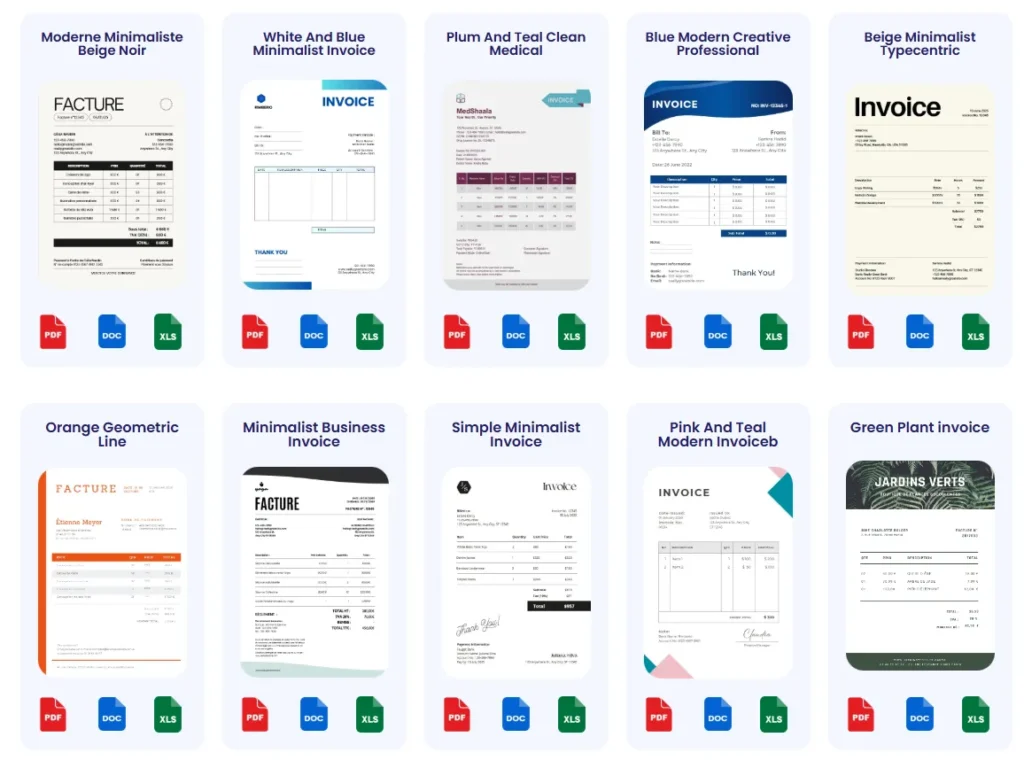
Effective AI invoice templates prioritize clarity and automation. They typically include preset fields for client details, line-item descriptions, quantities, unit prices, taxes, and totals. AI-powered templates adjust dynamically—for instance, applying regional tax rules or adding discounts automatically. A common flaw in generic templates is excessive clutter; streamlined layouts often reduce client queries and payment delays. Freelancers find templates with clear payment terms and due dates especially valuable for prompt cash flow.
Customizing AI Invoice Templates for Your Business
Customizing templates helps reflect brand identity and specific billing needs. Adding logos, custom fonts, or color schemes projects professionalism critical for small businesses competing in crowded markets. For example, a freelance graphic designer tailored an AI template to display project milestones and partial payment schedules, improving client communication. However, excessive customization can complicate AI processing or template updates—balance aesthetics with functional simplicity.
Download Free AI Invoice Templates
Free AI invoice templates offer fast onboarding for businesses new to AI invoicing. They come pre-configured to incorporate legal invoice standards and tax calculations. Small entrepreneurs appreciate freely downloadable templates as a no-cost gateway to improve professionalism. Yet, some free options limit template variety or advanced features like multi-currency support. To optimize usage, select templates aligned with your industry and workflow demands.
Link to invoice templates page
Explore a diverse collection of AI-optimized templates designed for freelancers and small businesses on our invoice templates page. These templates combine automation with customization options, enabling faster, error-free invoice creation tailored to your needs.
Frequently Asked Questions About AI Invoice Creation
Can I Create Invoice AI for Free?
Yes, many online tools allow you to ai create invoice free with basic features suitable for freelancers and small businesses. Free versions typically cover standard invoice generation but may limit customization or invoice volume. For example, using a free invoice generator can save time but might lack advanced tax options found in paid plans. To explore options, try a free invoice generator designed for quick, AI-assisted invoicing.
How Secure Is AI Invoice Data?
AI invoice tools usually employ encryption and secure cloud storage to protect your data. However, security depends on the provider’s standards and compliance with regulations like GDPR. It’s unsafe to input sensitive client info into platforms without clear privacy policies. A small business switching to a reputable AI invoice service noticed fewer data breaches compared to manual record-keeping. Always review security features before trusting AI with financial data.
Is Technical Skill Required to Use AI Invoice Tools?
No, most AI to create invoice tools are designed for users without technical backgrounds. They offer intuitive interfaces and automate calculations so non-experts can generate professional invoices. For instance, many freelancers report generating invoices faster with AI tools than manual methods despite minimal training. The key is proper data entry and a brief familiarization with the tool’s workflow.
What Are the Best AI Invoice Generators for Freelancers?
Top AI invoice generators for freelancers balance simplicity, automation, and customization. Features like client management, tax calculation, and mobile access are essential. A freelance consultant appreciated a tool that auto-filled client details and supported quick PDF exports, reducing invoicing time by half. Popular solutions often integrate with project management or payment systems. Explore options starting with the free invoice generator for a reliable, beginner-friendly experience.
Try Probill for Fast AI Invoice Creation
How Probill Supports AI Invoice Generation
Probill simplifies the creation of professional invoices by integrating AI-driven automation directly into its online platform. Users quickly input client and service details, and Probill’s AI handles numbering, tax calculations, and formatting without complex setup. A freelancer reported cutting invoice prep time in half after switching to Probill, thanks to its intuitive AI assist that minimizes errors and speeds iteration.If you need to invoice clients while away from your computer, mobile invoicing can make the process more convenient.
Features Including Invoice Generator and Templates
Probill combines a powerful invoice generator with customizable templates tailored for freelancers and small businesses. It offers pre-built fields for taxes, discounts, and payment terms, ensuring invoices remain compliant and clear. The tool also supports PDF export and bulk invoice management to track outstanding payments efficiently, addressing common pain points in manual invoicing workflows.
Access from Any Device for Freelancers and Entrepreneurs
Accessible via any web browser or mobile device, Probill empowers entrepreneurs to generate invoices on the go. This flexibility suits freelancers attending client meetings or small business owners managing billing remotely. The mobile-friendly interface prevents delays often caused by desktop-only software, enabling timely invoice delivery and faster payment cycles. Explore Probill’s AI capabilities through the free invoice generator for a trial without commitment.