Skip to content
How to Create Proforma Invoice Quickly and Correctly
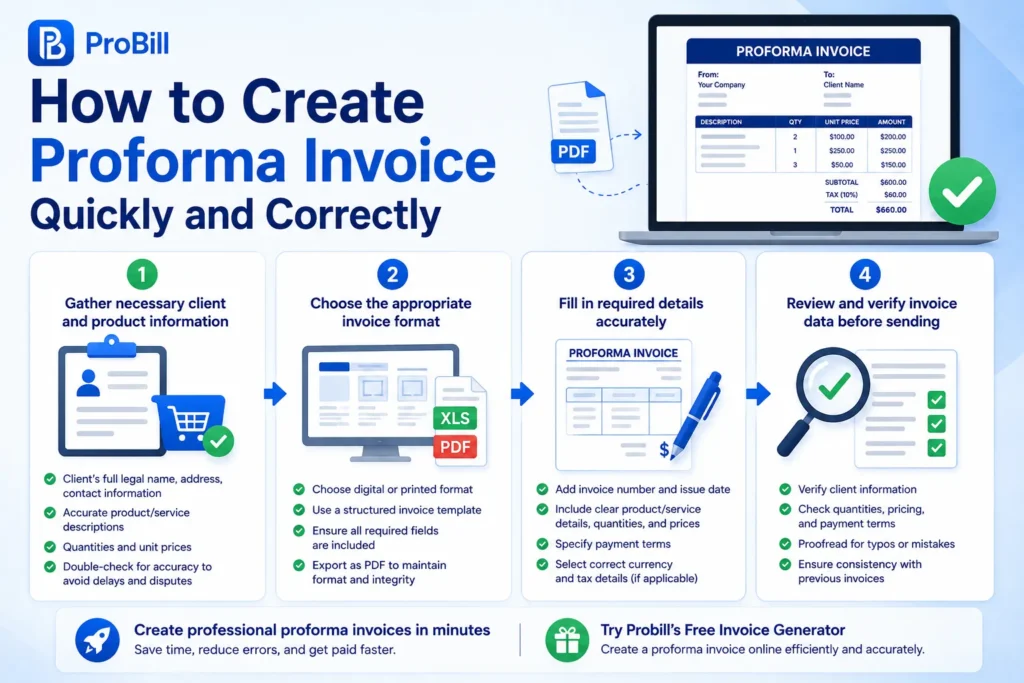
Step 1: Gather necessary client and product information
Start by collecting all essential details about your client and the items or services you intend to invoice. This includes the client’s full legal name, address, and contact information, plus precise descriptions, quantities, and unit prices of the products or services. Missing or inaccurate client data is a common cause of delayed payments, especially for international transactions. For freelancers, even small errors in product details can lead to disputes or renegotiations, so precision here saves time downstream.
Step 2: Choose the appropriate invoice format
Decide whether your invoice will be digital or printed. Simple invoices can use spreadsheet templates, but a professional-looking invoice is best created with an invoice format that supports all necessary data fields clearly. A structured format helps enforce consistency and compliance with international trade standards. For example, exporting invoices as a PDF ensures they remain unaltered when shared. This choice impacts how quickly you can create and send your invoice, especially under tight deadlines.
Step 3: Fill in required details accurately
Populate the invoice with accurate and complete information, including the invoice number, issue date, and payment terms. Ensure product descriptions are concise yet detailed to avoid misunderstandings. Overlooking the payment terms is a frequent issue, causing disputes and delayed clearing of funds. Pay special attention to currency type and tax details if applicable. Using an online template or generator often helps reduce errors by guiding the user through mandatory fields.
Step 4: Review and verify invoice data before sending
Before sending the proforma invoice, take a moment to double-check every detail. Confirm client information, product quantities, pricing, and payment conditions are correct. A quick proofreading pass can catch typos that cause confusion or distrust. If possible, compare with past invoices for the same client to ensure consistency. This final verification step prevents costly amendments and maintains your professional reputation. For seamless creation, consider using a free invoice generator that includes built-in validation features. After preparing the proforma invoice, you can send it to the customer before the transaction is completed.
Explore Probill’s free invoice generator for a streamlined way to create a proforma invoice online efficiently. For standard invoices, start with our guide on how to create invoices.
Methods to Create a Proforma Invoice Online
Using online invoice generators
Online invoice generators stand out for their speed and ease of use when you need to create a proforma invoice quickly. These tools typically provide guided forms that prompt you to enter client data, item descriptions, and payment terms, limiting common mistakes. For instance, a freelancer creating invoices for multiple clients can rely on pre-filled client profiles to cut down repetitive input. The main tradeoff is customization: some generators offer only basic templates but excel at delivering polished PDFs without requiring any technical skills.
Creating proforma invoices with spreadsheet templates
Spreadsheet templates offer flexibility at the cost of setup time. Many free and paid templates allow customization of columns, formulas, and logos to match your business identity. Small businesses often use Excel or Google Sheets for this method because it integrates well with their existing data. However, spreadsheets require a solid understanding of formatting and formulas to avoid calculation errors, which can delay invoice issuance or cause payment disputes. Proper template management is essential to prevent overwriting and maintaining version control.
Using dedicated invoicing software
Dedicated invoicing software packages provide comprehensive features beyond just creating a proforma invoice. These tools often include client management, payment tracking, tax calculation, and automated reminders, making them ideal for businesses with higher volume or recurring billing needs. Entrepreneurs benefit from the integration with accounting systems and analytics dashboards, yet the complexity of software can introduce a learning curve and sometimes higher costs. For efficient online invoice creation with added business insights, these systems can pay off in the long term.
For a fast and straightforward start, consider using Probill’s free invoice generator to create a proforma invoice online with minimal hassle and immediate PDF export options. Explore it on the free invoice generator page.
Essential Elements of a Proforma Invoice
Seller and buyer details
Accurate identification of both seller and buyer is foundational. Include full legal names, registered addresses, and contact information for each party. Omitting or using informal names can cause customs delays in international shipments or non-payment issues. For example, a freelancer invoicing a corporate client must use the company’s registered name to ensure the finance department processes the invoice smoothly.
Description and quantity of goods or services
Clear, unambiguous descriptions paired with exact quantities prevent misunderstandings. A vague entry like “consulting services” risks disputes; instead, specify the type of consulting, hours worked, and deliverables. For product invoices, list each item separately with unit counts. This level of detail also helps customs officials evaluate shipments when applicable, avoiding costly hold-ups.
Pricing and payment terms
State prices per unit, total amounts, currency, and taxes or discounts. Equally crucial are payment terms—due date, accepted methods, and penalties for late payment. Incomplete payment info is a leading cause of delayed receipts. A small business issuing a proforma invoice without payment terms may face postponed payments simply because customers don’t know when or how to pay.
Validity period and signature
Specify how long the proforma invoice remains valid—often 30 to 90 days. This protects both parties from price fluctuations or changing market conditions. Lack of a clearly stated validity can cause confusion if prices rise later. Additionally, a legally binding signature or digital equivalent adds authenticity. Many jurisdictions view unsigned proforma invoices as non-contractual. Including a signature enforces commitment and professionalism.
For a fast way to include all these elements correctly, try using a free invoice generator that guides the proforma invoice creation process.
More about official invoice requirements can be found at IRS invoice requirements.
Common Mistakes to Avoid When Creating a Proforma Invoice
Incorrect client information
Using wrong or outdated client details is a top reason proforma invoices stall payments. For instance, a freelancer sent a proforma invoice to an old company address, delaying acceptance by weeks. Always verify the client’s full legal name, accurate address, and current contact info before invoicing. Mistakes here can lead to administrative rejections, especially with overseas clients who require precise data for customs or finance teams.
Missing payment terms
Skipping payment terms removes clarity on when and how payment should be made, causing unnecessary delays. Small businesses often fail to specify due dates or accepted payment methods—clients then assume defaults, leading to late payments. Always include clear terms such as “Net 30 days,” payment methods, and penalties for late settlements. This prevents confusion and enforces timely collection.
Unclear product descriptions
Vague or generic product entries invite disputes and slow down invoice approvals. An entrepreneur invoicing for “services” without detailing scope, hours, or deliverables faced repeated client queries and postponed payment. Use specific language that defines each item or service precisely: include quantities, unit types, and relevant specs. Detailed descriptions minimize back-and-forth and keep transactions smooth.
Neglecting validity dates
Omitting an expiration date on a proforma invoice leaves clients unsure about the offer’s duration. Prices and terms may change, but without a validity period, clients may delay responding or expect old prices indefinitely. Stating a clear validity window (commonly 30 to 90 days) protects the seller against market fluctuations and enforces urgency. This element is often overlooked but essential for binding agreements.
Avoid these common pitfalls to create reliable proforma invoices that facilitate prompt and clear communication, reducing administrative setbacks and payment delays. For a reliable way to create a proforma invoice online without these mistakes, explore a free invoice generator that guides you through essential fields step by step.
Tips for Efficient Proforma Invoice Creation
Use pre-built invoice templates
Pre-built templates drastically cut setup time, eliminating the need to format every detail manually. For example, a freelance designer juggling multiple clients can reuse templates, ensuring consistent appearance while focusing on client specifics. Templates also reduce errors by pre-defining mandatory fields like invoice number and payment terms. Avoid reinventing formats, as small mistakes like missing header rows often cause confusion downstream.
Automate repeated information
When invoicing recurring clients or similar services, automating fields such as client addresses, item descriptions, or tax rates saves hours monthly. Small businesses frequently waste time retyping identical data, increasing the risk of typos. Using tools that auto-fill saved client profiles or product lists accelerates creation and enhances accuracy, especially when handling bulk or frequent invoicing.
Double-check before sending
Skipping a final verification leads to avoidable mistakes that delay payments or require issuing corrected invoices. Common errors include transposed digits in prices or outdated payment instructions. Professionals who develop a quick checklist — reviewing client contacts, totals, and terms — reduce disputes. For instance, confirming currency matches the client’s country avoids costly international payment misunderstandings.
Leverage mobile tools for on-the-go invoicing
Busy entrepreneurs and freelancers benefit from creating proforma invoices directly from smartphones or tablets. A mobile invoicing app enables immediate response to client requests without waiting to access a desktop. This advantage prevents losing momentum or having to recall details later. Real-world users report that mobile tools simplify keeping invoices organized and sending PDFs instantly, improving cash flow management on tight schedules.
For a reliable blend of templates and automation with mobile access, consider exploring the free invoice generator, which supports efficient proforma invoice creation online.
Proforma Invoice Templates and Examples
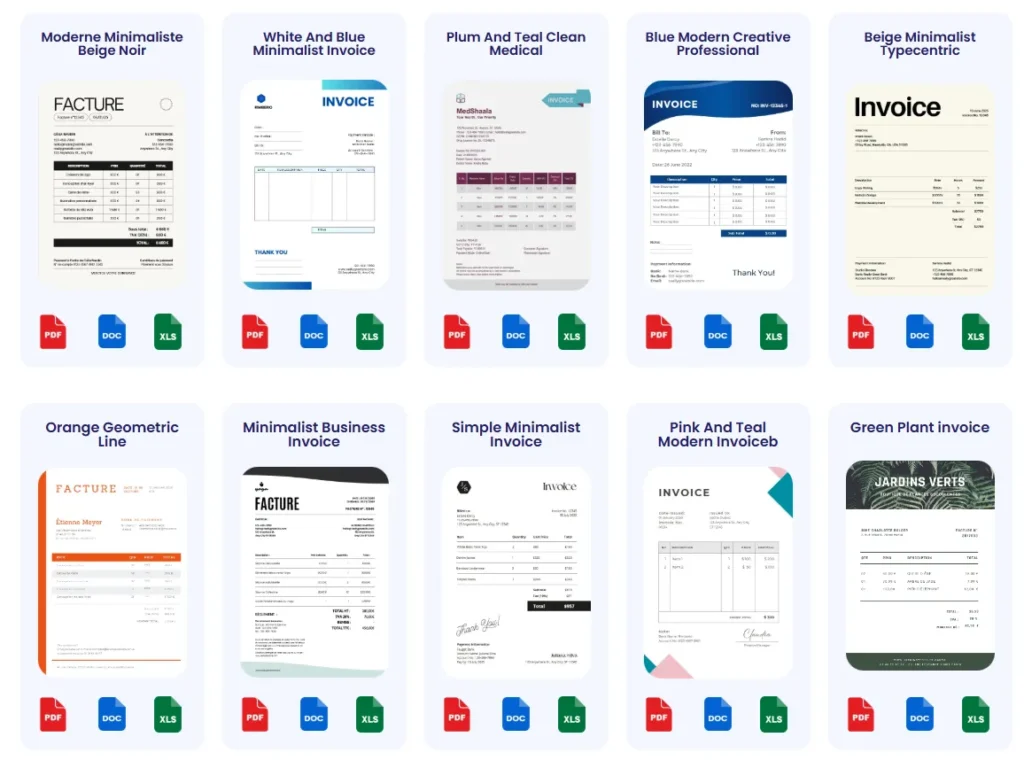
PDF and Word templates
PDF and Word templates are ideal for users who prefer simplicity without sacrificing professionalism. These formats are widely compatible, allowing easy sharing and printing. For instance, a freelance writer often sends a PDF proforma invoice to clients to ensure the document’s layout remains intact, preventing unexpected shifts in formatting. Word templates offer quick editing but risk layout issues if opened in incompatible versions. Both formats suit users who need ready-made but somewhat customizable invoices with minimal setup.
Excel proforma invoice samples
Excel samples provide spreadsheet flexibility for calculations and data manipulation. Small business owners frequently rely on Excel templates to tailor columns, automate totals, and include tax formulas. For example, a retailer can track inventory changes within the same document and immediately update invoice totals. However, Excel’s customization advantage comes with the risk of accidental formula breaks or formatting errors if the user isn’t careful. Proper version control is critical to avoid overwriting vital data.
Customizable online templates
Online invoice templates combine ease of use with instant customization. Tools offering these templates allow users to brand their proforma invoices with logos, colors, and tailored sections in minutes. Entrepreneurs benefit from the cloud access that enables creating or editing invoices anywhere, a stark contrast to desktop-bound templates. For example, a consultant can generate a proforma invoice on the spot during meetings using an online platform. This method also supports exporting invoices directly to PDF, streamlining client delivery.
Try starting your proforma invoice creation process with easy-to-use invoice templates designed to save time and maintain professionalism.
FAQs About Creating Proforma Invoices
What is a proforma invoice, and when should I use it?
A proforma invoice is a preliminary bill sent before the actual sale, detailing goods or services and estimated costs. It’s used mainly for customs, client approval, or securing upfront payment. For instance, exporters use it to clarify shipment terms before delivery. It’s not a demand for payment but a formal quote that helps avoid disputes.
How do I create a proforma invoice correctly?
Creating a proforma invoice correctly involves gathering exact client and product information, choosing a clear format, accurately filling required details, and reviewing everything before sending. Omitting any of these can cause delays or confusion. Using an online tool to create a proforma invoice online can simplify this process and reduce errors.
Can I create a proforma invoice without invoicing software?
Yes, proforma invoices can be created with spreadsheet templates or word processors. However, manual methods increase the risk of mistakes and inconsistent formatting. For freelancers or small businesses with frequent invoicing needs, online generators or dedicated software improve speed and accuracy.
Is a proforma invoice legally binding?
Generally, a proforma invoice is not legally binding like a commercial invoice but serves as a good faith estimate. It may become binding if both parties explicitly accept it as a contract. Including a signature and a validity period adds professionalism and helps clarify its intent. Without these, it mainly acts as a quotation.
What are the essential elements that must be on a proforma invoice?
A valid proforma invoice must include seller and buyer details, a clear description and quantity of goods or services, pricing, payment terms, and a validity date. Some jurisdictions also require a signature. Neglecting these elements can cause customs issues or payment delays.
How long is a proforma invoice valid?
Typically, proforma invoices are valid for 30 to 90 days, but this depends on the agreement and market conditions. The validity period protects both parties from price changes and clarifies the timeframe for acceptance. Omitting it often invites confusion or postponed responses.
Can I send a proforma invoice electronically?
Absolutely. Sending a proforma invoice electronically is common and efficient, especially using PDF format, which preserves layout integrity. Most online invoice generators support exporting and emailing invoices instantly, ensuring quick client receipt.
What’s the difference between a proforma invoice and a commercial invoice?
A proforma invoice is a preliminary document outlining terms before a sale, mainly informational and non-binding. In contrast, a commercial invoice is a final document used for payment and shipping, legally binding and records the completed sale.
Can I update or cancel a proforma invoice after sending?
Yes, but you must clearly communicate changes to the client. Since a proforma invoice is not a final demand for payment, updates or cancellations are common if terms change. Keeping versions organized avoids confusion. Automated tools can ease tracking revisions.
Where can I find professional proforma invoice templates?
Professional proforma invoice templates are available online in PDF, Word, and Excel formats or via invoicing software. Templates save time and ensure compliance with standard requirements. For quick online creation, explore reliable invoice templates that combine ease of use with full customization.
Try Probill’s Online Invoice Generator for Easy Proforma Invoices
Simple steps with Probill
Probill streamlines the process to create a proforma invoice by guiding users through intuitive step-by-step forms. Enter client contacts once and reuse them instantly for future invoices, eliminating repetitive typing. For example, a freelance graphic designer saved hours monthly by relying on Probill’s saved client profiles. Its beginner-friendly interface means you don’t need accounting skills to produce professional invoices quickly.
Export proforma invoices as PDF
Probill allows instant export of completed proforma invoices as PDF files, preserving formatting exactly as designed. This ensures your documents look polished and maintain integrity when emailed to clients or used for customs. A small business owner reported faster client approvals after switching to PDF exports, as emailed files were universally readable across devices without layout shifts.
Access from any device with mobile app
With Probill’s mobile invoicing app, creating or editing proforma invoices happens anywhere—whether at a client meeting or on the go. This flexibility reduces delays caused by waiting to return to a desktop. Entrepreneurs juggling sales outside the office find mobile app access crucial for responding immediately to pricing requests, ultimately speeding up the payment cycle.
Try Probill’s free invoice generator to create a proforma invoice online fast—no technical skills required.