Skip to content

How to Create an Invoice in NetSuite: Step-by-Step Guide
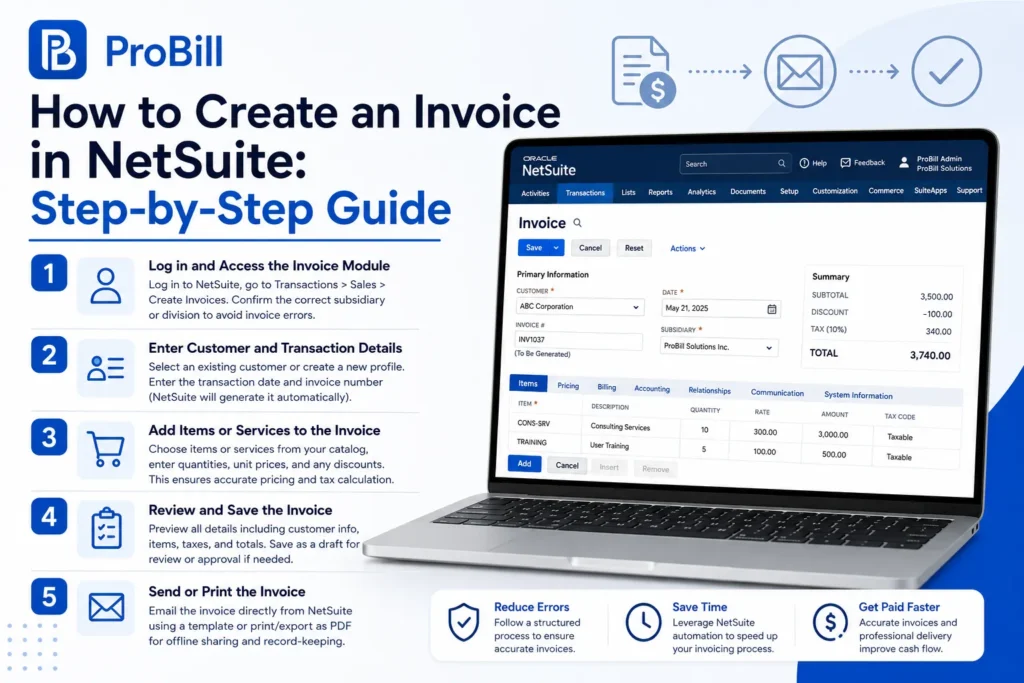
Log in and Access the Invoice Module
Start by logging into your NetSuite account with your credentials. Locate the Transactions tab, then navigate to Sales and select Create Invoices. A common pitfall is failing to select the correct subsidiary or division if your company operates multiple—this leads to invoice errors or missing data. Always confirm your business entity to avoid delays in processing payments.
Enter Customer and Transaction Details
Next, choose the customer from your pre-configured customer list. If the customer is new, create their profile first to ensure accurate billing and shipping information. Enter the transaction date and invoice number, which NetSuite will usually generate automatically. For instance, incorrect customer details can cause payment routing issues—a frequent mistake in small businesses shifting from manual invoicing systems.
Add Items or Services to the Invoice
Select products or services from your integrated item catalog. Specify quantities, unit prices, and any applicable discounts. This step ensures pricing consistency and automates tax calculations when set up correctly. A real-world issue involves skipping the catalog selection and manually inputting prices, increasing errors and reconciliation time. Using the catalog feature prevents such mistakes and maintains pricing integrity across your invoices.
Review and Save the Invoice
Always preview the invoice for accuracy before saving. Check customer information, itemized entries, pricing, taxes, and totals. Skipping this review often leads to disputes or payment delays. NetSuite allows saving drafts for review or approval workflows, which is valuable for teams managing many invoices. Saving incomplete or incorrect invoices is a common source of reporting errors. After creating the invoice, you’ll need to send it to the customer and manage its payment status
Send or Print the Invoice
Finally, send the invoice directly via email from NetSuite or print a physical copy. Utilizing NetSuite’s email template feature streamlines branding and communication consistency. Small business owners often overlook configuring email templates, resulting in unprofessional invoices. For convenience, exporting invoices as PDFs simplifies sharing and record-keeping. You can also complement this process by using an external free invoice generator to create quick drafts that can be imported into NetSuite for final processing.
This structured approach to creating invoices in NetSuite reduces errors and speeds up collections, supporting better cash flow management for freelancers and small business owners alike.For the general invoice creation process beyond NetSuite, see our guide on how to create invoices.
Common Mistakes to Avoid When Creating Invoices in NetSuite
Incorrect Customer Information
Using outdated or incorrect customer data is a leading cause of invoice disputes and payment delays. For example, a freelancer who sends an invoice with a misspelled customer name or wrong billing address might face slow payment or returned emails. Always verify customer records in NetSuite before invoicing to prevent confusion and maintain professionalism.
Missing or Wrong Pricing Details
Frequent errors happen due to manual price entry or overlooking price updates in the item catalog. A typical small business error is applying default pricing when a special discount or contract rate should be used. This mismatch causes reconciliation headaches and can erode client trust. Leverage NetSuite’s integrated pricing rules and regularly update your service or product catalog to avoid these issues.
Overlooking Tax or Discount Settings
Tax rates and discount configurations vary by region and client agreements; failing to apply them accurately leads to legal trouble or lost revenue. For instance, some users forget to enable regional tax schemas in NetSuite, resulting in underreported taxes. Double-check tax codes and discount policies before finalizing invoices, especially if dealing with multiple tax jurisdictions.
Skipping Invoice Review Steps
Rushing to send invoices without a thorough review often leaves invisible errors that delay payments. Common missed details include incorrect invoice dates, missing payment terms, or error-prone totals. A small business owner once sent several invoices lacking agreed-upon payment terms, causing client confusion. Utilize NetSuite’s draft-saving feature to preview and get approvals, minimizing costly mistakes.
Avoiding these mistakes in NetSuite not only ensures smoother cash flow but also improves client relationships and reduces administrative overhead. For quick invoice creation outside of NetSuite, try a free invoice generator to draft and verify details seamlessly.
For official guidance on invoicing compliance and tax considerations, consult the IRS invoice requirements.
Key Requirements and Features for Creating Invoices in NetSuite
Customer Records Setup
Accurate customer profiles are essential to avoid billing errors. NetSuite requires complete details, including billing addresses, payment terms, and tax IDs. A small service business once lost time correcting invoices because incomplete customer records caused tax code mismatches. Keeping customer data updated in NetSuite prevents such costly follow-ups and accelerates payment cycles.
Item and Service Catalog Integration
Integrating your product and service catalog eliminates manual price entry and prevents pricing inconsistencies. For example, a retailer who manually typed prices often applied outdated rates, causing revenue loss and customer disputes. NetSuite’s catalog sync ensures that invoice line items reflect the latest pricing and descriptions, simplifying complex billing scenarios with assorted products or service plans.
Payment Terms Configuration
Clear payment terms must be configured per customer or transaction type. Many delays stem from invoices lacking explicit terms, leading clients to delay payments or seek clarification. In NetSuite, defining standard and custom payment schedules—including due dates, early payment discounts, and late fees—streamlines collections and enhances cash flow predictability for freelancers and small businesses alike.
Automation Options within NetSuite
Automating invoice workflows reduces repetitive tasks and human error. Features like recurring invoices, scheduled billing, and approval routing save time and standardize output. A consulting firm increased efficiency by automating monthly retainer invoices, eliminating manual data entry. Leveraging NetSuite’s automation lets users focus on client work instead of chasing payments or fixing invoice mistakes. For simpler or quicker invoice drafts outside of NetSuite, consider using a free invoice generator that integrates well with many workflows.
How to Create an Invoice in Alternative Platforms
How to Create an Invoice in Sage 50
Sage 50’s invoicing relies heavily on accurate setup of customer and inventory records. Small business owners often struggle when they skip updating item prices, causing incorrect totals. To create an invoice, start by selecting the customer from your list, then add products or services, quantities, and pricing details. Sage 50 automatically calculates taxes based on location but lacks flexible discount options compared to NetSuite. Always preview your invoice for accuracy before saving or sending to avoid common mishaps.
How to Create an Invoice in Salesforce
Salesforce invoices are typically generated from opportunities or sales records, tying invoicing directly to customer relationship data. For example, sales teams benefit from the ability to pull customer purchase history into the invoice, but errors occur if opportunity stages aren’t correctly updated. To create an invoice, select the relevant opportunity, add products or services linked to your Salesforce catalog, and verify payment terms. Unlike NetSuite, Salesforce’s invoicing features often require third-party apps for full automation, increasing setup complexity for small businesses.
How to Create an Invoice in Stripe
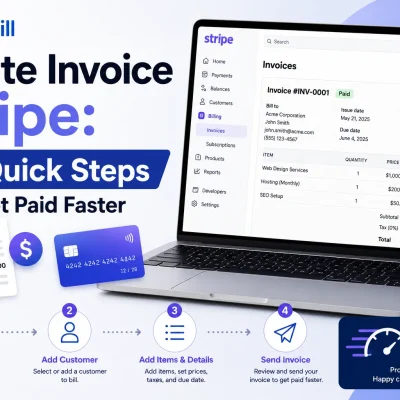
Stripe offers a streamlined invoicing process primarily focused on online payments and subscriptions. Freelancers appreciate how Stripe automatically calculates taxes and handles multi-currency billing. To create an invoice, add your customer’s email, list the paid items or services, and customize payment terms. Stripe’s system excels at quick, recurring billing scenarios but is less suited for heavy product catalogs or complex discounts. Its integration with payment gateways simplifies payment collection, a feature that often complements invoicing platforms like NetSuite for end-to-end cash flow management.
How to Create an Invoice in Xero
Xero’s invoice creation is user-friendly and targets small businesses needing simple cloud accounting. The process begins with selecting or creating a customer contact, adding invoice items with quantities and rates, and applying any discounts or taxes configured in the system. A common mistake is overlooking Xero’s tax settings, leading to wrong VAT calculations. Compared to NetSuite, Xero is less customizable in workflow automation but offers excellent mobile invoicing options, making it ideal for entrepreneurs who need quick invoicing on the go. For draft and template support outside Xero, you can explore quality invoice templates that integrate easily.
This comparison highlights how different platforms handle invoicing nuances, helping freelancers and small business owners pick tools matching their operational needs and invoicing complexity. For fast, simple invoice drafting regardless of platform, a free invoice generator can provide a no-fuss starting point before importing data into these systems.
Tips for Faster and Professional Invoice Creation
Use Templates and Saved Data
Relying on pre-built invoice templates cuts creation time dramatically and ensures brand consistency. For instance, a freelance graphic designer shaved hours weekly by standardizing their invoice layout with saved client data. Templates reduce errors from manual entry of repeated details, such as company address or payment terms. Small businesses benefit from integrating customizable invoice templates that auto-fill key fields, accelerating their billing cycle without sacrificing professionalism.
Automate Recurring Invoices
Recurring billing automation prevents missed invoices and speeds up routine transactions. Consider a consultant billing monthly retainers: automating invoice generation ensures clients receive timely statements without manual intervention. This reduces late payments by establishing reliable billing rhythms and reallocates administrative time to revenue-generating tasks. While NetSuite offers automation, small businesses with simpler needs might test standalone tools or invoice generators that support scheduled invoice creation to complement their workflows.
Double-Check Details Before Sending
Most payment delays stem from overlooked invoice details. Double-check customer contacts, item descriptions, and totals before sending. A small marketing agency once lost weeks waiting on payments due to a missing tax ID and inconsistent product codes. Instituting a quick review checklist catches such errors early. Even when using software like NetSuite or QuickBooks Online, the human eye matters to prevent minor mistakes from becoming costly disputes.
Leverage Mobile Invoicing Apps
Mobile invoicing apps bridge the gap between work and billing, helping freelancers and entrepreneurs invoice on the go. For example, a self-employed photographer used a mobile tool to create and send invoices immediately after a shoot, accelerating cash flow. These apps often integrate cloud syncing, supporting seamless updates across devices without having to return to a desktop. Pairing mobile invoicing with a cloud platform like NetSuite can enhance flexibility and responsiveness in financial operations.
Applying these practical tips reduces invoicing bottlenecks and cultivates a professional image that clients trust. For a quick start on invoice drafting anytime, a free invoice generator is a handy tool that complements more complex platforms.
Invoice Templates and Tools to Support NetSuite Users
Download Customizable NetSuite-Compatible Invoice Templates
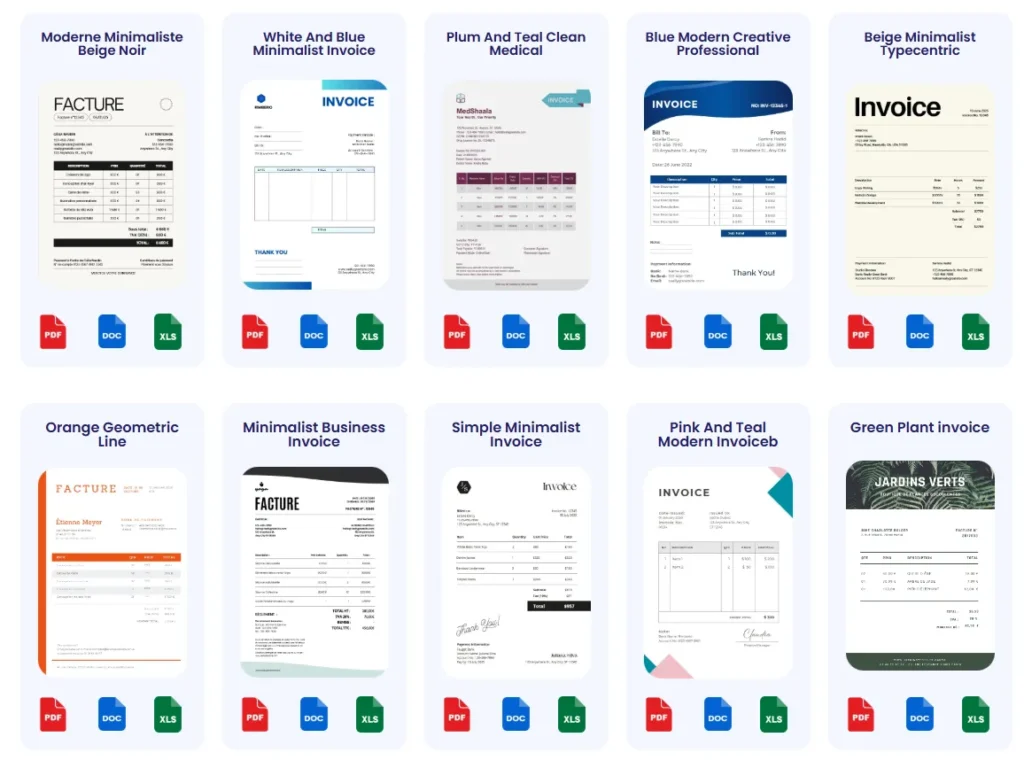
Using downloadable templates tailored for NetSuite accelerates the invoicing process while maintaining consistency. For example, a freelancer juggling multiple clients cut invoicing time by 30% switching from manual to template-based creation. These templates often include predefined fields aligned with NetSuite’s data structure, reducing import errors. While NetSuite has built-in invoice forms, external templates allow more design flexibility and branding control. Small business owners who customize templates avoid common pitfalls like missing payment terms or tax details.
Use Online Invoice Generators for Quick Drafts
Online invoice generators provide a fast way to draft professional invoices without diving into complex ERP systems. A small consulting firm used an online tool to create initial drafts, then uploaded the final invoice to NetSuite, saving administrative hours. Such generators, including those accessible via the free invoice generator, offer simple interfaces, auto-calculated taxes, and client detail storage. They serve well when you need to send a quick invoice outside NetSuite or prep multiple versions before official submission.
Export Invoices as PDFs for Easy Sharing
Exporting invoices as PDFs is essential for clean, universally readable documents. Many NetSuite users overlook configuring PDF exports, leading to inconsistent client presentations or errors printing invoices. A small design studio switched to standardized PDF exports and noticed fewer client questions and payment delays. PDFs preserve layouts, logos, and signatures, boosting professionalism. External tools can complement NetSuite’s export by adding password protection or batch processing multiple invoices simultaneously, enhancing security and workflow.
Leveraging these invoice templates and tools optimizes invoice quality and expedites billing cycles for freelancers and small businesses using NetSuite. For additional customizable options, explore our invoice templates page to streamline your invoicing further.
Frequently Asked Questions About Creating Invoices in NetSuite
What Are the Basic Steps to Create an Invoice in NetSuite?
Creating an invoice in NetSuite starts with selecting the customer and entering transaction details, followed by adding items or services from your catalog. After reviewing for accuracy, save the invoice and either send it via email or print it. Skipping any step often causes delays or billing errors, so a systematic approach ensures smooth processing.
How Do I Handle Partial Payments or Credits on a NetSuite Invoice?
NetSuite allows applying partial payments or credit memos directly to invoices. When a customer pays less than the full amount, record the payment and link it to the invoice. Credits from returns or allowances can also reduce the amount due before finalizing the invoice. Proper handling prevents accounting discrepancies and improves cash flow visibility.
Can Invoices Be Customized in NetSuite?
Yes, invoices in NetSuite are customizable through forms and templates. You can adjust layout, branding elements, and included fields to match your company’s style and compliance needs. Customization also extends to adding custom fields for specialized data, helping businesses maintain professionalism while capturing necessary information.
How Do I Correct Errors on an Already Sent Invoice?
NetSuite supports voiding or crediting previously sent invoices. If an error is found after distribution, create a credit memo or issue a corrected invoice reflecting the changes. Avoid editing the original invoice to ensure audit trails remain intact. This process prevents payment disputes and maintains accounting integrity.
What Is the Best Way to Automate Invoice Creation in NetSuite?
Utilize NetSuite’s recurring invoice feature for regular billing cycles and scheduled billing for timed events. Automation reduces manual data entry and errors, especially for subscription services or retainer clients. Combining this with approval workflows ensures accuracy and speeds up collections.
How Can I Track Invoice Payment Status in NetSuite?
NetSuite provides real-time status tracking on invoices, listing whether payments are pending, partial, or completed. Dashboards and reports offer insights into aging invoices and overdue accounts, enabling proactive follow-ups. This visibility aids freelancers and small businesses to maintain steady cash flow.
How Is Tax Calculated on Invoices in NetSuite?
NetSuite automates tax calculations based on configured tax codes, locations, and customer exemptions. Ensuring proper setup of tax schedules is critical to capturing accurate tax amounts. Incorrect settings can lead to compliance issues and penalties, so regular audits of tax configurations are recommended.
What Should I Know About Multi-Currency Invoicing in NetSuite?
NetSuite supports invoicing in multiple currencies with real-time exchange rate updates. When billing international clients, specify the currency on the invoice and understand currency gain/loss implications. This helps avoid confusion and financial reporting errors in global operations.
For addressing complex invoicing needs quickly, consider using a free invoice generator that complements NetSuite by enabling fast draft creation and client management from any device. For official invoicing standards and compliance guidance, consult the IRS invoice requirements.