Skip to content
How to Create an Invoice for Services: Quick Answer and Essential Tips
Summary of Key Steps
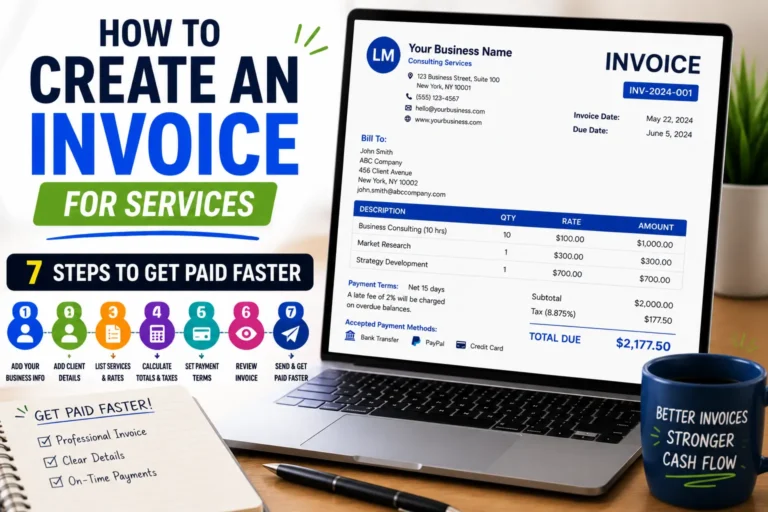
Creating an invoice for services involves a clear, streamlined process to ensure fast payment and accurate records. Start by gathering all client and service details, including a unique invoice number and date. Next, itemize the services provided with clear descriptions and rates. Calculate subtotals, add applicable taxes, and display the total amount due prominently. Specify payment terms and due dates to prevent delays. Finally, include your contact details and any important notes. A freelancer once lost days chasing payments due to unclear descriptions and no due dates—this simple checklist prevents such issues.For the general steps, see our guide on how to create invoices.
Link to Probill invoice generator page for faster invoice creation
Manually designing invoices can drain precious time, especially when balancing multiple clients. For a faster, error-free process, try a free invoice generator that automates numbering, formatting, and calculations. Online tools like Probill make it easy to create professional invoices for various services without technical skills. This approach minimizes errors and speeds up your billing cycle, giving you more time to focus on your core work.
Step-by-Step Guide: How to Create an Invoice for Services Rendered
Gather Client and Service Details
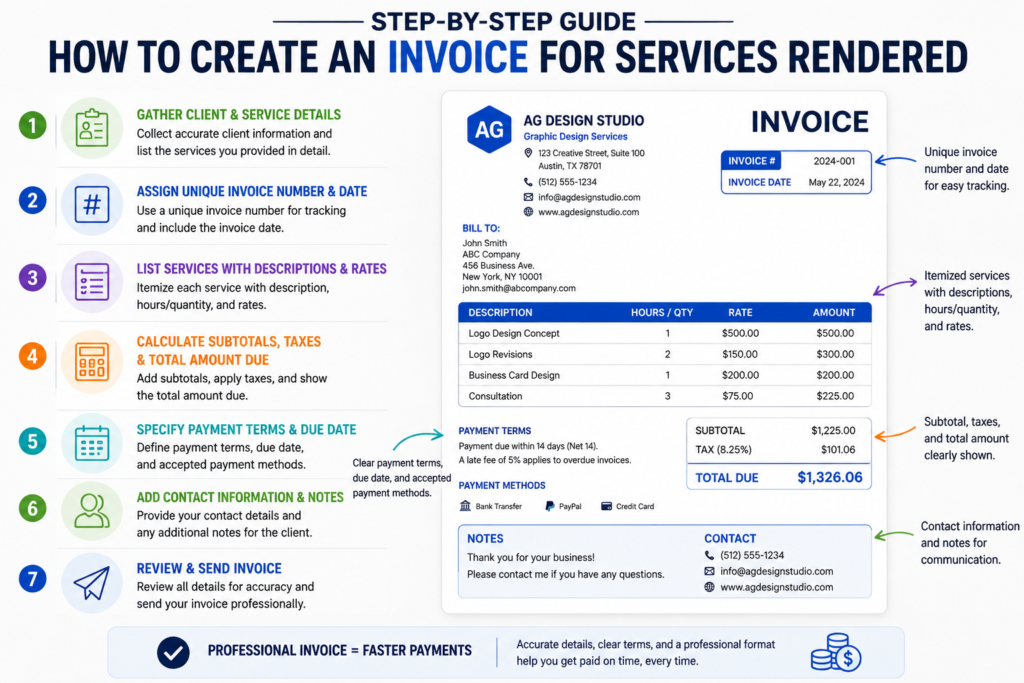
Start by collecting accurate client information: name, address, email, and phone number. Without correct details, invoices risk getting misplaced or ignored. Similarly, identify each service you provided in detail. For example, a freelance graphic designer notes “Logo design concept and two revisions,” avoiding vague phrases like “design work.” This clarity reduces follow-up queries and speeds payment.
Assign Unique Invoice Number and Date
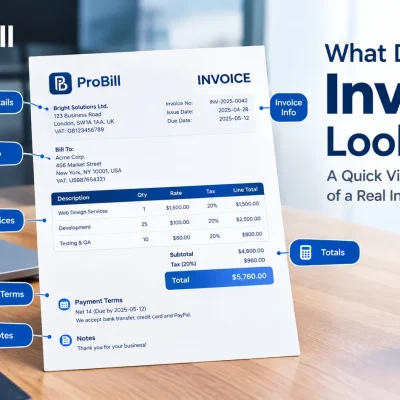
Every invoice must have a unique number to ensure easy tracking and avoid duplicates in bookkeeping. Use a simple sequence (e.g., 2024-001, 2024-002) or incorporate client initials. Always include the invoice date — this anchors your payment terms and due date. A missed or repeated invoice number can cause delays or disputes over billable work.
List Services Provided with Descriptions and Rates
Detail each service line with descriptions, hours or quantity, and rates. For instance, “Consultation – 3 hours at $75/hour.” If you offer flat-rate packages, specify the package name and rate. Avoid lumping all tasks into one line; breaking them down increases client trust and transparency. Poorly itemized invoices often lead to payment holds or client confusion.
Calculate Subtotals, Taxes, and Total Amount Due
Add up all service line costs for a subtotal. Then apply relevant taxes based on your jurisdiction—consult official tax rules for services if unsure. Clearly show tax amounts and the final total due. Errors here cause the most payment delays and create accounting headaches. Many freelancers skip tax calculations unintentionally, risking compliance issues.
Specify Payment Terms and Due Date
Define payment terms explicitly: due upon receipt, net 15, net 30, or other arrangements. Include acceptable payment methods (e.g., bank transfer, PayPal). A missing due date often leads to late payments because clients don’t know when to pay. For example, a small business owner incorporated “Payment due within 14 days; late fee of 5% applies” and cut overdue invoices by half.
Add Contact Information and Notes
End your invoice with your contact details for questions: phone number, email, or website. Include additional notes like “Thank you for your business” or reminders about next steps. This personalizes your invoice and encourages timely payment. Failing to provide contact means clients must search, causing unnecessary delays.
For a streamlined process, tools like Probill offer templates that handle numbering, calculations, and formatting effortlessly—saving time and reducing errors. Using a free invoice generator can turn these essential steps into a quick routine, freeing you from manual invoice creation.
For tax rules related to service invoices, referencing the IRS invoice requirements can provide helpful guidance.
Different Methods: How to Create an Invoice for Consulting, Cleaning, and Transportation Services
How to Create an Invoice for Consulting Work
Consulting invoices should emphasize clarity in hours billed and deliverables provided. List hourly rates alongside detailed descriptions like “Strategy session – 2 hours at $120/hour.” Consultants often charge retainer fees or milestone payments—these should be separately itemized to avoid confusion. Including a brief summary of outcomes can reinforce value and justify costs. Missing this detail can lead to client disputes. Using clear terms helps accelerate payments and reduces follow-up inquiries. Freelancers can also adapt this process when creating invoices for freelance work.
How to Create an Invoice for Cleaning Services
Cleaning service invoices must specify frequency, location, and scope clearly. For example, “Office cleaning – weekly, 4 visits at $75 each.” Additional charges for special tasks (e.g., carpet shampoo) should be listed separately. Many errors come from vague or generic descriptions like “cleaning services,” which delay approval. Adding a checklist or service period improves transparency. Cleaning contractors also benefit from specifying whether supplies are included or billed separately to avoid later disagreements.
How to Create an Invoice for Transportation
Transportation invoicing demands accuracy in mileage, time, and materials. Include line items such as “Delivery – 150 miles at $0.50/mile” or “Waiting time – 1 hour at $30/hour.” Drivers and logistics providers often face disputes over mileage or extra stops, so detailed logs with dates and locations support claims. Fuel surcharges or toll fees should be listed separately to maintain clear cost breakdowns. Without this level of detail, invoices risk rejection or delayed payments.
Tailoring invoices to the specific service type not only improves professionalism but also minimizes client disputes and payment delays. Tools like Probill support creating such customized invoices quickly, reducing manual effort while maintaining accuracy. Try the free invoice generator to simplify crafting precise invoices for your service niche. Independent contractors can use a similar approach when billing clients for completed work.
Key Elements Every Invoice for Services Must Include
Client Information
Accurate client information is the foundation of any invoice. Include the client’s full name, company name if applicable, billing address, phone number, and email. Missing or incorrect details here often cause invoices to be lost or delayed in accounts payable departments. For example, a freelance marketer once experienced delayed payments because the invoice listed an outdated client email. Always verify current contacts before invoicing.
Service Details and Descriptions
Clear, specific descriptions of each service are crucial. Instead of generic terms like “service fee,” use detailed labels such as “Website content writing – 5 pages.” This reduces confusion and speeds approval. Complex invoices with ambiguous service lines risk being disputed or returned. Breaking down services by hours, dates, or milestones also enhances transparency and client trust.
Pricing and Payment Terms
Detail the rates charged for each service, including any hourly fees or flat rates. Explicitly state taxes or additional charges. Vague pricing leads to disputes and delayed payments. Equally important are clearly defined payment terms — specify when payment is due and acceptable methods (bank transfer, PayPal, etc.). Omitting these terms invites late payments; most invoice delays occur from unclear due dates.
Invoice Number and Dates
A unique invoice number enables precise tracking and bookkeeping. Numbers should be sequential or incorporate client identifiers. The invoice date anchors payment timelines. Neglecting numbering or date consistency can cause double billing or missed payments. Small businesses often lose track of invoices without a structured numbering system, complicating financial audits. Remember to assign each invoice a unique number for easier record keeping.
A professional invoice incorporating these elements minimizes client confusion and expedites payments. For faster creation with correct formatting, explore reliable invoice templates that automate numbering and payment term insertion, reducing errors and saving time.
For comprehensive tax guidance on service invoicing, consult IRS invoice requirements.
Common Mistakes to Avoid When Creating an Invoice for Services
Missing or Incorrect Client Details
Invoice delays commonly stem from billing to the wrong contact or outdated client information. For example, a freelancer once sent multiple reminders before discovering the client’s email had changed. Always verify the client’s billing name, address, and email before generating the invoice. Incorrect details increase the risk that your invoice will be ignored or lost in accounts payable systems, causing payment bottlenecks.
Unclear Service Descriptions
Using vague terms like “services rendered” or “consulting fee” leaves clients guessing what they’re paying for and triggers disputes. A clean invoice spells out each service with precise descriptions, such as “Website audit and SEO recommendations – 4 hours.” This clarity reduces back-and-forth emails and accelerates approval. Remember, unclear service descriptions are a primary cause of payment delays.
Incorrect Calculations or Totals
Miscalculating subtotals, tax amounts, or final totals is one of the fastest ways to lose credibility and stall payments. Manual errors happen when adding different hourly rates or applying tax percentages. A small business owner once faced a delayed payment because the invoice’s tax was calculated on the wrong line item. Always double-check math or use automated tools to avoid these costly mistakes.
Lack of Payment Terms or Due Dates
Invoices that omit clear payment terms or due dates leave clients uncertain when or how to pay. Without specifying terms like “Net 15” or “Due upon receipt,” the risk of late payments rises significantly. One consultant cut overdue payments by half simply after adding “Payment due within 14 days” and indicating accepted methods like bank transfer. Always include explicit terms to set expectations upfront.
Avoid common pitfalls by reviewing these areas closely before sending your invoice. For a reliable way to prevent errors and speed invoice creation, consider using a free invoice generator that automates numbering, calculations, and formatting.
For tax compliance and invoicing standards, consult official guidance such as the IRS invoice requirements.
Helpful Tips for Creating Invoices for Services Faster and More Accurately
Use Invoice Templates for Repetitive Services
When your services repeat regularly—like monthly consulting or weekly cleaning—using a well-designed invoice template saves valuable time. Templates eliminate reformatting and reduce the chance of missing key information. For example, a cleaning business owner who reuses a template with predefined line items and pricing cut invoice generation time by 70%. Templates also promote consistency, which builds client trust and simplifies bookkeeping. Leveraging templates for common service types speeds up invoicing while maintaining accuracy.
Double-Check All Details Before Sending
Rushing to send invoices often leads to oversights—wrong client names, forgotten taxes, or inaccurate totals. These errors cause payment delays or disputes. Spend a moment verifying client info, service descriptions, and calculations before emailing or printing. Freelancers have lost days chasing corrections due to simple errors like mismatched invoice numbers. Use a checklist to confirm every key element is correct. This final quality control step prevents unnecessary back-and-forth and speeds your cash flow.
Keep Digital Records for Easy Tracking
Maintaining organized digital records of all your invoices enables quick searches, status checks, and follow-ups. Small business owners juggling multiple clients benefit from searchable folders or invoice management apps that log sent, paid, and overdue invoices. This practice avoids duplicate billing and clarifies what’s outstanding. It also simplifies tax reporting and financial reconciliation. Using tools that export invoices as PDFs and link payments to client profiles cuts administrative overhead. Staying digitally organized ensures faster invoicing cycles and professional service management.
Applying these practical tips enhances your ability to create accurate invoices efficiently. For an even faster, error-reducing process, a free invoice generator can automate many tasks like numbering, tax calculation, and formatting, letting you focus on your core work.
Invoice Templates and Tools to Simplify How You Create an Invoice for Services
Overview of Invoice Template Types
Invoice templates come in various forms tailored to service billing: itemized, timesheet-based, fixed-fee, and progress-payment formats. Itemized templates break down each service line, ideal for freelancers or consultants who bill hourly or by deliverable. Timesheet templates suit hourly work, like consulting or cleaning services, where tracking hours is essential. Fixed-fee templates simplify billing for flat-rate projects, while progress-payment templates support milestone-based arrangements. Choosing the right template cuts invoice preparation time and reduces the risk of missing details or miscalculations.
Where to Find Free and Customizable Templates
Freelancers and small businesses can access free invoice templates from trusted sites, including the invoice templates page of reputable invoicing platforms. These templates are often downloadable in Word, Excel, or PDF formats and come with customization options for branding, currency, and tax settings. Using free, customizable templates prevents common mistakes like incorrect formatting or missing payment terms. For example, a freelance consultant switched to a customizable template and eliminated frequent client queries about vague invoices.
Using an Online Invoice Generator for Services
Online invoice generators remove manual errors by automating calculations, numbering, tax inclusion, and formatting. These tools often allow exporting invoices as PDFs and sending them directly via email. A key benefit is efficiency—service providers who juggle invoicing with client work avoid delays caused by manual entry mistakes. For instance, a cleaning company owner using an online generator cut invoice creation time by half and improved payment turnaround. Online tools also store client profiles for repeat billing, addressing the frequent problem of re-entering details on every invoice.
How Probill’s Invoice Templates Can Help
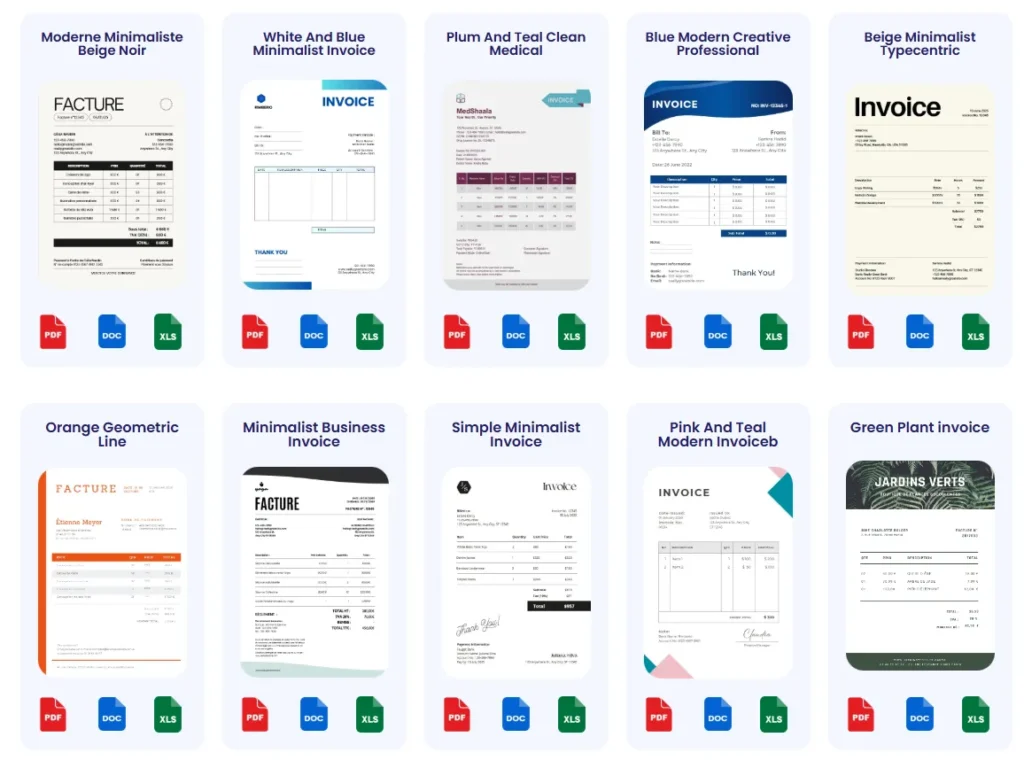
Probill offers built-in invoice templates specifically designed to fit various service scenarios, including consulting, cleaning, and transportation. These templates come pre-formatted with sections for detailed service descriptions, tax calculations, and payment terms. Users report saving significant time since Probill automates numbering, tax rules, and export to PDF, reducing common errors like missing due dates or totals. Beyond templates, Probill supports managing client data and payment tracking—features helpful for freelancers who struggle with invoice follow-ups. Explore these advantages by trying the free invoice generator to streamline how to create an invoice for services rendered efficiently. A service invoice template can help you structure your rates, descriptions, and payment details.
Frequently Asked Questions About Creating Invoices for Services
What is the best way to create an invoice for services rendered?
The best way combines clear detail with accuracy: include precise client info, list each service with descriptions and rates, and calculate totals correctly. Avoid vague terms like “services rendered.” Using an online invoice generator reduces errors and speeds up the process. For example, freelancers often struggle with manual calculations; a tool automates taxes and numbering, preventing common mistakes that stall payments.
How do I create an invoice for consulting work?
Focus on hours worked and deliverables. Specify hourly rates, session details, and any retainer or milestone payments. Break down complex projects into clear line items to avoid client confusion. Omitting retainer amounts or unclear descriptions causes delays. Consultants benefit from summarizing outcomes briefly to justify fees and speed approval.
How can I create an invoice for cleaning services?
Detail the frequency, location, and scope explicitly—e.g., “Weekly office cleaning, 4 visits at $75/visit.” Separate special tasks like carpet cleaning or supply charges. Vague descriptions such as “cleaning services” often cause disputes. Including a checklist or service dates improves transparency and reduces payment delays for cleaning contractors.
What should I include when creating an invoice for transportation?
Accurately list mileage, time, and additional fees. For example, “Delivery – 150 miles at $0.50/mile” plus “Waiting time – 1 hour at $30/hour.” Detailed logs with dates and locations support claims and prevent client disputes. Fuel surcharges and tolls must be itemized separately to clarify costs and prevent invoice rejection.
How important are payment terms on a service invoice?
Payment terms are crucial. Most invoice delays come from missing or unclear due dates. Always specify payment deadlines, acceptable methods, and late fees if applicable. For instance, stating “Payment due within 14 days” can halve overdue invoices. Clear terms set expectations upfront and accelerate cash flow.
Can I use invoice templates to save time on service invoices?
Absolutely. Templates ensure consistency, reduce errors, and speed repetitive invoicing tasks. Many freelancers reuse templates customized for their common service types, cutting creation time significantly. Templates help maintain professionalism and make bookkeeping simpler by standardizing format and content.
Is it necessary to assign a unique invoice number?
Yes. Unique numbers prevent duplicate billing and simplify bookkeeping. Sequential or client-specific numbering aids in organizing invoices. Missing or repeated invoice numbers cause confusion and payment delays, especially for small businesses handling many clients.
How can technology improve my invoicing process for services?
Online invoice generators automate numbering, tax calculations, formatting, and allow easy export to PDF. They reduce human errors that often delay payments. For example, service providers juggling multiple clients benefit from stored profiles and automatic totals. Using tools like Probill’s free invoice generator can speed up invoicing and enhance accuracy effortlessly.
What should I do if my client delays payment despite a clear invoice?
First, review if the invoice includes all necessary details—service descriptions, payment terms, and contact info. Follow up politely with a reminder referencing the invoice number and due date. Consider adding a late fee notice in future invoices to incentivize prompt payment. Keeping digital records helps track overdue accounts effectively.
Where can I find reliable invoice templates and tools for services?
Reputable platforms offer free, customizable templates tailored for service industries. For hassle-free creation, the invoice templates page provides downloadable options. Coupling templates with an online invoice generator streamlines the entire billing process, reducing errors and accelerating payments.
For compliance and invoicing standards related to services, refer to the official IRS invoice requirements.
Final Step: Try a Free Online Tool to Create Your Invoice for Services
Benefits of Using Probill’s Invoice Generator
Probill’s online invoice generator eliminates the tedious parts of invoicing—manual numbering, tax calculations, and formatting errors. Freelancers and small business owners note how it consolidates client info and service details into one streamlined interface, saving time. For example, a consultant juggling dozens of clients cut invoice prep from hours to minutes by automating repetitive tasks. Its mobile app also supports creating and sending invoices on the go, ensuring you never miss billing after a job is done. Accuracy improves as Probill reduces common mistakes that can stall payments. This tool works well whether you’re figuring out how to create an invoice for services rendered or tailoring one for consulting, cleaning, or transportation.
How to Get Started Quickly
Getting started with Probill requires no technical skills or software installation. Simply open the free invoice generator on any device, input your client and service data, and select a professional template. The system automatically generates unique invoice numbers and calculates totals, including taxes. You can save invoices as PDFs or send them directly to clients. For repeated services, Probill stores client profiles and past invoices, which speeds future billing cycles. Trying this tool is an immediate way to experience how simple invoice creation can be, removing the guesswork of how to create an invoice for services efficiently while enhancing professionalism.
Utilize Probill’s free invoice generator to simplify your billing process and focus more on delivering services instead of chasing paperwork.