Skip to content
How Do You Create a PayPal Invoice Quickly and Without Errors
Step-by-step overview
Creating a PayPal invoice involves a straightforward sequence that minimizes mistakes and saves time. First, log in to your PayPal account and navigate to the invoicing section. Next, enter the client’s contact information and list the products or services with accurate pricing. Set payment terms, such as due date and accepted payment methods. Finally, review every detail to avoid typos or incorrect amounts and send the invoice directly through PayPal.
For example, a freelance graphic designer who uses PayPal can quickly generate an invoice by following these steps without needing external software, ensuring professional billing while avoiding common errors like missing due dates or payment instructions. For a broader look at the invoice creation process, see our guide on how to create invoices.
Benefits of using PayPal invoice feature
PayPal’s invoice feature speeds up billing by integrating payment processing and tracking in one place. It eliminates manual calculations by automatically summing itemized charges and adding applicable taxes. Since invoices are sent directly through PayPal, clients can pay immediately with trusted, secure methods reducing payment delays. Additionally, PayPal records all invoicing activity, which simplifies tracking overdue payments and bookkeeping.
Freelancers and small business owners benefit from clear communication with clients through automatic notifications, reducing confusion and disputes. The all-in-one platform also supports multi-currency transactions, enhancing global business without extra hassle.
Link to online invoice generator page for alternatives
While PayPal offers a reliable invoicing system, some users prefer dedicated tools for advanced customization or faster workflows. Tools like Probill’s free invoice generator provide templates tailored for various professions, bulk invoicing options, and detailed client management. This can be a valuable alternative or supplement to PayPal’s native invoice creation, especially for businesses looking to scale invoicing without errors or delays.
Step-by-Step Guide to Create PayPal Invoice
Logging into your PayPal account
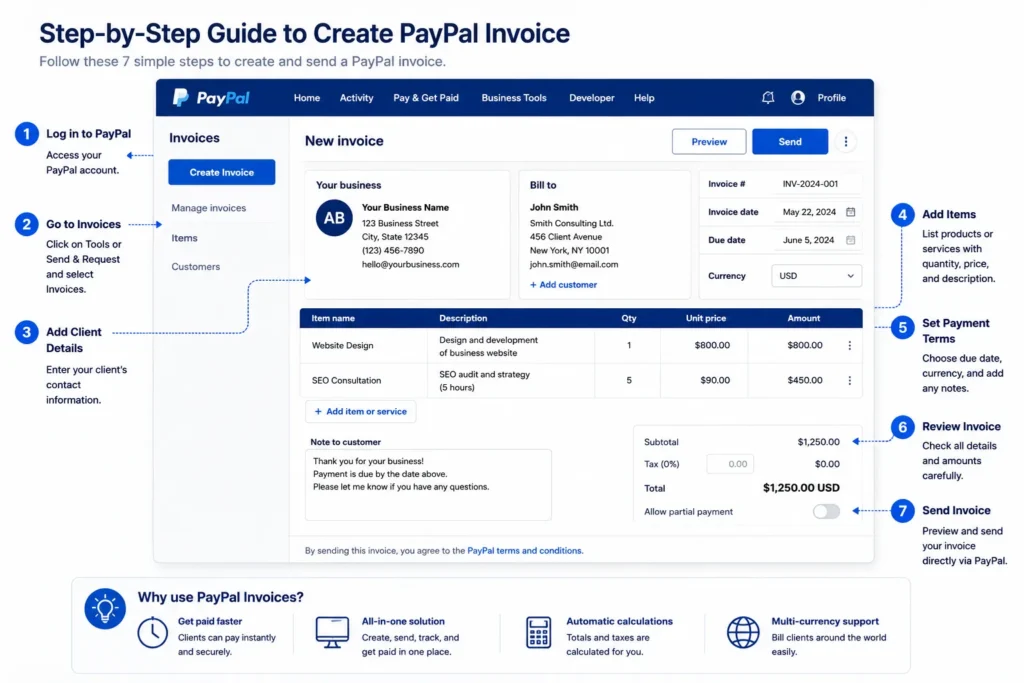
Start by entering your credentials at the official PayPal login page. Using two-factor authentication, if enabled, improves your account security. For business accounts, ensure you’re accessing the correct profile that has invoicing privileges. Logging in from a trusted device reduces issues linked to account verification.
Navigating to the invoice creation section
Once logged in, locate the “Tools” or “Send & Request” menu on the dashboard. Select “Invoices” from the dropdown options. This section is the hub for invoice management and creation—clear and streamlined to avoid confusion. Recognizing the exact invoice interface saves time compared to searching through PayPal’s less obvious menus.
Adding client details and invoice items
Input precise client information such as email, name, and physical address when applicable. Incorrect details lead to delayed payments or lost invoices. Then, itemize products or services with exact quantities, unit prices, and descriptions. Avoid vague terms; specificity mitigates payment disputes. For example, a consultant adding “Marketing strategy session, 2 hours” is clearer than just “Consulting.”
Setting payment terms and notes
Define payment deadlines explicitly, choosing net 15, net 30, or custom due dates. Include accepted payment methods the invoice supports, although PayPal usually covers most. Use the notes field for special instructions or thank-you messages, which can improve client relations. Most invoice delays stem from unclear or missing payment terms, so prioritizing this step eliminates confusion.
Reviewing and sending the invoice
Before dispatching, double-check all entries for typos, especially amounts and currency. Confirm totals, tax calculations, and client addresses are accurate. Preview the invoice as the client will see it to catch formatting issues that could signal unprofessionalism. After review, send the invoice directly through PayPal to trigger an immediate payment option for the client. Creating the invoice is only part of the process; you also need to know how to send it to your customer.
For users seeking streamlined alternatives to create invoice in PayPal, using a dedicated tool like Probill’s free invoice generator offers enhanced client management and bulk invoice creation to speed the process without sacrificing accuracy.
Methods to Create a PayPal Invoice: App vs Website
Creating an invoice on PayPal website
The PayPal website offers a full-featured interface for invoice creation, ideal for detailed billing needs. Users access a dedicated “Invoices” section where they can enter comprehensive client info, multiple line items, attach files, and apply taxes or discounts. This method suits freelancers or small business owners who prefer a desktop environment with the benefit of reviewing invoices easily before sending them.
A common oversight here is rushing through the website interface without careful review, leading to mistakes like incorrect currency selection or missing payment notes. The web platform provides more control, making it easier to avoid those errors.
Creating an invoice on PayPal app
Creating an invoice with PayPal’s mobile app focuses on quick, on-the-go billing. The app’s streamlined interface is perfect for simple invoices, allowing users to add client details and items swiftly from their smartphone or tablet. This can be a lifesaver during client meetings or events where immediate invoicing is crucial.
However, the app version limits advanced customization compared to the website, such as fewer options for tax settings and attachment uploads. Freelancers using the app often create simpler invoices and follow up with more detailed bills via desktop if needed.
Pros and cons of each method
Choosing between the PayPal website and app hinges on the invoicing context:
- Website Pros: Comprehensive features, easier batch invoicing, better invoice review, stronger formatting options.
Website Cons: Less convenient away from a computer, slower for quick invoicing.
App Pros: Speed, accessibility anywhere, suitable for quick client charges, push notifications for invoice status.
- App Cons: Limited customization, reduced ability to add detailed notes or taxes, small screen limits visibility.
For example, a small business owner might prefer the website for monthly billing cycles, while a freelancer invoicing post-consultation may rely on the app for fast client payment requests. Both methods fulfill the essential task of how do you create a PayPal invoice but cater to different workflows.
In case you want streamlined invoicing without toggling between devices, tools like Probill’s free invoice generator can complement PayPal, offering multi-device access and enhanced template customization. For official guidance about PayPal’s invoicing capabilities, visit the PayPal Invoice Help Center.
Key Requirements and Elements for a Professional PayPal Invoice
Essential invoice fields in PayPal
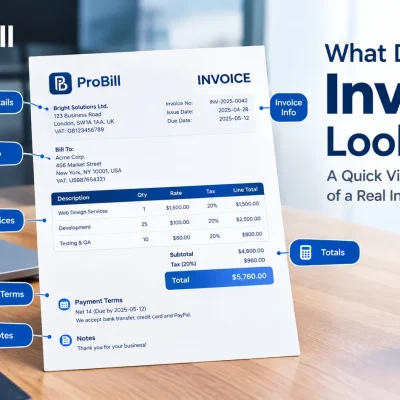
A professional PayPal invoice must include these core elements to ensure clarity and compliance: client name and email, a unique invoice number, issue and due dates, itemized descriptions with quantities and unit prices, subtotal and total amounts, tax calculations, and accepted payment terms. Missing the invoice number or client contact info often leads to payment delays or confusion, especially for freelancers handling multiple clients. Adding your business logo within PayPal’s customization options also reinforces brand recognition and trust.
Tips for clear descriptions and pricing
Vague terms like “services rendered” create room for disputes. Instead, specify each product or service clearly, such as “Website design – homepage and 3 subpages” with exact hours or units. Break down complex charges into separate line items to help clients understand the invoice at a glance. Consistent use of currency symbols and decimal points prevents misinterpretation, particularly in international transactions. For example, a consultant who clearly documents “2-hour coaching session @ $100/hour” reduces back-and-forth questions, speeding payment.
Ensuring accurate tax and payment terms
Automate tax application in PayPal settings based on your region to avoid undercharging. Always verify tax rates for different item types to remain compliant with regulations. Payment terms are equally critical; stating “Payment due within 15 days” sets clear expectations. Ambiguous or missing terms create reasons for payment delays. Including notes that specify accepted currencies or late fees also protects your cash flow. Small businesses that overlook tax details risk audits, while freelancers often forget to highlight payment deadlines, causing client confusion.
For more tailored invoice format options compatible with PayPal, explore invoice templates that simplify adding all required elements without guesswork.
Common Mistakes When Creating a PayPal Invoice and How to Avoid Them
Missing client information
One of the most frequent errors when creating a PayPal invoice is omitting or misstating client details. Missing an email address or incorrectly typing the recipient’s name can lead to undelivered invoices and delayed payments. For instance, a freelancer once lost a $500 payment because the invoice was sent to an outdated client email. Always double-check client contact info before sending to avoid these costly delays. Utilizing saved client profiles in PayPal or external tools can reduce this risk significantly.
Incorrect amounts or currency
Incorrectly entering amounts or choosing the wrong currency on your PayPal invoice can cause confusion and payment disputes. A common scenario is charging a foreign client but failing to set the correct currency, resulting in underpayment or rejected transactions. PayPal does show the currency prominently during creation, yet rushing through this step often leads to errors. Always review your totals and confirm the currency aligns with your client’s expectations to prevent misunderstandings.
Overlooking payment instructions
Omitting clear payment instructions or due dates is a mistake that increases the chance of late payments. PayPal invoices that lack specific terms like “Payment due within 14 days” or details on accepted payment methods leave clients uncertain about deadlines. Consider including concise notes to clarify instructions and avoid back-and-forth questions that slow down the payment process. For example, a small business that routinely skipped adding terms noticed frequent delays, which improved only after explicitly stating payment expectations.
Using tools like PayPal’s built-in reminders or external invoice management apps can help automate communication and reduce overlooked instructions.
For those needing alternatives or more control over invoice customization to avoid these pitfalls, exploring a free invoice generator like Probill’s can enhance your invoicing accuracy and efficiency.
Tips for Faster Invoice Creation with PayPal
Using saved client profiles
Saved client profiles cut repetitive data entry dramatically. Instead of typing contact details every time you create a PayPal invoice, accessing stored client info speeds up the process and reduces typos. For example, a freelancer who invoices multiple clients monthly saved at least 30% of their invoice creation time by maintaining a detailed client list. This also ensures consistency in client names and email accuracy, preventing lost payments.
Leveraging invoice templates
Invoice templates are a major time saver on PayPal. Creating a custom template with your branding, item groups, and common payment terms allows quick reuse without starting from scratch. Small businesses benefit especially here: a local photographer set up a template that included standard session rates and terms, enabling invoicing in under five minutes. Templates reduce errors by standardizing descriptions and pricing formats every time you create an invoice.
For advanced template options beyond PayPal’s standard formats, explore specialized tools like Probill’s invoice templates to customize layouts suited for your business style.
Automating recurring invoices
Automating recurring invoices eliminates the manual task of generating repeat bills. Subscriptions, retainers, or ongoing service fees are prime candidates. PayPal allows scheduling invoices to send automatically at set intervals, which cuts administrative overhead and improves cash flow predictability. For instance, a consultant invoicing monthly retainer fees avoided late payments and saved hours monthly by automating their invoices. Just ensure recurring invoice details and client info remain up to date to prevent confusion or disputes.
Combining saved profiles, templates, and automation forms a robust strategy for creating PayPal invoices faster and with fewer errors—key to productive freelance and small business operations.If you don’t need PayPal specifically, you can also create an invoice online for free.
Invoice Templates and Examples to Use with PayPal
Accessing free invoice templates
Many freelancers and small businesses struggle to design invoices that look professional yet remain simple to complete. Free invoice templates designed for PayPal compatibility eliminate this hassle. These templates usually come in editable formats like PDF or Word, pre-filled with necessary invoice sections. For instance, a freelance writer found that using a free template cut their invoice preparation time in half while ensuring key fields weren’t missed.
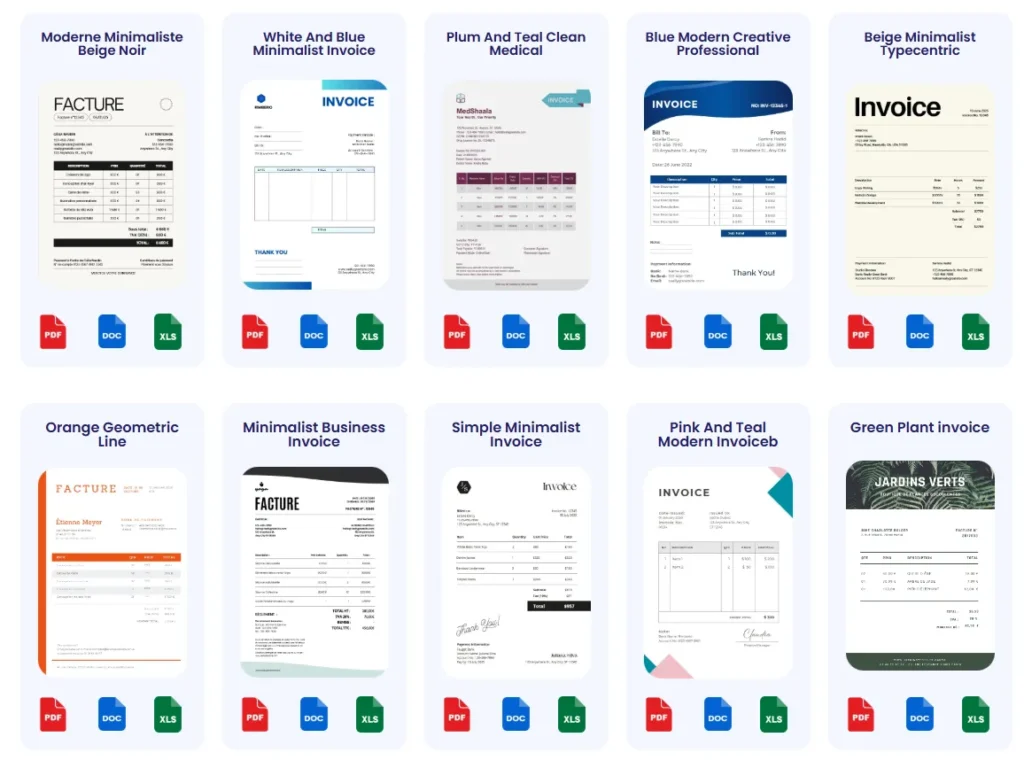
Platforms offering invoice templates often cover common business types and feature clean layouts with branding placeholders. Accessing such resources reduces errors during PayPal invoice create steps, providing a ready-made foundation that matches PayPal’s formatting requirements.
Customizing templates for PayPal invoicing
Templates require adjustments to fit your unique billing needs. Customizing involves adding your business logo, adjusting line item categories, and specifying payment terms that PayPal will display. For example, a consultant who customizes template fields to separate billable hours from expenses avoids confusion when creating an invoice with PayPal later.
Good customization reflects on your professionalism and minimizes client queries. Keep your template aligned with PayPal’s input fields to streamline the transfer process — doing otherwise may make you double-check or re-enter details, wasting time and introducing errors.
Downloadable examples
Having real invoice examples serves as a quick reference when creating your own PayPal invoices. For example, a landscaper downloaded sample invoices that clearly itemize services and tax breakdowns, helping them model their PayPal invoices accurately.
Downloadable invoice samples demonstrate best practices like setting due dates and including payment instructions, which are key for reliable PayPal invoice create workflows. Using these samples alongside an invoice templates resource gives you both structure and inspiration, saving time and ensuring consistency.
For users wanting to avoid designing from scratch, Probill offers a variety of professionally designed templates that export directly to PayPal-compatible formats, supporting faster and error-free invoicing. This approach benefits those frequently creating invoices on PayPal with varying client needs and billing complexity.
Frequently Asked Questions About How Do You Create a PayPal Invoice
Can I create an invoice on the PayPal app?
Yes, you can create an invoice using the PayPal app. The mobile interface is designed for quick invoicing on the go, letting you add client details and line items swiftly. However, it offers fewer customization options than the website, such as limited tax settings and no file attachments, which may require follow-up via desktop for complex invoices.
Is it possible to create a PayPal invoice link?
Creating a PayPal invoice link directly within PayPal is not a standard feature, but you can generate a shareable invoice by sending the invoice through PayPal’s system and copying the payment URL from the confirmation page. Alternatively, many choose external tools like Probill’s free invoice generator, which allows creating a PayPal invoice link quickly and sharing it via email or messaging platforms.
How do I track payments from PayPal invoices?
Payments from PayPal invoices are tracked within your PayPal account under the “Invoices” section. Each invoice shows its payment status—paid, pending, or overdue—with timestamps and transaction details. For freelancers handling multiple clients, using PayPal’s built-in reminders helps reduce late payments. Advanced users also export reports or integrate with external management tools to maintain organized financial records.
For official details on invoice tracking features, refer to the PayPal Invoice Help Center.