Skip to content

How to Create a Photography Invoice Quickly (Step-by-Step)

Step 1: Gather Project and Client Details
Start by collecting essential client and project information before drafting your invoice. This includes your client’s full name, address, phone number, and email, as well as the project name, location, and date. Missing or inaccurate client details cause payment delays—always double-check. For example, a freelance photographer once delayed payment because their invoice lacked the client’s billing address. Having these details upfront streamlines the invoicing process.
Step 2: List Photography Services and Hours Worked
Detail every service provided, from shooting sessions to editing and retouching. Specify the date and hours worked for each task—this is crucial for clarity and prevents disputes over billed time. If you’re unsure how to create an invoice for hours worked, maintain a precise log during the project that translates easily into your invoice line items. For instance, a photographer billing for event coverage must list exact hours and associated fees rather than a lump sum.
Step 3: Calculate Fees and Taxes
Accurately total your charges by multiplying your hourly rates or fixed service fees by the hours or units delivered. Don’t forget to include applicable taxes such as VAT or sales tax. Avoid common errors like mixing tax-inclusive and tax-exclusive amounts. For those unsure how to create an invoice for artwork or other creative services, clearly state whether taxes are included or added separately. Refer to your local tax authority for correct tax rates and compliance.
Step 4: Format the Invoice Professionally
Use a clean, consistent layout that highlights key information: your branding, client details, invoice number, date, itemized services, totals, and payment terms. Clarity in formatting helps avoid confusion and speeds up client approvals. Professional formatting also reduces disputes—freelancers often lose time fixing poorly formatted invoices. Templates tailored for photography invoices save time here without sacrificing professionalism.
Step 5: Review and Send the Invoice
Before sending, review the entire invoice for accuracy in rates, hours, calculations, and client information. Mistakes here trigger payment delays or rejection. Once confirmed, send the invoice via email as a PDF or through an invoicing tool for added tracking. You can expedite this step by using a free invoice generator designed for photography projects, ensuring your invoice reaches clients promptly and is easy to pay.
For quicker invoicing, browse our free invoice generator to streamline creating and sending your photography invoices.
Methods for How to Create an Invoice for Photography
Manual Invoice Creation Using Word or Excel
Many photographers start by manually crafting invoices in Word or Excel for full control. This method allows custom layouts and detailed itemization, crucial for describing multiple photography services or hours worked. However, manual creation often leads to errors like miscalculations or inconsistent formatting. For example, a photographer manually adding taxes forgot to update the rate, resulting in client confusion. Manual methods suit those comfortable with software but slow processing and lack of automation can prolong invoicing cycles.
Using Online Invoice Generators
Online invoice generators streamline creating professional invoices with minimal effort. They often include pre-built templates designed specifically for services like photography or artwork, which reduce mistakes in line items, tax calculations, and payment terms. A freelancer dealing with multiple clients found that switching to an online tool cut invoice preparation time in half and flagged unpaid invoices automatically. This method balances accuracy and speed without requiring design skills. Explore various tools like our free invoice generator for quick setups and PDF exports.
Leveraging Mobile Invoicing Apps
Mobile invoicing apps provide real-time invoice creation and sending capabilities directly from smartphones or tablets. This is ideal for on-the-go photographers who need to bill minutes after a shoot, improving cash flow. In a small business scenario, a photographer used a mobile app to generate roofing invoices and photographic service bills from client location, ensuring fast payments and less administrative backlog. These apps typically sync across devices and offer client management features, streamlining repeated invoicing. The tradeoff is subscription cost and occasional connectivity issues but the gains in convenience are substantial.
For the general process, see our guide on how to create invoices.
Key Elements Every Photography Invoice Must Include
Client and Photographer Contact Information
Accurate contact details prevent confusion and speed payment. Include your full name or business name, mailing address, phone number, and email. Equally, list the client’s exact billing information—errors here often delay processing. For example, a freelancer who omitted the client’s email had to resend the invoice, which stalled payment by days. These details serve as the baseline for all communication and legal documentation.
Invoice Number and Date
Each invoice needs a unique, sequential number plus an issue date. Skip this, and bookkeeping or tax filing becomes a headache, especially when managing multiple projects. A missing invoice number caused a photographer to face disputes with their accountant over duplicates. Assign numbers consistently to avoid confusion or audit problems. The invoice date anchors payment deadlines and tax records. Give each photography invoice a unique number to keep client and payment records organized
Detailed Services Rendered with Descriptions
Describe each photography service clearly, not vaguely. State what was done—e.g., “Event coverage, 4 hours,” or “20 edited portrait photos.” This eliminates disputes about unclear charges, a frequent cause of delayed payments. Relating this to artwork invoices, vague descriptions cause similar troubles. Detailed listings empower clients to verify services before paying, reducing follow-ups.
Hours Worked and Rates
Specify the exact hours worked per service or project phase and the corresponding hourly rate or fixed fee. A photographer billing a mixed-rate project without breaking down hours confused their client and delayed payment. Transparency here encourages trust and smooth collections. When unsure how to create an invoice for hours worked, maintain daily logs that reflect precisely on the invoice.
Payment Terms and Methods
Clear payment terms speed collections and reduce back-and-forth. Indicate due dates, late fees if any, accepted payment methods (bank transfer, credit card, PayPal), and currency. Many invoicing errors stem from vague or missing terms, forcing freelancers to chase payments repeatedly. For instance, not specifying payment within 15 days led to a client paying after two months. Well-defined terms cut misunderstandings and speed cash flow.
Including all these elements transforms an ordinary invoice into a professional document that clients trust and pay promptly. For crafting an invoice that hits all these points efficiently, consider using specialized invoice templates designed for photographers.
Common Mistakes When Creating a Photography Invoice and How to Avoid Them
Omitting Important Client Information
Missing or incorrect client details cause the most frequent payment delays. For instance, a photographer who left out the client’s billing address had to resend the invoice, costing valuable time. Always verify and double-check names, addresses, emails, and phone numbers before sending. Omissions here stall accounting processes on the client’s side and increase back-and-forth communication.
Incorrect Calculation of Hours or Fees
Errors in totaling hours worked or applying the correct rates lead to disputes and overdue payments. A freelancer once billed a half-day shoot but calculated rates as if it were a full day—this mistake confused the client and strained trust. Using spreadsheets or automated tools limits miscalculations, especially for complex projects with multiple service types or variable fees.
Lack of Clear Payment Terms
Invoices without explicit payment deadlines, accepted methods, or late fee policies invite confusion and delayed collections. One photographer’s invoice stated no due date; the client paid late despite reminders. Explicitly state payment windows (e.g., “Net 15 days”), methods (bank transfer, credit card, PayPal), and consequences of late payment to prevent ambiguity and ensure timely cash flow.
Using Unprofessional or Inconsistent Formatting
Disorganized or cluttered invoices look unprofessional and increase processing errors. A photographer using mismatched fonts and no clear structure found clients often delayed approval while requesting clarifications. Consistent alignment, legible fonts, and clear sections build credibility and speed client review. Templates tailored for photography invoicing help maintain uniformity and save repeated formatting efforts.
Avoid these pitfalls to make your photography invoice clear and easy to process, minimizing payment delays and disputes. For a fast, accurate solution, try a free invoice generator that prevents common errors and ensures professional formatting.
Tips to Make Creating Photography Invoices Faster and More Accurate
Use Invoice Templates Tailored for Photography
Generic templates often ignore key details unique to photography projects, like listing retouching fees or usage rights. Tailored templates reduce the risk of missing these critical items and speed up drafting. For example, a wedding photographer cut invoice creation time by 40% after switching to a photography-specific template that included standard service categories and tax fields. Ready-made templates also ensure consistent formatting and professional appearance, essential for client trust.
Automate Calculations with Tools
Manual fee and tax calculations invite mistakes that delay payments. Spreadsheets help but require manual input, prone to error. Automation through invoicing tools eliminates these risks by instantly calculating totals, discounts, taxes, and even currency conversions. A freelancer who used formulas in Excel still faced frequent errors, but after adopting an online invoice generator, their invoice accuracy improved dramatically, reducing client queries and follow-ups. Automating math lets you focus on project delivery, not number crunching.
Keep Client Information Organized
Disorganized or incomplete client data lengthens invoice preparation and increases error rates. Maintaining a centralized contact list with billing addresses, email preferences, and payment history lets you auto-fill invoices fast and accurately. In a small business scenario, a photographer juggling multiple clients and projects lost days tracing missing contact details. Using client management features integrated into invoicing apps prevents this waste, ensuring invoices reach the right person promptly.
Use Standardized Descriptions for Services
Describing services inconsistently creates confusion and slows payment. Standardized descriptions with agreed-upon terminology streamline the approval process. For instance, a freelance artist learned that vague entries like “photo edits” triggered back-and-forth clarifications, delaying payment by weeks. After adopting clear, consistent wording aligned with client contracts (e.g., “50 color-corrected portrait photos”), invoicing disputes dropped markedly. This approach helps with invoices for photography as well as artwork or hours worked, improving clarity across all billing. Photography invoices often involve service-based billing, so a service invoice can provide a useful structure.
For faster, more accurate invoices, consider using specialized invoice templates designed for photography professionals.
Photography Invoice Templates and Examples
Downloadable Photography Invoice Templates
Ready-to-use templates are a huge time saver for photographers who want to streamline invoicing without sacrificing professionalism. These templates often include fields specifically designed for the nuances of photography billing—like itemizing hours worked, listing various service types (shooting, retouching, prints), and capturing usage rights. For example, a freelance photographer who switched from generic templates to a dedicated photography invoice saved hours each month by avoiding manual adjustments. Downloadable templates eliminate formatting hassles and reduce errors common in self-created invoices.
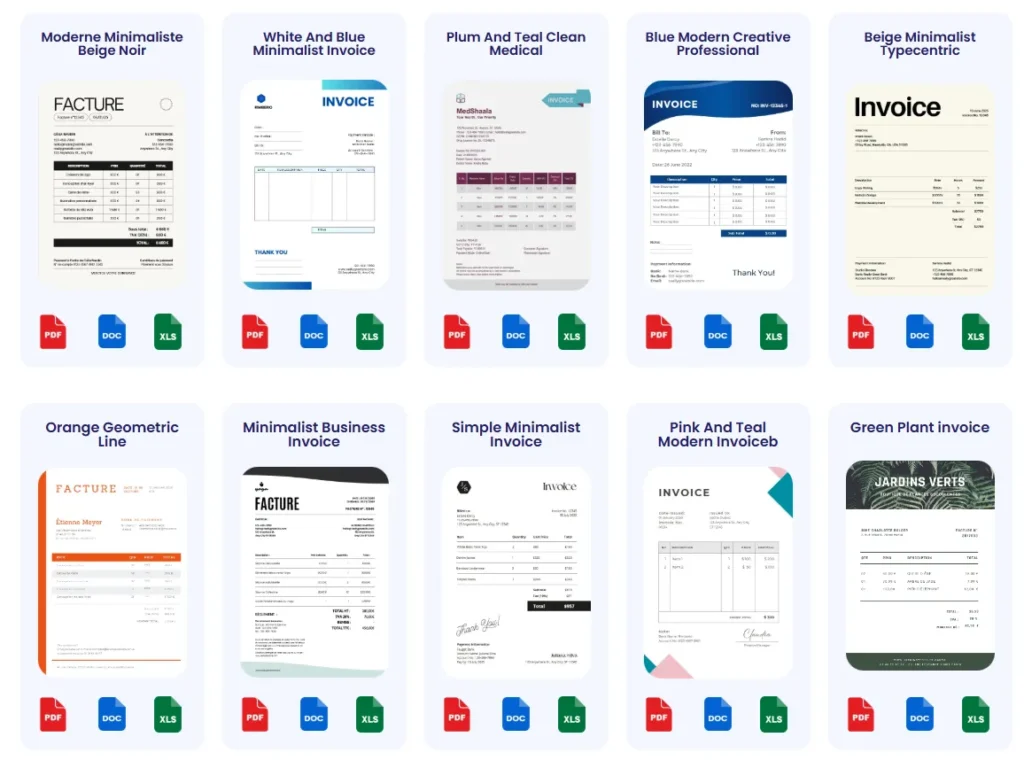
How to Customize Templates for Your Needs
A template works best when tailored to your unique business model. Customize line items to include services frequently billed, like “Event Coverage,” “Post-Processing,” or “Drone Photography.” Adjust tax rates based on your local regulations and add branding elements such as your logo and brand colors to build trust. One small business owner adapted a roofing invoice template for combined roofing and photography services, allowing seamless billing across different offerings. Keep descriptions clear and consistent to prevent disputes, especially when switching between projects billed by hours worked or fixed fees. Updating templates regularly saves rework and improves client experience.
For customizable and photography-specific invoice templates, see our curated invoice templates tailored for freelancers and creative professionals.
Frequently Asked Questions on How to Create a Photography Invoice
What essential details should I include when creating a photography invoice?
Include full client contact info (name, billing address, email), your business details, invoice number, date, a detailed list of services with hours worked, rates, taxes, and clear payment terms. Omitting any of these can delay payment or cause disputes. This applies not just to photography invoices but also when you learn how to create an invoice for artwork or hours worked.
How do I calculate fees and taxes correctly on my photography invoice?
Multiply your hourly rate or fixed service fee by hours or units delivered. Add applicable taxes separately, noting whether your prices include tax or not. Avoid mixing tax-inclusive and tax-exclusive numbers. Refer to official sources like the IRS invoice requirements for correct tax guidance to ensure compliance on your invoices.
Can I use the same invoice template for photography and other services like roofing or artwork?
Yes, but customize line items and tax codes for each service type. For example, a small business owner merged roofing and photography billing by adapting a roofing invoice template to include photographic services. Consistent formatting and clear descriptions maintain professionalism across all invoice types.
What is the best way to handle invoices for hours worked in photography projects?
Track every hour precisely and translate these logs directly into your invoice line items. Transparency in detailing hours and rates prevents confusion and speeds payment. If unsure how to create an invoice for hours worked, use specialized templates or invoicing tools that simplify this process and minimize errors.
How soon should I send the photography invoice after completing a project?
Send the invoice as soon as possible after delivery to avoid payment delays. Mobile invoicing apps or online invoice generators can help you bill immediately on-site or remotely. Prompt invoicing improves cash flow and client trust, vital for freelancers and small business owners alike.
Where can I find ready-to-use invoice templates?
You can download professionally designed templates tailored for photographers on our invoice templates page. These templates include fields necessary for itemizing services, calculating taxes, and setting payment terms, saving time and minimizing errors.
Do I need special software to create a photography invoice?
No, manual methods like Word or Excel work but risk errors and inefficiency. Online invoice generators and mobile apps streamline the process with built-in calculations, templates, and client management. Many freelancers benefit from tools that speed up how to create an invoice for photography, artwork, and related services.
How do I ensure my photography invoice looks professional and clear?
Use consistent fonts, organized layouts, and properly labeled sections. Avoid clutter or overly complex formats. Employing templates designed for photography billing guarantees legibility and professionalism, encouraging faster client approval and payment.
How can I address payment terms on my photography invoice?
Clearly state due date, acceptable payment methods, currency, and late fee policies. Ambiguous or missing terms cause frequent payment delays and disputes. Explicit terms help clients understand expectations, reducing follow-ups and fostering timely payment.
Are there differences between invoicing for standard photography services and specialized work like artwork or roofing?
While core components are similar, specialized services may require customized descriptions, tax treatments, or billing methods. For example, invoicing for roofing projects often involves different regulatory details than photography. Tailor your invoice content accordingly for clarity and compliance.
For a streamlined approach, leverage our free invoice generator to create detailed and accurate photography invoices quickly.
Use Probill to Simplify How to Create a Photography Invoice
Fast, No-Skill Invoice Generator for Photography
Probill eliminates complexity in how to create a photography invoice by offering a streamlined, no-skill-required tool. Freelancers often waste time wrestling with formatting or tax calculations—but Probill automates these steps, producing professional invoices in minutes. One wedding photographer reduced billing time from hours to under 10 minutes per invoice, thanks to Probill’s intuitive interface. This speed is critical for creatives focused on delivering work, not paperwork.
Mobile Access to Create and Send Invoices Anywhere
The advantage of Probill’s mobile invoicing app lies in immediate invoicing capabilities on the go. Photographers who juggle shoots, meetings, and travel can create and send roofing invoices or photographic service bills directly onsite or from a client location. This flexibility boosts cash flow by eliminating billing delays common when invoices wait until returning to a desktop. Users appreciate the synced data across devices, ensuring consistent invoice history and client information.
Track Payments and Manage Clients Easily
Probill’s integrated dashboard lets users track payment statuses and manage client records effortlessly, avoiding common payment tracking issues. Small business owners handling multiple photography projects can quickly identify overdue invoices, send reminders, and view client payment histories. This centralized management reduces administrative overhead and helps maintain steady income streams. Rather than juggling spreadsheets or emails, photographers rely on Probill to keep invoicing organized and reliable.
For hassle-free invoice creation and management, try Probill’s free invoice generator designed with photography freelancers in mind.