Skip to content
How to Create an Invoice as an Independent Contractor: Quick Answer
Step overview to create an invoice
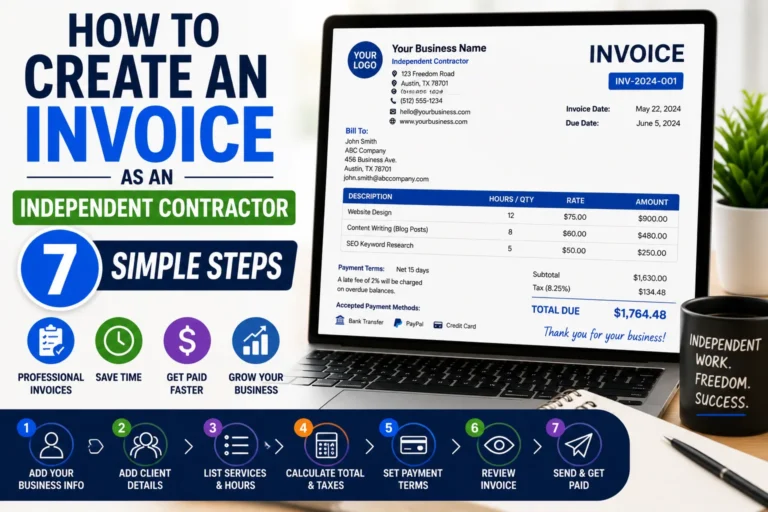
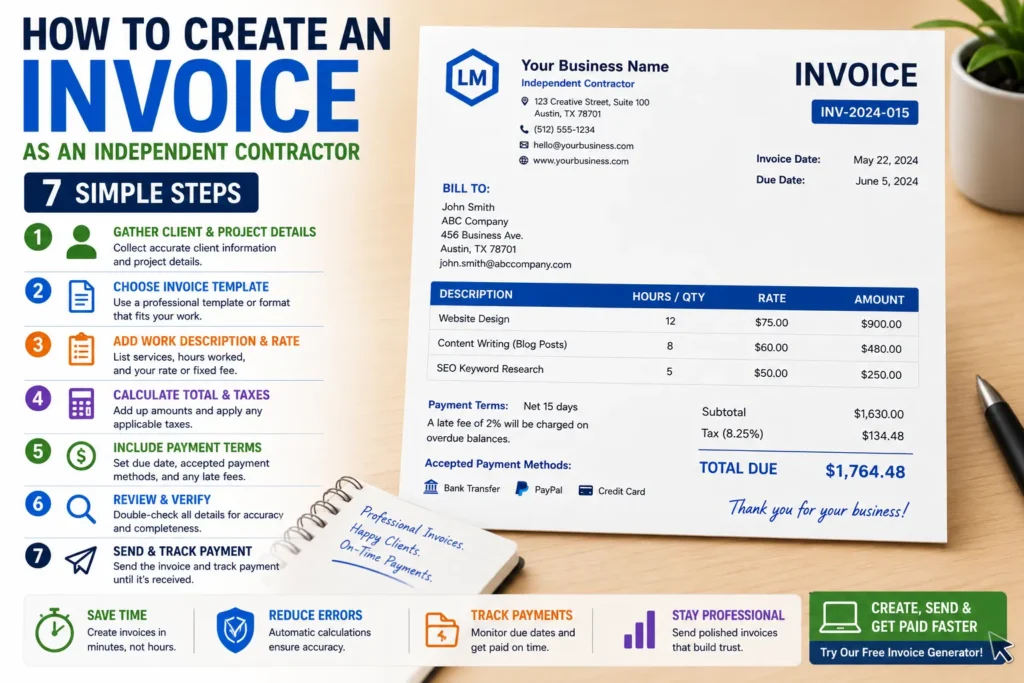
Creating an invoice as an independent contractor involves a straightforward series of steps: start by gathering client information and details about the services provided. Next, choose the right invoice format that suits your work style—spreadsheet, document, or digital template. Then, fill in the essential details such as services rendered, rates, taxes, and totals. Afterward, review for accuracy and completeness before professionally sending the invoice. Tracking the invoice until payment arrives ensures timely follow-ups without confusion. For a broader explanation of the invoice creation process, see how to create invoices.
Using an online invoice generator for faster creation
An online invoice generator streamlines this process by automating calculations, standardizing layout, and storing client information for reuse. This reduces manual errors, especially in tax and total calculations, and allows quick creation of professional invoices without design skills. For instance, freelancers juggling multiple projects benefit greatly from such automation, freeing time to focus on work instead of admin tasks.
Link to invoice generator page for streamlined invoicing
For a seamless, no-hassle invoice creation experience, use our free invoice generator. This tool provides templates optimized for independent contractors and freelancers looking to speed up invoicing. It supports PDF export and tracking features to stay organized and professional in client billing. Saving the finished invoice as a PDF provides a convenient format for sending it to clients .
Step-by-Step Guide: How to Create an Invoice as an Independent Contractor
Gather essential information for the invoice
Start with precise client details: full name, billing address, and contact info. Include your business name and tax ID where applicable to comply with legal standards. Collect project-specific data such as contract dates, scope of work, and agreed rates. For example, a graphic designer should note hourly rates, number of hours worked, and any extra expenses pre-approved by the client. Missing or vague details here lead to payment delays or disputes.
Choose the right invoice format
Select a format that matches your workflow and client expectations—common options are spreadsheets, word processing documents, or digital invoice templates. Freelancers often prefer spreadsheet templates for flexibility, but contractors managing multiple clients benefit from invoicing tools that automate numbering and calculation. The choice impacts how easily you update and customize invoices for repeat clients or varying projects.
Fill out invoice details: services, rates, taxes
Detail each billed service clearly with descriptions and corresponding rates. Use line items to separate tasks or deliverables, avoiding lump sums that obscure transparency. Calculate taxes correctly based on your jurisdiction and client location; overlooking tax requirements can lead to penalties or underpayment. For instance, contractors working across states must apply correct sales tax or VAT. This step is crucial for professional, compliant invoicing. If you provide professional services, this guide explains how to structure a service invoice .
Review and verify invoice data
Double-check calculations, client info, and dates before sending your invoice. Errors in totals, taxation, or missing payment terms are the most common reasons invoices get delayed or rejected. Use a checklist or peer review for accuracy. One missed decimal point on a service rate can cut your payment by tens or hundreds of dollars, so invest time here to avoid costly revisions.
Send the invoice professionally and track payment
Deliver your invoice in a professional format—PDF is standard to preserve layout integrity. Include a polite but clear message outlining payment terms and deadlines. Follow up proactively on unpaid invoices by tracking due dates and payment status. Freelancers relying on recurring contract work find this habit essential to maintain steady cash flow and client relationships. Efficient tracking reduces unpaid invoice risks substantially.
IRS invoice requirements clarify what must be included for tax purposes and can help ensure your invoice complies with federal tax laws.
Methods to Create an Invoice for Freelance and Contract Work
Manual invoice creation using templates
Manually creating invoices using templates is common for freelancers who prefer control and customization. Templates in spreadsheets or word processors allow adjustments tailored to specific contract work. However, this method consumes more time and risks errors in calculations or formatting. For example, a freelance writer using a Word template might forget to update invoice numbers or taxes, causing delays. Despite these downsides, templates offer flexibility for freelancers with sporadic invoicing needs or simple billing structures.
Using dedicated online invoice generators
Online invoice generators simplify how to create an invoice as a freelancer by automating layout, calculations, and number sequencing. These tools reduce errors and speed up invoice creation, especially when handling multiple clients or contracts. Freelancers can save client data and generate professional invoices within minutes, without design skills. For contractors managing ongoing projects, generators with tracking capabilities ensure no payment is missed. For a straightforward experience, try the free invoice generator designed for freelance and contract work.
Pros and cons of each method
Manual templates offer full control and low cost but risk inconsistency and take longer per invoice. They are best for occasional or very simple invoicing but struggle with scaling or tax compliance. In contrast, invoice generators provide speed, accuracy, and professional appearance, supporting complex billing like multi-service rates and tax calculations. On the downside, they sometimes require an internet connection and may have subscription costs. Choosing the right method depends on invoicing volume, technical comfort, and client expectations—balancing efficiency with flexibility is key.
Key Elements of an Invoice for Independent Contractors & Freelancers
Contact information and invoice number
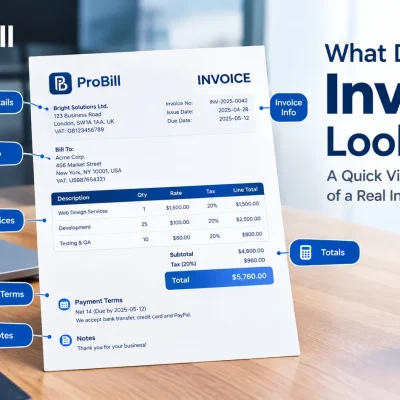
Accurate contact details for both parties are the foundation of every invoice. Include your full name or business name, address, email, and phone number. Add the client’s corresponding contact info precisely to avoid confusion. Every invoice must feature a unique invoice number to help track payments and maintain organized records. For example, contractors working with multiple clients benefit from sequential invoice numbering to quickly reference past billing. Skipping or duplicating invoice numbers can cause accounting errors and delay payments. Every invoice should also have a clear number so you can organize your records and track payments
Description of services and payment terms
A clear, itemized description of each service prevents disputes and facilitates faster client approval. Specify what work was done, when, and at what rate—whether hourly, fixed price, or milestone-based. Break down tasks instead of lump totals to enhance transparency. Alongside service details, explicitly state payment terms: due dates, accepted methods, and late payment penalties if applicable. Most invoice delays come from missing payment terms or vague service descriptions, which create uncertainty for clients.
Tax and compliance information
Including correct tax details ensures legal compliance and smooth payment processing. Depending on your jurisdiction and client location, this may include sales tax, VAT, or income tax IDs. Independent contractors must apply taxes correctly to avoid audits or fines. For example, contractors dealing with out-of-state clients in the US should verify applicable state taxes or exemptions. Consult official resources like the IRS invoice requirements to confirm which information must appear on your invoices for federal compliance. Omitting tax data risks liability and complicates bookkeeping.
Payment instructions and due date
Specify how clients should pay to minimize delays. Include accepted payment methods such as bank transfer, PayPal, or checks, along with all necessary details (account numbers, links, or addresses). Set a clear due date—commonly 15 to 30 days from invoice issue—and mention consequences for late payments if this applies. For instance, freelancers charging late fees should state them upfront to enforce timely settlement. Ambiguous or missing payment instructions lead to wasted follow-ups and strained client relationships.
Following these key elements improves invoice professionalism and accelerates payment, answering many freelancers’ and contractors’ questions on how to create an invoice for freelance work correctly. Properly composed invoices also reduce confusion during tax season and provide a reliable cash flow foundation.
Common Mistakes When Creating an Invoice as an Independent Contractor
Missing required information
Omitting essential details like client contact info, invoice number, or payment terms is a frequent cause of delayed payments. For example, a freelance web developer once sent an invoice without specifying their mailing address or payment due date, confusing the client and pushing back payment indefinitely. Always double-check that every required field, including your business identification and agreed rates, is present to prevent disputes or rejection.
Inaccurate calculations or rates
A small math error or applying the wrong hourly rate can drastically affect your income. Consider a contractor who charged $50/hr but mistakenly invoiced at $5/hr—this requires resending corrected invoices and risks client frustration. Miscalculations in taxes or discounts also cause headaches and slow the payment process. Using automated tools or calculators minimizes these costly mistakes, ensuring your invoices reflect the correct amounts every time.
Unclear payment terms
Vague or missing payment terms cause confusion and delay. For instance, a freelancer that failed to specify net 30 payment terms faced repeated follow-ups and split payments from clients uncertain about when and how much to pay. Clear wording on due dates, late fees, and accepted payment methods removes ambiguity and speeds collections. Make payment terms prominent and easy to find on your invoice for smoother transactions.
Delayed invoice sending
Waiting too long to send an invoice hurts cash flow and professionalism. A small business owner invoicing after project completion waits months for payment because clients forgot the work was done. Independent contractors should send invoices immediately or within 24 hours after service delivery. Prompt invoicing keeps your work top-of-mind, sets clear expectations, and accelerates payment cycles—key when managing freelance or contract work.
Avoiding these common pitfalls directly improves your invoicing effectiveness and ensures faster payment with fewer client disputes. For an efficient way to reduce errors and speed up your billing, consider using a free invoice generator tailored to contractors and freelancers.
Tips to Create Invoices Faster and Without Errors
Use templates and standard formats
Starting with a reliable template eliminates guesswork and builds consistency. Standard formats ensure clients recognize your invoices instantly, which smooths approval and payment. For instance, many freelancers stick to templates that highlight key sections like services and totals, so no details get lost. Reusing the same layout also slashes the time spent formatting each invoice. Avoid reinventing the wheel—customize a template once and replicate it perfectly every time.
Automate calculations and tracking
Manual math invites mistakes that delay payments. Automate calculations of rates, taxes, and totals with spreadsheet formulas or online tools. This not only reduces errors but speeds up invoice completion notably. Tracking payment status is equally critical: set reminders or use software to flag overdue invoices. A freelance photographer learned this the hard way, losing days reconciling payments manually. Automation frees energy for actual work, reducing back-office headaches.
Keep consistent client and project information
Repeating client details and project descriptions with consistent wording avoids confusion and minimizes edits. For example, if you invoice multiple projects for one client, standardize how their name and address appear. This prevents clients from disputing invoices over mismatched contact info. Also, maintain clear, uniform descriptions of services across invoices to speed up client review. Consistent data speeds invoice preparation and boosts credibility.
Regularly update payment methods and terms
Review your accepted payment options periodically to match client preferences and reduce friction. Introducing popular methods like PayPal or bank transfers streamlines payment and cuts follow-up efforts. Similarly, update payment terms to reflect practical due dates and late fees that encourage timely settlements. A contractor who neglected to update terms lost weeks on slow payments. Clear, current payment details prevent needless delays and improve cash flow.
Adopting these habits directly improves how to create an invoice as an independent contractor with fewer errors and quicker turnaround. For further efficiency, combining templates with automation using a free invoice generator can dramatically enhance your invoicing process.
Invoice Templates Examples and How to Use Them
Free downloadable invoice templates suitable for contractors
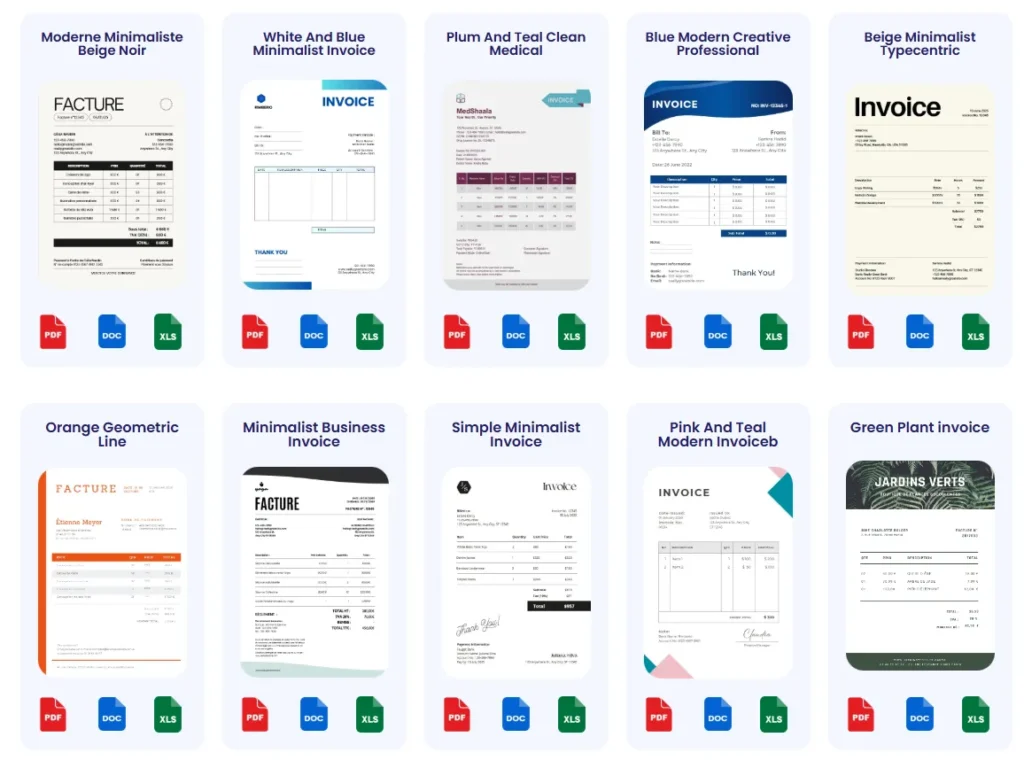
Free invoice templates save time and reduce errors in billing contract work. Many contractors benefit from spreadsheets or PDF templates designed for detailed service breakdowns, customizable rates, and tax calculations. For example, a freelance consultant found a downloadable Excel template that allowed easy hourly tracking and automatic totals, cutting invoicing time in half. Reliable templates eliminate formatting issues and ensure consistent professionalism across invoices. Using a reusable invoice template can make billing clients much faster.
Customizing templates to fit independent contractor needs
Customization is key to making templates truly effective. Adjust templates to reflect your business branding with logo and contact info, or modify line items to fit project specifics, such as hourly work versus fixed fees. For instance, an independent contractor specializing in digital marketing tailored a template to include milestone payments and separate expense reimbursements, improving clarity and client trust. Neglecting customization can make invoices look generic and reduce perceived professionalism.
Reference to available templates on invoice templates page
Access a variety of contractor-friendly invoice designs on our invoice templates page. These templates cover common freelance and contract use cases and are ready for immediate download and use. Using a trusted source ensures compliance with invoicing best practices while allowing flexibility for your unique work style. This resource helps answer how to create an invoice for freelance work efficiently while maintaining quality and accuracy.
Frequently Asked Questions About Creating an Invoice as an Independent Contractor
What information must I include to create a valid invoice as an independent contractor?
Include your full name or business name, client’s contact details, a unique invoice number, date of issue, detailed descriptions of services, rates, applicable taxes, payment terms, and instructions. Missing any of these can delay payment or cause disputes. Accurate invoicing reflects professionalism and helps maintain clear financial records.
How do I calculate taxes correctly on my invoices?
Tax calculation depends on your business location and client’s jurisdiction. For example, U.S. contractors may need to apply state sales tax or provide a tax ID number. Consulting official resources such as the IRS invoice requirements ensures you comply with federal tax rules. Cross-border contract work may involve complex VAT or GST rules—double-check to avoid penalties.
Can I create an invoice without specialized software?
Yes, but manual creation using templates increases the risk of errors and inefficiencies. Spreadsheets or word processors work for simple invoicing, but freelancers handling multiple clients benefit from tools that automate invoicing tasks. For streamlined creation, consider using a free invoice generator optimized for independent contractors.
How soon should I send an invoice after completing contract work?
Send your invoice as soon as possible, ideally within 24 hours of delivering services. Delays can confuse clients and slow payments. Prompt invoicing maintains professionalism and keeps your billing top-of-mind, ensuring steady cash flow for your freelance or contract work.
What are effective payment terms to include on my invoice?
Common terms include payment due within 15 to 30 days, accepted payment methods (bank transfer, PayPal, checks), and any late payment penalties. Clear terms reduce confusion and accelerate payment. Be explicit about due dates and any fees for late settlement to set proper expectations.
How can I track payments after sending invoices?
Use simple tools like spreadsheets or accounting software to record issued invoices, due dates, and received payments. Paid invoices should be marked promptly to identify outstanding balances. Online invoice generators often include built-in payment tracking features, reducing manual follow-up and minimizing missed payments.
What should I do if a client delays payment?
Politely follow up with a reminder including the original invoice and payment terms. In case of repeated delays, consider imposing late fees if specified or renegotiating payment schedules. Keeping communication clear and professional preserves client relationships while encouraging timely settlement.
How do I handle invoicing for multiple projects or clients?
Maintain separate invoices with unique invoice numbers and clear service descriptions per project. Consistent formatting for repeated clients eases recognition and processing. Automation tools can save client data and invoice history, simplifying recurring contract work invoicing.
These FAQs address common concerns freelancers and contractors face when learning how to create an invoice as an independent contractor while improving your billing accuracy and professionalism.
Try a Free Invoice Generator to Create Invoices Easily
Benefits of using Probill’s online invoice generator
Probill’s online invoice generator simplifies how to create an invoice as an independent contractor by removing technical hurdles. It automatically formats your invoice professionally, reduces manual math errors, and speeds up entry with saved client profiles. For instance, a freelance web developer juggling multiple projects cut invoice preparation time by half using Probill. Its clear layout ensures you include critical details like taxes and payment terms without guesswork. This straightforward approach boosts accuracy and client confidence.
Features supporting quick and professional invoicing
Probill supports real-time calculation of service rates, taxes, and totals, eliminating miscalculations that cause payment delays. It offers customizable invoice templates tailored for freelance and contract work, enabling you to present itemized services clearly. The tool also allows PDF export and email delivery directly to clients, maintaining a professional standard. Payment tracking features help you monitor due dates and flag late invoices automatically, preventing overdue payments from slipping through. This end-to-end functionality streamlines your entire invoicing process.
Link to download mobile invoicing app
For contractors on the move, Probill’s mobile invoicing app extends convenience with invoice creation, sending, and tracking all accessible from your smartphone. Whether at a client site or commuting, you can generate invoices instantly to maintain cash flow without delays. Download the app from the home page to stay productive anywhere. Using the mobile app complements the online invoice generator by providing flexibility and ensuring your freelance or contract invoicing never stalls.