Skip to content

How to Create an Invoice for Freelance Work: Step-by-Step Guide
Step 1: Gather Client and Project Details
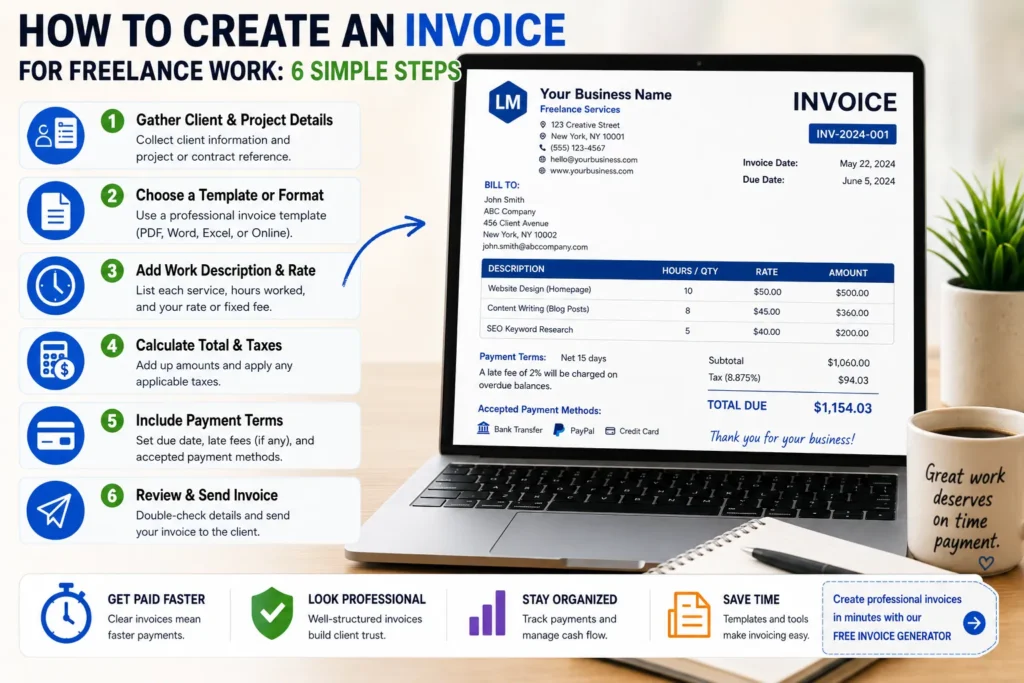
Start by collecting all necessary information about your client and the project. This includes the client’s full name or company name, billing address, and contact details. Be precise—incorrect client details can delay payments. Also, have on hand the project title or contract reference, which anchors your invoice to a specific job or agreement.
Step 2: Choose an Invoice Template or Format
Decide whether to create your invoice from scratch or use a pre-designed template. Templates simplify formatting, ensuring professionalism and consistency. For freelancers unsure about design, selecting a professional template reduces errors and time spent. To access a variety of customizable invoice templates specifically tailored for freelance work, visit the invoice templates page.
Step 3: Add Work Description and Hours/Rate
Detail the work you performed by listing each service or task. Include the number of hours worked alongside your hourly rate, or list a fixed fee per deliverable. Clear descriptions prevent disputes—avoid vague entries like “consulting.” For instance, “Content editing for blog articles, 10 hours at $50/hour” transparently justifies your charge. This precision is critical when creating an invoice for freelance work to establish trust and clarity.
Step 4: Calculate Total Amount and Taxes
Sum all line items to determine the subtotal. Then, apply any relevant taxes—this varies by location and type of freelance work. For example, independent contractors may need to add sales tax or VAT. Use reliable tax rates to avoid undercharging or overcharging. For compliance, refer to your local tax authority guidelines. Accurate calculations reflect professionalism and help prevent payment delays.
Step 5: Include Payment Terms and Instructions
Specify how and when you expect to be paid. Common terms include “Net 30 days,” meaning payment is due within 30 days of invoice receipt. Also, list accepted payment methods like bank transfer, PayPal, or checks. Clear instructions reduce confusion and follow-up reminders, speeding up payment. Not including these terms is a frequent mistake when creating an invoice as a freelancer, often causing unnecessary delays.
Step 6: Review and Finalize the Invoice
Before sending, double-check all details: client info, service descriptions, calculations, and payment terms. A simple typo or miscalculation can stall payment or harm your professional reputation. Once verified, convert your invoice to PDF format if sending electronically, preventing unintended edits. Finalizing your invoice thoroughly saves you from common pitfalls in creating an invoice for freelance work and ensures prompt payment.
If you want a quick solution, you can also create an invoice online for free.
Methods to Create an Invoice for Freelance Work Faster
Manual Creation Using Word or Excel
Creating an invoice manually with Word or Excel is common among freelancers starting out. The key advantage is full control over layout and formatting. However, manual creation often leads to errors, especially in calculations or updating client details. For example, a freelancer who changes rates frequently might accidentally bill old prices if they don’t update templates carefully. This approach is best for one-off invoices but quickly becomes inefficient as freelancing grows.
Using Online Invoice Generators
Online invoice generators simplify the process by offering ready-made templates that require minimal input. These tools automatically handle calculations and formatting, reducing errors significantly. For instance, a consultant can enter client info and hours worked, then instantly get a professional invoice in PDF. This method saves time and ensures consistency, making it ideal when creating an invoice for freelance work regularly. To explore seamless options, try a [free invoice generator] that suits freelance needs.
Automating with Invoice Management Tools
Invoice management tools take automation further by integrating client databases, payment tracking, and recurring invoice scheduling. Freelancers handling multiple contract work projects benefit from these tools as they centralize invoicing and reduce repetitive tasks. For example, an independent contractor who bills monthly can automate invoicing and reminders, preventing late payments. While these tools require initial setup, they boost productivity and cash flow control. This method is the fastest way to create an invoice as a freelancer at scale.
For the basic invoicing process, start with our guide on how to create invoices.
Key Elements Every Invoice for Freelance Work Must Include
Client Information
Accurate client details are crucial. This includes the client’s full business name, billing address, and a reliable contact method. Missing or incorrect client information frequently causes payment delays or lost invoices. For example, a graphic designer once sent invoices to an outdated client email, resulting in postponed payments. Always verify client data before finalizing your invoice to prevent such issues.
Freelancer Contact Details
Your invoice must clearly show your contact information: name, address, phone number, and email. This transparency reassures clients and streamlines communication if questions arise. Independent contractors often overlook including alternate contact options, which complicates follow-up. Providing multiple contact points reduces friction and speeds up resolving payment queries.
Invoice Number and Date
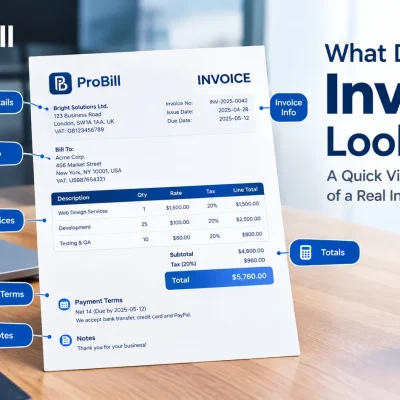
Each invoice should have a unique number and issue date to track payments and maintain order. Freelancers using inconsistent numbering systems risk duplicate numbers, causing accounting confusion. Consider a sequential or date-based system (e.g., INV-20240601) to maintain clarity. This practice also helps when managing multiple contracts or clients, making reconciliation straightforward.
Detailed Service Description
List every service or deliverable with clarity, specifying hours worked and rates where applicable. Instead of generic terms like “design work,” write “Logo design: 12 hours at $40/hour.” This eliminates ambiguity and justifies charges, minimizing client disputes. For consulting work, specifying meeting dates or milestones improves invoice credibility and client trust.
Payment Terms and Methods
Clearly state payment deadlines (e.g., “Net 15 days”) and accepted methods: bank transfer, PayPal, or credit card. Omitting these details leads to confusion and delayed payments. A freelance writer once lost two weeks waiting for a client to confirm acceptable payment options. Defining terms firmly from the start promotes timely transactions. To ensure your invoice hits all crucial points, you can explore [invoice templates] that include preset payment sections for freelancers.
For official guidelines on invoicing requirements and taxation, refer to IRS invoice requirements. Independent contractors can also follow a dedicated guide for creating invoices for contract work.
Common Mistakes to Avoid When Creating an Invoice for Freelance Work
Incorrect or Missing Client Details
Invoices often stall because of wrong or incomplete client information. One freelancer missed payment for weeks after sending an invoice missing the client’s billing address. Always confirm client details: full company name, billing address, and correct email. This small step avoids bounced emails and delayed processing at the client’s accounting department.
Unclear Work Descriptions
Vague descriptions like “design work” confuse clients and cause disputes. Precise wording such as “Website homepage redesign, 15 hours at $45/hour” clarifies expectations and justifies your charges. Unclear work descriptions complicate reconciliation and lengthen payment cycles, especially when issuing invoices for consulting work or contract projects.
Forgetting to Add Payment Terms
The absence of payment terms is the most common reason clients delay payment. Terms like “Net 15 days” or “Due upon receipt” set clear expectations. A copywriter once waited two months for a client’s payment simply because no due date was specified. Including late fees or discounts for early payment can also incentivize timely settlement.
Calculation Errors
Math mistakes on invoices look unprofessional and stall payments. Miscalculations of hours, rates, or taxes often require correction and re-sending. For example, an independent contractor accidentally applied the wrong tax rate, causing a 20% undercharge noticed during client review. Automated invoice generators reduce this risk by handling calculations instantly.
Non-Professional Formatting
Messy layout, inconsistent fonts, or missing logo creates doubt about reliability. A professional invoice exudes trust and makes payment processing smoother. Poor formatting can cause delays if clients’ systems reject unclear invoices or require clarifications. Using a clean template ensures your invoice looks polished and maintains your freelance brand image.
Avoid these mistakes to speed up payment and maintain client trust while creating an invoice for freelance work efficiently. For a hassle-free start, consider using ready-made invoice templates designed for freelancers.
Tips for Creating Professional Invoices as a Freelancer
Keep Invoices Clear and Simple
Complicated invoices confuse clients and increase the chance of delayed payments. Use straightforward language and a clean layout. For example, list each task or deliverable on its own line with quantity, rate, and total. Avoid jargon or unnecessary details that clutter the invoice. A freelancer once lost payment time because their invoice packed excessive project notes, causing the client to seek clarification. Clear, simple invoices speed up approval and reduce back-and-forth.
Use Consistent Invoice Numbering
A consistent numbering system prevents confusion on your end and your client’s. Choose a method—sequential, date-based, or client-specific—and stick to it. For instance, “INV-20240615-01” clearly marks the invoice date and sequence. Irregular numbering can make it difficult to track payments or reconcile accounts, especially with multiple contract work engagements. Establishing numbering discipline supports organization and professional record-keeping as you create invoices for freelance work. Because freelancers often bill for their expertise or time, a service invoice may be the most relevant format.
Send Invoices Promptly
Delaying invoice submission directly impacts your cash flow. Send your invoice immediately after finishing the work or on the scheduled billing date agreed with your client. Late invoices cause frustration and risk slipping lower on the client’s priority list. For example, a graphic designer waiting weeks before invoicing faced overdue payments because the project faded from the client’s immediate focus. Prompt invoicing enforces your payment terms and accelerates the payment cycle.
Keep Digital Copies for Tracking
Always save a digital copy of every invoice you create as a freelancer. Whether stored in cloud folders or invoicing apps, this archive helps when clients dispute charges or you need to reference past work. Digital copies simplify tax reporting and year-end reconciliation as well. Missing invoice records create unnecessary hurdles if your payments are questioned or delayed. Use reliable tools that export invoices in accessible formats to maintain an organized invoicing history.
For freelancers looking to streamline this process, professional invoice templates and tracking tools are available on the invoice templates page.
Invoice Templates and Tools for Freelancers
Free Invoice Templates for Freelance Work
Free invoice templates offer a reliable starting point, especially for freelancers new to creating invoices. These templates ensure essential sections are covered without overwhelming users with unnecessary design complexity. For example, a freelance writer shifting from manual invoicing found that using a template cut invoice errors in half and sped up billing cycles. While free templates serve well for simple projects, keep in mind they often lack automation for taxes or payment tracking, which can slow down freelancing growth.
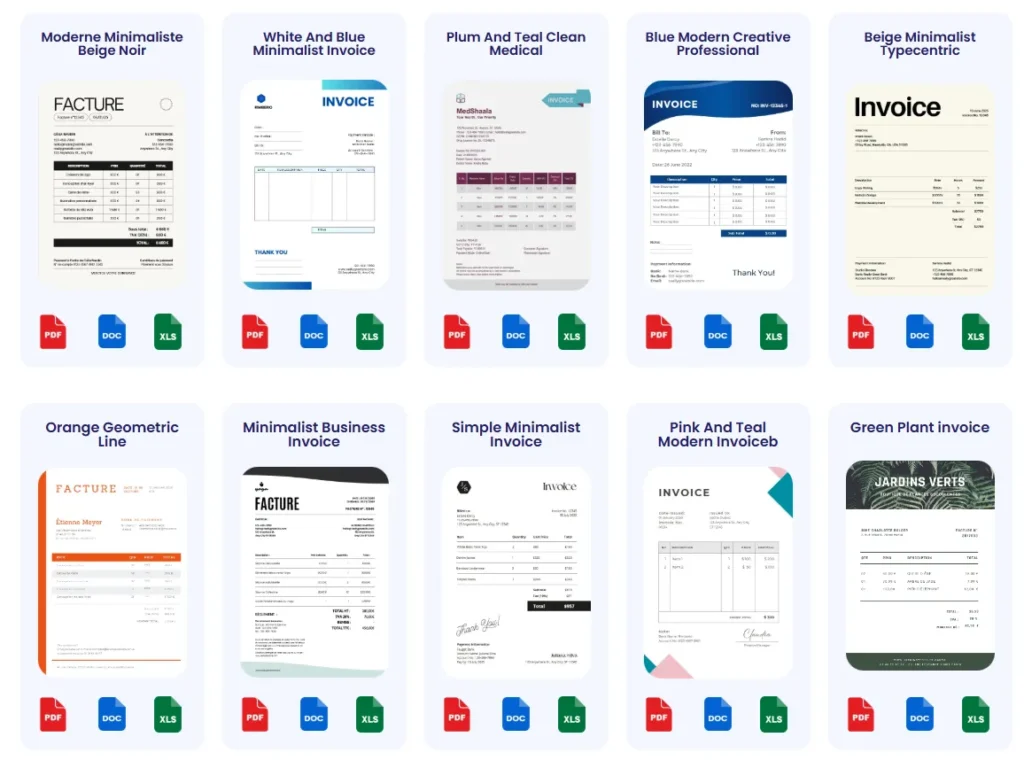
To explore a variety of clean, professional templates tailored for freelancers, visit the invoice templates page.
How Online Invoice Generators Can Help
Online invoice generators bring immediate benefits by automating formatting, calculations, and export to PDF. Imagine a consultant juggling multiple clients: manually creating invoices risks inconsistent layout and calculation errors. Using an online generator guarantees each invoice looks professional and is accurate. Many tools also auto-save client profiles, speeding up repeat invoicing for contract work. The tradeoff is dependency on internet access and occasional subscription fees, but these are outweighed by timesaving and payment clarity.
A good starting point is trying a free invoice generator to experience how fast and error-free your next invoice can be.
Probill: Fast Invoice Creation and Management
Probill offers more than basic invoice generation—it’s a full invoicing tool that supports freelancers with easy invoice creation, client management, and payment tracking. Freelancers juggling consulting work or contract jobs benefit from Probill’s mobile app, which lets them create and send invoices anytime, anywhere. One small business owner highlighted how Probill reduced their invoicing time by 70% while keeping payment statuses visible, simplifying follow-up.
Its key strengths lie in being beginner-friendly, requiring no technical skills, and providing a seamless PDF export feature. While not the main content driver here, Probill is a helpful tool within the spectrum of options for freelancers wanting to streamline invoicing tasks effortlessly.
For easy access to these features, you can explore Probill on their home page.